
Product count issue
The support doesn work on Saturdays and Sundays, so some Friday requests can be answered on Monday. If you have problems with registration ask help on contact us page pleaseIf you not got email within 24~36 business hours, firstly check your spam box, and if no any email from the support there - back to the forum and read answer here. DO NOT ANSWER ON EMAILS [noreply@pluginus.net] FROM THE FORUM!! Emails are just for your info, all answers should be published only here.
The support doesn work on Saturdays and Sundays, so some Friday requests can be answered on Monday.

Quote from lakshman92 on March 28, 2022, 15:28Hi,
We faced an issue with product count when I goes to the particular category page. Filter applied for the category page. For Example, If I go to the Breitling category page which contains only 4 products but the product count is 140. How can I change the product count based on the product category total count? Please refer the screenshot below.
Hi,
We faced an issue with product count when I goes to the particular category page. Filter applied for the category page. For Example, If I go to the Breitling category page which contains only 4 products but the product count is 140. How can I change the product count based on the product category total count? Please refer the screenshot below.

Quote from Pablo Borysenco on March 29, 2022, 11:02Hello
Please check these options - https://c2n.me/4fhFLW4.png
Drop me exact link to the issue
Hello
Please check these options - https://c2n.me/4fhFLW4.png
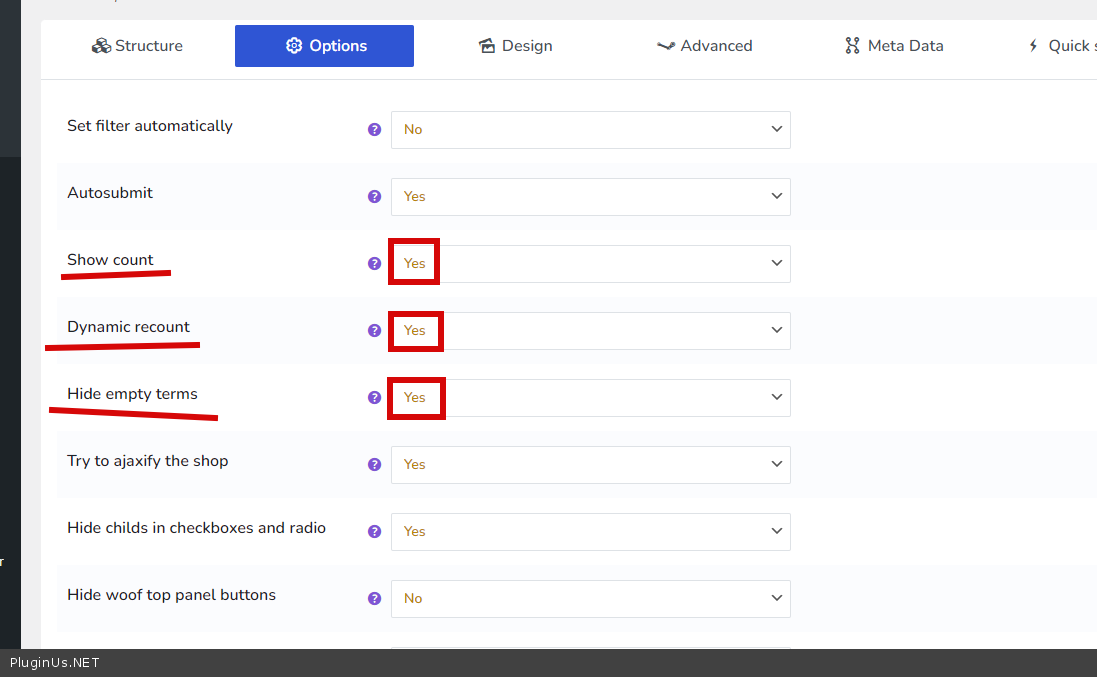
Drop me exact link to the issue
Quote from lakshman92 on March 29, 2022, 12:09Hi,
Thanks for your quick response. We have already applied these settings but it didn't show the count for the particular category products.
Hi,
Thanks for your quick response. We have already applied these settings but it didn't show the count for the particular category products.
Quote from lakshman92 on March 29, 2022, 12:13Hi,
Please refer to the Screenshot below.
Hi,
Please refer to the Screenshot below.
Quote from Pablo Borysenco on March 30, 2022, 10:19Hello
Please paste your license key here - https://share.pluginus.net/image/i20210618130558.png -> https://share.pluginus.net/image/i20210618130614.png
Update the plugin to latest version - https://products-filter.com/how-to-make-auto-update-for-wordpress-plugins-and-themes-bought-on-envato
Hello
Please paste your license key here - https://share.pluginus.net/image/i20210618130558.png -> https://share.pluginus.net/image/i20210618130614.png


Update the plugin to latest version - https://products-filter.com/how-to-make-auto-update-for-wordpress-plugins-and-themes-bought-on-envato
Quote from lakshman92 on March 30, 2022, 12:08Hi,
There is no input box to paste the license key.
Hi,
There is no input box to paste the license key.
Quote from Pablo Borysenco on March 31, 2022, 10:11Hello
Please check it from your acount - https://c2n.me/4fiV2Iy.png
Hello
Please check it from your acount - https://c2n.me/4fiV2Iy.png
Quote from lakshman92 on March 31, 2022, 10:17Hi,
We have updated the Licence key and the login credentials for the website. Please check and please fix this issue as soon as possible.
Hi,
We have updated the Licence key and the login credentials for the website. Please check and please fix this issue as soon as possible.
Quote from Pablo Borysenco on March 31, 2022, 11:55Hello
Great! Please read my message - https://c2n.me/4fj1pCL.png - We do not support older versions
Drop me exact link to the issue(category page)
Hello
Great! Please read my message - https://c2n.me/4fj1pCL.png - We do not support older versions

Drop me exact link to the issue(category page)
Quote from lakshman92 on March 31, 2022, 12:04Please click on the Menu Rolex
Please click on the Menu Rolex
Quote from lakshman92 on March 31, 2022, 12:09This is the Current version [Version 2.2.5.6]. Our backend doesn't show the option to update that plugin. I think already the plugin is up to date.
This is the Current version [Version 2.2.5.6]. Our backend doesn't show the option to update that plugin. I think already the plugin is up to date.
Quote from Pablo Borysenco on April 1, 2022, 11:34Hello
Our backend doesn't show the option to update that plugin. I think already the plugin is up to date. - And it is for this reason that I gave you a link to the article, please read it - https://products-filter.com/how-to-make-auto-update-for-wordpress-plugins-and-themes-bought-on-envato
https://watch.xxxxxxxxxxxxxxxxxxxxxx.com/breitling/ - also note that this is just a custom page like a blog, contacts, etc. This page has no information about the current taxonomy. Use standard archive pages
Hello
Our backend doesn't show the option to update that plugin. I think already the plugin is up to date. - And it is for this reason that I gave you a link to the article, please read it - https://products-filter.com/how-to-make-auto-update-for-wordpress-plugins-and-themes-bought-on-envato
https://watch.xxxxxxxxxxxxxxxxxxxxxx.com/breitling/ - also note that this is just a custom page like a blog, contacts, etc. This page has no information about the current taxonomy. Use standard archive pages
Quote from lakshman92 on April 5, 2022, 13:20Hi,
We have applied the default archive for the woocommerce categories. But the filter options not working based on the count now.
https://watch.xxxxxxxxxxxxxxxxxxxxxx.com/product-category/breitling
Please check and let us know your solutions for this issue.
Hi,
We have applied the default archive for the woocommerce categories. But the filter options not working based on the count now.
https://watch.xxxxxxxxxxxxxxxxxxxxxx.com/product-category/breitling
Please check and let us know your solutions for this issue.
Quote from lakshman92 on April 5, 2022, 16:40we have overridden the taxonomy archive file on the woocommerce. But still it is not working.
we have overridden the taxonomy archive file on the woocommerce. But still it is not working.
Quote from lakshman92 on April 5, 2022, 16:45But the arguments passed over the url. but filter is not working.
But the arguments passed over the url. but filter is not working.
Quote from lakshman92 on April 6, 2022, 09:09We have updated this plugin also. But still the archive page filter didn't working.
We have updated this plugin also. But still the archive page filter didn't working.
Quote from Pablo Borysenco on April 6, 2022, 11:37Hello
I did a test - https://c2n.me/4fm9vW1 - filter counter shows according to the current category
But the arguments passed over the url. but filter is not working. - as you can see this product display template doesn't hear search queries and doesn't even display products from the current category. Change template to default
Hello
I did a test - https://c2n.me/4fm9vW1 - filter counter shows according to the current category
But the arguments passed over the url. but filter is not working. - as you can see this product display template doesn't hear search queries and doesn't even display products from the current category. Change template to default
Quote from Pablo Borysenco on April 6, 2022, 11:49this template doesn't even hear woocommerce native filters
this template doesn't even hear woocommerce native filters
Quote from lakshman92 on April 6, 2022, 11:53Hi,
Please give me a solution for that. What else need to done by my side.
Hi,
Please give me a solution for that. What else need to done by my side.
Quote from Pablo Borysenco on April 6, 2022, 12:21Unfortunately, I have nothing to do with the current theme and product template. It doesn't depend on me or my plugin.
for filters to work, the template developer must make templates taking into account woocommerce standards (use hooks).
Can I disable plugins/theme to test?
Unfortunately, I have nothing to do with the current theme and product template. It doesn't depend on me or my plugin.
for filters to work, the template developer must make templates taking into account woocommerce standards (use hooks).
Can I disable plugins/theme to test?