Margheritamengoni1994(@margheritamengoni1994)
4 Posts
Customers
Quote from Margheritamengoni1994 on November 30, 2021, 12:36
Hi,
On mobile devices the display of the drop-down menu of my color filter is not optimal as you can see: https://www.mengonisrl.com/negozio/.
Here a screenshot:
https://snipboard.io/wv1LGR.jpg
Would it be possible to use the default selection of the operating system used by each user?
Something similar to this screenshot from another website:
https://snipboard.io/BUSFxr.jpg
How can I do it?
Thanks in advance
Hi,
On mobile devices the display of the drop-down menu of my color filter is not optimal as you can see: https://www.mengonisrl.com/negozio/.
Here a screenshot:
https://snipboard.io/wv1LGR.jpg
Would it be possible to use the default selection of the operating system used by each user?
Something similar to this screenshot from another website:
https://snipboard.io/BUSFxr.jpg
How can I do it?
Thanks in advance

Pablo Borysenco(@pavlo_borysenco)
34,196 Posts
Quote from Pablo Borysenco on November 30, 2021, 12:58
Hello
Try to use this solution - https://products-filter.com/how-to-disable-chosen-js-lib-drop-downs-for-mobile-devices
Hello
Try to use this solution - https://products-filter.com/how-to-disable-chosen-js-lib-drop-downs-for-mobile-devices
Margheritamengoni1994(@margheritamengoni1994)
4 PostsTopic Author
Customers
Quote from Margheritamengoni1994 on November 30, 2021, 15:43
Thank you very very much, it's perfect!
Just another thing: How can I change the text inside the box "0 elementi" with "seleziona colori"?
https://www.mengonisrl.com/negozio/
This is the screenshot:
https://snipboard.io/Vc58Wv.jpg
Thank you very very much, it's perfect!
Just another thing: How can I change the text inside the box"0 elementi" with"seleziona colori"?
https://www.mengonisrl.com/negozio/
This is the screenshot:
https://snipboard.io/Vc58Wv.jpg
Pablo Borysenco(@pavlo_borysenco)
34,196 Posts
Quote from Pablo Borysenco on December 1, 2021, 12:20
Hello
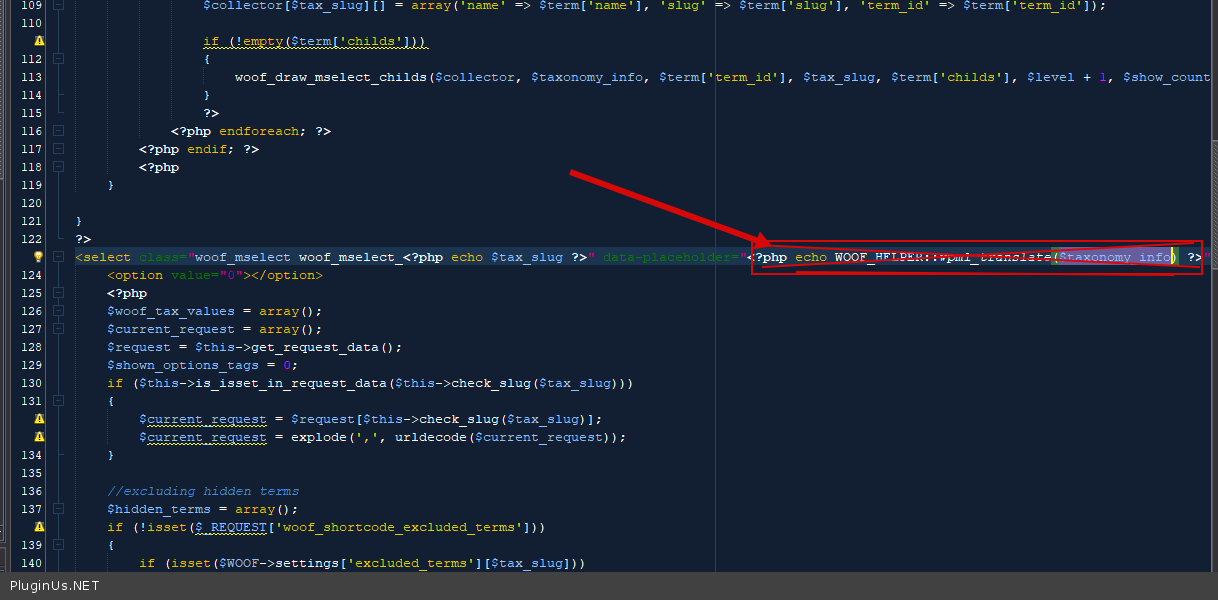
To change this string, in file - wp-content\plugins\woocommerce-products-filter\views\html_types\mselect.php - paste your text - https://c2n.me/4ebsU4a.png
Hello
To change this string, in file - wp-content\plugins\woocommerce-products-filter\views\html_types\mselect.php - paste your text - https://c2n.me/4ebsU4a.png
Margheritamengoni1994(@margheritamengoni1994)
4 PostsTopic Author
Customers
Quote from Margheritamengoni1994 on December 1, 2021, 12:40
Thank you very much but I meant in the mobile version of the filter.
https://snipboard.io/Vc58Wv.jpg
As you can see in the mobile version, the text of the placeholder is different from the desktop version.
When you have not yet selected any color it says "0 elements".
I would like to change this initial writing by adding something like "select a color" if it's possible.
Thank you in advance!
Thank you very much but I meant in the mobile version of the filter.
https://snipboard.io/Vc58Wv.jpg
As you can see in the mobile version, the text of the placeholder is different from the desktop version.
When you have not yet selected any color it says"0 elements".
I would like to change this initial writing by adding something like"select a color" if it's possible.
Thank you in advance!
Pablo Borysenco(@pavlo_borysenco)
34,196 Posts
Quote from Pablo Borysenco on December 1, 2021, 13:30
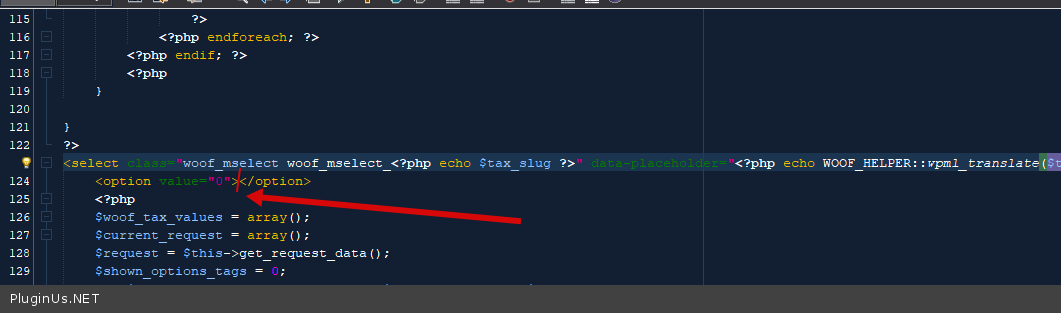
Ok! Add text here - https://c2n.me/4ebxSB7.png
Ok! Add text here - https://c2n.me/4ebxSB7.png