
Problem with categories
The support doesn work on Saturdays and Sundays, so some Friday requests can be answered on Monday. If you have problems with registration ask help on contact us page pleaseIf you not got email within 24~36 business hours, firstly check your spam box, and if no any email from the support there - back to the forum and read answer here. DO NOT ANSWER ON EMAILS [noreply@pluginus.net] FROM THE FORUM!! Emails are just for your info, all answers should be published only here.
The support doesn work on Saturdays and Sundays, so some Friday requests can be answered on Monday.

Quote from Tomasz on May 10, 2020, 12:35Hello.
I want to buy the premium version for two pages, but during the testing of one of the pages, the filter shows all products, instead of showing products from the selected category.www.rodsilver925.pl
The filter is working properly on the other tested website - www.kokott.pl .Example:
https://www.rodsilver925.pl/srebro/zawieszki/
There are three products in the category. After adding the filter, all products from the entire store are displayed.
https://www.rodsilver925.pl/srebro/zawieszki/?swoof=1&pa_dla-kogo=dla-niej&really_curr_tax=246-product_catIt works fine here. Only products from the current category are displayed.
https://www.kokott.pl/oferta/odziez/reprezentacja_polski/
https://www.kokott.pl/oferta/odziez/reprezentacja_polski/?swoof=1&product_tag=komplety&really_curr_tax=148-product_catBoth sites operate on the Divi theme and are updated on a regular basis.
Greetings.
Tomek
Hello.
I want to buy the premium version for two pages, but during the testing of one of the pages, the filter shows all products, instead of showing products from the selected category.www.rodsilver925.pl
The filter is working properly on the other tested website - http://www.kokott.pl .
Example:
https://www.rodsilver925.pl/srebro/zawieszki/
There are three products in the category. After adding the filter, all products from the entire store are displayed.
https://www.rodsilver925.pl/srebro/zawieszki/?swoof=1&pa_dla-kogo=dla-niej&really_curr_tax=246-product_cat
It works fine here. Only products from the current category are displayed.
https://www.kokott.pl/oferta/odziez/reprezentacja_polski/
https://www.kokott.pl/oferta/odziez/reprezentacja_polski/?swoof=1&product_tag=komplety&really_curr_tax=148-product_cat
Both sites operate on the Divi theme and are updated on a regular basis.
Greetings.
Tomek

Quote from Pablo Borysenco on May 11, 2020, 14:12Hello
it looks like a conflict with a third-party plugin( 3rd party software modifies search query )
Try to disable all plugins except woo+woof and do test
Hello
it looks like a conflict with a third-party plugin( 3rd party software modifies search query )
Try to disable all plugins except woo+woof and do test
Quote from Tomasz on May 11, 2020, 22:20I cloned the website and removed all plugins except woo and woof.
It still doesn't work.
The cloned page is at:
http://test.rs925.ayz.pl/srebro/calza/http://test.rs925.ayz.pl/srebro/calza/?swoof=1&pa_dla-kogo=dla-niej&really_curr_tax=193-product_cat
It constantly displays all products instead of products from the current category.
I cloned the website and removed all plugins except woo and woof.
It still doesn't work.
The cloned page is at:
http://test.rs925.ayz.pl/srebro/calza/
http://test.rs925.ayz.pl/srebro/calza/?swoof=1&pa_dla-kogo=dla-niej&really_curr_tax=193-product_cat
It constantly displays all products instead of products from the current category.
Quote from Pablo Borysenco on May 12, 2020, 15:47Hello
Ok! Please drop me wp-admin + FTP access to the clone
Hello
Ok! Please drop me wp-admin + FTP access to the clone
Quote from Tomasz on May 12, 2020, 20:57Ok. I sent the data to the cloned page.
Ok. I sent the data to the cloned page.
Quote from Pablo Borysenco on May 14, 2020, 16:35Hello
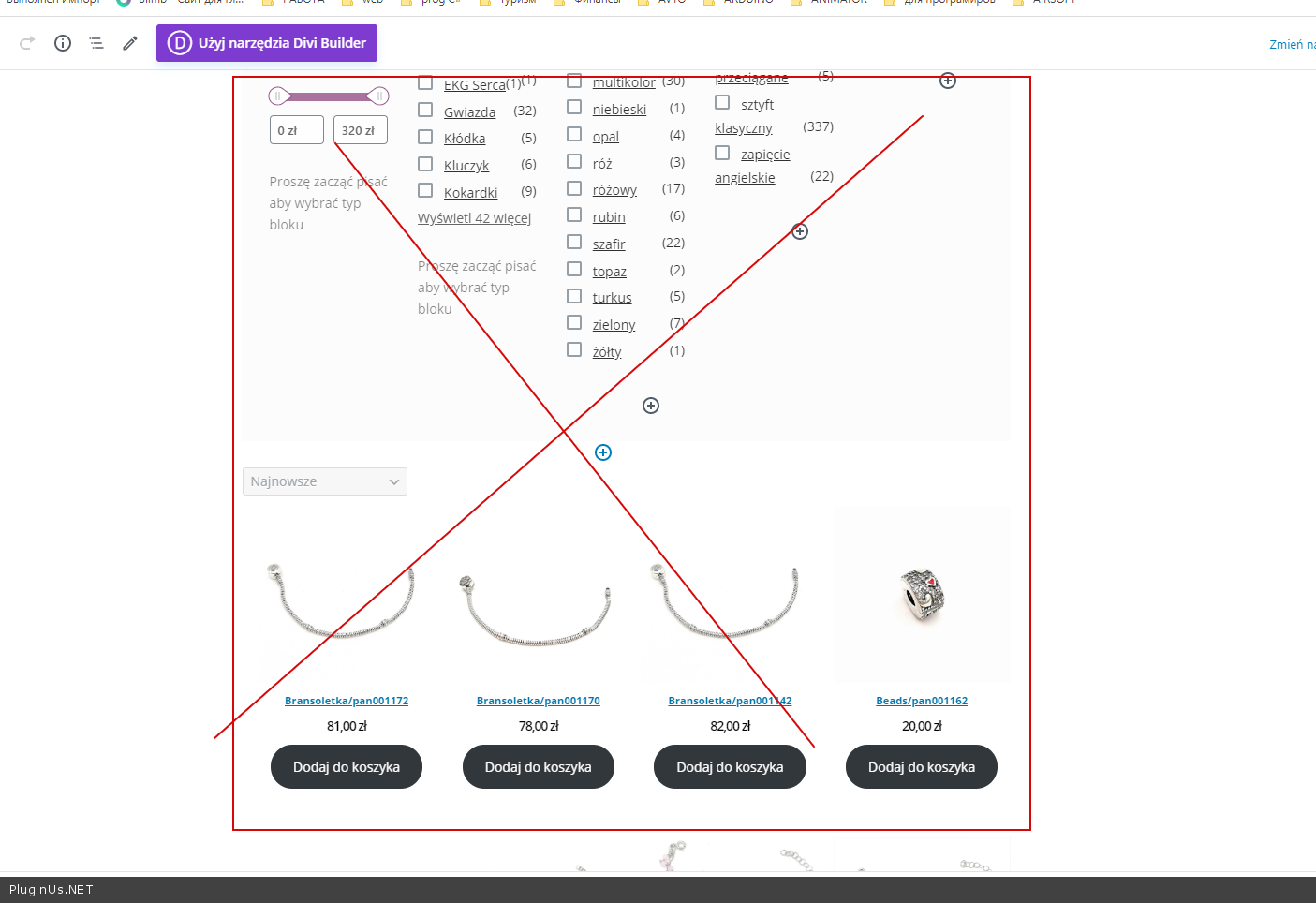
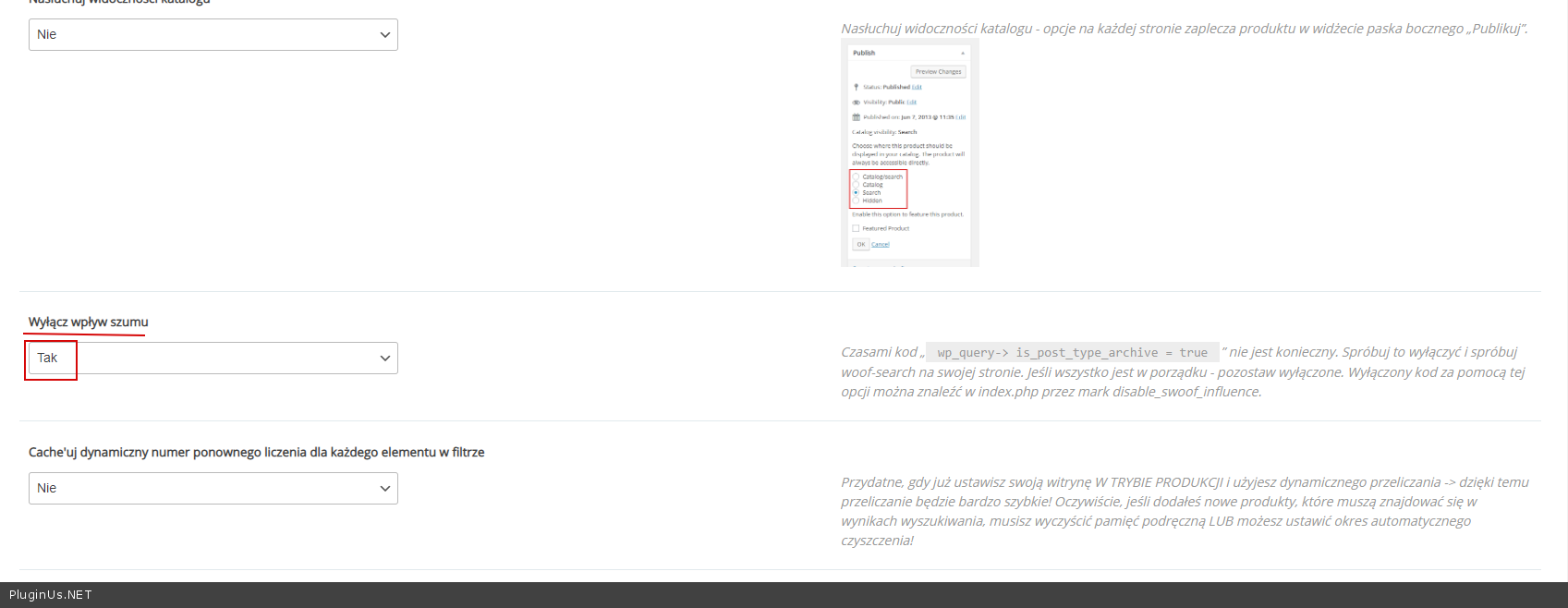
this is a problem with the shop page settings/
Please use standard shop (delete all blocks ) - https://c2n.me/47w2zeh.png
Or try this option - https://c2n.me/47w3dus.png
Hello
this is a problem with the shop page settings/
Please use standard shop (delete all blocks ) - https://c2n.me/47w2zeh.png
Or try this option - https://c2n.me/47w3dus.png
Quote from Tomasz on June 8, 2020, 23:50Thank you for your help in the previous problem.
I bought a Pro but it doesn't display the price filter slider well. On the test page http://test.rs925.ayz.pl/produkty/ the filter works well, but on the destination page it doesn't work well anymore (https://www.rodsilver925.pl/produkty/)The price filter generates the code:
https://www.rodsilver925.pl/produkty/?min_price=294&max_price=363It works only in this form:
https://www.rodsilver925.pl/produkty/?swoof=1&min_price=294&max_price=363Where to look for a problem.
Thank you for your help in the previous problem.
I bought a Pro but it doesn't display the price filter slider well. On the test page http://test.rs925.ayz.pl/produkty/ the filter works well, but on the destination page it doesn't work well anymore (https://www.rodsilver925.pl/produkty/)
The price filter generates the code:
https://www.rodsilver925.pl/produkty/?min_price=294&max_price=363
It works only in this form:
https://www.rodsilver925.pl/produkty/?swoof=1&min_price=294&max_price=363
Where to look for a problem.
Quote from Tomasz on June 9, 2020, 00:39I found a problem. Settings in the divi module shop.
I changed the setting because sorting from the latest products did not work. Now filtering works, but it sorts incorrectly.
I found a problem. Settings in the divi module shop.
I changed the setting because sorting from the latest products did not work. Now filtering works, but it sorts incorrectly.
Quote from Pablo Borysenco on June 9, 2020, 12:13Hello
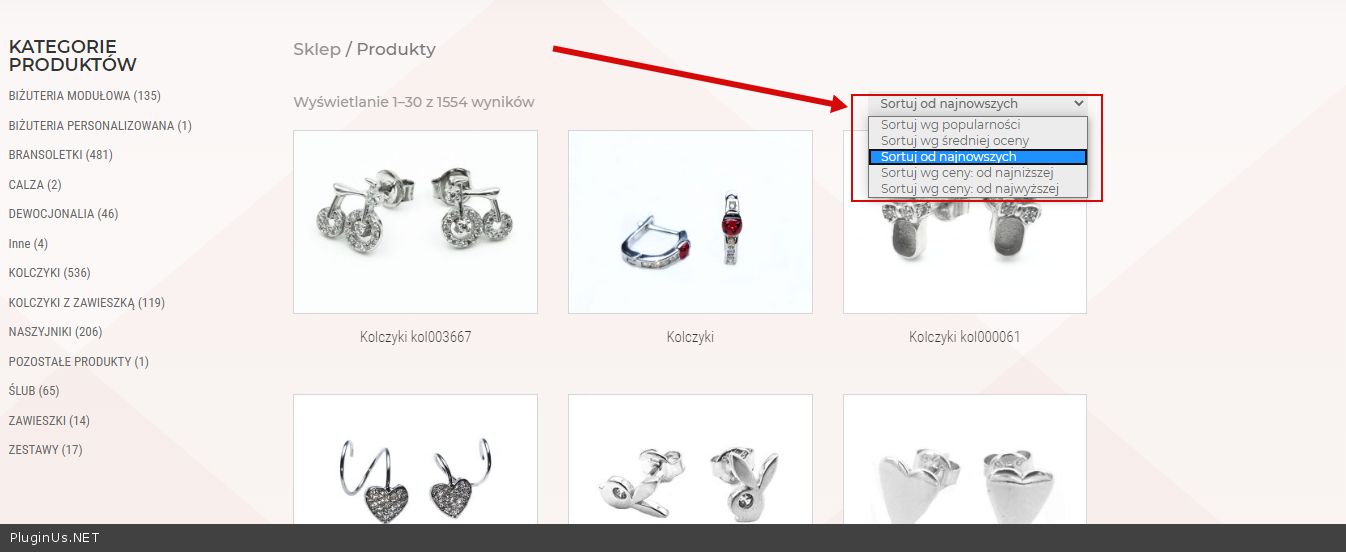
but it sorts incorrectly. - https://c2n.me/47UUapo.png - Do you mean this? My plugin does not affect product sorting
Hello
but it sorts incorrectly. - https://c2n.me/47UUapo.png - Do you mean this? My plugin does not affect product sorting
Quote from Tomasz on June 9, 2020, 12:55"... My plugin does not affect product sorting
I know.
I think I have a problem with the shop module (DIVI).
As I mark "Use the current page" in the settings module store then sorts well, but does not filter on the price. If I don't check this option, it's the other way around.
"... My plugin does not affect product sorting
I know.
I think I have a problem with the shop module (DIVI).
As I mark"Use the current page" in the settings module store then sorts well, but does not filter on the price. If I don't check this option, it's the other way around.
Quote from Tomasz on June 10, 2020, 00:42Is it possible for the price filter to add to the address "?swoof=1"
Then
https://www.rodsilver925.pl/produkty/?swoof=1&min_price=112&max_price=363
it works correctlyNow it works (not works) like this
https://www.rodsilver925.pl/produkty/?min_price=112&max_price=363The price filter does not work in the main category products only.
Is it possible for the price filter to add to the address"?swoof=1"
Then
https://www.rodsilver925.pl/produkty/?swoof=1&min_price=112&max_price=363
it works correctly
Now it works (not works) like this
https://www.rodsilver925.pl/produkty/?min_price=112&max_price=363
The price filter does not work in the main category products only.
Quote from Pablo Borysenco on June 10, 2020, 13:05Hello
I think you should contact divi support. ask them why standard filtering and sorting by price does not work
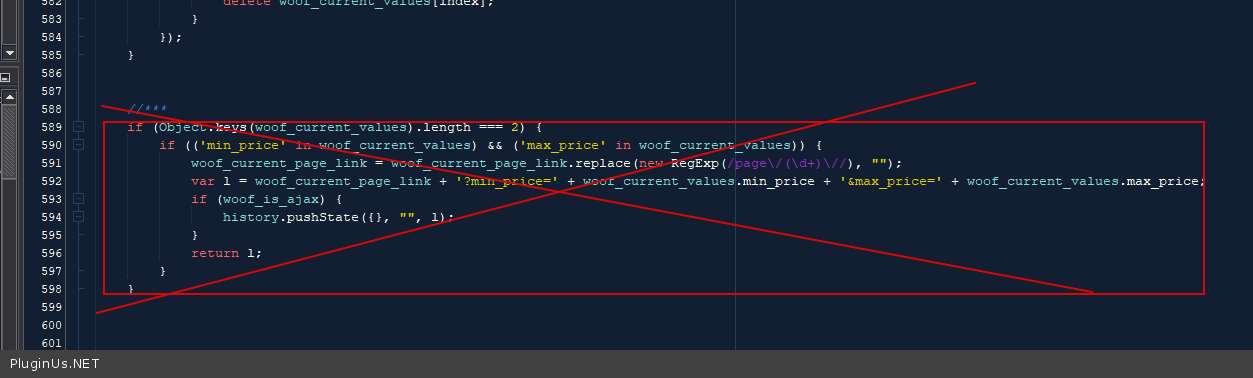
Is it possible for the price filter to add to the address "?swoof=1" - Try in file - \plugins\woocommerce-products-filter\js\front.js - delete this code - https://c2n.me/47W1PrO.png
Hello
I think you should contact divi support. ask them why standard filtering and sorting by price does not work
Is it possible for the price filter to add to the address"?swoof=1" - Try in file - \plugins\woocommerce-products-filter\js\front.js - delete this code - https://c2n.me/47W1PrO.png
Quote from Tomasz on June 11, 2020, 11:41I think that after removing the code works well.
It appeared in the address: ?swoof=1
Now I will test a little.
Thank you for your interest in my problem.
I think that after removing the code works well.
It appeared in the address: ?swoof=1
Now I will test a little.
Thank you for your interest in my problem.
Quote from Pablo Borysenco on June 11, 2020, 13:09Hello
Welcome;)
Hello
Welcome;)
Quote from Tomasz on December 3, 2020, 19:05I have one more question. For the product attribute, the filter shows the number of products. It also counts products that are out of stock.
How to fix it?https://www.rodsilver925.pl/produkty/
I have one more question. For the product attribute, the filter shows the number of products. It also counts products that are out of stock.
How to fix it?
https://www.rodsilver925.pl/produkty/
Quote from Pablo Borysenco on December 4, 2020, 14:54Hello
Please renew your support
Activate an extension - https://c2n.me/4a5O14f.png
And an option - https://c2n.me/4a5O6rT.png
Hello
Please renew your support
Activate an extension - https://c2n.me/4a5O14f.png
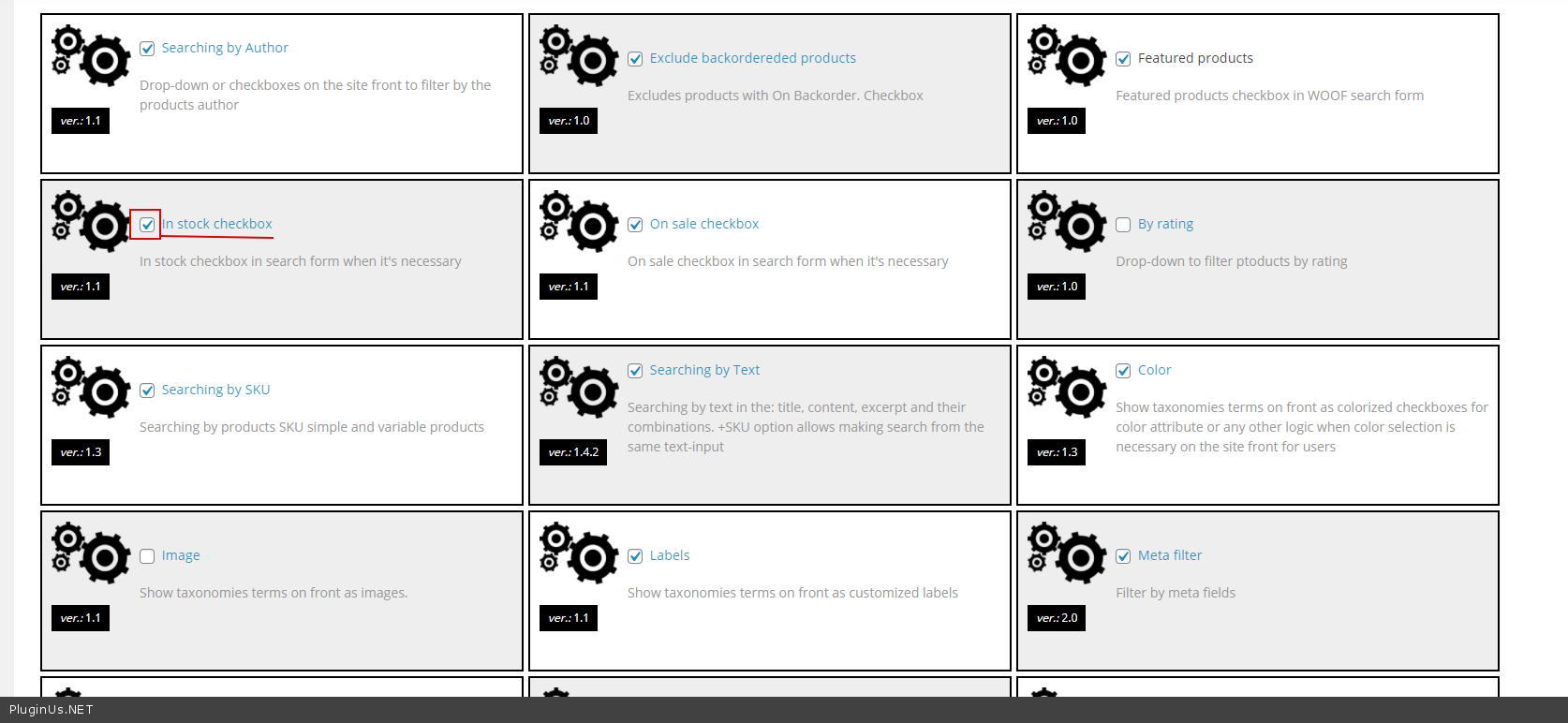
And an option - https://c2n.me/4a5O6rT.png
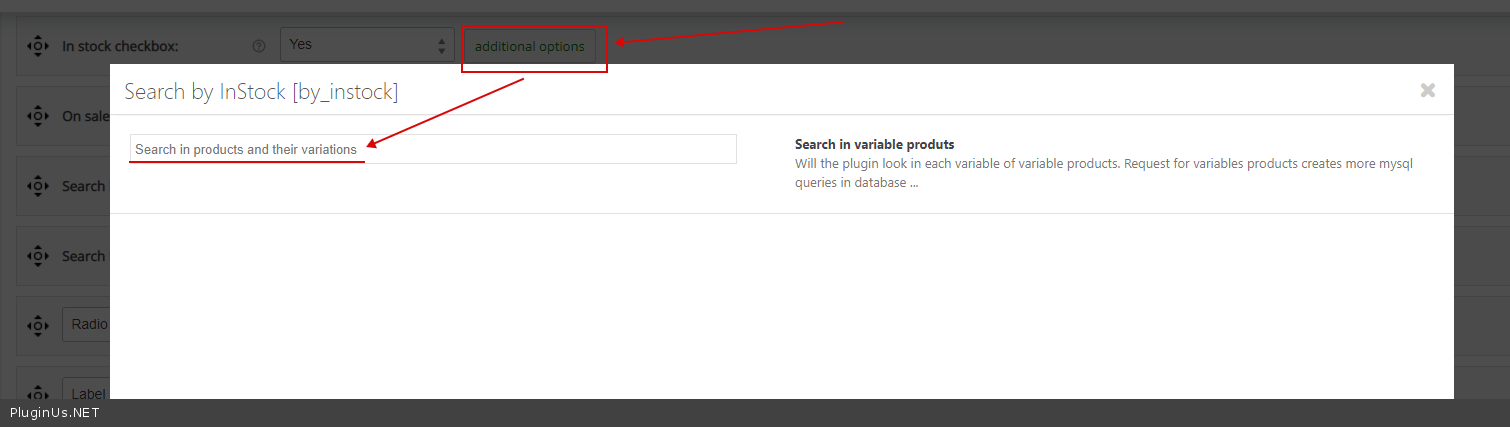
Quote from Tomasz on December 5, 2020, 20:57Hello
It's probably not the plug's fault. The number of products is also displayed by Woocommerce.
The store does not show products that are not in stock, but counts them.
Atrybut: "zolty"
Hello
It's probably not the plug's fault. The number of products is also displayed by Woocommerce.
The store does not show products that are not in stock, but counts them.
Atrybut:"zolty"


Quote from Tomasz on December 5, 2020, 20:58Now I can see that it's been six months now.
Thanks
Now I can see that it's been six months now.
Thanks
Quote from Pablo Borysenco on December 7, 2020, 13:53Hello
The store does not show products that are not in stock, but counts them. - Yes! but that should change this behavior - https://c2n.me/4a7yXG5.png
Hello
The store does not show products that are not in stock, but counts them. - Yes! but that should change this behavior - https://c2n.me/4a7yXG5.png

Quote from Tomasz on December 7, 2020, 15:57It actually works.
Is it possible to set a default on stock without showing a checkbox?
It actually works.
Is it possible to set a default on stock without showing a checkbox?