

Pro version, how to save query
The support doesn work on Saturdays and Sundays, so some Friday requests can be answered on Monday. If you have problems with registration ask help on contact us page pleaseIf you not got email within 24~36 business hours, firstly check your spam box, and if no any email from the support there - back to the forum and read answer here. DO NOT ANSWER ON EMAILS [noreply@pluginus.net] FROM THE FORUM!! Emails are just for your info, all answers should be published only here.
The support doesn work on Saturdays and Sundays, so some Friday requests can be answered on Monday.

Quote from Vegandrea on November 16, 2020, 18:37Hello,
my website offers product attribute to be filtered (food, vegan yes/no, nuts yes/no/unknown, milk yes/no/unknown ect.)
I start with: www.vegan-vegetarisch.com, first option vegan vs. vegetarian -> Shop page: after 1st click, filter disappears, it is not savable.
Same when starting filter on the shop page https://vegan-vegetarisch.com/vegan-filter/ (or sidebar widget button).
I have prepard a doc-file with more details, pro version Purchase code can be provided.
Could you kindly help? Thank you in advance, A.
Hello,
my website offers product attribute to be filtered (food, vegan yes/no, nuts yes/no/unknown, milk yes/no/unknown ect.)
I start with: http://www.vegan-vegetarisch.com, first option vegan vs. vegetarian -> Shop page: after 1st click, filter disappears, it is not savable.
Same when starting filter on the shop page https://vegan-vegetarisch.com/vegan-filter/ (or sidebar widget button).
I have prepard a doc-file with more details, pro version Purchase code can be provided.
Could you kindly help? Thank you in advance, A.

Quote from Pablo Borysenco on November 17, 2020, 13:41Hello
I'm not sure if I understood you correctly.
Shop page: after 1st click, filter disappears, it is not savable. - I made a test, it looks like everything works. "it is not savable" - What do you mean
The plugin has such an extension - https://products-filter.com/extencion/saver-of-search-query/
Or custom code - https://products-filter.com/save-selected-filter-in-session-of-website/
my sidebar WOOF Widget only shows this filter button to open the filter. Is this due to Flatsome theme? - Yes!
Hello
I'm not sure if I understood you correctly.
Shop page: after 1st click, filter disappears, it is not savable. - I made a test, it looks like everything works. "it is not savable" - What do you mean
The plugin has such an extension - https://products-filter.com/extencion/saver-of-search-query/
Or custom code - https://products-filter.com/save-selected-filter-in-session-of-website/
my sidebar WOOF Widget only shows this filter button to open the filter. Is this due to Flatsome theme? - Yes!
Quote from Vegandrea on November 18, 2020, 18:12Hello,
thanks so far!!
"not savable" means: I set a filter > I see a search result, then I click on any categorie/product and I check my filter again: no settings in the filter any more, so I see all products. Filter has kind of "reset" to zero as soon as I leave search results.
I tried the "Saver of Search Query": this is only for logged-in customers. And: same problem as mentioned above. As soon as I leave the search result, settings are at null.
I will try your second option, function.php. Is there a reset possible during the session?!
Thank you for your support, its appreciated !!
BR
Hello,
thanks so far!!
"not savable" means: I set a filter > I see a search result, then I click on any categorie/product and I check my filter again: no settings in the filter any more, so I see all products. Filter has kind of"reset" to zero as soon as I leave search results.
I tried the"Saver of Search Query": this is only for logged-in customers. And: same problem as mentioned above. As soon as I leave the search result, settings are at null.
I will try your second option, function.php. Is there a reset possible during the session?!
Thank you for your support, its appreciated !!
BR
Quote from Vegandrea on November 18, 2020, 20:56Hi Pablo,
I tried the function.php-solution (in child theme, code FYI at the end). Results:
> I set filter, example with "Cashew": https://vegan-vegetarisch.com/vegan-filter/?DeinFilter=1&pa_cashewnuss=ja-laut-rezeptur-enthalten&paged=1
> Afterwards, click on any categorie, no filter mentioned in the URL: https://vegan-vegetarisch.com/produkt-kategorie/lebensmittel/aufstriche/
My idea like on purenature (.)de or foodoase (.)de
Help against payment is welcome!
BR, Andrea
FYI the Code:
<?php
// Add custom Theme Functions here
add_filter('send_headers', function() {
if ($_SERVER['SCRIPT_URL'] === '/' OR $_SERVER['SCRIPT_URL'] === '/shop/')
{
global $WOOF;
if (!$WOOF->is_isset_in_request_data($WOOF->get_swoof_search_slug()))
{
$woof_last_search_request = $WOOF->storage->get_val('woof_last_search_request');
if (!empty($woof_last_search_request) AND is_array($woof_last_search_request))
{
unset($woof_last_search_request['wc-ajax']);
unset($woof_last_search_request['page']);
unset($woof_last_search_request['paged']);
//***
$_GET = $woof_last_search_request;
add_filter('woof_get_request_data', function() use($woof_last_search_request) {
return $woof_last_search_request;
});
}
}
}
}, 9999);
Hi Pablo,
I tried the function.php-solution (in child theme, code FYI at the end). Results:
> I set filter, example with"Cashew": https://vegan-vegetarisch.com/vegan-filter/?DeinFilter=1&pa_cashewnuss=ja-laut-rezeptur-enthalten&paged=1
> Afterwards, click on any categorie, no filter mentioned in the URL: https://vegan-vegetarisch.com/produkt-kategorie/lebensmittel/aufstriche/
My idea like on purenature (.)de or foodoase (.)de
Help against payment is welcome!
BR, Andrea
FYI the Code:
<?php
// Add custom Theme Functions here
add_filter('send_headers', function() {
if ($_SERVER['SCRIPT_URL'] === '/' OR $_SERVER['SCRIPT_URL'] === '/shop/')
{
global $WOOF;
if (!$WOOF->is_isset_in_request_data($WOOF->get_swoof_search_slug()))
{
$woof_last_search_request = $WOOF->storage->get_val('woof_last_search_request');
if (!empty($woof_last_search_request) AND is_array($woof_last_search_request))
{
unset($woof_last_search_request['wc-ajax']);
unset($woof_last_search_request['page']);
unset($woof_last_search_request['paged']);
//***
$_GET = $woof_last_search_request;
add_filter('woof_get_request_data', function() use($woof_last_search_request) {
return $woof_last_search_request;
});
}
}
}
}, 9999);
Quote from Vegandrea on November 18, 2020, 21:22Next try with "Save query function":
1- I set the filter in https://vegan-vegetarisch.com/vegan-filter/ and I save the query named "cashew"
2- I click on any categorie such as https://vegan-vegetarisch.com/produkt-kategorie/lebensmittel/aufstriche/
3- I click on the query name "cashew", result is: new window and https://vegan-vegetarisch.com/veganer-shop/?DeinFilter=1&pa_cashewnuss=ja-laut-rezeptur-enthalten
So I am not in my product category where I applied my filter.
I can save a filter, yes. But I can not apply it on a specific category (and there are products in this categorie with the specific attribute/taxonomie).
Pls help, thank you!
Andrea
Next try with"Save query function":
1- I set the filter in https://vegan-vegetarisch.com/vegan-filter/ and I save the query named"cashew"
2- I click on any categorie such as https://vegan-vegetarisch.com/produkt-kategorie/lebensmittel/aufstriche/
3- I click on the query name"cashew", result is: new window and https://vegan-vegetarisch.com/veganer-shop/?DeinFilter=1&pa_cashewnuss=ja-laut-rezeptur-enthalten
So I am not in my product category where I applied my filter.
I can save a filter, yes. But I can not apply it on a specific category (and there are products in this categorie with the specific attribute/taxonomie).
Pls help, thank you!
Andrea
Quote from Pablo Borysenco on November 19, 2020, 13:05Hello Andrea
This is a sample code. If you have no experience in programming, you should hire a developer
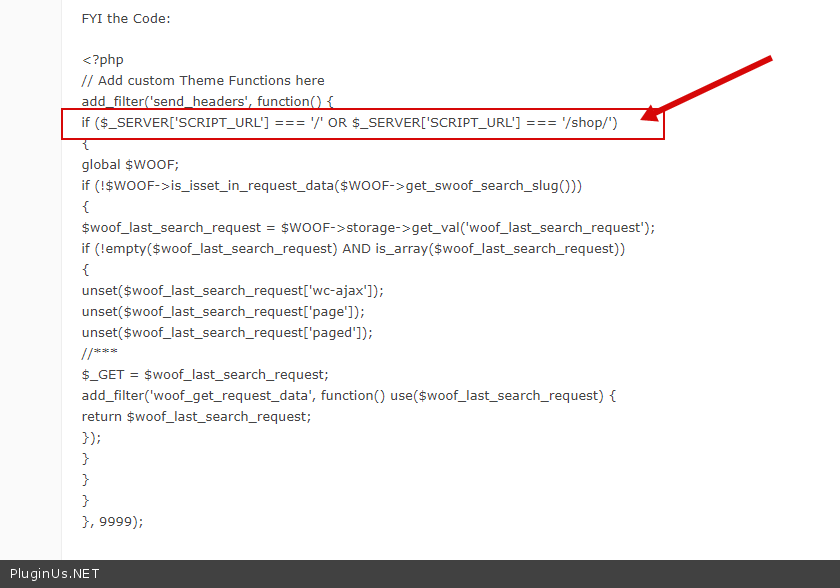
https://c2n.me/49SUUke.png - This line of code restricts the execution of this function to the main and shop page only
Hello Andrea
This is a sample code. If you have no experience in programming, you should hire a developer
https://c2n.me/49SUUke.png - This line of code restricts the execution of this function to the main and shop page only
Quote from Vegandrea on November 19, 2020, 17:21Hello Pablo,
thanks, you are right in regards on programming. Last question: "Save query function":
1- I set the filter in https://vegan-vegetarisch.com/vegan-filter/ and I save the query named "cashew"
2- I click on any categorie such as https://vegan-vegetarisch.com/produkt-kategorie/lebensmittel/aufstriche/
3- I click on the query name "cashew", result is: new window and https://vegan-vegetarisch.com/veganer-shop/?DeinFilter=1&pa_cashewnuss=ja-laut-rezeptur-enthalten
So I am not in my product category where I applied my filter.
I can save a filter, yes. But I can not apply it on a specific category (and there are products in this categorie with the specific attribute/taxonomie).
I apologize, low budget forces me to do it by myself.
best regards,
Andrea
Hello Pablo,
thanks, you are right in regards on programming. Last question: "Save query function":
1- I set the filter in https://vegan-vegetarisch.com/vegan-filter/ and I save the query named"cashew"
2- I click on any categorie such as https://vegan-vegetarisch.com/produkt-kategorie/lebensmittel/aufstriche/
3- I click on the query name"cashew", result is: new window and https://vegan-vegetarisch.com/veganer-shop/?DeinFilter=1&pa_cashewnuss=ja-laut-rezeptur-enthalten
So I am not in my product category where I applied my filter.
I can save a filter, yes. But I can not apply it on a specific category (and there are products in this categorie with the specific attribute/taxonomie).
I apologize, low budget forces me to do it by myself.
best regards,
Andrea
Quote from Pablo Borysenco on November 20, 2020, 13:42Hello Andrea
As you described everything works correctly!
Please read docs - https://products-filter.com/extencion/saver-of-search-query/ - this saves the current search. So in this case you need to create search on this category page and save it.
Hello Andrea
As you described everything works correctly!
Please read docs - https://products-filter.com/extencion/saver-of-search-query/ - this saves the current search. So in this case you need to create search on this category page and save it.
Quote from Vegandrea on November 20, 2020, 14:47Hello Pablo, thank you!
As soons as I found s.b. to help me with this, we might get back to you. This code seems to be an interesting solution.
BR, Andrea
Hello Pablo, thank you!
As soons as I found s.b. to help me with this, we might get back to you. This code seems to be an interesting solution.
BR, Andrea
Quote from Pablo Borysenco on November 23, 2020, 13:03Hello Andrea
Ok! Welcome;)
Hello Andrea
Ok! Welcome;)
Quote from Vegandrea on November 27, 2020, 16:44Hi Pablo!
We have removed the restriction from the snippet and now the filter is used. Thanks for the snippet!
But now the "Delete filter" doesn't work anymore, because the snippet seems to populate the filter immediately again.
Any hint, how to prevent this just for the "clear filter" feature?
Best regards
Hi Pablo!
We have removed the restriction from the snippet and now the filter is used. Thanks for the snippet!
But now the"Delete filter" doesn't work anymore, because the snippet seems to populate the filter immediately again.
Any hint, how to prevent this just for the"clear filter" feature?
Best regards
Quote from Pablo Borysenco on November 30, 2020, 15:17Hello
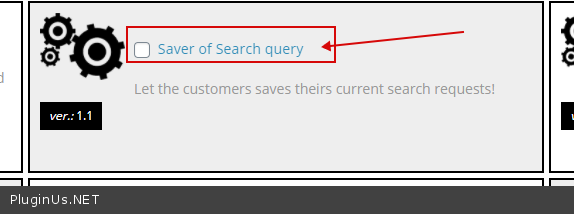
But now the "Delete filter" doesn't work anymore - Do you mean this extension - https://c2n.me/4a1OkKT.png ?
if you mean custom code, then you should hire a developer. Unfortunately I don't have a ready-made solution for you
Hello
But now the"Delete filter" doesn't work anymore - Do you mean this extension - https://c2n.me/4a1OkKT.png ?
if you mean custom code, then you should hire a developer. Unfortunately I don't have a ready-made solution for you
Quote from Vegandrea on November 30, 2020, 16:07Hello Pablo,
the filter is being managed by a Pro now.
And he means the "reset button" in your filter.
BR, Andrea
Hello Pablo,
the filter is being managed by a Pro now.
And he means the"reset button" in your filter.
BR, Andrea
Quote from Pablo Borysenco on December 1, 2020, 13:39Hello Andrea
And he means the "reset button" in your filter. - yes, this custom code will not allow you to do this. You need to change this code
When the reset button is pressed use this code:
$WOOF->storage->unset_val('woof_last_search_request');
Hello Andrea
And he means the"reset button" in your filter. - yes, this custom code will not allow you to do this. You need to change this code
When the reset button is pressed use this code:
$WOOF->storage->unset_val('woof_last_search_request');
Quote from Vegandrea on December 10, 2020, 16:43Hello Pablo,
thank you!
Could you tell us please WHERE to put this code?
Thank´s and a good day,
Andrea
Hello Pablo,
thank you!
Could you tell us please WHERE to put this code?
Thank´s and a good day,
Andrea
Quote from Pablo Borysenco on December 11, 2020, 13:40Hello Andrea
Where you will determine that the reset button was pressed(in your custom code).
You'd better ask your developer about this.
Hello Andrea
Where you will determine that the reset button was pressed(in your custom code).
You'd better ask your developer about this.