

[Pro] Custom product filter
The support doesn work on Saturdays and Sundays, so some Friday requests can be answered on Monday. If you have problems with registration ask help on contact us page pleaseIf you not got email within 24~36 business hours, firstly check your spam box, and if no any email from the support there - back to the forum and read answer here. DO NOT ANSWER ON EMAILS [noreply@pluginus.net] FROM THE FORUM!! Emails are just for your info, all answers should be published only here.
The support doesn work on Saturdays and Sundays, so some Friday requests can be answered on Monday.

Quote from eightyn80n on February 21, 2022, 14:00Hello everyone. Unfortunately I do not manage to set the filter reasonably. Can you help please?
Hello everyone. Unfortunately I do not manage to set the filter reasonably. Can you help please?
Quote from eightyn80n on February 21, 2022, 14:28I added WP Login Data to the private data section
I added WP Login Data to the private data section

Quote from Pablo Borysenco on February 22, 2022, 13:02Hello
Unfortunately, the plugin setup is not included in support.
Please watch this video - https://products-filter.com/video#beGT6p_look
And describe what exactly did not work for you
Hello
Unfortunately, the plugin setup is not included in support.
Please watch this video - https://products-filter.com/video#beGT6p_look
And describe what exactly did not work for you
Quote from eightyn80n on February 22, 2022, 13:04HI, thank you.
You can see the bug imediatly on the front Page. Please have a look.
HI, thank you.
You can see the bug imediatly on the front Page. Please have a look.
Quote from Pablo Borysenco on February 22, 2022, 13:56Everything works according to your settings.
To hide the terms immediately use this option - https://c2n.me/4f19iFH.png
Everything works according to your settings.
To hide the terms immediately use this option - https://c2n.me/4f19iFH.png
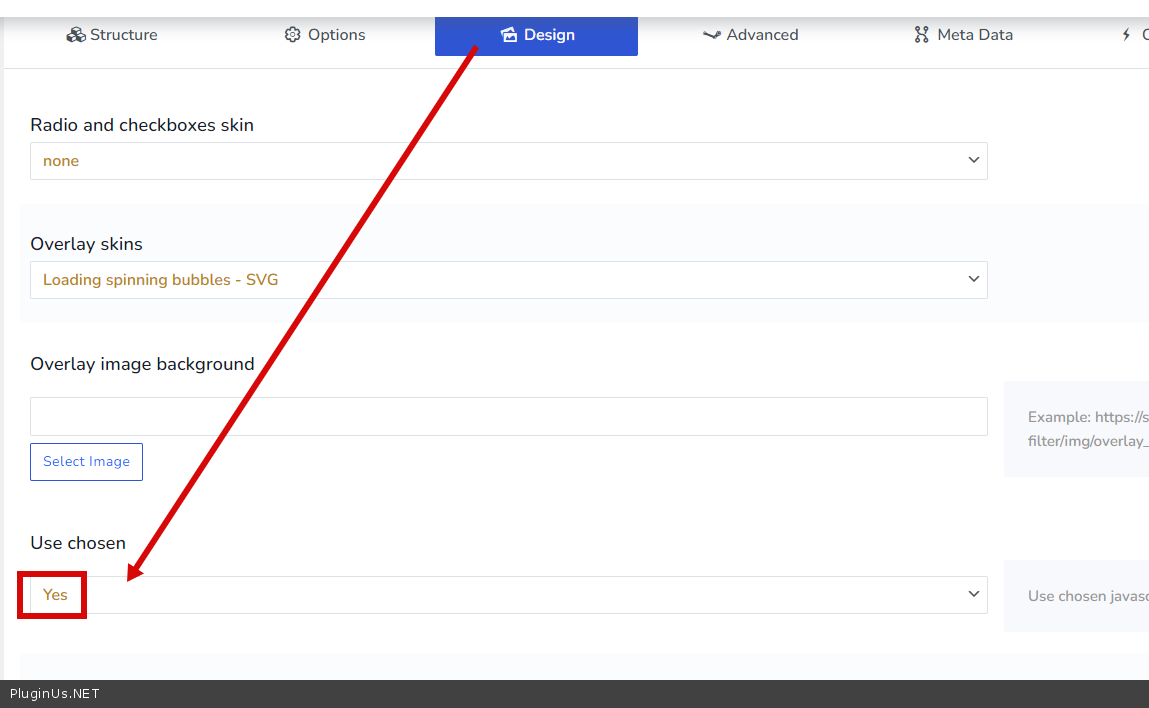
Quote from eightyn80n on February 23, 2022, 09:26Hi there,
is it possible to hire someone from your team to setup plugin as we need?
Hi there,
is it possible to hire someone from your team to setup plugin as we need?
Quote from Pablo Borysenco on February 23, 2022, 13:06Hello
Unfortunately, we don't have time for custom tasks right now.
But you can describe what you can't set up, I'll help you
Hello
Unfortunately, we don't have time for custom tasks right now.
But you can describe what you can't set up, I'll help you
Quote from eightyn80n on February 24, 2022, 10:35@pavlo_borysenco
Thank you so much for helping me. Basically we have 2 problems.
The first problem is a performance problem. We have angled a custom taxonomy in Woocommerce/WP and imported about 10,000 taxonomies. We now want to place Woof via Shortcorde on the home page. Although there is only one article in the store, the page takes about 20 seconds to load until a filtering can be done. Do you have an idea how to solve this problem?
@pavlo_borysenco
Thank you so much for helping me. Basically we have 2 problems.
The first problem is a performance problem. We have angled a custom taxonomy in Woocommerce/WP and imported about 10,000 taxonomies. We now want to place Woof via Shortcorde on the home page. Although there is only one article in the store, the page takes about 20 seconds to load until a filtering can be done. Do you have an idea how to solve this problem?
Quote from eightyn80n on February 24, 2022, 10:47@pavlo_borysenco
The second problem is that I can not manage to set the settings to resemble the appearance of the page (see "Your theme private data") or reproduce 1:1. The Woof plugin was also used on the page. After the first selection by clicking in the dropdown, the selection is displayed at the top left and the found items are already restricted and displayed at the top of the middle. Then on the 2nd selection, only taxonomies that match the first selection are shown. Please see the screenshot in the "Your topic private data" Section
@pavlo_borysenco
The second problem is that I can not manage to set the settings to resemble the appearance of the page (see"Your theme private data") or reproduce 1:1. The Woof plugin was also used on the page. After the first selection by clicking in the dropdown, the selection is displayed at the top left and the found items are already restricted and displayed at the top of the middle. Then on the 2nd selection, only taxonomies that match the first selection are shown. Please see the screenshot in the"Your topic private data" Section
Quote from Pablo Borysenco on February 24, 2022, 14:31Hello
- The number of taxonomies affects the speed of the filter. Because the plugin has to make a request for each taxonomy. Minimize the number of taxonomies
- To show checked options - https://products-filter.com/shortcode/woof_search_options to show number of products found - https://products-filter.com/shortcode/woof_found_count
Hello
- The number of taxonomies affects the speed of the filter. Because the plugin has to make a request for each taxonomy. Minimize the number of taxonomies
- To show checked options - https://products-filter.com/shortcode/woof_search_options to show number of products found - https://products-filter.com/shortcode/woof_found_count
Quote from eightyn80n on February 24, 2022, 16:45Thank you.
To 1.:
Unfortunately, we cannot simply delete these taxonomies. They will be filtered by vendor and the related types.
Is there no way to speed this up with many taxonomies?
Thank you.
To 1.:
Unfortunately, we cannot simply delete these taxonomies. They will be filtered by vendor and the related types.
Is there no way to speed this up with many taxonomies?
Quote from Pablo Borysenco on February 25, 2022, 12:58Hello
In this case disable "Dynamic recount" - this should help
Hello
In this case disable "Dynamic recount" - this should help
Quote from eightyn80n on February 27, 2022, 16:36Hello
thank you very much.
Can you please tell me where I can make the setting, for example, as soon as a category is selected, that only the selected category is displayed in the 2 drop-down box and everything else is greyed out or hidden?
Hello
thank you very much.
Can you please tell me where I can make the setting, for example, as soon as a category is selected, that only the selected category is displayed in the 2 drop-down box and everything else is greyed out or hidden?
Quote from Pablo Borysenco on February 28, 2022, 14:31Hello
In this case, you need to check if there are products for the current search query and the filter should make a request for each term of the taxonomy(over 10,000 requests) . And there's no other way - "Dynamic recount" as "Yes"
Hello
In this case, you need to check if there are products for the current search query and the filter should make a request for each term of the taxonomy(over 10,000 requests) . And there's no other way - "Dynamic recount" as"Yes"