

Prevent Preview Image Popup On Small Screens
The support doesn work on Saturdays and Sundays, so some Friday requests can be answered on Monday. If you have problems with registration ask help on contact us page pleaseIf you not got email within 24~36 business hours, firstly check your spam box, and if no any email from the support there - back to the forum and read answer here. DO NOT ANSWER ON EMAILS [noreply@pluginus.net] FROM THE FORUM!! Emails are just for your info, all answers should be published only here.
The support doesn work on Saturdays and Sundays, so some Friday requests can be answered on Monday.

Quote from Quadica on June 7, 2022, 19:14I have the "Preview on hover" option enabled for some tables. When you open a product on a mobile device, you are directed to the product page, but then when you return to the table page, the popup image for the product you just visited is displayed on the screen.
Is there a way to disable the Preview on hover popup option on small screens?
I have the"Preview on hover" option enabled for some tables. When you open a product on a mobile device, you are directed to the product page, but then when you return to the table page, the popup image for the product you just visited is displayed on the screen.
Is there a way to disable the Preview on hover popup option on small screens?

Quote from Pablo Borysenco on June 8, 2022, 10:24hello
Please drop me exact link to the issue
hello
Please drop me exact link to the issue
Quote from Quadica on June 8, 2022, 21:37Testing page link in the private windows.
If you touch the image, you are taken to a new tab in the browser. Now when you touch the back button, then you will see that the popup window is still displayed.
This leads to a question about product page linking. If you touch the description text, then the product page is opened in the same tab. But if you touch the product image, then the product page is opened in a new tab. Is there a way to configure WOOT so that products are always opened in the same tab when you touch either the image or text?
Even better, is there a way to have the product page opened if the user touches or clicks anywhere in the table row?
Testing page link in the private windows.
If you touch the image, you are taken to a new tab in the browser. Now when you touch the back button, then you will see that the popup window is still displayed.
This leads to a question about product page linking. If you touch the description text, then the product page is opened in the same tab. But if you touch the product image, then the product page is opened in a new tab. Is there a way to configure WOOT so that products are always opened in the same tab when you touch either the image or text?
Even better, is there a way to have the product page opened if the user touches or clicks anywhere in the table row?
Quote from Pablo Borysenco on June 9, 2022, 14:28Hello
Try in file - https://fasttracks.kinsta.cloud/product-category/bullfrogs/ - delete this code - https://share.pluginus.net/image/i20220608205105.png
is there a way to have the product page opened if the user touches or clicks anywhere in the table row? - unfortunately the plugin does not have this feature
Hello
Try in file - https://fasttracks.kinsta.cloud/product-category/bullfrogs/ - delete this code - https://share.pluginus.net/image/i20220608205105.png

is there a way to have the product page opened if the user touches or clicks anywhere in the table row? - unfortunately the plugin does not have this feature
Quote from Quadica on June 9, 2022, 18:08I assume you meant this file:
/public/wp-content/plugins/woot-products-tables/profiles/woocommerce/woocommerce.php
I removed the target statement and the image link is now opening in the same tab now. A popup image still shows up when you touch the image, but at least now when you go back to the page it is no longer being displayed.
Is there a way to configure WOOT so that the pop-up image is not displayed on mobile devices?
I assume you meant this file:
/public/wp-content/plugins/woot-products-tables/profiles/woocommerce/woocommerce.php
I removed the target statement and the image link is now opening in the same tab now. A popup image still shows up when you touch the image, but at least now when you go back to the page it is no longer being displayed.
Is there a way to configure WOOT so that the pop-up image is not displayed on mobile devices?
Quote from Pablo Borysenco on June 10, 2022, 16:26Hello
Yes sorry for the link.
way to configure WOOT so that the pop-up image is not displayed on mobile devices? - I think this can be resolved. I will pass this on to our developer. He must provide a solution (code) on Monday
Hello
Yes sorry for the link.
way to configure WOOT so that the pop-up image is not displayed on mobile devices? - I think this can be resolved. I will pass this on to our developer. He must provide a solution (code) on Monday
Quote from Pablo Borysenco on June 13, 2022, 16:43Hello
In file - "woot-products-tables\profiles\woocommerce\woocommerce.php" - change code - https://c2n.me/4fU2Qla.png
&& !wp_is_mobile()
Hello
In file -"woot-products-tables\profiles\woocommerce\woocommerce.php" - change code - https://c2n.me/4fU2Qla.png
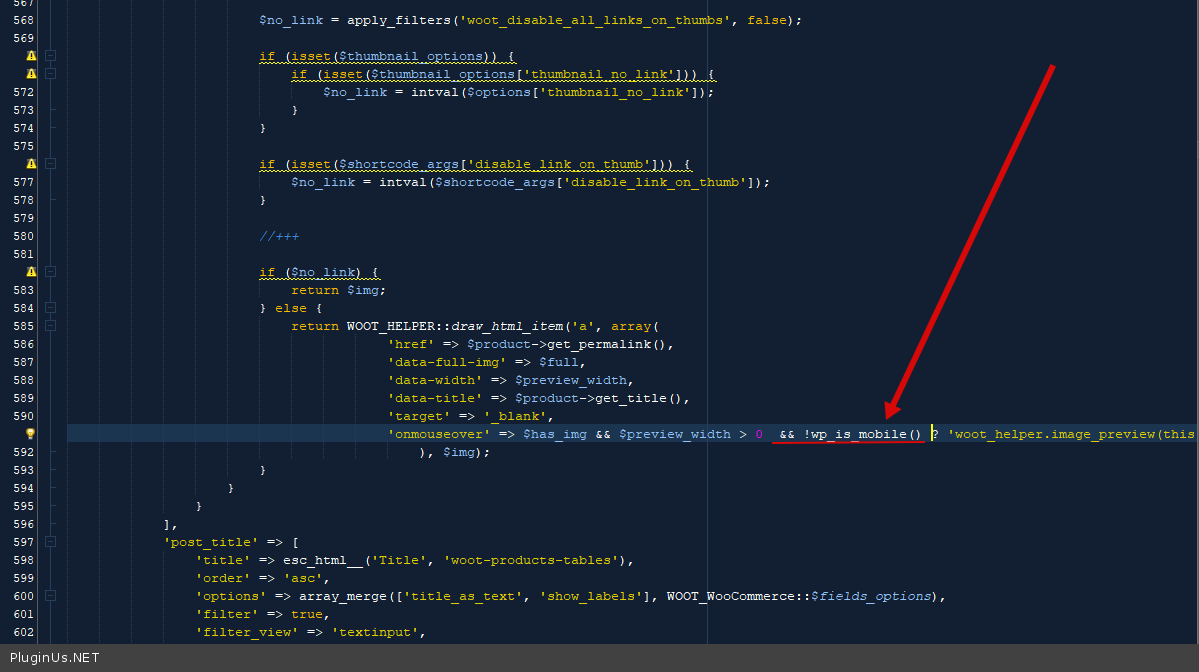
&& !wp_is_mobile()
Quote from Quadica on June 13, 2022, 19:34Thanks!
This has fixed the problem.
Thanks!
This has fixed the problem.