

Pre Sales Slideout Questions
The support doesn work on Saturdays and Sundays, so some Friday requests can be answered on Monday. If you have problems with registration ask help on contact us page pleaseIf you not got email within 24~36 business hours, firstly check your spam box, and if no any email from the support there - back to the forum and read answer here. DO NOT ANSWER ON EMAILS [noreply@pluginus.net] FROM THE FORUM!! Emails are just for your info, all answers should be published only here.
The support doesn work on Saturdays and Sundays, so some Friday requests can be answered on Monday.

Quote from filtercreation on October 29, 2020, 18:51Hi There
I've installed the plugin on a site I'm developing and it looks really good so far. I believe I need to upgrade to the pro version, but just wanted to ask a few questions / double check a few details.
1. I cannot scroll through the options on the filters once I click on the slideout? https://tinyurl.com/y27zzrq6
2. Is it possible to group filter options? Or to filter based on tags? So for example, if you check the filters on the current site, https://tinyurl.com/yye82j6m, the select by thickness, width and wear layer filters are grouped into ranges of sizes?
3. I presume that I can setup a different set of filters for the flooring and doors categories?Thanks in advance for your assistance
Hi There
I've installed the plugin on a site I'm developing and it looks really good so far. I believe I need to upgrade to the pro version, but just wanted to ask a few questions / double check a few details.
1. I cannot scroll through the options on the filters once I click on the slideout? https://tinyurl.com/y27zzrq6
2. Is it possible to group filter options? Or to filter based on tags? So for example, if you check the filters on the current site, https://tinyurl.com/yye82j6m, the select by thickness, width and wear layer filters are grouped into ranges of sizes?
3. I presume that I can setup a different set of filters for the flooring and doors categories?
Thanks in advance for your assistance

Quote from Pablo Borysenco on October 30, 2020, 13:39Hello
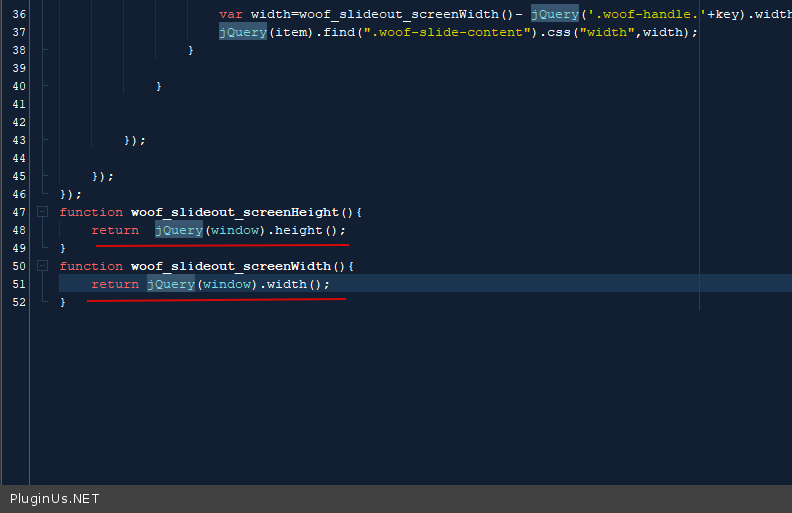
- try in file - \wp-content\plugins\woocommerce-products-filter\ext\slideout\js\slideout.js change code - https://c2n.me/49DxbDE.png
- Unfortunately not
- Read this:
1) In category pages use shortcode - [woof_products] with attribute : taxonomies=product_cat:X Where X id your product category. ( if you use custom page )
2) In widgets use shortcode [woof] with attribute : * taxonomies=product_cat:X
+
tax_only - write taxonomies or products slug using comma
+
by_only - write any by-filter-elements there using comma: by_text,by_price,by_sku,by_author,by_insales,by_instock. Of course firstly user should enable extensions for that by-filter-elements
*- Do not forget set the same condition in [woof_products]3) For show or hide widgets on different pages - http://www.woocommerce-filter.com/how-to-show-or-hide-widget-only-on-selected-site-pages/
You can read more about shortcodes - http://www.woocommerce-filter.com/documentation/#!/section_3_1
Hello
- try in file - \wp-content\plugins\woocommerce-products-filter\ext\slideout\js\slideout.js change code - https://c2n.me/49DxbDE.png
- Unfortunately not
- Read this:
1) In category pages use shortcode - [woof_products] with attribute : taxonomies=product_cat:X Where X id your product category. ( if you use custom page )
2) In widgets use shortcode [woof] with attribute : * taxonomies=product_cat:X
+
tax_only - write taxonomies or products slug using comma
+
by_only - write any by-filter-elements there using comma: by_text,by_price,by_sku,by_author,by_insales,by_instock. Of course firstly user should enable extensions for that by-filter-elements
*- Do not forget set the same condition in [woof_products]
3) For show or hide widgets on different pages - http://www.woocommerce-filter.com/how-to-show-or-hide-widget-only-on-selected-site-pages/
You can read more about shortcodes - http://www.woocommerce-filter.com/documentation/#!/section_3_1
Quote from filtercreation on October 30, 2020, 14:41Thank you Pablo
Point 1 has worked. Just to double check, this will be overwritten when the plugin is updated? Or will this changed be applied to the core files in the next release?
Just looking over point 3 now
Thank you Pablo
Point 1 has worked. Just to double check, this will be overwritten when the plugin is updated? Or will this changed be applied to the core files in the next release?
Just looking over point 3 now
Quote from filtercreation on October 30, 2020, 17:20Will pick this back up over the weekend and come back on Monday if I have any questions, thanks for the quick response
Will pick this back up over the weekend and come back on Monday if I have any questions, thanks for the quick response
Quote from Pablo Borysenco on November 2, 2020, 12:05Hello
this will be overwritten when the plugin is updated? - this will be included in the next version
Hello
this will be overwritten when the plugin is updated? - this will be included in the next version
Quote from filtercreation on November 2, 2020, 14:22Hi Pablo
In response to your direction concerning point 3, can I just double check that I can use the slideout option on different category pages? Not the widget option but the slideout?
I'd only need two filters setup, one for the floors and one for the doors?
Many Thanks
Hi Pablo
In response to your direction concerning point 3, can I just double check that I can use the slideout option on different category pages? Not the widget option but the slideout?
I'd only need two filters setup, one for the floors and one for the doors?
Many Thanks
Quote from Pablo Borysenco on November 3, 2020, 11:25Hello
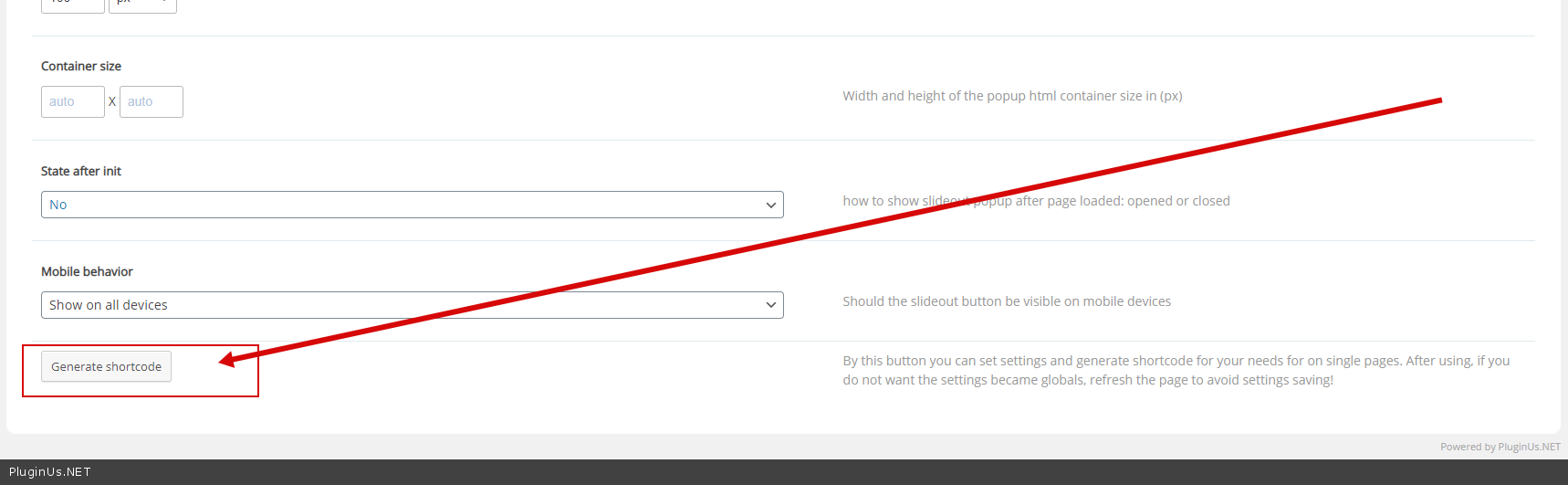
3) Oh! sorry! Generate a shortcode - https://c2n.me/49G0dt3.png - And put it on the pages you want
Hello
3) Oh! sorry! Generate a shortcode - https://c2n.me/49G0dt3.png - And put it on the pages you want
Quote from filtercreation on November 3, 2020, 19:51Thanks Pablo
I'll be working on this tomorrow morning, will come back with any questions
Have a great evening
Thanks Pablo
I'll be working on this tomorrow morning, will come back with any questions
Have a great evening
Quote from Pablo Borysenco on November 4, 2020, 11:38Hello
Ok!
Thank you
Hello
Ok!
Thank you
Quote from filtercreation on November 4, 2020, 15:58Hi Pablo
Can I just check that we are on the same page and that this is possible to achieve my requirements with this plugin? I would like the two category's, doors and flooring to display different filters in the slideout for each category?
Please check the different filters on the current site and you'll see what I mean? I'm basically trying to replicate this behaviour but with a slideout?
Flooring - https://tinyurl.com/yye82j6m
Different Filters on Left Hand Side for Doors - https://tinyurl.com/y277tdplCan I filter and only show relevant attributes applied to products in the two different product categories?
Here is my current attempt at the coding on the flooring page, flooring category is 82, but it only displays that category in the slideout, doesn't impact the attributes, categories or tags displayed in the filter?
[woof_slideout image_h=150 image_w=150 location=left speed=101 action=click offset=300px onloadslideout=false taxonomies=product_cat:82 ]
[woof_products taxonomies=product_cat:82]
[/woof_slideout]https://tinyurl.com/y2zxx3b6
Thanks for your help here, once I get this cracked that will be all my questions answered!
Hi Pablo
Can I just check that we are on the same page and that this is possible to achieve my requirements with this plugin? I would like the two category's, doors and flooring to display different filters in the slideout for each category?
Please check the different filters on the current site and you'll see what I mean? I'm basically trying to replicate this behaviour but with a slideout?
Flooring - https://tinyurl.com/yye82j6m
Different Filters on Left Hand Side for Doors - https://tinyurl.com/y277tdpl
Can I filter and only show relevant attributes applied to products in the two different product categories?
Here is my current attempt at the coding on the flooring page, flooring category is 82, but it only displays that category in the slideout, doesn't impact the attributes, categories or tags displayed in the filter?
[woof_slideout image_h=150 image_w=150 location=left speed=101 action=click offset=300px onloadslideout=false taxonomies=product_cat:82 ]
[woof_products taxonomies=product_cat:82]
[/woof_slideout]
Thanks for your help here, once I get this cracked that will be all my questions answered!
Quote from Pablo Borysenco on November 5, 2020, 12:39Hello
To show filter:
use [woof taxonomies=product_cat:82]
To show filter in slideout:
[woof_slideout image_h=150 image_w=150 location=left speed=101 action=click offset=300px onloadslideout=false ]
[woof taxonomies=product_cat:82]
[/woof_slideout]
Hello
To show filter:
use [woof taxonomies=product_cat:82]
To show filter in slideout:
[woof_slideout image_h=150 image_w=150 location=left speed=101 action=click offset=300px onloadslideout=false ]
[woof taxonomies=product_cat:82]
[/woof_slideout]
Quote from filtercreation on November 5, 2020, 13:08Thanks Pablo
I've applied that, but it doesn't seem to have made a difference?
So for example, on this page, it shouldn't display "dimensions" as that filter only applies to doors, not floors?
https://uk609.directrouter.com/~crebfgfc/upgrade/product-category/flooring/
Thanks Pablo
I've applied that, but it doesn't seem to have made a difference?
So for example, on this page, it shouldn't display"dimensions" as that filter only applies to doors, not floors?
https://uk609.directrouter.com/~crebfgfc/upgrade/product-category/flooring/
Quote from filtercreation on November 6, 2020, 11:01Hi Pablo
Thanks for your help so far, would it be possible to get this ticket resolved today before the end of the week?
Many Thanks
Hi Pablo
Thanks for your help so far, would it be possible to get this ticket resolved today before the end of the week?
Many Thanks
Quote from Pablo Borysenco on November 9, 2020, 12:37Hello
Check options -https://c2n.me/49KrlV8.png
And for flooring use - 81
Hello
Check options -https://c2n.me/49KrlV8.png
And for flooring use - 81
Quote from filtercreation on November 9, 2020, 15:47Hi Pablo
Thanks for your help here, that seems to have done the job and I've bought the pro version of the plugin.
Thanks again, I'll fully configure over the next few days and will come back if I have any questions
Hi Pablo
Thanks for your help here, that seems to have done the job and I've bought the pro version of the plugin.
Thanks again, I'll fully configure over the next few days and will come back if I have any questions
Quote from Pablo Borysenco on November 10, 2020, 13:30Hello
Ok! Great. Welcome;)
Hello
Ok! Great. Welcome;)
Quote from filtercreation on November 11, 2020, 14:25Hi Pablo
I've found an issue, hopefully you have come across this before with elementor plugin users. I'm overriding the default shop page with a custom theme builder in Elementor. However, when I search on the filters on the WOOF plugin, it shows results based upon the default shop page, not the style that I have applied to the category in Elementor? How can I stop this from happening, so that the filters do not change the styling on the page?
Hope that makes sense, please click on the filters on this link and it will make sense?
https://uk609.directrouter.com/~crebfgfc/upgrade/product-category/flooring/
Thanks
Daniel
Hi Pablo
I've found an issue, hopefully you have come across this before with elementor plugin users. I'm overriding the default shop page with a custom theme builder in Elementor. However, when I search on the filters on the WOOF plugin, it shows results based upon the default shop page, not the style that I have applied to the category in Elementor? How can I stop this from happening, so that the filters do not change the styling on the page?
Hope that makes sense, please click on the filters on this link and it will make sense?
https://uk609.directrouter.com/~crebfgfc/upgrade/product-category/flooring/
Thanks
Daniel
Quote from Pablo Borysenco on November 12, 2020, 12:31Hello Daniel
the problem is that the filter uses the shop template to display products
So use the same template for categories
OR
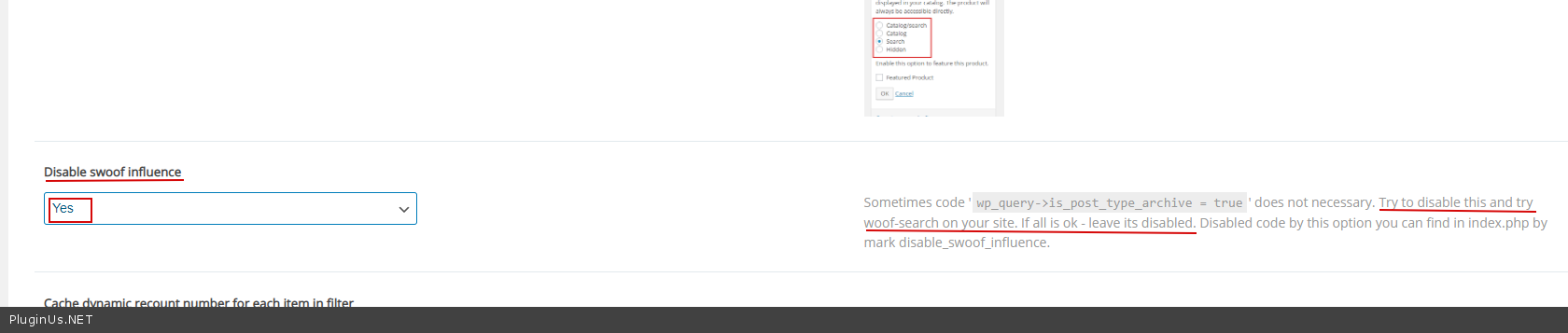
Advanced->Options - https://c2n.me/49Nl4WW.png
Hello Daniel
the problem is that the filter uses the shop template to display products
So use the same template for categories
OR
Advanced->Options - https://c2n.me/49Nl4WW.png
Quote from filtercreation on November 12, 2020, 13:45Hi Pablo
Quick question in response, when I disable the swoof influence it simply stops the filter from working, it just reloads the page?
Hi Pablo
Quick question in response, when I disable the swoof influence it simply stops the filter from working, it just reloads the page?
Quote from filtercreation on November 13, 2020, 11:37Hi Pablo
Could I just give you a gentle nudge on this? As I said yesterday, when I disable the swoof influence the filters simply stop working?
Is there another setting that I need to change or anything else that can be done?
Hi Pablo
Could I just give you a gentle nudge on this? As I said yesterday, when I disable the swoof influence the filters simply stop working?
Is there another setting that I need to change or anything else that can be done?