
Pre-Sale: Filtering on variable stock not working correctly
The support doesn work on Saturdays and Sundays, so some Friday requests can be answered on Monday. If you have problems with registration ask help on contact us page pleaseIf you not got email within 24~36 business hours, firstly check your spam box, and if no any email from the support there - back to the forum and read answer here. DO NOT ANSWER ON EMAILS [noreply@pluginus.net] FROM THE FORUM!! Emails are just for your info, all answers should be published only here.
The support doesn work on Saturdays and Sundays, so some Friday requests can be answered on Monday.

Quote from ovgarderen on March 12, 2021, 11:31Dear Support,
I was tested with the free version before I want to buy it.
But I found already a bug in filtering. I have a couple of boots, with different sizes and different stock.
When I filter on size 19, I found 1 product. If I filter on size 20, I found 4 different products. So when I select size 19 and 20, there must be shown 5 products. But size 19 is not clickable after selecting size 20. So this is realy strange. Logical filtering is stand on the option "OR".It is happening with more sizes and combinations. So not good for the sales if it not working corectly.
I hope you have a solution for this, because it is a very nice plugin if it works!
Kind regards,
OVG
Dear Support,
I was tested with the free version before I want to buy it.
But I found already a bug in filtering. I have a couple of boots, with different sizes and different stock.
When I filter on size 19, I found 1 product. If I filter on size 20, I found 4 different products. So when I select size 19 and 20, there must be shown 5 products. But size 19 is not clickable after selecting size 20. So this is realy strange. Logical filtering is stand on the option"OR".
It is happening with more sizes and combinations. So not good for the sales if it not working corectly.
I hope you have a solution for this, because it is a very nice plugin if it works!
Kind regards,
OVG

Quote from Pablo Borysenco on March 12, 2021, 14:20Hello
Please drop me exact link to the issue
Hello
Please drop me exact link to the issue
Quote from ovgarderen on March 12, 2021, 14:43https://www.ovg-demo.nl/druppies/webshop/


Quote from Pablo Borysenco on March 15, 2021, 13:17Hello
This means that a product with a size 19 has a variant with a size 20 out of stock.
Hello
This means that a product with a size 19 has a variant with a size 20 out of stock.
Quote from ovgarderen on March 15, 2021, 14:07Hi Pablo,
It's not clear what you mean with your answer.
I have change the Multi Dropdown into a single Dropdown. When you select size 19 at first, you see one product. When you have selected size 20, you can't select size 19 anymore. In my opinion, this is a kind of a bug. Hope there is a solution for this.
Thanks for your help!
Kind regards,
OVG
Hi Pablo,
It's not clear what you mean with your answer.
I have change the Multi Dropdown into a single Dropdown. When you select size 19 at first, you see one product. When you have selected size 20, you can't select size 19 anymore. In my opinion, this is a kind of a bug. Hope there is a solution for this.
Thanks for your help!
Kind regards,
OVG
Quote from Pablo Borysenco on March 16, 2021, 12:40Hello
Ok! I will try to describe it in more detail:
When you have selected size 20, - yes you did a search Size 20 + In stock/ The filter looks for variations that have such data: Size 20 and out of stock. If such an variation exists, the filter excludes the parent product from the result.
So in this case you have one product with variations: 20 + out of stock AND 19 + In stock
If you search by Size 20 + In stock - this product is excluded from the search. and for this reason there is no choice Size 19 - because there is no such product anymore
Hello
Ok! I will try to describe it in more detail:
When you have selected size 20, - yes you did a search Size 20 + In stock/ The filter looks for variations that have such data: Size 20 and out of stock. If such an variation exists, the filter excludes the parent product from the result.
So in this case you have one product with variations: 20 + out of stock AND 19 + In stock
If you search by Size 20 + In stock - this product is excluded from the search. and for this reason there is no choice Size 19 - because there is no such product anymore
Quote from ovgarderen on March 16, 2021, 13:02Hi Pablo,
Thank you for your answer. So in summary you say, if a product has size 19 in stock and size 20 out stock, and you select size 20, the product has disappeared.
In my opinion this is not logical filtering. I was looking for a filter who always shows the product in stock per size. So it is not necessary to select multiple sizes. But a customer must have de option to select for example size 25 and see all the products with size 25 in stock. When he select after size 25 for example size 20, he need to see all the products with size 20 in stock. I think that must be the 'OR' function of logical filtering. You explenation looks like the 'AND' function.
Kind regards,
OVG
Hi Pablo,
Thank you for your answer. So in summary you say, if a product has size 19 in stock and size 20 out stock, and you select size 20, the product has disappeared.
In my opinion this is not logical filtering. I was looking for a filter who always shows the product in stock per size. So it is not necessary to select multiple sizes. But a customer must have de option to select for example size 25 and see all the products with size 25 in stock. When he select after size 25 for example size 20, he need to see all the products with size 20 in stock. I think that must be the 'OR' function of logical filtering. You explenation looks like the 'AND' function.
Kind regards,
OVG
Quote from Pablo Borysenco on March 17, 2021, 12:44Hello
It won't work any differently.
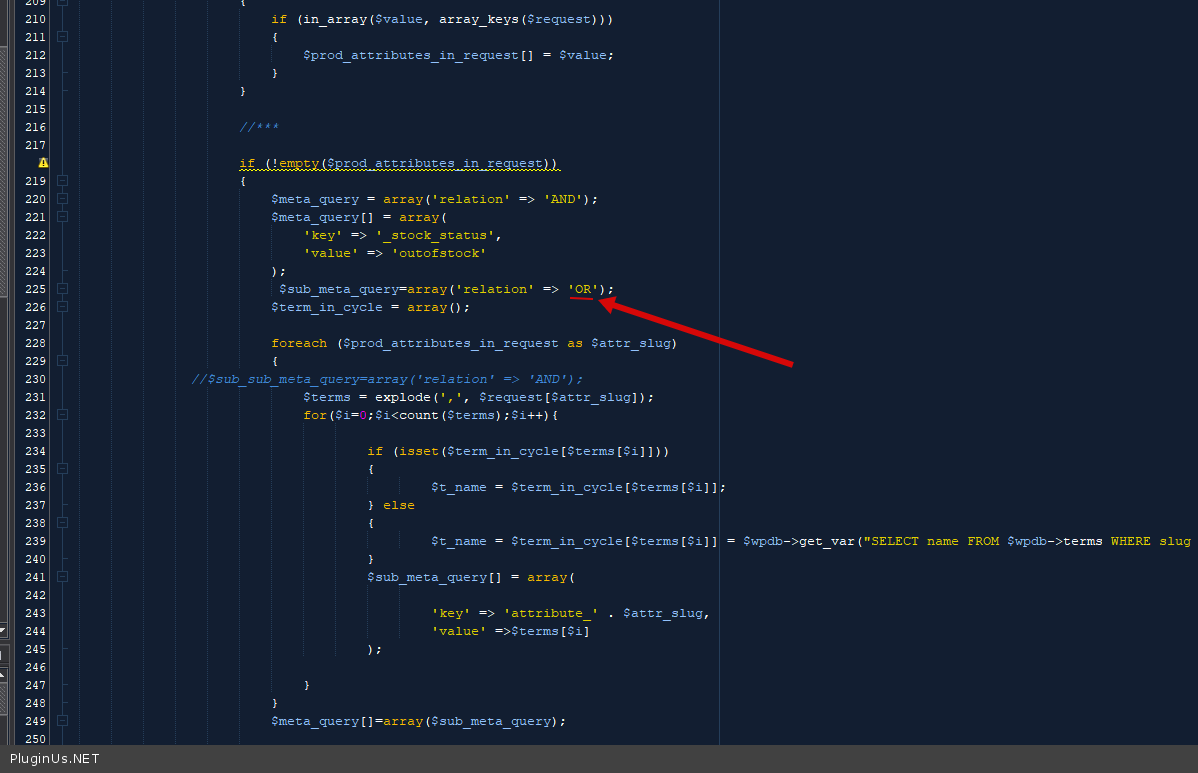
You can try in file - wp-content\plugins\woocommerce-products-filter\ext\by_instock\index.php - chang to "AND" - https://c2n.me/4bkUS8R.png and do a test
Hello
It won't work any differently.
You can try in file - wp-content\plugins\woocommerce-products-filter\ext\by_instock\index.php - chang to"AND" - https://c2n.me/4bkUS8R.png and do a test
Quote from ovgarderen on March 18, 2021, 17:16Hi Pablo,
I have tested it, but unfortunately this don't work.
I have created a workaround. I've make the insoles available in all sizes. So when you select a single dropdown, there is always one product in every size available. And because of that, al sizes will show the correct in stock.In this case it will work. But for the most shops, this solution won't work for them. So, you guys have to look into this, because the 'OR' function works not correctly.
Thanks for your time!
Kind regards,
OVG
Hi Pablo,
I have tested it, but unfortunately this don't work.
I have created a workaround. I've make the insoles available in all sizes. So when you select a single dropdown, there is always one product in every size available. And because of that, al sizes will show the correct in stock.
In this case it will work. But for the most shops, this solution won't work for them. So, you guys have to look into this, because the 'OR' function works not correctly.
Thanks for your time!
Kind regards,
OVG
Quote from Pablo Borysenco on March 19, 2021, 13:25Hello
Welcome;)
Hello
Welcome;)