

Poduct filter for a PC shop and creation of severall filters for differente pages?
The support doesn work on Saturdays and Sundays, so some Friday requests can be answered on Monday. If you have problems with registration ask help on contact us page pleaseIf you not got email within 24~36 business hours, firstly check your spam box, and if no any email from the support there - back to the forum and read answer here. DO NOT ANSWER ON EMAILS [noreply@pluginus.net] FROM THE FORUM!! Emails are just for your info, all answers should be published only here.
The support doesn work on Saturdays and Sundays, so some Friday requests can be answered on Monday.

Quote from vins1892 on April 7, 2021, 22:52Hello,
I have downloaded your plugin and I think it should meet my needs, but have some difficulties using it.
Question 1: List of products is:
- Main category 1: PC
- Sub-category of PC: desktop - laptop;
- PC brands are: dell - lenovo
- Main category 2: Components;
- Sub-category of component: mouse - printer - screen
- Component brands are: logitech - microsoft
How should I set up the filter? On the category and sub-categories and attributes (brands)?
How can I manage the sub-categories?Question 2: can I create severall filters (one for the PC and one for the components) and copy/paste the shortcode of each of them on different page?
Thanks for your help.
Hello,
I have downloaded your plugin and I think it should meet my needs, but have some difficulties using it.
Question 1: List of products is:
- Main category 1: PC
- Sub-category of PC: desktop - laptop;
- PC brands are: dell - lenovo
- Main category 2: Components;
- Sub-category of component: mouse - printer - screen
- Component brands are: logitech - microsoft
How should I set up the filter? On the category and sub-categories and attributes (brands)?
How can I manage the sub-categories?
Question 2: can I create severall filters (one for the PC and one for the components) and copy/paste the shortcode of each of them on different page?
Thanks for your help.

Quote from Pablo Borysenco on April 8, 2021, 13:04Hello
Q1. I'm not sure if I understood you correctly/ Plugin does not manage taxonomies. Please describe it in more detail
Q2.
1) In category pages use shortcode - [woof_products] with attribute : taxonomies=product_cat:X Where X id your product category. ( if you use custom page )
2) In widgets use shortcode [woof] with attribute : * taxonomies=product_cat:X
+
tax_only - write taxonomies or products slug using comma
+
by_only - write any by-filter-elements there using comma: by_text,by_price,by_sku,by_author,by_insales,by_instock. Of course firstly user should enable extensions for that by-filter-elements
*- Do not forget set the same condition in [woof_products]3) For show or hide widgets on different pages - http://www.woocommerce-filter.com/how-to-show-or-hide-widget-only-on-selected-site-pages/
You can read more about shortcodes - http://www.woocommerce-filter.com/documentation/#!/section_3_1
Hello
Q1. I'm not sure if I understood you correctly/ Plugin does not manage taxonomies. Please describe it in more detail
Q2.
1) In category pages use shortcode - [woof_products] with attribute : taxonomies=product_cat:X Where X id your product category. ( if you use custom page )
2) In widgets use shortcode [woof] with attribute : * taxonomies=product_cat:X
+
tax_only - write taxonomies or products slug using comma
+
by_only - write any by-filter-elements there using comma: by_text,by_price,by_sku,by_author,by_insales,by_instock. Of course firstly user should enable extensions for that by-filter-elements
*- Do not forget set the same condition in [woof_products]
3) For show or hide widgets on different pages - http://www.woocommerce-filter.com/how-to-show-or-hide-widget-only-on-selected-site-pages/
You can read more about shortcodes - http://www.woocommerce-filter.com/documentation/#!/section_3_1
Quote from vins1892 on April 9, 2021, 08:38Thanks for your quick answer.
The aim is to have something similar to here (sorry the site is in French):
When the category "Laptop" is selected, there is one filter on the brand (I do not need the other filters) and one on "new" or "refurbished").
Filter on the brand would be used as attribute: right?
Filer on the "new" or "refurbished" would be "Etiquette": right?And show those filter in any page of the site using a shortcode.
Thanks for your help.
Thanks for your quick answer.
The aim is to have something similar to here (sorry the site is in French):
When the category"Laptop" is selected, there is one filter on the brand (I do not need the other filters) and one on"new" or"refurbished").
Filter on the brand would be used as attribute: right?
Filer on the"new" or"refurbished" would be"Etiquette": right?
And show those filter in any page of the site using a shortcode.
Thanks for your help.
Quote from Pablo Borysenco on April 9, 2021, 15:39Hello
Please watch a video - https://products-filter.com/video-tutorials/#video_beGT6p_look
If you check this options - https://c2n.me/4bDi8tT.png - the filter show only actual values
For example, if products in the laptop category have only brands and tags, the plugin will show only these two filters.
Hello
Please watch a video - https://products-filter.com/video-tutorials/#video_beGT6p_look
If you check this options - https://c2n.me/4bDi8tT.png - the filter show only actual values
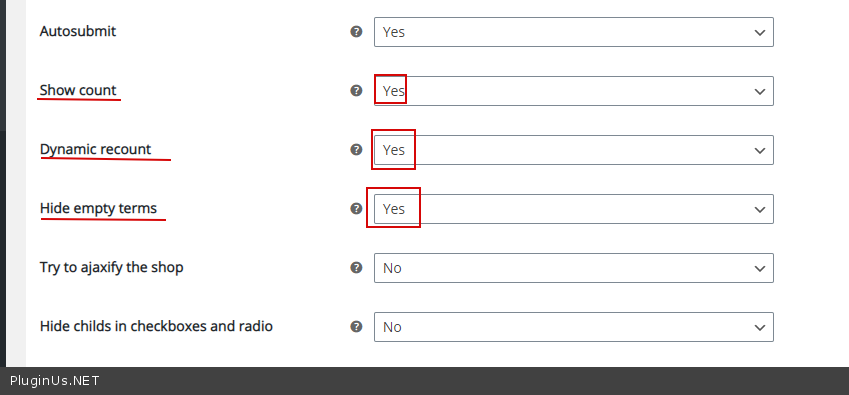
For example, if products in the laptop category have only brands and tags, the plugin will show only these two filters.
Quote from vins1892 on April 10, 2021, 18:02Hello,
I read again carrefully the documentation.
- I was able to display the the filter on the right side of my page dedicated to Computer, see here.
BUT all the filters categories are showed and I'm trying to have only the category "Computer".
Computer category has number 82 and I try the following shortocode:[woof sid="auto_shortcode" auto_hide=0 taxonomies=product_cat:82]
[woof_products per_page=8 columns=3 is_ajax=1 taxonomies=product_cat:82]but it is still showing all the categories ...
2. The option to hile empty category is only available for the paid version: right?
Thanks,
Hello,
I read again carrefully the documentation.
- I was able to display the the filter on the right side of my page dedicated to Computer, see here.
BUT all the filters categories are showed and I'm trying to have only the category"Computer".
Computer category has number 82 and I try the following shortocode:
[woof sid="auto_shortcode" auto_hide=0 taxonomies=product_cat:82]
[woof_products per_page=8 columns=3 is_ajax=1 taxonomies=product_cat:82]
but it is still showing all the categories ...
2. The option to hile empty category is only available for the paid version: right?
Thanks,
Quote from Pablo Borysenco on April 12, 2021, 14:19Hello
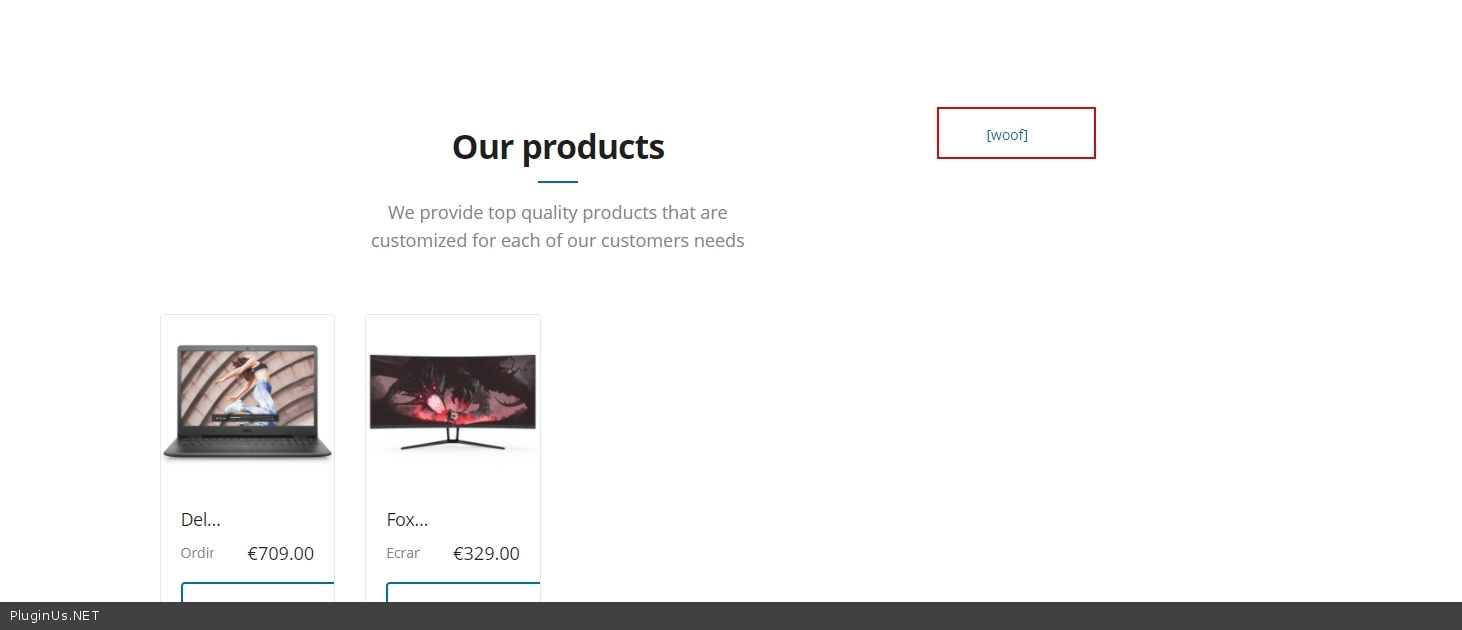
- Your link - https://c2n.me/4bEURYZ.jpg
- Yes. But in the free version, non-useful filters must have a counter equal to zero.
Hello
- Your link - https://c2n.me/4bEURYZ.jpg
- Yes. But in the free version, non-useful filters must have a counter equal to zero.
Quote from vins1892 on April 12, 2021, 18:28Sorry I desabled the plugin for testing purposes ..
It is now activated again.
The shortcode (see block under "woof sid="auto_shortcode" auto_hide=0 taxonomies=product_cat:82" text):
[woof sid="auto_shortcode" auto_hide=0 taxonomies=product_cat:82]
gives exactly the same result as the shortcode (see block under "woof" text):
[woof]
I would like to show only a filter on the product category 82.
Thanks for your help.
Sorry I desabled the plugin for testing purposes ..
It is now activated again.
The shortcode (see block under"woof sid="auto_shortcode" auto_hide=0 taxonomies=product_cat:82" text):
[woof sid="auto_shortcode" auto_hide=0 taxonomies=product_cat:82]
gives exactly the same result as the shortcode (see block under"woof" text):
[woof]
I would like to show only a filter on the product category 82.
Thanks for your help.
Quote from Pablo Borysenco on April 13, 2021, 11:55Hello
Ok! Please drop me wp-admun access - https://c2n.me/43SC6rb.png -> https://c2n.me/42BAoj4.png I will check it
Hello
Ok! Please drop me wp-admun access - https://c2n.me/43SC6rb.png -> https://c2n.me/42BAoj4.png I will check it


Quote from vins1892 on April 13, 2021, 21:05Can you confirm that you have received my private data?
Thanks,
Can you confirm that you have received my private data?
Thanks,
Quote from Pablo Borysenco on April 14, 2021, 15:48Hello
unfortunately I cannot enter the administration panel.
Your site just redirects me to the home page
Hello
unfortunately I cannot enter the administration panel.
Your site just redirects me to the home page
Quote from vins1892 on April 14, 2021, 16:00Can you try again?
Can you try again?
Quote from Pablo Borysenco on April 15, 2021, 11:12Hello
Ok! My test - https://c2n.me/4bHAVIE
Hello
Ok! My test - https://c2n.me/4bHAVIE
Quote from Pablo Borysenco on April 16, 2021, 12:07Hello
I checked it. Everything works correctly
Pay attention to the counter - https://c2n.me/4bIyhqx.png AND https://c2n.me/4bIyjus.png
In the paid version, items with a counter of zero will be hidden
Hello
I checked it. Everything works correctly
Pay attention to the counter - https://c2n.me/4bIyhqx.png AND https://c2n.me/4bIyjus.png
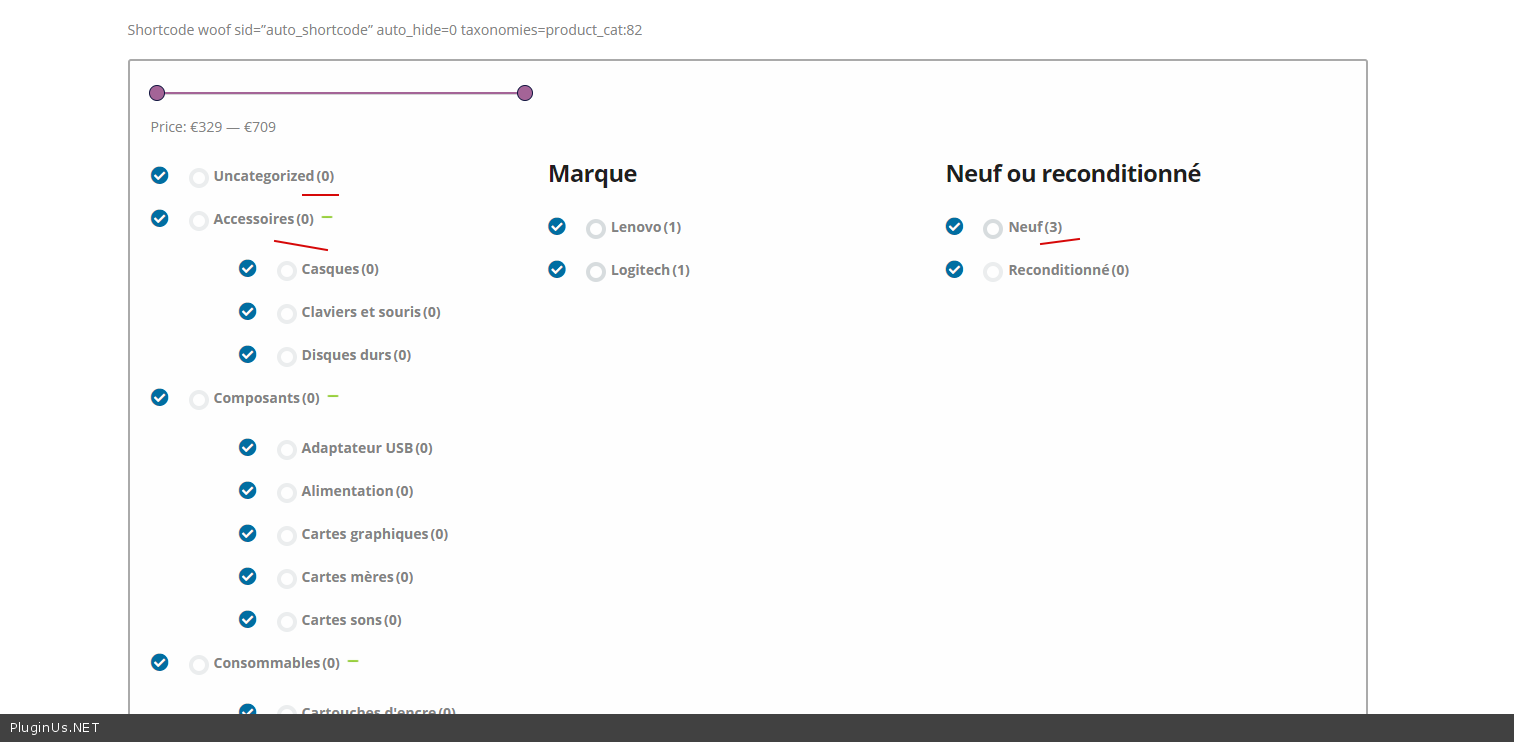
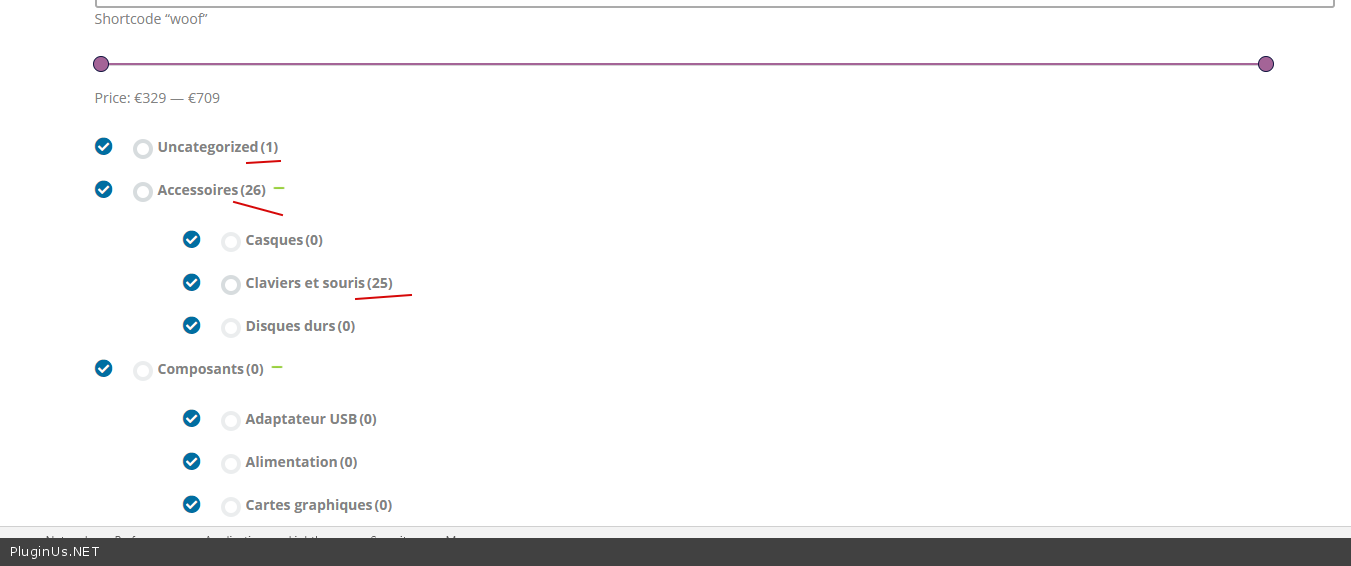
In the paid version, items with a counter of zero will be hidden
Quote from vins1892 on April 16, 2021, 12:22Thanks Pablo for your reply.
When using the shortcode "Shortcode woof sid=”auto_shortcode” auto_hide=0 taxonomies=product_cat:82", shouldn't only the items from the concerned category (product_cat:82) be shown and not all the categories?
See the 2 examples: whatever the shortcode used, all the items are listed.
Thanks,
Thanks Pablo for your reply.
When using the shortcode"Shortcode woof sid=”auto_shortcode” auto_hide=0 taxonomies=product_cat:82", shouldn't only the items from the concerned category (product_cat:82) be shown and not all the categories?
See the 2 examples: whatever the shortcode used, all the items are listed.
Thanks,
Quote from Pablo Borysenco on April 16, 2021, 13:02Please read this - https://c2n.me/4bICfzl.png
Please compare the category and attribute counters carefully.
Please read this - https://c2n.me/4bICfzl.png
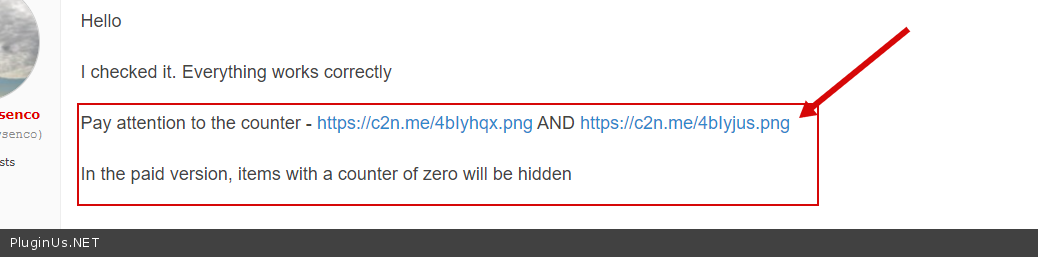
Please compare the category and attribute counters carefully.
Quote from vins1892 on April 16, 2021, 13:42Sorry, I don't understand what you mean.
In the category "Computer" (product_cat:82), I have 3 items, see here.
I had understood that using the shortcode taxonomies=product_cat:82, Woof was able to show only this category and sub-category of "Computer".I'm planning to buy the plugin, but will it solve the above issue?
The purchase will allow me to hide the categories where the number of items is 0.Thanks for your help.
Sorry, I don't understand what you mean.
In the category"Computer" (product_cat:82), I have 3 items, see here.
I had understood that using the shortcode taxonomies=product_cat:82, Woof was able to show only this category and sub-category of"Computer".
I'm planning to buy the plugin, but will it solve the above issue?
The purchase will allow me to hide the categories where the number of items is 0.
Thanks for your help.
Quote from Pablo Borysenco on April 19, 2021, 11:24Hello
I had understood that using the shortcode taxonomies=product_cat:82, Woof was able to show only this category and sub-category of "Computer". - The plugin will show the current filters for this category
In paid version - https://c2n.me/4bK70xG.png
Hello
I had understood that using the shortcode taxonomies=product_cat:82, Woof was able to show only this category and sub-category of"Computer". - The plugin will show the current filters for this category
In paid version - https://c2n.me/4bK70xG.png
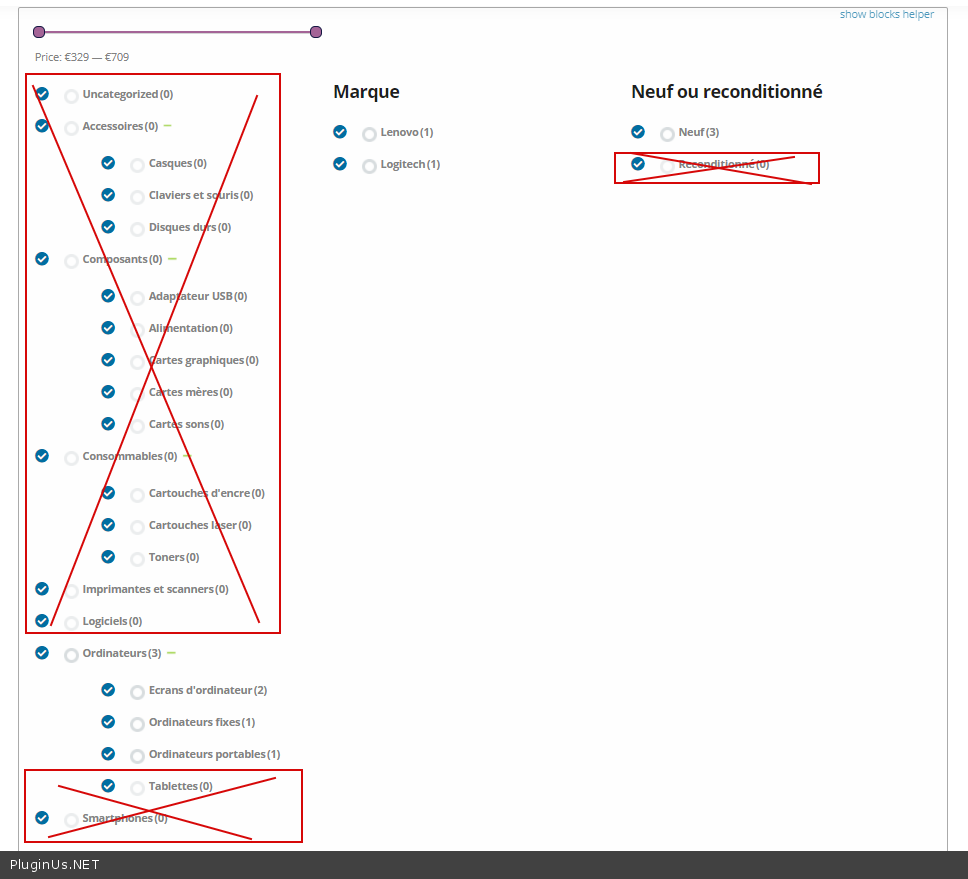
Quote from vins1892 on April 20, 2021, 08:15Ok thanks understood now: the shortcode taxonomies=product_cat:82 shows the category 82 AND all the other categories where there are no product.
Sorry for being a bit slow to understand ...
Ok thanks understood now: the shortcode taxonomies=product_cat:82 shows the category 82 AND all the other categories where there are no product.
Sorry for being a bit slow to understand ...
Quote from Pablo Borysenco on April 20, 2021, 13:03Hello
Welcome;)
Hello
Welcome;)