

Plugin slows down website drasticly
The support doesn work on Saturdays and Sundays, so some Friday requests can be answered on Monday. If you have problems with registration ask help on contact us page pleaseIf you not got email within 24~36 business hours, firstly check your spam box, and if no any email from the support there - back to the forum and read answer here. DO NOT ANSWER ON EMAILS [noreply@pluginus.net] FROM THE FORUM!! Emails are just for your info, all answers should be published only here.
The support doesn work on Saturdays and Sundays, so some Friday requests can be answered on Monday.

Quote from Jelle-Jacob on November 5, 2020, 22:01Hi, I went through the various documentation and questions on the forum, but my WooCommerce website with product filter is still loading very slow. If I disable the plugin the website will load much faster. Is there anything else that can be done about this?
Below 2 test urls. For the url with filter plugin, a CDN is also active here. This does not apply to the url / website without a filter plugin.
URL with filter plugin active: https://inspiratie.utilicht.nl/product-categorie/decoratief/pendelarmatuur/
URL without filter plugin active: https://utilicht.jellit.nl/product-categorie/decoratief/pendelarmatuur/
Thanks, Jelle
Hi, I went through the various documentation and questions on the forum, but my WooCommerce website with product filter is still loading very slow. If I disable the plugin the website will load much faster. Is there anything else that can be done about this?
Below 2 test urls. For the url with filter plugin, a CDN is also active here. This does not apply to the url / website without a filter plugin.
URL with filter plugin active: https://inspiratie.utilicht.nl/product-categorie/decoratief/pendelarmatuur/
URL without filter plugin active: https://utilicht.jellit.nl/product-categorie/decoratief/pendelarmatuur/
Thanks, Jelle

Quote from Pablo Borysenco on November 9, 2020, 12:28Hello
Paste your license key here - https://c2n.me/43SC6rb.png -> https://c2n.me/42HBIt7.png
Read this please - https://products-filter.com/searching-is-slow/
Hello
Paste your license key here - https://c2n.me/43SC6rb.png -> https://c2n.me/42HBIt7.png


Read this please - https://products-filter.com/searching-is-slow/
Quote from Jelle-Jacob on November 9, 2020, 14:08Hello,
I pasted license key. I already read this recommendations. They don't seem to work. Searching is slow, but my point is the plugin/filter is loading slow on the page itself. Activating the CDN did help, but I guess in normal situations this shouldn't be necessary. Also CDN support mentioned the following. I diabled the CDN, so you can test. If I deactivate your plugin the website is loading way faster.
/////
Easy IO (EWWW) support mentioned:
I did notice one odd thing when I was looking at GTmetrix though.
This file isn't minified: plugins/woocommerce-products-filter/js/chosen/chosen. jquery.min.js?ver=2.2.4
But the filename says it should be--it has .min in the filename, which is why Easy IO doesn't resolve it.
I'd ask those folks to minify their script, or remove the .min from the filename./////
Hello,
I pasted license key. I already read this recommendations. They don't seem to work. Searching is slow, but my point is the plugin/filter is loading slow on the page itself. Activating the CDN did help, but I guess in normal situations this shouldn't be necessary. Also CDN support mentioned the following. I diabled the CDN, so you can test. If I deactivate your plugin the website is loading way faster.
/////
Easy IO (EWWW) support mentioned:
I did notice one odd thing when I was looking at GTmetrix though.
This file isn't minified: plugins/woocommerce-products-
But the filename says it should be--it has .min in the filename, which is why Easy IO doesn't resolve it.
I'd ask those folks to minify their script, or remove the .min from the filename.
/////
Quote from Pablo Borysenco on November 10, 2020, 13:04Hello
Please update plugin to latest version - https://products-filter.com/how-to-make-auto-update-for-wordpress-plugins-and-themes-bought-on-envato/
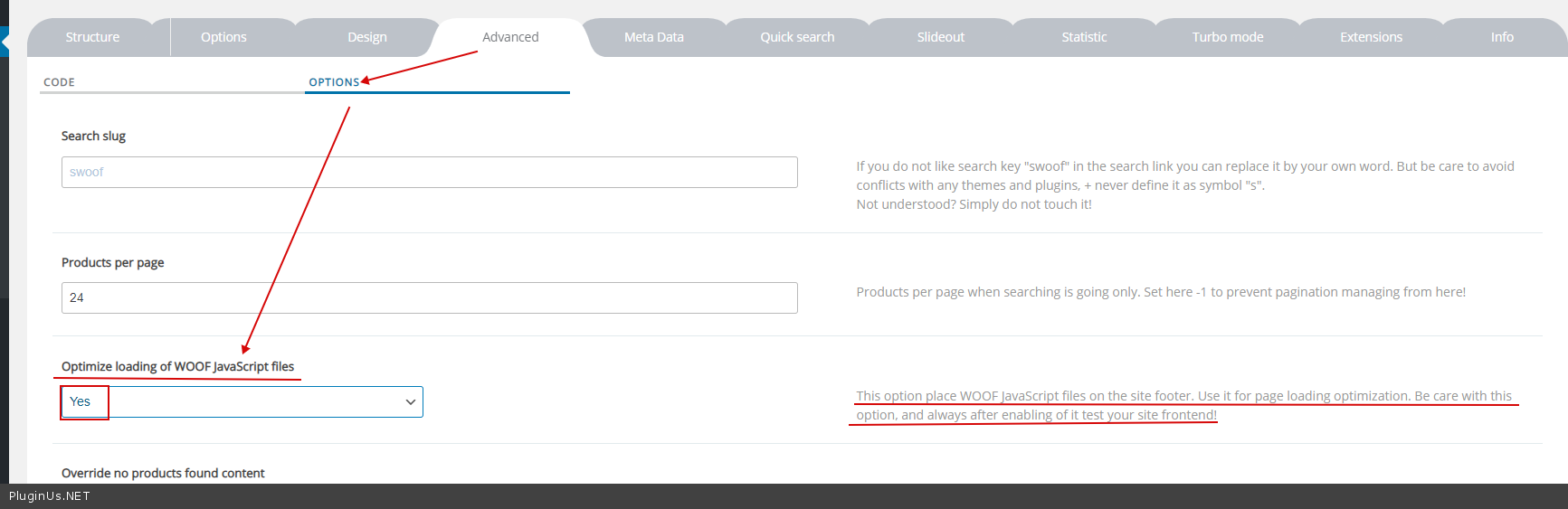
You can check this option - https://c2n.me/49Lr35a.png
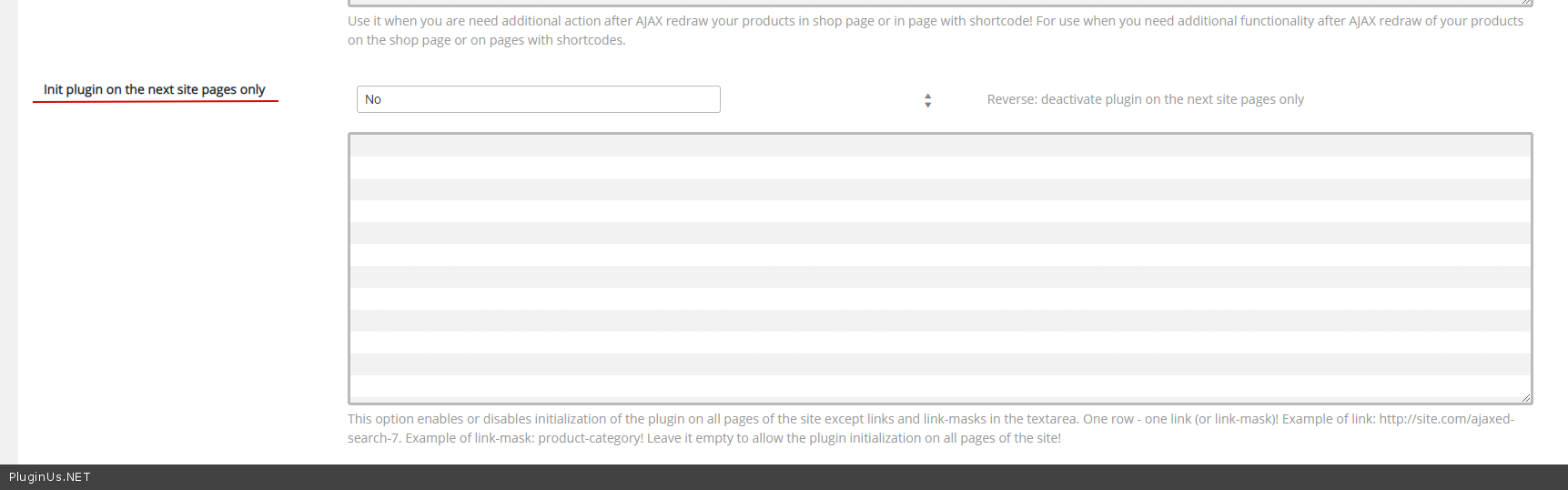
you can initialize the plugin on the pages you need - https://c2n.me/49Lr9Va.png
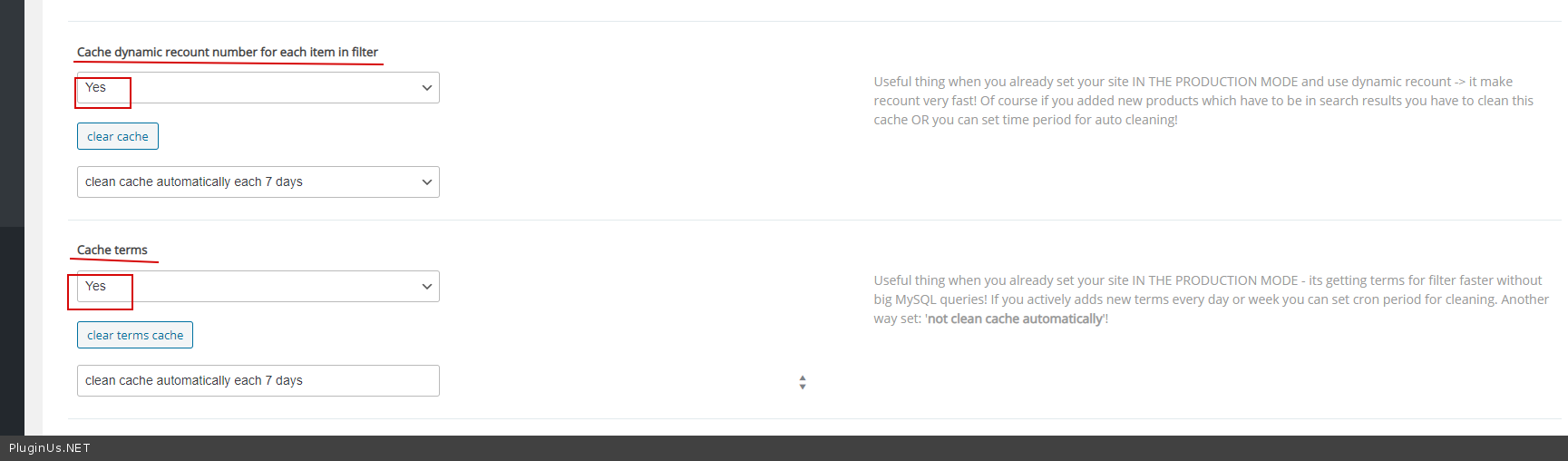
Use a cache - https://c2n.me/49LrgWt.png
Hello
Please update plugin to latest version - https://products-filter.com/how-to-make-auto-update-for-wordpress-plugins-and-themes-bought-on-envato/
You can check this option - https://c2n.me/49Lr35a.png
you can initialize the plugin on the pages you need - https://c2n.me/49Lr9Va.png
Use a cache - https://c2n.me/49LrgWt.png
Quote from Jelle-Jacob on November 11, 2020, 18:15Hi,
2.2.4 is the latest?
I checked the options. Not sure if it is doing anything to be honest. Besides how do i initliaze only for WC category pages? Using 'category' or 'category!' And Yes or no for main setting?
Thanks!
Hi,
2.2.4 is the latest?
I checked the options. Not sure if it is doing anything to be honest. Besides how do i initliaze only for WC category pages? Using 'category' or 'category!' And Yes or no for main setting?
Thanks!
Quote from Pablo Borysenco on November 12, 2020, 13:11Hello
2.2.4 - Yes
Please try these options and do a test
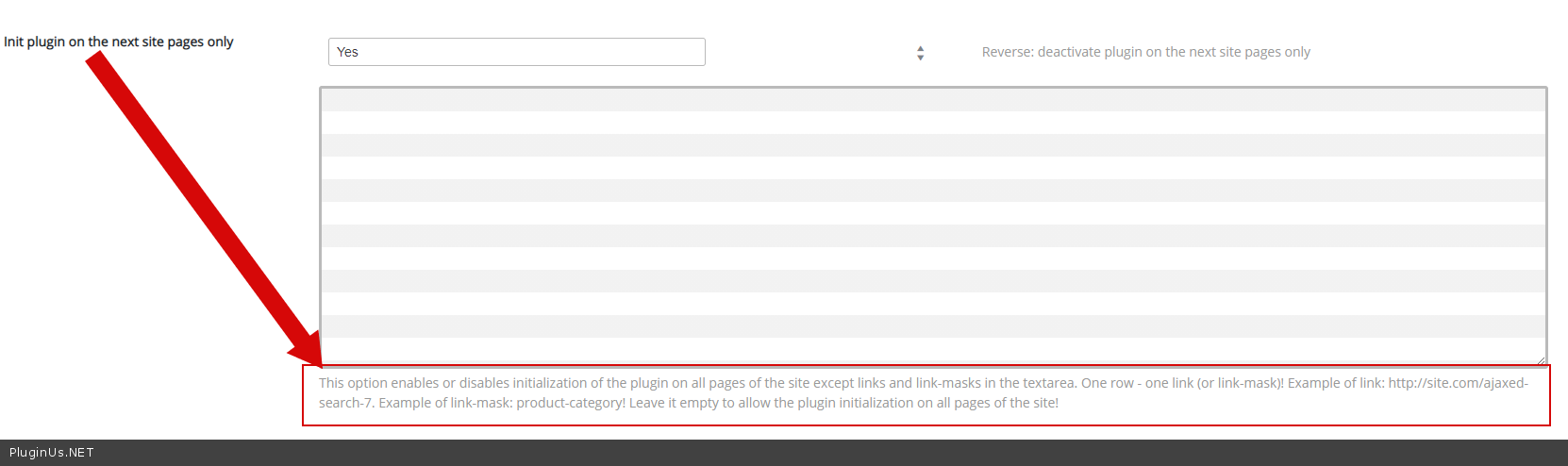
. Besides how do i initliaze only for WC category pages? - https://c2n.me/49NolMV.png
Hello
2.2.4 - Yes
Please try these options and do a test
. Besides how do i initliaze only for WC category pages? - https://c2n.me/49NolMV.png
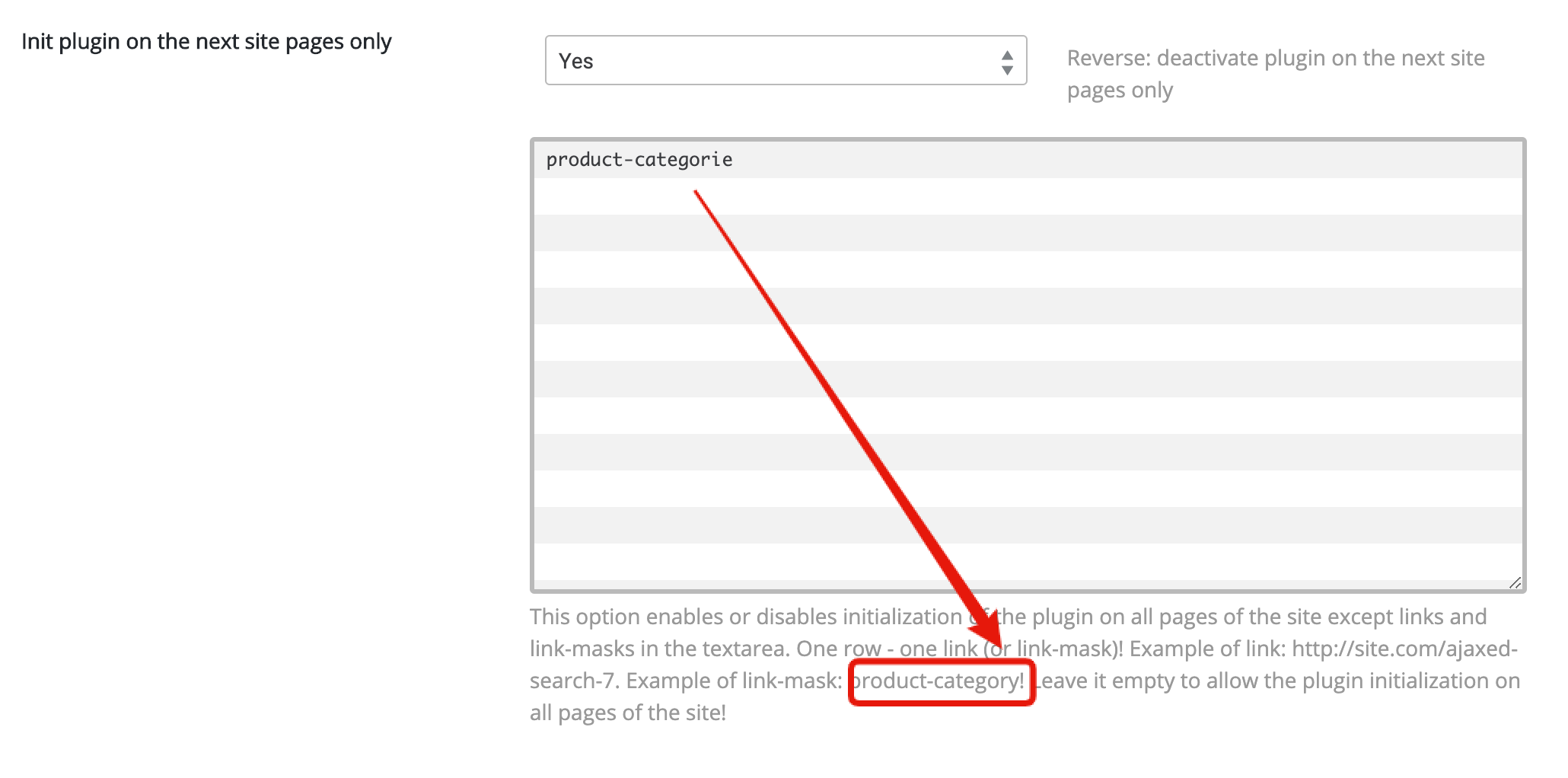
Quote from Jelle-Jacob on November 14, 2020, 17:21Thanks, but you really should remove the exclamation marks from your helper texts, it is confusing.
Did you take a look at the improved in the minify file name as suggested? You didn't mention it in your reply.
Thanks, but you really should remove the exclamation marks from your helper texts, it is confusing.
Did you take a look at the improved in the minify file name as suggested? You didn't mention it in your reply.
Quote from Pablo Borysenco on November 16, 2020, 14:31Hello
but you really should remove the exclamation marks from your helper texts - Describe it in detail where should I do it. You can make screenshots
Did you take a look at the improved in the minify file name as suggested? - Sorry, I thought I answered you(my fault). This is a third party JS library. Unfortunately, I don't know why the author did this. But I'll write to him.
Hello
but you really should remove the exclamation marks from your helper texts - Describe it in detail where should I do it. You can make screenshots
Did you take a look at the improved in the minify file name as suggested? - Sorry, I thought I answered you(my fault). This is a third party JS library. Unfortunately, I don't know why the author did this. But I'll write to him.
Quote from Jelle-Jacob on November 17, 2020, 21:03Of course. F.e. here. It could implicate there's an extra ! needed after product-category or product-categorie in Dutch.
Of course. F.e. here. It could implicate there's an extra ! needed after product-category or product-categorie in Dutch.
Quote from Pablo Borysenco on November 18, 2020, 13:03Hello
Thank you. We will remove this in the next version.
Hello
Thank you. We will remove this in the next version.