

Plugin showing more than 12 products per page
The support doesn work on Saturdays and Sundays, so some Friday requests can be answered on Monday. If you have problems with registration ask help on contact us page pleaseIf you not got email within 24~36 business hours, firstly check your spam box, and if no any email from the support there - back to the forum and read answer here. DO NOT ANSWER ON EMAILS [noreply@pluginus.net] FROM THE FORUM!! Emails are just for your info, all answers should be published only here.
The support doesn work on Saturdays and Sundays, so some Friday requests can be answered on Monday.

Quote from Moises on September 30, 2020, 17:07Hello! I have configured so it shows three products per row and 12 products per page.
Woof is showing more than 12 products and 4 products per row
www.adams.com.ec
Hello! I have configured so it shows three products per row and 12 products per page.
Woof is showing more than 12 products and 4 products per row
Quote from Moises on September 30, 2020, 18:56Also, apart from this question
Is there a way to setup the slider to work as Range and SElecting a single size?
For example I just want to select a single size with slider extension
Also, apart from this question
Is there a way to setup the slider to work as Range and SElecting a single size?
For example I just want to select a single size with slider extension
Quote from Moises on September 30, 2020, 20:48Im having issues also when entering a product i get redirected to shop page
Im having issues also when entering a product i get redirected to shop page
Quote from Moises on October 1, 2020, 01:44I have resolved the issues below
however now I am having the next issue:
Checkmark is getting deleted when selecting a product
https://www.adams.com.ec/tienda
I still have this doubt
Also, apart from this question
Is there a way to setup the slider to work as Range and SElecting a single size?
For example I just want to select a single size with slider extension
I have resolved the issues below
however now I am having the next issue:
Checkmark is getting deleted when selecting a product
https://www.adams.com.ec/tienda
I still have this doubt
Also, apart from this question
Is there a way to setup the slider to work as Range and SElecting a single size?
For example I just want to select a single size with slider extension
Quote from Moises on October 1, 2020, 03:59TurboMode not working with OnStock filter
Uncaught SyntaxError: Parse error on line 1:
...k' ) OR check_id(id,)=true ) AND (get_v
-----------------------^
Expecting 'LITERAL', 'BRALITERAL', 'LPAR', 'NUMBER', 'STRING', 'SHARP', 'DOLLAR', 'AT', 'VALUE', 'COLON', 'NOT', 'IF', 'PLUS', 'STAR', 'QUESTION', 'CURRENT_TIMESTAMP', 'JAVASCRIPT', 'NEW', 'CAST', 'CONVERT', 'SUM', 'COUNT', 'MIN', 'MAX', 'AVG', 'FIRST', 'LAST', 'AGGR', 'ARRAY', 'REPLACE', 'DATEADD', 'DATEDIFF', 'INTERVAL', 'TRUE', 'FALSE', 'NSTRING', 'NULL', 'EXISTS', 'ARRAYLBRA', 'BRAQUESTION', 'CASE', 'TILDA', 'MINUS', 'ATLBRA', 'LCUR', got 'RPAR'
at mi.bi.parseError (alasql.min.js?ver=2.2.4:1)
at mi.parse (alasql.min.js?ver=2.2.4:1)
at Function.e.parse (alasql.min.js?ver=2.2.4:1)
at Function.e.dexec (alasql.min.js?ver=2.2.4:1)
at Function.e.exec (alasql.min.js?ver=2.2.4:1)
at e (alasql.min.js?ver=2.2.4:1)
at WoofTurboMode_obj.do_query (turbo_mode.js?ver=2.2.4:406)
at WoofTurboMode_obj.search (turbo_mode.js?ver=2.2.4:712)
at WoofTurboMode_obj.woof_submit_link (turbo_mode.js?ver=2.2.4:1587)
at woof_submit_link (front.js?ver=2.2.4:445)
TurboMode not working with OnStock filter
Uncaught SyntaxError: Parse error on line 1:
...k' ) OR check_id(id,)=true ) AND (get_v
-----------------------^
Expecting 'LITERAL', 'BRALITERAL', 'LPAR', 'NUMBER', 'STRING', 'SHARP', 'DOLLAR', 'AT', 'VALUE', 'COLON', 'NOT', 'IF', 'PLUS', 'STAR', 'QUESTION', 'CURRENT_TIMESTAMP', 'JAVASCRIPT', 'NEW', 'CAST', 'CONVERT', 'SUM', 'COUNT', 'MIN', 'MAX', 'AVG', 'FIRST', 'LAST', 'AGGR', 'ARRAY', 'REPLACE', 'DATEADD', 'DATEDIFF', 'INTERVAL', 'TRUE', 'FALSE', 'NSTRING', 'NULL', 'EXISTS', 'ARRAYLBRA', 'BRAQUESTION', 'CASE', 'TILDA', 'MINUS', 'ATLBRA', 'LCUR', got 'RPAR'
at mi.bi.parseError (alasql.min.js?ver=2.2.4:1)
at mi.parse (alasql.min.js?ver=2.2.4:1)
at Function.e.parse (alasql.min.js?ver=2.2.4:1)
at Function.e.dexec (alasql.min.js?ver=2.2.4:1)
at Function.e.exec (alasql.min.js?ver=2.2.4:1)
at e (alasql.min.js?ver=2.2.4:1)
at WoofTurboMode_obj.do_query (turbo_mode.js?ver=2.2.4:406)
at WoofTurboMode_obj.search (turbo_mode.js?ver=2.2.4:712)
at WoofTurboMode_obj.woof_submit_link (turbo_mode.js?ver=2.2.4:1587)
at woof_submit_link (front.js?ver=2.2.4:445)
Quote from Moises on October 1, 2020, 04:10Finally,
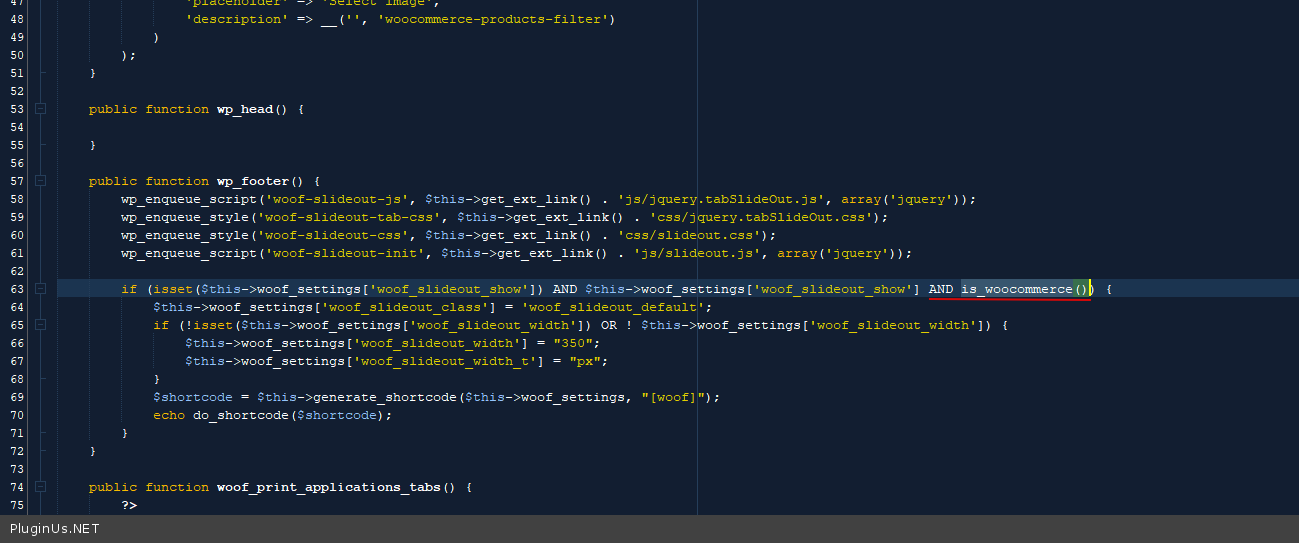
When enabling slideout on shop pages, it gets added On all my pages, including home page, archive pages, product pages
Finally,
When enabling slideout on shop pages, it gets added On all my pages, including home page, archive pages, product pages

Quote from Pablo Borysenco on October 1, 2020, 12:05Hello
Please try to watch this video - https://products-filter.com/video-tutorials#video_beGT6p_look
Check option - https://c2n.me/49hkqbi.png
Read this - https://products-filter.com/force-filtered-results-show-three-columns/
Filter not working on product page
Is there a way to setup the slider to work as Range and SElecting a single size? - Unfortunately the plugin does not have this feature.
When enabling slideout on shop pages, - read this please - https://products-filter.com/extencion/slideout/ - if you want to display it only on specific pages use shortcode - https://c2n.me/49hlqnV.png
OR in file - wp-content\plugins\woocommerce-products-filter\ext\slideout\index.php - add code - https://c2n.me/49hlvjb.png
urboMode not working with OnStock filter - Add FTP access
Hello
Please try to watch this video - https://products-filter.com/video-tutorials#video_beGT6p_look
Check option - https://c2n.me/49hkqbi.png
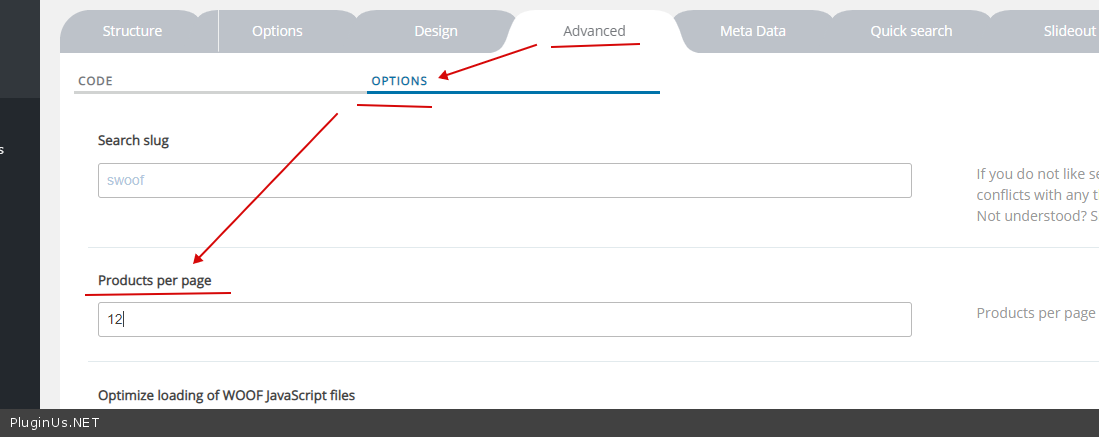
Read this - https://products-filter.com/force-filtered-results-show-three-columns/
Filter not working on product page
Is there a way to setup the slider to work as Range and SElecting a single size? - Unfortunately the plugin does not have this feature.
When enabling slideout on shop pages, - read this please - https://products-filter.com/extencion/slideout/ - if you want to display it only on specific pages use shortcode - https://c2n.me/49hlqnV.png
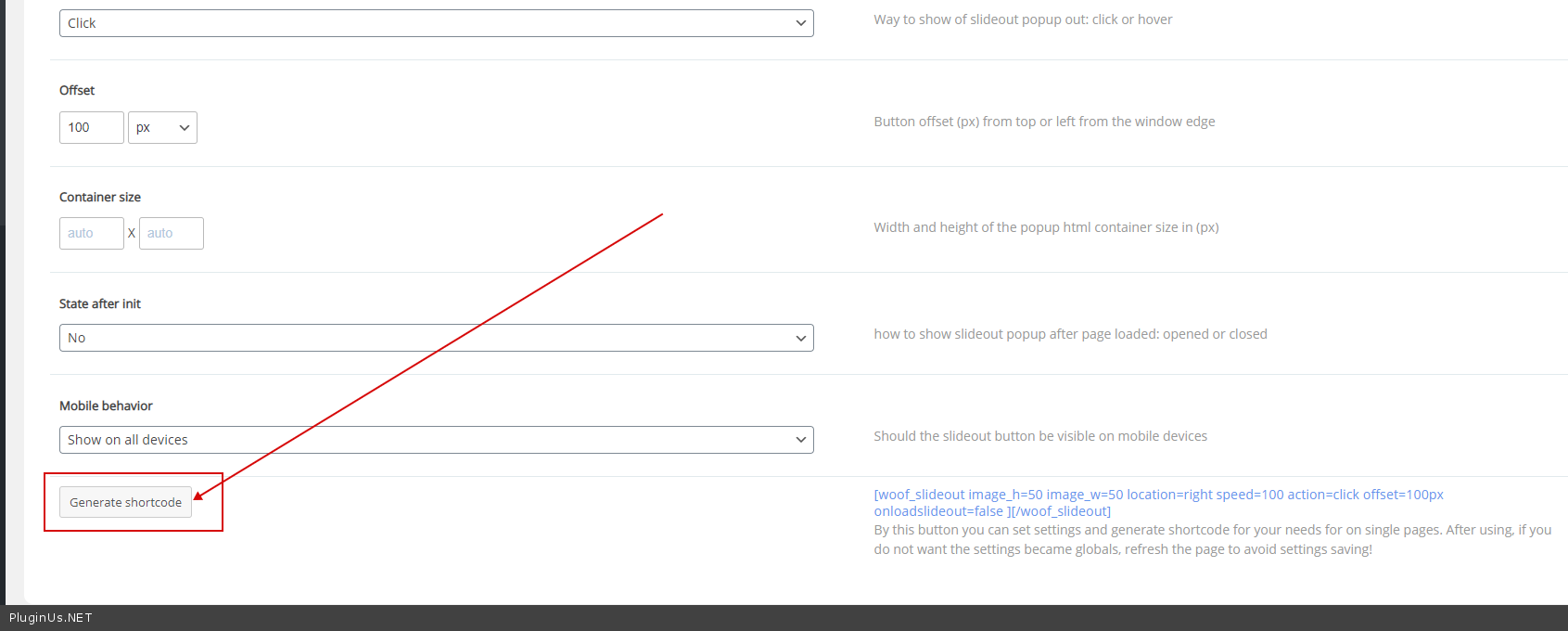
OR in file - wp-content\plugins\woocommerce-products-filter\ext\slideout\index.php - add code - https://c2n.me/49hlvjb.png
urboMode not working with OnStock filter - Add FTP access
Quote from Moises on October 2, 2020, 22:59FTP added, you can enable turbomode when testing, I have it disabled
FTP added, you can enable turbomode when testing, I have it disabled
Quote from Pablo Borysenco on October 5, 2020, 15:37Hello
Your site - https://c2n.me/49k1rkR.png
Hello
Your site - https://c2n.me/49k1rkR.png
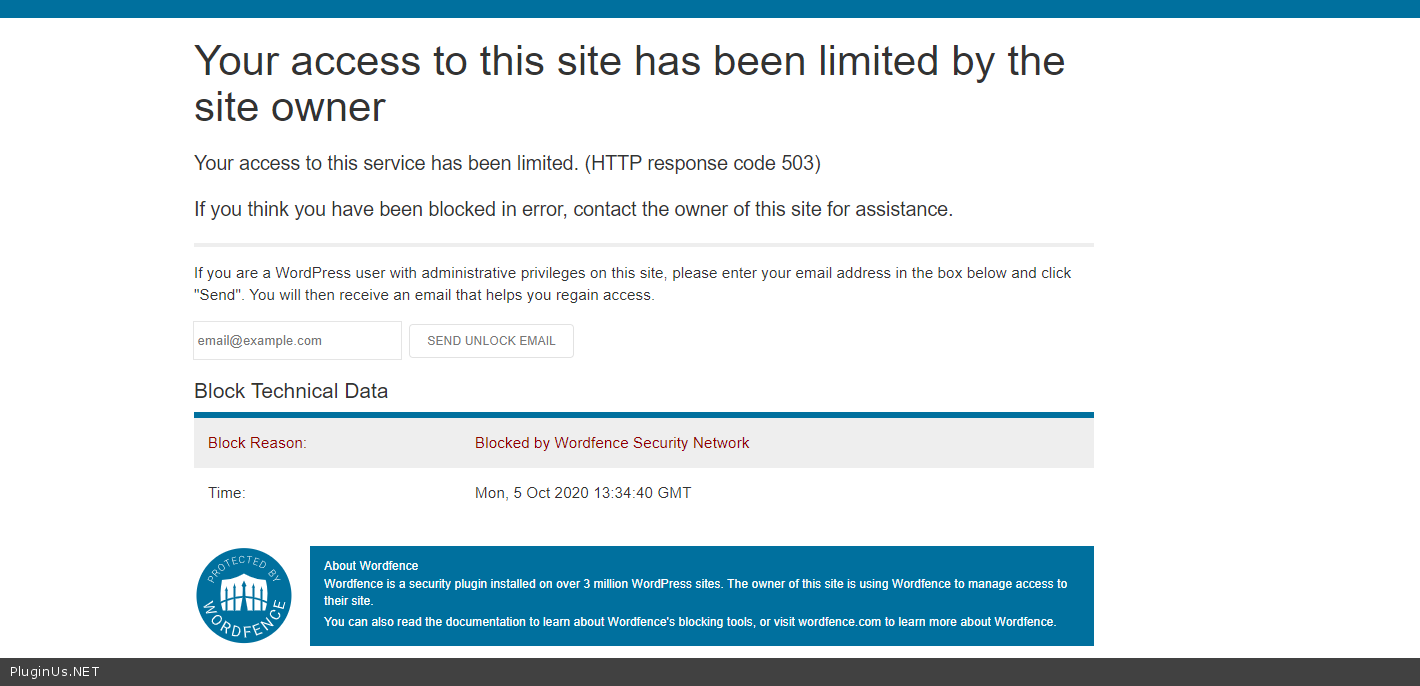
Quote from Moises on October 7, 2020, 00:11I have disabled wordfence,
Another thing, I use COLOR Search extension, the thing is that I all the colors I had added are shown. But lastly I added a new color (naranja) but it wont appear on WOOF color term list when pressing toggle color list
Naranja is not here
https://imgur.com/a/1hlMliQ
but it is on the attribute list
https://imgur.com/a/XNkoRoJ
I have disabled wordfence,
Another thing, I use COLOR Search extension, the thing is that I all the colors I had added are shown. But lastly I added a new color (naranja) but it wont appear on WOOF color term list when pressing toggle color list
Naranja is not here
but it is on the attribute list
Quote from Pablo Borysenco on October 7, 2020, 15:56Hello
But lastly I added a new color (naranja) but it wont appear on WOOF color term - Please clear all cache - https://c2n.me/49lREJw.png
Please do a test
Hello
But lastly I added a new color (naranja) but it wont appear on WOOF color term - Please clear all cache - https://c2n.me/49lREJw.png
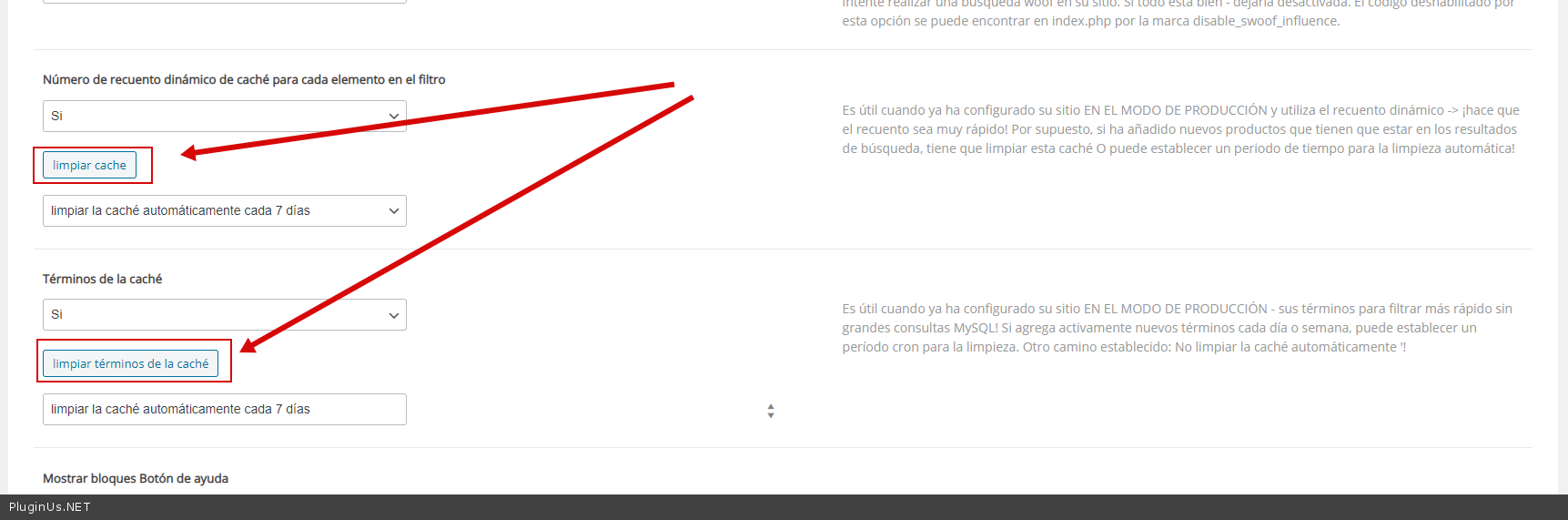
Please do a test
Quote from Moises on October 7, 2020, 19:11Thank you! Working
Please check the turbo mode issue which wont work with InStock filter
Uncaught SyntaxError: Parse error on line 1:
...k' ) OR check_id(id,)=true ) AND (get_v
-----------------------^
Expecting 'LITERAL', 'BRALITERAL', 'LPAR', 'NUMBER', 'STRING', 'SHARP', 'DOLLAR', 'AT', 'VALUE', 'COLON', 'NOT', 'IF', 'PLUS', 'STAR', 'QUESTION', 'CURRENT_TIMESTAMP', 'JAVASCRIPT', 'NEW', 'CAST', 'CONVERT', 'SUM', 'COUNT', 'MIN', 'MAX', 'AVG', 'FIRST', 'LAST', 'AGGR', 'ARRAY', 'REPLACE', 'DATEADD', 'DATEDIFF', 'INTERVAL', 'TRUE', 'FALSE', 'NSTRING', 'NULL', 'EXISTS', 'ARRAYLBRA', 'BRAQUESTION', 'CASE', 'TILDA', 'MINUS', 'ATLBRA', 'LCUR', got 'RPAR'
at mi.bi.parseError (alasql.min.js?ver=2.2.4:1)
at mi.parse (alasql.min.js?ver=2.2.4:1)
at Function.e.parse (alasql.min.js?ver=2.2.4:1)
at Function.e.dexec (alasql.min.js?ver=2.2.4:1)
at Function.e.exec (alasql.min.js?ver=2.2.4:1)
at e (alasql.min.js?ver=2.2.4:1)
at WoofTurboMode_obj.do_query (turbo_mode.js?ver=2.2.4:406)
at WoofTurboMode_obj.search (turbo_mode.js?ver=2.2.4:712)
at WoofTurboMode_obj.woof_submit_link (turbo_mode.js?ver=2.2.4:1587)
at woof_submit_link (front.js?ver=2.2.4:445)
Thank you! Working
Please check the turbo mode issue which wont work with InStock filter
Uncaught SyntaxError: Parse error on line 1:
...k' ) OR check_id(id,)=true ) AND (get_v
-----------------------^
Expecting 'LITERAL', 'BRALITERAL', 'LPAR', 'NUMBER', 'STRING', 'SHARP', 'DOLLAR', 'AT', 'VALUE', 'COLON', 'NOT', 'IF', 'PLUS', 'STAR', 'QUESTION', 'CURRENT_TIMESTAMP', 'JAVASCRIPT', 'NEW', 'CAST', 'CONVERT', 'SUM', 'COUNT', 'MIN', 'MAX', 'AVG', 'FIRST', 'LAST', 'AGGR', 'ARRAY', 'REPLACE', 'DATEADD', 'DATEDIFF', 'INTERVAL', 'TRUE', 'FALSE', 'NSTRING', 'NULL', 'EXISTS', 'ARRAYLBRA', 'BRAQUESTION', 'CASE', 'TILDA', 'MINUS', 'ATLBRA', 'LCUR', got 'RPAR'
at mi.bi.parseError (alasql.min.js?ver=2.2.4:1)
at mi.parse (alasql.min.js?ver=2.2.4:1)
at Function.e.parse (alasql.min.js?ver=2.2.4:1)
at Function.e.dexec (alasql.min.js?ver=2.2.4:1)
at Function.e.exec (alasql.min.js?ver=2.2.4:1)
at e (alasql.min.js?ver=2.2.4:1)
at WoofTurboMode_obj.do_query (turbo_mode.js?ver=2.2.4:406)
at WoofTurboMode_obj.search (turbo_mode.js?ver=2.2.4:712)
at WoofTurboMode_obj.woof_submit_link (turbo_mode.js?ver=2.2.4:1587)
at woof_submit_link (front.js?ver=2.2.4:445)
Quote from Moises on October 8, 2020, 01:19Plus, testing the COLOR filter, even thought I have selected the OR logic it allows me to select more than one color
Plus, testing the COLOR filter, even thought I have selected the OR logic it allows me to select more than one color
Quote from Pablo Borysenco on October 8, 2020, 12:45Hello
Please clear all cache AND CTRL+F5
My test - https://c2n.me/49mwW06
even thought I have selected the OR logic it allows me to select more than one color - ??? this filter allows you to select as many colors as you want and it does not depend on the comparison logic
Hello
Please clear all cache AND CTRL+F5
My test - https://c2n.me/49mwW06
even thought I have selected the OR logic it allows me to select more than one color - ??? this filter allows you to select as many colors as you want and it does not depend on the comparison logic
Quote from Moises on October 22, 2020, 01:46Hello when enabling Turbo Mode it wills tay in blank
https://imgur.com/a/mOPuFje
and there wil be errors in console
https://imgur.com/a/BiSiwnJ
turbo_mode.js?ver=2.2.4:1816 Uncaught ReferenceError: woof_tm_data is not defined
at turbo_mode.js?ver=2.2.4:1816
slideout.js?ver=5.5.1:48 Uncaught TypeError: Cannot read property 'opera' of undefined
at woof_slideout_screenHeight (slideout.js?ver=5.5.1:48)
at HTMLDivElement.<anonymous> (slideout.js?ver=5.5.1:21)
at Function.each (jquery.js?ver=1.12.4-wp:2)
at HTMLDocument.<anonymous> (slideout.js?ver=5.5.1:5)
at i (jquery.js?ver=1.12.4-wp:2)
at Object.fireWith [as resolveWith] (jquery.js?ver=1.12.4-wp:2)
at Function.ready (jquery.js?ver=1.12.4-wp:2)
at HTMLDocument.J (jquery.js?ver=1.12.4-wp:2)
Hello when enabling Turbo Mode it wills tay in blank
and there wil be errors in console
turbo_mode.js?ver=2.2.4:1816 Uncaught ReferenceError: woof_tm_data is not defined
at turbo_mode.js?ver=2.2.4:1816
slideout.js?ver=5.5.1:48 Uncaught TypeError: Cannot read property 'opera' of undefined
at woof_slideout_screenHeight (slideout.js?ver=5.5.1:48)
at HTMLDivElement.<anonymous> (slideout.js?ver=5.5.1:21)
at Function.each (jquery.js?ver=1.12.4-wp:2)
at HTMLDocument.<anonymous> (slideout.js?ver=5.5.1:5)
at i (jquery.js?ver=1.12.4-wp:2)
at Object.fireWith [as resolveWith] (jquery.js?ver=1.12.4-wp:2)
at Function.ready (jquery.js?ver=1.12.4-wp:2)
at HTMLDocument.J (jquery.js?ver=1.12.4-wp:2)
Quote from Pablo Borysenco on October 22, 2020, 11:39Hello
Ok! Please clear all cache - https://c2n.me/49x5Tac
Hello
Ok! Please clear all cache - https://c2n.me/49x5Tac
Quote from Moises on October 24, 2020, 00:03Thank you!
I keep fighting with turbo mode, on incognito mode it works
When logged in in my site it stays like this
https://imgur.com/a/6xTdZuP
For example
http://f.cgm.rs/2020-10-23_16-59-34.mp4
I have disabled turbo mode till then, but I would really like to use it
Thank you!
I keep fighting with turbo mode, on incognito mode it works
When logged in in my site it stays like this
For example
[video src="http://f.cgm.rs/2020-10-23_16-59-34.mp4" /]
I have disabled turbo mode till then, but I would really like to use it
Quote from Pablo Borysenco on October 26, 2020, 12:51Hello
Please clear all cache
I did test - https://c2n.me/49zNom7.mp4 - I don't see any errors
Hello
Please clear all cache
I did test - https://c2n.me/49zNom7.mp4 - I don't see any errors