

Plugin not working
The support doesn work on Saturdays and Sundays, so some Friday requests can be answered on Monday. If you have problems with registration ask help on contact us page pleaseIf you not got email within 24~36 business hours, firstly check your spam box, and if no any email from the support there - back to the forum and read answer here. DO NOT ANSWER ON EMAILS [noreply@pluginus.net] FROM THE FORUM!! Emails are just for your info, all answers should be published only here.
The support doesn work on Saturdays and Sundays, so some Friday requests can be answered on Monday.

Quote from Giorgos on June 9, 2020, 09:32Hello I have bought the premium version of your plugin but the last days it does not work. I cant filter or search products basically.
Any help?
Thanks,
Giorgos
Hello I have bought the premium version of your plugin but the last days it does not work. I cant filter or search products basically.
Any help?
Thanks,
Giorgos

Quote from Pablo Borysenco on June 9, 2020, 12:17Hello Giorgos
Paste your license key here - https://c2n.me/43SC6rb.png -> https://c2n.me/42HBIt7.png and wp-admin access - https://c2n.me/42BAoj4.png
Hello Giorgos
Paste your license key here - https://c2n.me/43SC6rb.png -> https://c2n.me/42HBIt7.png and wp-admin access - https://c2n.me/42BAoj4.png



Quote from Giorgos on June 9, 2020, 14:21Hello Pablo, I have just enter them in private area. Let me know when you check it out.
Hello Pablo, I have just enter them in private area. Let me know when you check it out.
Quote from Pablo Borysenco on June 10, 2020, 12:10Hello
Can I disable plugins/theme to test?
I think this is a JS conflict with a third-party plugin
Hello
Can I disable plugins/theme to test?
I think this is a JS conflict with a third-party plugin
Quote from Giorgos on June 11, 2020, 16:51Hello Pablo, we are not very pleased with the fact that the plugin did not work. We bought the Yith product editor to work.
Sorry but my partner des not want to give access and we are in a hurry to launch. If you find a similar problem and a solution some time, just email me if you can. I like your editor but...
Regards
Giorgos
Hello Pablo, we are not very pleased with the fact that the plugin did not work. We bought the Yith product editor to work.
Sorry but my partner des not want to give access and we are in a hurry to launch. If you find a similar problem and a solution some time, just email me if you can. I like your editor but...
Regards
Giorgos
Quote from Pablo Borysenco on June 12, 2020, 13:57Hello Giorgos
If you find a similar problem and a solution some time - These are third-party plugins that trigger JS. Unfortunately this does not depend on my plugin.
Hello Giorgos
If you find a similar problem and a solution some time - These are third-party plugins that trigger JS. Unfortunately this does not depend on my plugin.
Quote from Giorgos on June 12, 2020, 14:29Hi Pablo, sure I understand this but just in case you find a conflict lately might be the same plugin that caused mine too.
Thanks
Hi Pablo, sure I understand this but just in case you find a conflict lately might be the same plugin that caused mine too.
Thanks
Quote from Pablo Borysenco on June 15, 2020, 11:41Hello
Yes. Sure!
Hello
Yes. Sure!
Quote from Giorgos on June 19, 2020, 11:43Hello again Pablo, we just cant find any other plugin that suits us more than yours so we decided that we MUST fix the issue.
I can provide access to a staging site, are you still willing to help us?
Regards
Giorgos
Hello again Pablo, we just cant find any other plugin that suits us more than yours so we decided that we MUST fix the issue.
I can provide access to a staging site, are you still willing to help us?
Regards
Giorgos
Quote from Pablo Borysenco on June 19, 2020, 13:00Hello Giorgos
Yes! Please drop me access I will check it
Hello Giorgos
Yes! Please drop me access I will check it
Quote from Giorgos on June 30, 2020, 13:15Hello again and sorry for the late reply but we had issues with our hosting.
Anyway I have a staging site you can test everything. Please test the plugin and the problem and let me know.
Regards
Giorgos
Hello again and sorry for the late reply but we had issues with our hosting.
Anyway I have a staging site you can test everything. Please test the plugin and the problem and let me know.
Regards
Giorgos
Quote from Pablo Borysenco on July 1, 2020, 12:41Hello Giorgos
I have no way to work with plugins - https://c2n.me/48dxOFL.png
Hello Giorgos
I have no way to work with plugins - https://c2n.me/48dxOFL.png
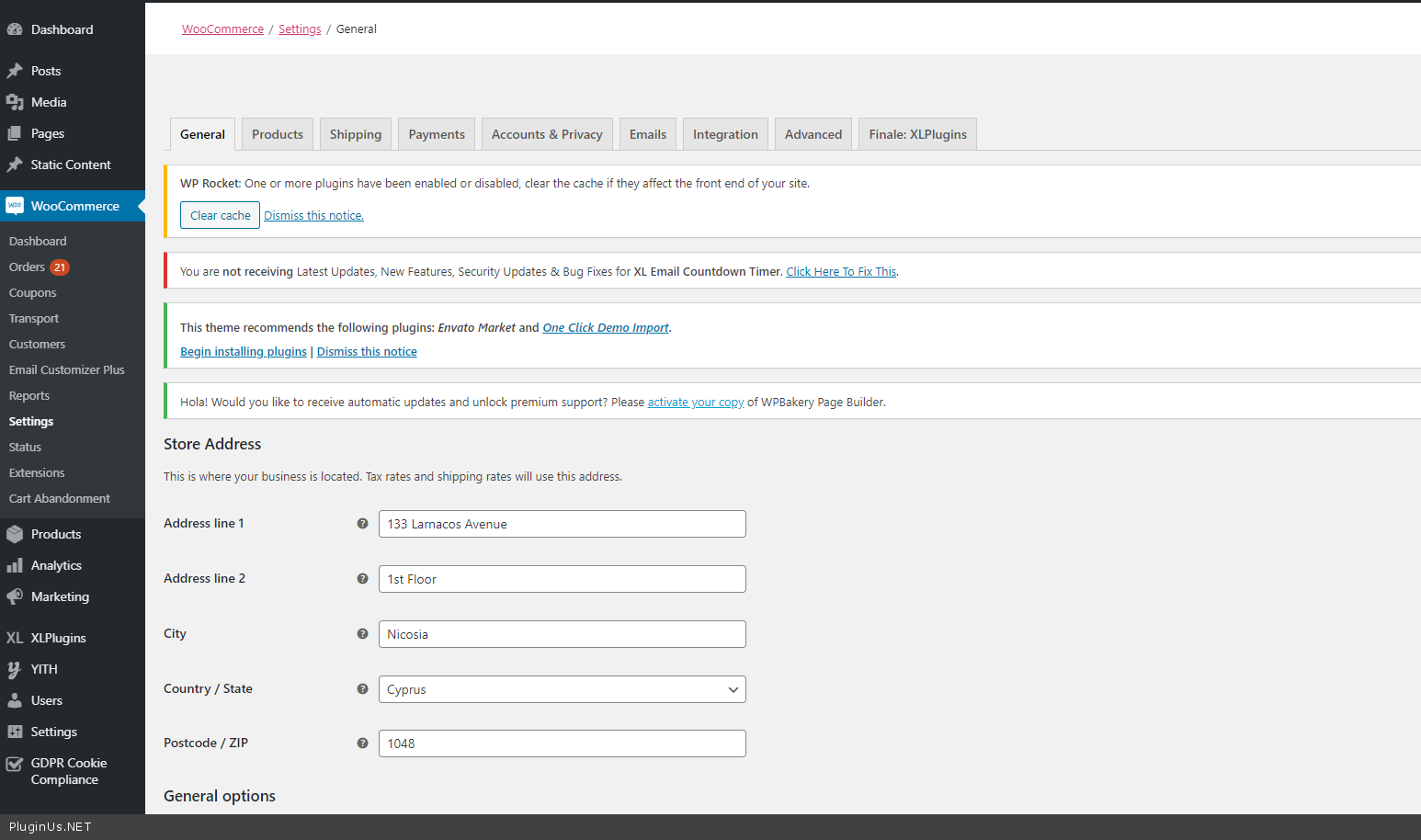
Quote from Giorgos on July 1, 2020, 13:16Hi Pablo, I think that was my fault. I am sorry, I forgot to disable a plugin that hides menu items to other admins.
Please check now and let me know.
Regards
Giorgos
Hi Pablo, I think that was my fault. I am sorry, I forgot to disable a plugin that hides menu items to other admins.
Please check now and let me know.
Regards
Giorgos
Quote from Pablo Borysenco on July 2, 2020, 11:16Hello
I checked it - video on private data - I can not find the error. Describe in more detail what I must do to get this error
Hello
I checked it - video on private data - I can not find the error. Describe in more detail what I must do to get this error
Quote from Giorgos on July 2, 2020, 11:24Hi Pablo, yes the plugin works in the staging!!! But not at the live site :(
I think the reason is one of the plugins I disabled. Think its a conflict...
Hi Pablo, yes the plugin works in the staging!!! But not at the live site :(
I think the reason is one of the plugins I disabled. Think its a conflict...
Quote from Giorgos on July 2, 2020, 11:31Just checked, the four plugins I have in the live site and NOT in the staging are:
PBT Pay
Advanced noCaptcha & invisible Captcha
Redis
Zoho SalesIQDoes this help maybe? Ever had a problem with any of them?
PS Also note that I see the loading message at top right but nothing changes.
Just checked, the four plugins I have in the live site and NOT in the staging are:
PBT Pay
Advanced noCaptcha & invisible Captcha
Redis
Zoho SalesIQ
Does this help maybe? Ever had a problem with any of them?
PS Also note that I see the loading message at top right but nothing changes.
Quote from Pablo Borysenco on July 2, 2020, 12:21I need to see the error to fix this.
Try on the live site add a code to index files ( at the top ) of these plugins
test code:
if (isset($_GET['page']) AND $_GET['page'] == 'woobe') {
return false;
}
And do test
I need to see the error to fix this.
Try on the live site add a code to index files ( at the top ) of these plugins
test code:
if (isset($_GET['page']) AND $_GET['page'] == 'woobe') {
return false;
}
And do test
Quote from Giorgos on July 2, 2020, 12:33Sorry but I did not understand where to try this. You mean add this code to all plugins index pages?
For example got to /plugins/zoho/ and add this code to the index.ph there? And so on?
Sorry but I did not understand where to try this. You mean add this code to all plugins index pages?
For example got to /plugins/zoho/ and add this code to the index.ph there? And so on?
Quote from Pablo Borysenco on July 3, 2020, 10:52Hello
PBT Pay
Advanced noCaptcha & invisible Captcha
Redis
Zoho SalesIQeach of these plugins has a start file. An example - https://c2n.me/48ffWL2.png - and do test
this code will exclude these plugins on the WOOBE editor page.
Hello
PBT Pay
Advanced noCaptcha & invisible Captcha
Redis
Zoho SalesIQ
each of these plugins has a start file. An example - https://c2n.me/48ffWL2.png - and do test
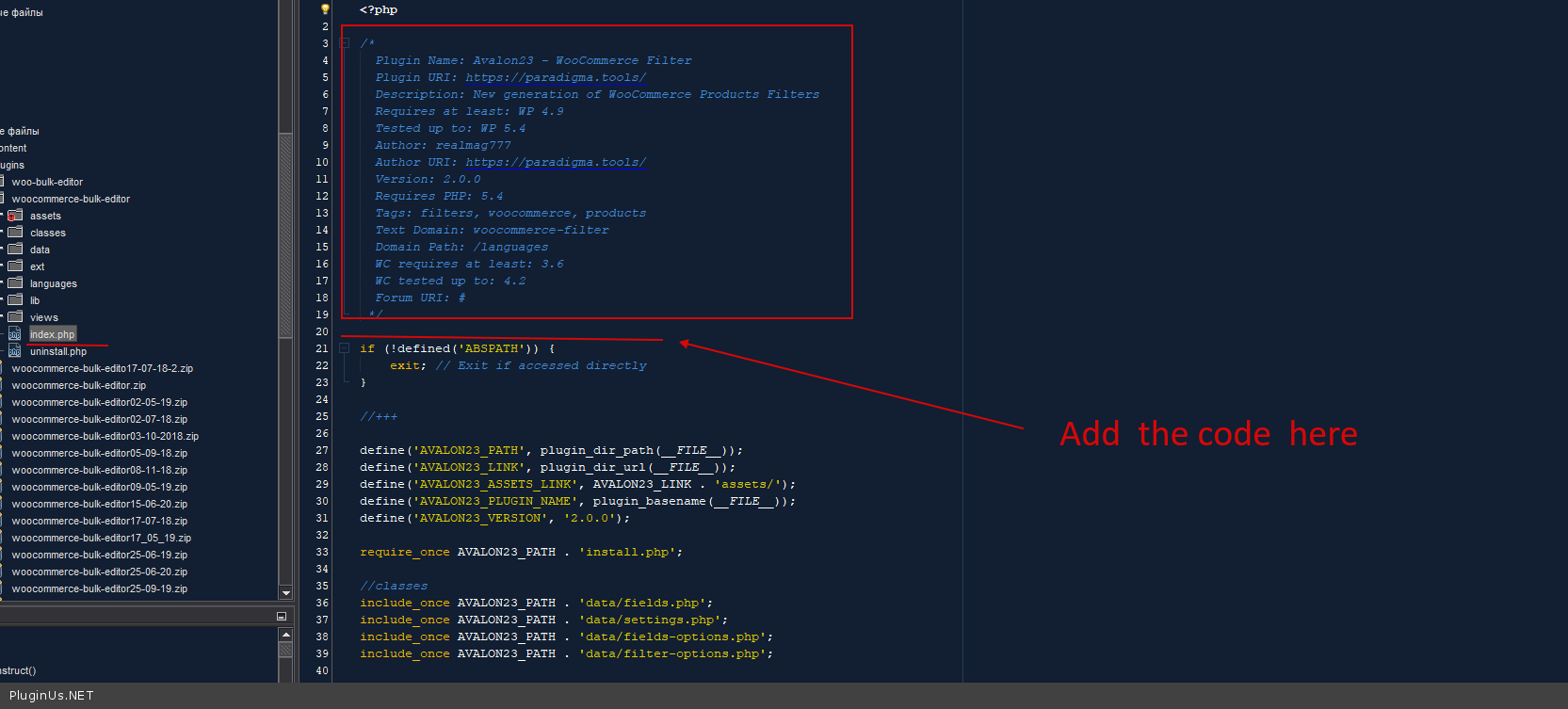
this code will exclude these plugins on the WOOBE editor page.
Quote from Giorgos on July 3, 2020, 11:05Thanks, will try it and let you know...
Thanks, will try it and let you know...