

Page Refresh Template Issues - BeaverBuilder
The support doesn work on Saturdays and Sundays, so some Friday requests can be answered on Monday. If you have problems with registration ask help on contact us page pleaseIf you not got email within 24~36 business hours, firstly check your spam box, and if no any email from the support there - back to the forum and read answer here. DO NOT ANSWER ON EMAILS [noreply@pluginus.net] FROM THE FORUM!! Emails are just for your info, all answers should be published only here.
The support doesn work on Saturdays and Sundays, so some Friday requests can be answered on Monday.

Quote from Papaya on May 3, 2022, 14:32Hello,
Our website is built using beaver builder and beaver themer, which we are using to create a shop archive page for a range of taxonomies. We are using WOOF on these pages to filter products.
Everything works great the first time, however, after applying some filters, then refreshing the page, WOOF seems to redirect to a version of the page that doesn't use our templates.
Steps to recreate issue:
- Visit: https://chelleon-migration-base.flywheelsites.com/skincare__concern/acne/
- Apply Filters > Filters load through AJX > Everything is great.
- Refresh the page
- Default shop page is loaded instead / you are no longer viewing the correct taxonomy archive.
This happens on all custom taxonomy pages.
Can you help us resolve this issue?
Thanks in advance,
Nathan
Hello,
Our website is built using beaver builder and beaver themer, which we are using to create a shop archive page for a range of taxonomies. We are using WOOF on these pages to filter products.
Everything works great the first time, however, after applying some filters, then refreshing the page, WOOF seems to redirect to a version of the page that doesn't use our templates.
Steps to recreate issue:
- Visit: https://chelleon-migration-base.flywheelsites.com/skincare__concern/acne/
- Apply Filters > Filters load through AJX > Everything is great.
- Refresh the page
- Default shop page is loaded instead / you are no longer viewing the correct taxonomy archive.
This happens on all custom taxonomy pages.
Can you help us resolve this issue?
Thanks in advance,
Nathan

Quote from Pablo Borysenco on May 4, 2022, 10:25Hello Nathan
Please paste your license key here - https://share.pluginus.net/image/i20210618130558.png -> https://share.pluginus.net/image/i20210618130614.png
Check on Advanced->Options - https://share.pluginus.net/image/i20220504082026.png and activate this extension - https://share.pluginus.net/image/i20220504082404.png and https://share.pluginus.net/image/i20220504082518.png
Hello Nathan
Please paste your license key here - https://share.pluginus.net/image/i20210618130558.png -> https://share.pluginus.net/image/i20210618130614.png


Check on Advanced->Options - https://share.pluginus.net/image/i20220504082026.png and activate this extension - https://share.pluginus.net/image/i20220504082404.png and https://share.pluginus.net/image/i20220504082518.png


Quote from Papaya on May 5, 2022, 13:28Hey Pablo,
Sorry your images are not loading properly. Please can you send the links again :)
Thank you
Hey Pablo,
Sorry your images are not loading properly. Please can you send the links again :)
Thank you
Quote from Pablo Borysenco on May 6, 2022, 11:12Hello
Ok!
Check on Advanced->Options - https://share.pluginus.net/image/i20220504082026.png and activate this extension - https://share.pluginus.net/image/i20220504082404.png and https://share.pluginus.net/image/i20220504082518.png
Hello
Ok!
Check on Advanced->Options - https://share.pluginus.net/image/i20220504082026.png and activate this extension - https://share.pluginus.net/image/i20220504082404.png and https://share.pluginus.net/image/i20220504082518.png
Quote from Papaya on May 9, 2022, 11:21Hi Pablo,
We've done as suggested but the issue still persists unfortunately -
https://www.loom.com/share/d6825845d7ca48e18a0ceb3d24dfc58b
Thanks.
Hi Pablo,
We've done as suggested but the issue still persists unfortunately -
https://www.loom.com/share/d6825845d7ca48e18a0ceb3d24dfc58b
Quote from Pablo Borysenco on May 9, 2022, 13:29Hello Nathan
Please paste your license key here - https://share.pluginus.net/image/i20210618130558.png -> https://share.pluginus.net/image/i20210618130614.png and wp-admin access - https://share.pluginus.net/image/i20210618130637.png
Hello Nathan
Please paste your license key here - https://share.pluginus.net/image/i20210618130558.png -> https://share.pluginus.net/image/i20210618130614.png and wp-admin access - https://share.pluginus.net/image/i20210618130637.png

Quote from Papaya on May 16, 2022, 11:19Hi Pablo, where can we find the license key, please? It's not in the 'documentation' or 'Licensing' folders (that we could find)...
Hi Pablo, where can we find the license key, please? It's not in the 'documentation' or 'Licensing' folders (that we could find)...
Quote from Pablo Borysenco on May 16, 2022, 12:36Hello
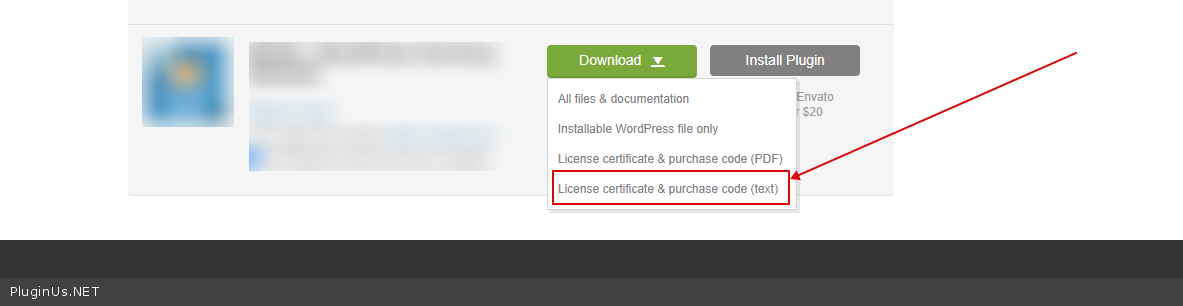
To get license key - https://codecanyon.net/downloads -> https://c2n.me/49ZXJv0.png
Hello
To get license key - https://codecanyon.net/downloads -> https://c2n.me/49ZXJv0.png
Quote from Papaya on May 17, 2022, 15:59Hi Pablo,
Have submitted the purchase code and login details.
We've noticed another issue pop-up and looks like it's connected to the Turbo Mode - you'll notice that the filters now have an overlay and we can't access them on the front-end...
Btw, we're adding custom functions via the Snippets plugin.
Thanks.
Hi Pablo,
Have submitted the purchase code and login details.
We've noticed another issue pop-up and looks like it's connected to the Turbo Mode - you'll notice that the filters now have an overlay and we can't access them on the front-end...
Btw, we're adding custom functions via the Snippets plugin.
Thanks.
Quote from Pablo Borysenco on May 18, 2022, 12:55Hello
Looks like you forgot to follow this recommendation - https://share.pluginus.net/image/i20220518103900.png My test - https://share.pluginus.net/image/i20220518105157.png
But there is another problem - All filter elements disappear. Can you turn off all your customizations and do a test?
you'll notice that the filters now have an overlay - Please create a screenshots with the issue
Hello
Looks like you forgot to follow this recommendation - https://share.pluginus.net/image/i20220518103900.png My test - https://share.pluginus.net/image/i20220518105157.png


But there is another problem - All filter elements disappear. Can you turn off all your customizations and do a test?
you'll notice that the filters now have an overlay - Please create a screenshots with the issue
Quote from Papaya on May 20, 2022, 16:25Hi Pablo,
RE the overlay when Turbo Mode is switched on: https://www.loom.com/share/756e3fed5e754f318e9a810484f408e9
Thx.
Hi Pablo,
RE the overlay when Turbo Mode is switched on: https://www.loom.com/share/756e3fed5e754f318e9a810484f408e9
Thx.
Quote from Pablo Borysenco on May 23, 2022, 12:32Hello
Please try to read this - https://products-filter.com/extencion/turbo-mode
It looks like you managed to solve this problem - https://share.pluginus.net/video/v20220523103127.mp4
The reason for this behavior could be: JS errors in the browser console or an incorrectly created search file
Hello
Please try to read this - https://products-filter.com/extencion/turbo-mode
It looks like you managed to solve this problem - https://share.pluginus.net/video/v20220523103127.mp4
The reason for this behavior could be: JS errors in the browser console or an incorrectly created search file