grahamswims(@grahamswims)
4 Posts
Customers
Quote from grahamswims on November 20, 2020, 10:46
Hi
Is there a way to filter out products that aren't 'Enabled' in the WooCommerce Product data variations?
Currently, the filter is showing Sizes and Colours even when the product is out of stock.
Many thanks
Hi
Is there a way to filter out products that aren't 'Enabled' in the WooCommerce Product data variations?
Currently, the filter is showing Sizes and Colours even when the product is out of stock.
Many thanks

Pablo Borysenco(@pavlo_borysenco)
34,196 Posts
Quote from Pablo Borysenco on November 20, 2020, 14:28
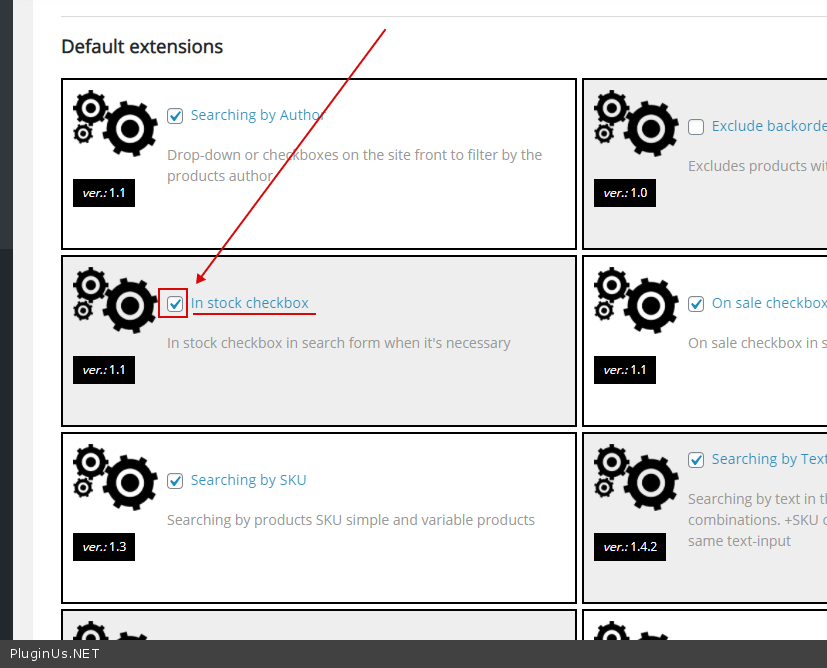
Hello
please check extension - https://c2n.me/49U4k6Z.png and an option - https://c2n.me/49U4Mdz.png
Hello
please check extension - https://c2n.me/49U4k6Z.png and an option - https://c2n.me/49U4Mdz.png
grahamswims(@grahamswims)
4 PostsTopic Author
Customers
Quote from grahamswims on November 26, 2020, 10:50
Thank you, that’s great. Is there a way to make the ‘In Stock’ checkbox ‘Checked’ by default?
Thank you, that’s great. Is there a way to make the ‘In Stock’ checkbox ‘Checked’ by default?
Pablo Borysenco(@pavlo_borysenco)
34,196 Posts
Quote from Pablo Borysenco on November 26, 2020, 13:36
Hello
Please read this - https://products-filter.com/manipulate-search-data-options/
Hello
Please read this - https://products-filter.com/manipulate-search-data-options/
grahamswims(@grahamswims)
4 PostsTopic Author
Customers
Quote from grahamswims on November 26, 2020, 14:46
Thanks Pablo, that worked.
However, if I set a product variation as ‘Out of Stock’ it will hide all the other product variations.
For example, say the product was a sweater with 3 colour options, if I set ‘blue’ as out of stock then the other two colours will be hidden too.
Do you know why this might be?
thanks again
Thanks Pablo, that worked.
However, if I set a product variation as ‘Out of Stock’ it will hide all the other product variations.
For example, say the product was a sweater with 3 colour options, if I set ‘blue’ as out of stock then the other two colours will be hidden too.
Do you know why this might be?
thanks again
Pablo Borysenco(@pavlo_borysenco)
34,196 Posts
Quote from Pablo Borysenco on November 27, 2020, 13:36
Hello
if I set ‘blue’ as out of stock then the other two colours will be hidden too. - not sure if I understood you. Do you mean the options disappear after filtering?
Hello
if I set ‘blue’ as out of stock then the other two colours will be hidden too. - not sure if I understood you. Do you mean the options disappear after filtering?
grahamswims(@grahamswims)
4 PostsTopic Author
Customers
Quote from grahamswims on November 27, 2020, 13:42
Sorry Pablo
Yes, the whole product will disappear from the filter results if I set just one option as out of stock.
Sorry Pablo
Yes, the whole product will disappear from the filter results if I set just one option as out of stock.
Pablo Borysenco(@pavlo_borysenco)
34,196 Posts
Quote from Pablo Borysenco on November 30, 2020, 13:21
Hello
Ok! On the shop page, you cannot display variations( this is only displayed on the single page ).
For this reason, if you search for "blue" and "in stock" And if the product has at least one variant "blue" + "out of stock" - the filter will hide the parent product
Hello
Ok! On the shop page, you cannot display variations( this is only displayed on the single page ).
For this reason, if you search for"blue" and "in stock" And if the product has at least one variant "blue" +"out of stock" - the filter will hide the parent product