

Only search on first letter
The support doesn work on Saturdays and Sundays, so some Friday requests can be answered on Monday. If you have problems with registration ask help on contact us page pleaseIf you not got email within 24~36 business hours, firstly check your spam box, and if no any email from the support there - back to the forum and read answer here. DO NOT ANSWER ON EMAILS [noreply@pluginus.net] FROM THE FORUM!! Emails are just for your info, all answers should be published only here.
The support doesn work on Saturdays and Sundays, so some Friday requests can be answered on Monday.

Quote from kontakt@engedal.it on January 5, 2021, 12:54Hi, I want to be able to search ONLY on the first letter. So if I write "A" only products that starts with A appear. How do I do it?
Another problem is that some products have a double name like "Boat Amanda" and because "Amanda" starts with A, it shows this result. But "Boat Amanda" should ONLY be shown if I search and write on "B". how do I do that?
Hi, I want to be able to search ONLY on the first letter. So if I write"A" only products that starts with A appear. How do I do it?
Another problem is that some products have a double name like"Boat Amanda" and because"Amanda" starts with A, it shows this result. But"Boat Amanda" should ONLY be shown if I search and write on"B". how do I do that?

Quote from Pablo Borysenco on January 6, 2021, 11:50Hello
Unfortunately the plugin does not have this feature.
You need code customization
Hello
Unfortunately the plugin does not have this feature.
You need code customization
Quote from kontakt@engedal.it on January 6, 2021, 11:59Ah ok, how can I get this customization? I don't know where to look for it.
Ah ok, how can I get this customization? I don't know where to look for it.
Quote from Pablo Borysenco on January 6, 2021, 13:21Hello
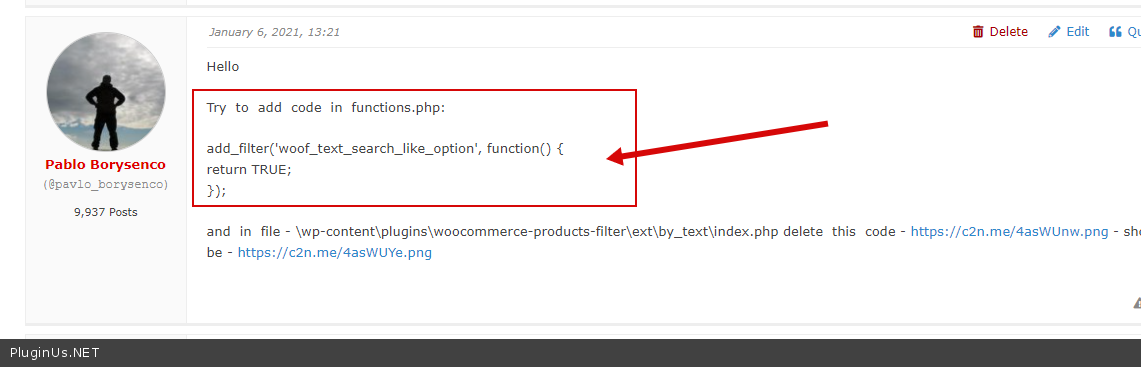
Try to add code in functions.php:
add_filter('woof_text_search_like_option', function() {
return TRUE;
});and in file - \wp-content\plugins\woocommerce-products-filter\ext\by_text\index.php delete this code - https://c2n.me/4asWUnw.png - should be - https://c2n.me/4asWUYe.png
Hello
Try to add code in functions.php:
add_filter('woof_text_search_like_option', function() {
return TRUE;
});
and in file - \wp-content\plugins\woocommerce-products-filter\ext\by_text\index.php delete this code - https://c2n.me/4asWUnw.png - should be - https://c2n.me/4asWUYe.png
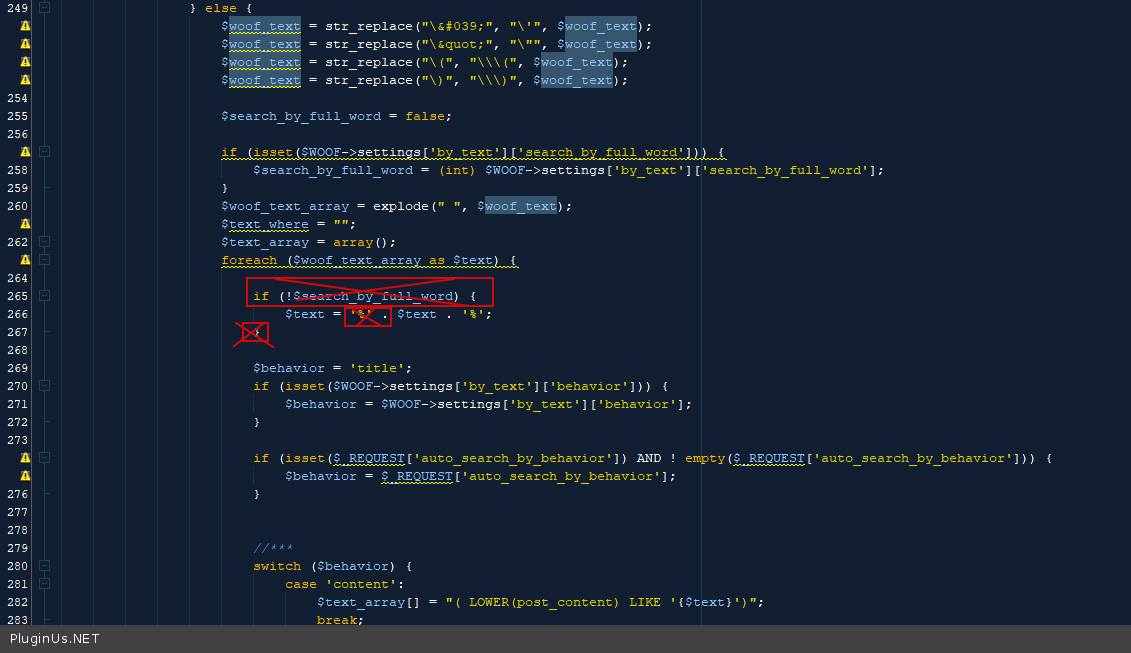
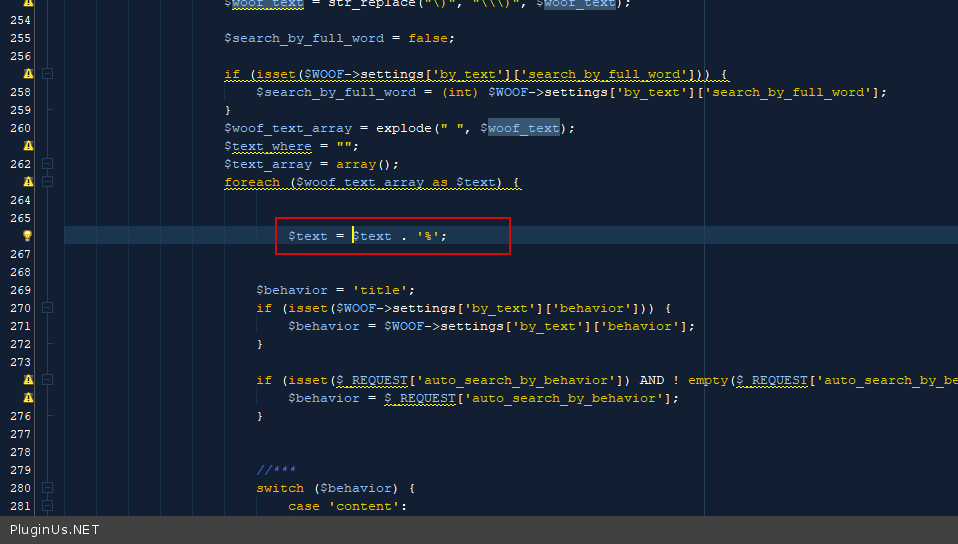
Quote from kontakt@engedal.it on January 6, 2021, 15:12Thanks a lot but it seems like it did not change? See attached:
Thanks a lot but it seems like it did not change? See attached:


Quote from Pablo Borysenco on January 7, 2021, 12:39Hello
Did you add this code - https://c2n.me/4atqUEa.png ?
Drop me exact link to the issue please
Hello
Did you add this code - https://c2n.me/4atqUEa.png ?
Drop me exact link to the issue please
Quote from kontakt@engedal.it on January 7, 2021, 16:08Yes I did. In functions.php that is in the WP-Includes folder. That's the place, right?
The issue is in the menu: schultz.engedal.it and also here: https://schultz.engedal.it/shop/
Yes I did. In functions.php that is in the WP-Includes folder. That's the place, right?
The issue is in the menu: schultz.engedal.it and also here: https://schultz.engedal.it/shop/
Quote from Pablo Borysenco on January 8, 2021, 11:59Hello
That's the place, right? - No! in the current theme folder
Hello
That's the place, right? - No! in the current theme folder
Quote from kontakt@engedal.it on January 8, 2021, 13:07Ok, I put in in both the child theme and the themes functions.php folder. Which one should it be?
But I can not see a difference when I search on the letter "A" for example. Can you?
Ok, I put in in both the child theme and the themes functions.php folder. Which one should it be?
But I can not see a difference when I search on the letter"A" for example. Can you?
Quote from Pablo Borysenco on January 11, 2021, 11:50Hello
Which one should it be? - in the child theme
It looks like we did not understand each other.
I thought you meant text search - "So if I write "A" only products that starts with A appear."
https://c2n.me/4avkPHx.jpg - but this is a taxonomy filter.
Hello
Which one should it be? - in the child theme
It looks like we did not understand each other.
I thought you meant text search - "So if I write"A" only products that starts with A appear."
https://c2n.me/4avkPHx.jpg - but this is a taxonomy filter.
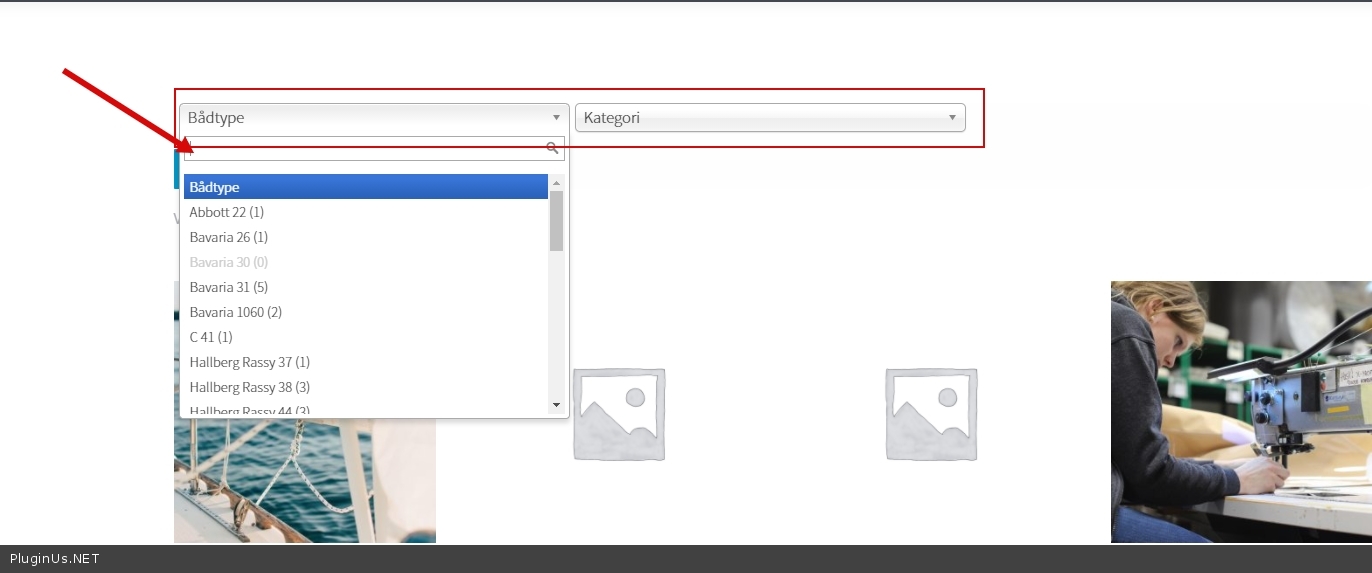
Quote from kontakt@engedal.it on January 11, 2021, 13:12I put it in the Child theme.
What do you mean exactly? I am talking about how to search through your plugin? I have to search in categories and tags of course.
Let me know what else I can do. Sorry if my english is not clear, it's not my first language.
I put it in the Child theme.
What do you mean exactly? I am talking about how to search through your plugin? I have to search in categories and tags of course.
Let me know what else I can do. Sorry if my english is not clear, it's not my first language.
Quote from Pablo Borysenco on January 12, 2021, 11:42Hello
What do you mean exactly? - You wrote it - "So if I write "A" only products that starts with A appear." - In this case, you need a text search( search by product title )! And for this I gave you the code
You gave me this screenshot - https://c2n.me/4awfuiH.jpg - But this is a taxonomy filter that has nothing to do with the product title. And there is no such solution for this type of filter
Hello
What do you mean exactly? - You wrote it - "So if I write"A" only products that starts with A appear." - In this case, you need a text search( search by product title )! And for this I gave you the code
You gave me this screenshot - https://c2n.me/4awfuiH.jpg - But this is a taxonomy filter that has nothing to do with the product title. And there is no such solution for this type of filter
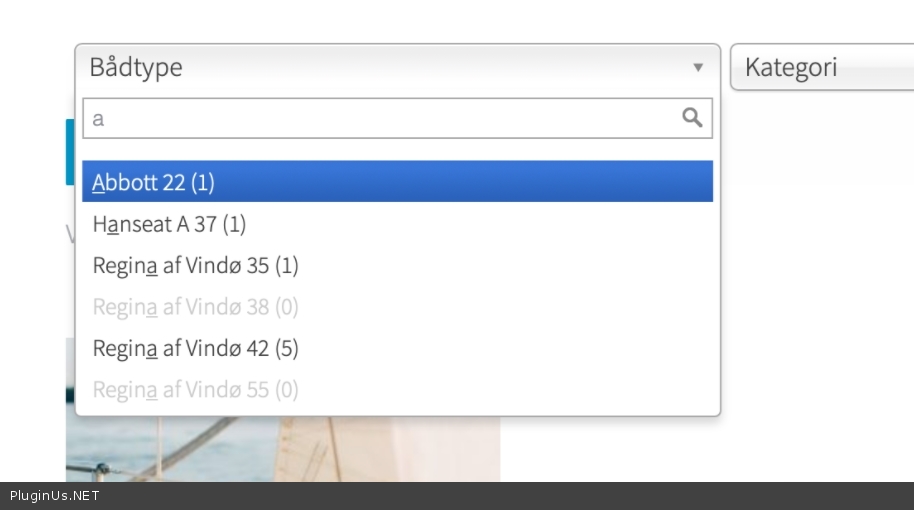
Quote from kontakt@engedal.it on January 12, 2021, 14:06But I put in the code as you described. And it does not work. Like I showed in the two screenshots. So what should I then do to make the search work properly?
And what is it that your code should do?
But I put in the code as you described. And it does not work. Like I showed in the two screenshots. So what should I then do to make the search work properly?
And what is it that your code should do?
Quote from Pablo Borysenco on January 13, 2021, 11:46Hello
please firstly watch a video - https://products-filter.com/video-tutorials/#video_beGT6p_look
You don't use text search. You don't have a text filter by title. I gave you the code to filter by text - https://c2n.me/4axbG5C.png
Like I showed in the two screenshots. - These are filters by taxonomy(category,Tag,attributes) and it has nothing to do with the title of the products - https://c2n.me/4axbXY1.png
it is impossible to filter by category to search for product title.
Hello
please firstly watch a video - https://products-filter.com/video-tutorials/#video_beGT6p_look
You don't use text search. You don't have a text filter by title. I gave you the code to filter by text - https://c2n.me/4axbG5C.png
Like I showed in the two screenshots. - These are filters by taxonomy(category,Tag,attributes) and it has nothing to do with the title of the products - https://c2n.me/4axbXY1.png
it is impossible to filter by category to search for product title.
Quote from kontakt@engedal.it on January 13, 2021, 12:04Ok, so you say that I can not search for a title with your plugin? Just to be sure.
You send me 3 videoes - pretty long :) Let me know if there is something specific I should watch and which one.
Ok, so you say that I can not search for a title with your plugin? Just to be sure.
You send me 3 videoes - pretty long :) Let me know if there is something specific I should watch and which one.
Quote from Pablo Borysenco on January 13, 2021, 12:41so you say that I can not search for a title with your plugin? - No! You can filter by title, but for this you should use the appropriate filter
Please watch this video - https://www.youtube.com/watch?v=beGT6p_look
so you say that I can not search for a title with your plugin? - No! You can filter by title, but for this you should use the appropriate filter
Please watch this video - https://www.youtube.com/watch?v=beGT6p_look
Quote from kontakt@engedal.it on January 13, 2021, 13:42Ok, I think I did what you mean now. There is a field for text search in the top right corner: https://schultz.engedal.it - But none of the tags or categories shows up. I don't understand what else to do from here to make them searchable?
You can get login if it's easier?
Ok, I think I did what you mean now. There is a field for text search in the top right corner: https://schultz.engedal.it - But none of the tags or categories shows up. I don't understand what else to do from here to make them searchable?
You can get login if it's easier?
Quote from Pablo Borysenco on January 14, 2021, 11:28Hello
But none of the tags or categories shows up. - ??? There are no categories or tags in text search
Hello
But none of the tags or categories shows up. - ??? There are no categories or tags in text search
Quote from kontakt@engedal.it on January 14, 2021, 12:15I understand.
But do you understand my problem? It seems like you don't want to help me? Your answers are hard to understand. As I wrote you can get access if it's easier?
I want to search on the products by their titles first letters.
I understand.
But do you understand my problem? It seems like you don't want to help me? Your answers are hard to understand. As I wrote you can get access if it's easier?
I want to search on the products by their titles first letters.
Quote from Pablo Borysenco on January 15, 2021, 12:28Hello
I do not understand you. it will be much easier if you try to watch the video - https://www.youtube.com/watch?v=beGT6p_look
I want to search on the products by their titles first letters. - The plugin does not have this feature. You need customization of the code, I described how to do it earlier. If you have no experience in programming, you should hire a developer. And please use the text search(an extension) but this filter has nothing to do with categories and tags
I wrote you can get access if it's easier? - plugin setup and customization is not included in support
Hello
I do not understand you. it will be much easier if you try to watch the video - https://www.youtube.com/watch?v=beGT6p_look
I want to search on the products by their titles first letters. - The plugin does not have this feature. You need customization of the code, I described how to do it earlier. If you have no experience in programming, you should hire a developer. And please use the text search(an extension) but this filter has nothing to do with categories and tags
I wrote you can get access if it's easier? - plugin setup and customization is not included in support