
Design issues
The support doesn work on Saturdays and Sundays, so some Friday requests can be answered on Monday. If you have problems with registration ask help on contact us page pleaseIf you not got email within 24~36 business hours, firstly check your spam box, and if no any email from the support there - back to the forum and read answer here. DO NOT ANSWER ON EMAILS [noreply@pluginus.net] FROM THE FORUM!! Emails are just for your info, all answers should be published only here.
The support doesn work on Saturdays and Sundays, so some Friday requests can be answered on Monday.

Quote from Juli on February 2, 2021, 12:29Hi,
I've just installed the plugin on my site and have two main questions:
- Design - Use chosen javascript library on the front of your site for drop-downs - YES: when the site loads i can see the filter loads as per theme's design https://pasteboard.co/JMtA0DE.png, but after loading is complete it shows quite different containers for drop downs https://pasteboard.co/JMtAbQ8.png, please see screenshots attached. Also I would like to ask how could i make the filter fit the theme's design in such case, but have the functionality of "Use chosen javascript library on the front of your site for drop-downs - YES"?
- On sale checkbox - it is not in the same row with other checkboxes, how could i change it? https://pasteboard.co/JMtzxs9.png
Thanks fo your help.
Best,
Ekaterina


Hi,
I've just installed the plugin on my site and have two main questions:
- Design - Use chosen javascript library on the front of your site for drop-downs - YES: when the site loads i can see the filter loads as per theme's design https://pasteboard.co/JMtA0DE.png, but after loading is complete it shows quite different containers for drop downs https://pasteboard.co/JMtAbQ8.png, please see screenshots attached. Also I would like to ask how could i make the filter fit the theme's design in such case, but have the functionality of"Use chosen javascript library on the front of your site for drop-downs - YES"?
- On sale checkbox - it is not in the same row with other checkboxes, how could i change it? https://pasteboard.co/JMtzxs9.png
Thanks fo your help.
Best,
Ekaterina

Quote from Pablo Borysenco on February 2, 2021, 13:26Hello Ekaterina
1 In this case, you need to choose. Use the default design - https://c2n.me/4aMZSBM.png OR use chosen design - https://c2n.me/4aMZUmU.png
2 Because these are different filters. Please drop me exact link to the issue
Hello Ekaterina
1 In this case, you need to choose. Use the default design - https://c2n.me/4aMZSBM.png OR use chosen design - https://c2n.me/4aMZUmU.png
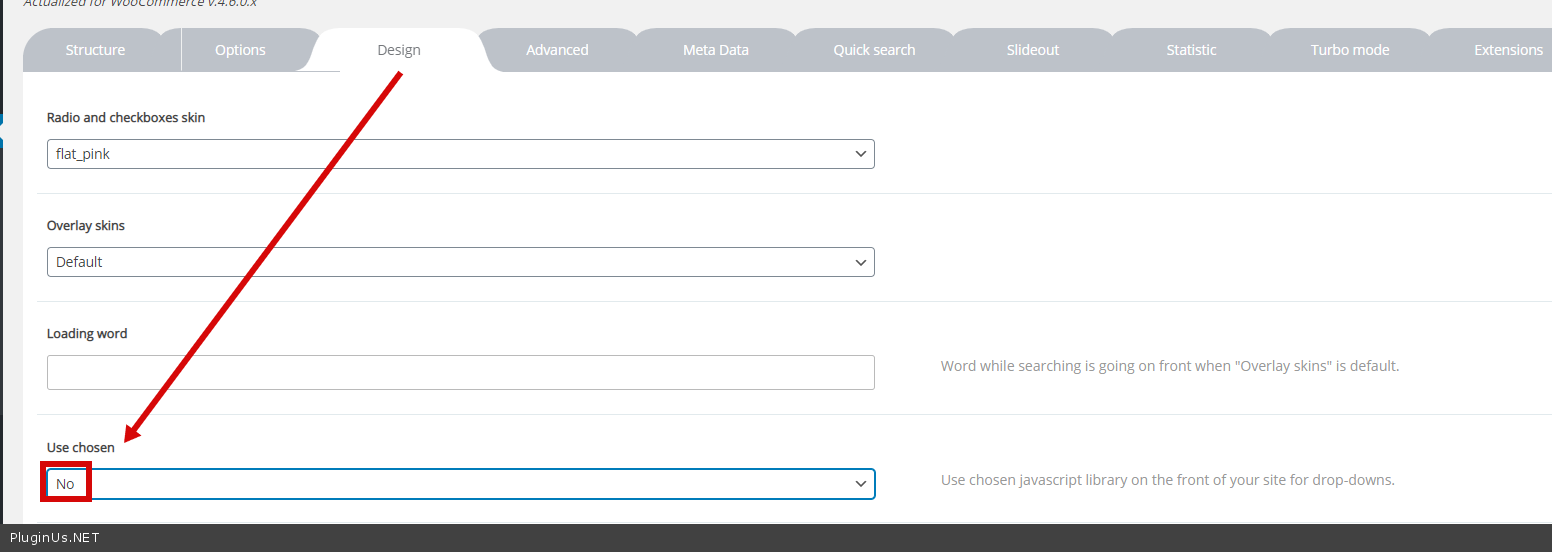
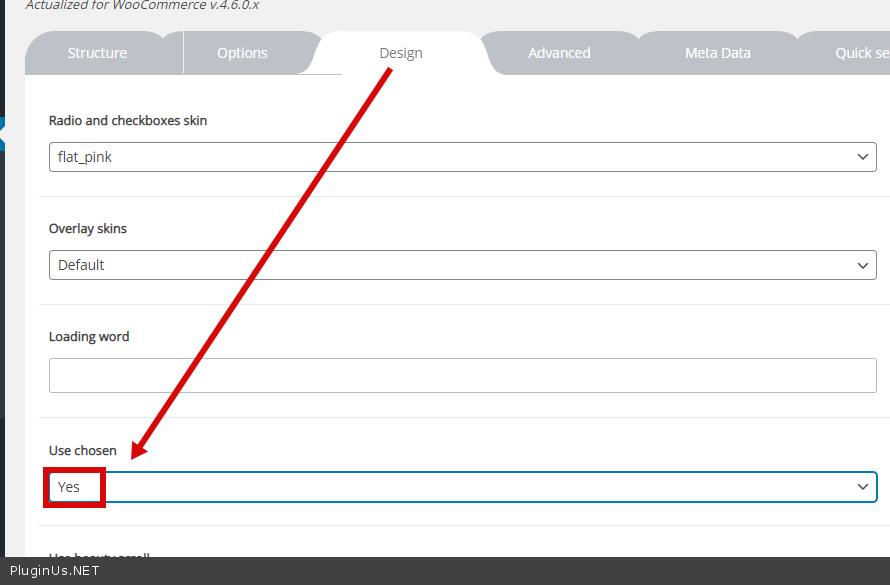
2 Because these are different filters. Please drop me exact link to the issue
Quote from Juli on February 2, 2021, 13:31Hi Pablo,
Thanks for your reply.
- I fi choose the default design, then i dont have this search functionality in the drop down: https://pasteboard.co/JMtAbQ8.png and i really would like to keep it
- These are different filters, but design wise shouldn't they be all inline? https://woocommerce-542392-1735896.cloudwaysapps.com/n2315/
- PRIVATE DATA
Hi Pablo,
Thanks for your reply.
- I fi choose the default design, then i dont have this search functionality in the drop down: https://pasteboard.co/JMtAbQ8.png and i really would like to keep it
- These are different filters, but design wise shouldn't they be all inline? https://woocommerce-542392-1735896.cloudwaysapps.com/n2315/
- PRIVATE DATA
Quote from Juli on February 3, 2021, 11:44Hi there,
any update for me?
Thanks
Hi there,
any update for me?
Thanks
Quote from Pablo Borysenco on February 3, 2021, 11:51Hello
1) As I wrote above, you have this choice - https://c2n.me/4aNOAS9.png Otherwise, you should hire a CSS developer to customize the Chosen library styles.
2) Add this CSS:
.woof_checkbox_sales {
margin-left: 3px;
}
Hello
1) As I wrote above, you have this choice - https://c2n.me/4aNOAS9.png Otherwise, you should hire a CSS developer to customize the Chosen library styles.
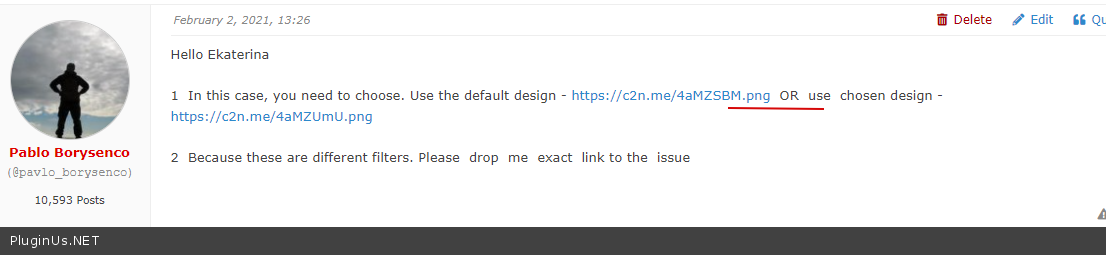
2) Add this CSS:
.woof_checkbox_sales {
margin-left: 3px;
}
Quote from Juli on February 4, 2021, 00:42Hi,
I have two more questions.
- what is WOOF_HELPER:: - its causing. a significant load time https://pasteboard.co/JMHOAxc.png
- Dynamic recount, it says that i can set it "YES, only for PC", but i dont see such option https://pasteboard.co/JMHPhX3.png
- Thanks!


Hi,
I have two more questions.
- what is WOOF_HELPER:: - its causing. a significant load time https://pasteboard.co/JMHOAxc.png
- Dynamic recount, it says that i can set it"YES, only for PC", but i dont see such option https://pasteboard.co/JMHPhX3.png
- Thanks!
Quote from Pablo Borysenco on February 4, 2021, 12:52Hello
- this function is for getting price limits. This will be optimized in the new version of the plugin
- "YES, only for PC" - This is only available for turbo mode
Hello
- this function is for getting price limits. This will be optimized in the new version of the plugin
- "YES, only for PC" - This is only available for turbo mode
Quote from Juli on February 8, 2021, 09:58Hi there
this function is for getting price limits. This will be optimized in the new version of the plugin
The problem i have right now is as soon as the price filter is activated the catalog page refuses to load. So i deactivated the price filter for now, but it is actually very much needed in the shop. Do you know this problem already? Could you give a solution to solve it?
Thanks
Hi there
this function is for getting price limits. This will be optimized in the new version of the plugin
The problem i have right now is as soon as the price filter is activated the catalog page refuses to load. So i deactivated the price filter for now, but it is actually very much needed in the shop. Do you know this problem already? Could you give a solution to solve it?
Thanks
Quote from Pablo Borysenco on February 8, 2021, 13:36Hello
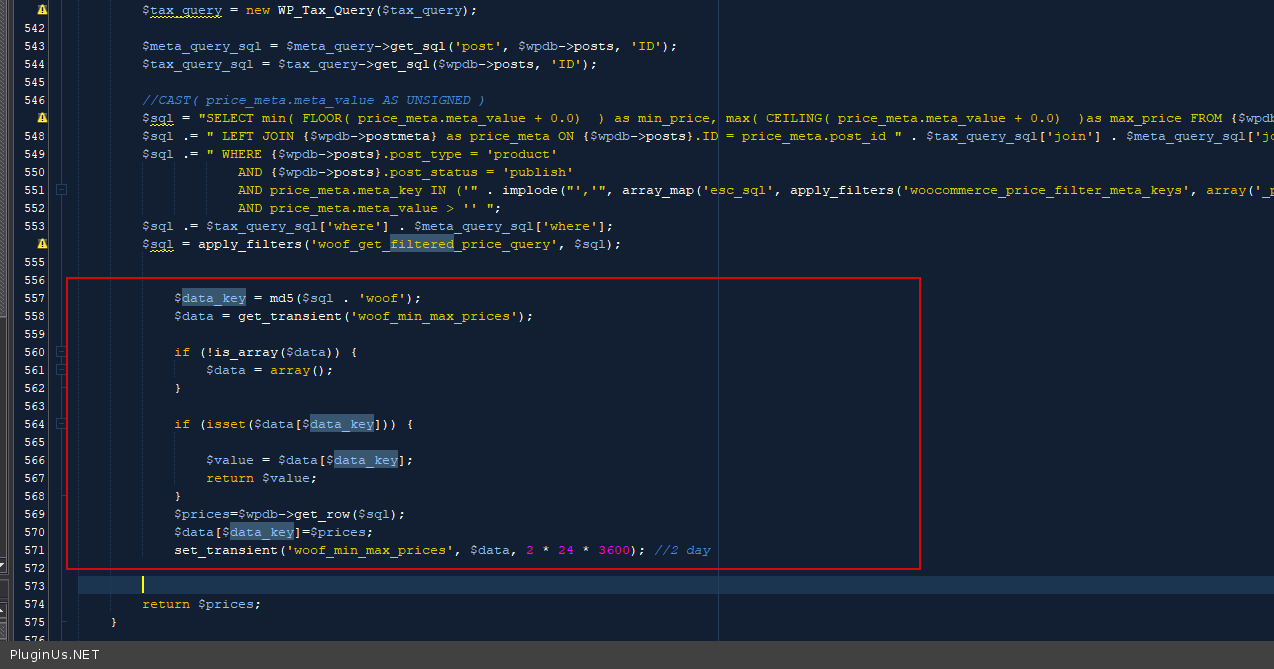
oK! Try in file - wp-content\plugins\woocommerce-products-filter\classes\helper.php
add code - https://c2n.me/4aRDfv1.png
$data_key = md5($sql . 'woof');
$data = get_transient('woof_min_max_prices');if (!is_array($data)) {
$data = array();
}if (isset($data[$data_key])) {
$value = $data[$data_key];
return $value;
}
$prices=$wpdb->get_row($sql);
$data[$data_key]=$prices;
set_transient('woof_min_max_prices', $data, 2 * 24 * 3600); //2 day
Hello
oK! Try in file - wp-content\plugins\woocommerce-products-filter\classes\helper.php
add code - https://c2n.me/4aRDfv1.png
$data_key = md5($sql . 'woof');
$data = get_transient('woof_min_max_prices');
if (!is_array($data)) {
$data = array();
}
if (isset($data[$data_key])) {
$value = $data[$data_key];
return $value;
}
$prices=$wpdb->get_row($sql);
$data[$data_key]=$prices;
set_transient('woof_min_max_prices', $data, 2 * 24 * 3600); //2 day
Quote from Juli on February 10, 2021, 12:53Hi there,
thanks for this.
I also have a question about the infinite scroll. I have this plugin https://www.wpintense.com/product/auto-infinite-scroll/ installed on our site, but it doesnt work/ dont show products to scroll down when i use filters.
These are the selectors are set:
Pagination wrapper: .woocommerce-pagination
Products wrapper: ul.ul_products.products
Item selectors: li.product_item
Could you assist in this?
Thanks!
Hi there,
thanks for this.
I also have a question about the infinite scroll. I have this plugin https://www.wpintense.com/product/auto-infinite-scroll/ installed on our site, but it doesnt work/ dont show products to scroll down when i use filters.
These are the selectors are set:
Pagination wrapper: .woocommerce-pagination
Products wrapper: ul.ul_products.products
Item selectors: li.product_item
Could you assist in this?
Thanks!
Quote from Pablo Borysenco on February 10, 2021, 13:03Hello
Read this please - https://products-filter.com/make-infinite-scroll-for-filtered-products-also/
Hello
Read this please - https://products-filter.com/make-infinite-scroll-for-filtered-products-also/
Quote from Juli on February 10, 2021, 13:05Hi,
do i have to use the YITH Infinite Scrolling or is it enough to use these settings?
- Navigation Selector: nav.woocommerce-pagination
- Next Selector: nav.woocommerce-pagination a.next
- Item Selector: li.product
- Content Selector: ul.products
Hi,
do i have to use the YITH Infinite Scrolling or is it enough to use these settings?
- Navigation Selector: nav.woocommerce-pagination
- Next Selector: nav.woocommerce-pagination a.next
- Item Selector: li.product
- Content Selector: ul.products
Quote from Juli on February 10, 2021, 15:12Hey, i would like to use this plugin for infinite scrolling https://www.wpintense.com/product/auto-infinite-scroll/ , is there a way to make it work with your plugin? I'd appreciate your support.
Hey, i would like to use this plugin for infinite scrolling https://www.wpintense.com/product/auto-infinite-scroll/ , is there a way to make it work with your plugin? I'd appreciate your support.
Quote from Pablo Borysenco on February 11, 2021, 12:36Hello
Unfortunately the filter is not compatible with this third party plugin - https://www.wpintense.com/product/auto-infinite-scroll/
Hello
Unfortunately the filter is not compatible with this third party plugin - https://www.wpintense.com/product/auto-infinite-scroll/