

No results on my shop page
The support doesn work on Saturdays and Sundays, so some Friday requests can be answered on Monday. If you have problems with registration ask help on contact us page pleaseIf you not got email within 24~36 business hours, firstly check your spam box, and if no any email from the support there - back to the forum and read answer here. DO NOT ANSWER ON EMAILS [noreply@pluginus.net] FROM THE FORUM!! Emails are just for your info, all answers should be published only here.
The support doesn work on Saturdays and Sundays, so some Friday requests can be answered on Monday.

Quote from info@askit.gr on December 19, 2025, 11:35Helo.
I use theme Botiga Version: 2.3.9 and HUSKY - Products Filter Professional for WooCommerce version 3.3.7.2
The filters placed on Shop Sidebar Widget and the "e-shop" page SOMETIMES have no results SOMETIMES is OK:
https://e-round.gr/e-shop/
Some suggestion?
Helo.
I use theme Botiga Version: 2.3.9 and HUSKY - Products Filter Professional for WooCommerce version 3.3.7.2
The filters placed on Shop Sidebar Widget and the"e-shop" page SOMETIMES have no results SOMETIMES is OK:
Some suggestion?

Quote from Alex Dovlatov on December 19, 2025, 16:07Hello
Place please actual purchase code of the plugin into the private area of this ticket:
https://share.pluginus.net/image/i20230222134241.png
https://share.pluginus.net/image/i20230222134615.png
https://share.pluginus.net/image/i20230222134511.pngIdea: you uses "LiteSpeed Cache" make please tests without it
Solution: Exclude WOOF parameters from cache (Recommended)
Go to LiteSpeed Cache → Cache → Excludes tab
Find section: Do Not Cache Query Strings
Add these parameters (one per line):swoof
really_curr_tax
product_cat
min_price
max_price
orderbySave Changes
Go to LiteSpeed Cache → Toolbox and click Purge All
Hello
Place please actual purchase code of the plugin into the private area of this ticket:
https://share.pluginus.net/image/i20230222134241.png
https://share.pluginus.net/image/i20230222134615.png
https://share.pluginus.net/image/i20230222134511.png


Idea: you uses"LiteSpeed Cache" make please tests without it
Solution: Exclude WOOF parameters from cache (Recommended)
Go to LiteSpeed Cache → Cache → Excludes tab
Find section: Do Not Cache Query Strings
Add these parameters (one per line):
swoof
really_curr_tax
product_cat
min_price
max_price
orderby
Save Changes
Go to LiteSpeed Cache → Toolbox and click Purge All
Quote from info@askit.gr on December 20, 2025, 11:51I change the LiteSpeed Cache Settings, Excludes TAB like this:
Do Not Cache URIs:
/e-shop/*
/e-shop-2/*
/contact-us/*Do Not Cache Query Strings:
swoof
really_curr_tax
product_cat
min_price
max_price
orderbyBut the problem continuous to exist.
My site also use elementor and WPML, if this can help.
I change the LiteSpeed Cache Settings, Excludes TAB like this:
Do Not Cache URIs:
/e-shop/*
/e-shop-2/*
/contact-us/*
Do Not Cache Query Strings:
swoof
really_curr_tax
product_cat
min_price
max_price
orderby
But the problem continuous to exist.
My site also use elementor and WPML, if this can help.
Quote from Alex Dovlatov on December 22, 2025, 14:19Hello
Ok, create please site clone using Duplicator https://wordpress.org/plugins/duplicator/ and in the secret area also provide ftp+wp-admin acess to that stage site + actual purchse code as on the next screens. I will play with code and options of the site, better to do it on stage site and not on its production version
Also will be good if you will create video where its possible to see such behaviour with appearing/disappearing
https://share.pluginus.net/image/i20230222134241.png
https://share.pluginus.net/image/i20230222134615.png
https://share.pluginus.net/image/i20230222134511.png
Hello
Ok, create please site clone using Duplicator https://wordpress.org/plugins/duplicator/ and in the secret area also provide ftp+wp-admin acess to that stage site + actual purchse code as on the next screens. I will play with code and options of the site, better to do it on stage site and not on its production version
Also will be good if you will create video where its possible to see such behaviour with appearing/disappearing
https://share.pluginus.net/image/i20230222134241.png
https://share.pluginus.net/image/i20230222134615.png
https://share.pluginus.net/image/i20230222134511.png
Quote from info@askit.gr on December 22, 2025, 16:17Ι created staging site from my hosting:
https://test5.e-round.gr/wp-admin/
The credential is on private window.
Now i checked the sites and the productive have no items:
https://e-round.gr/e-shop/
And the staging have items normally.
Ι created staging site from my hosting:
https://test5.e-round.gr/wp-admin/
The credential is on private window.
Now i checked the sites and the productive have no items:
And the staging have items normally.
Quote from Alex Dovlatov on December 23, 2025, 13:00Hello
Just looked stage site https://test5.e-round.gr and original one - both works perfectly
What can be also the reason another cache - and this cache in on Elementor plugin: https://share.pluginus.net/image/i20251223125749.png - I see you have cahe there, disable it please on main site and rest all kinds of cache
Also:
1. Check for Cloudflare/CDN:
Are you using Cloudflare or any CDN?
If yes, you need to purge Cloudflare cache completely
Also add WOOF parameters to Cloudflare cache exclusion rules2. Check Object Cache:
Do you have Redis or Memcached enabled on production hosting?
If yes, you need to flush it completely
Contact your hosting support to flush Redis/Memcached3. WPML + Cache Issue:
Since you use WPML, try this:Go to WPML → Settings → Custom XML Configuration
Add exception for WOOF parameters
Purge all caches after4. Hosting-level cache:
Many hostings (like WP Engine, Kinsta, SiteGround) have their own caching
Check your hosting control panel for cache settings
Or contact hosting support to flush all server-side cacheIMPORTANT - I see you're on Hostinger hosting!
Hostinger has multiple cache layers that often cause this exact issue:
6. Hostinger-specific cache (CRITICAL):Log into your Hostinger hPanel (hosting control panel)
Find "Website" section → your domain → "Cache Manager"
Click "Clear All Cache" / "Flush Cache"
Hostinger uses LiteSpeed + their own Object Cache layer
You MUST clear both!7. Elementor Cache (Common Issue with WOOF):
Go to Elementor → Tools → Regenerate CSS & Data
Click "Regenerate Files & Data"
Go to Elementor → Settings → Features
Make sure "Dynamic Content" is enabled
Then Settings → Advanced → scroll to "Switch Editor Loader"
Try toggling it on/off and test8. Clear ALL Elementor cache:
wp-admin/admin.php?page=elementor-tools
Click all "Regenerate" buttons there
Important for WOOF + Elementor:Which Elementor widget do you use for the Shop page?
If it's "Products" widget - it might cache the query
Better to use standard WooCommerce [shop] shortcode pageQuick diagnostic:
Open production site in Incognito/Private window
Does filtering work there?
If YES = browser cache issue
If NO = server-side cache (Hostinger most likely)The staging works because Hostinger staging environments often have cache disabled by default.
p.s. Cache Logged-in Users - set to No
For further support please add also actual purchase key to the privat data of this ticket
https://share.pluginus.net/image/i20230222134241.png
https://share.pluginus.net/image/i20230222134615.png
https://share.pluginus.net/image/i20230222134511.png
Hello
Just looked stage site https://test5.e-round.gr and original one - both works perfectly
What can be also the reason another cache - and this cache in on Elementor plugin: https://share.pluginus.net/image/i20251223125749.png - I see you have cahe there, disable it please on main site and rest all kinds of cache

Also:
1. Check for Cloudflare/CDN:
Are you using Cloudflare or any CDN?
If yes, you need to purge Cloudflare cache completely
Also add WOOF parameters to Cloudflare cache exclusion rules
2. Check Object Cache:
Do you have Redis or Memcached enabled on production hosting?
If yes, you need to flush it completely
Contact your hosting support to flush Redis/Memcached
3. WPML + Cache Issue:
Since you use WPML, try this:
Go to WPML → Settings → Custom XML Configuration
Add exception for WOOF parameters
Purge all caches after
4. Hosting-level cache:
Many hostings (like WP Engine, Kinsta, SiteGround) have their own caching
Check your hosting control panel for cache settings
Or contact hosting support to flush all server-side cache
IMPORTANT - I see you're on Hostinger hosting!
Hostinger has multiple cache layers that often cause this exact issue:
6. Hostinger-specific cache (CRITICAL):
Log into your Hostinger hPanel (hosting control panel)
Find"Website" section → your domain →"Cache Manager"
Click"Clear All Cache" /"Flush Cache"
Hostinger uses LiteSpeed + their own Object Cache layer
You MUST clear both!
7. Elementor Cache (Common Issue with WOOF):
Go to Elementor → Tools → Regenerate CSS & Data
Click"Regenerate Files & Data"
Go to Elementor → Settings → Features
Make sure"Dynamic Content" is enabled
Then Settings → Advanced → scroll to"Switch Editor Loader"
Try toggling it on/off and test
8. Clear ALL Elementor cache:
wp-admin/admin.php?page=elementor-tools
Click all"Regenerate" buttons there
Important for WOOF + Elementor:
Which Elementor widget do you use for the Shop page?
If it's"Products" widget - it might cache the query
Better to use standard WooCommerce [shop] shortcode page
Quick diagnostic:
Open production site in Incognito/Private window
Does filtering work there?
If YES = browser cache issue
If NO = server-side cache (Hostinger most likely)
The staging works because Hostinger staging environments often have cache disabled by default.
p.s. Cache Logged-in Users - set to No
For further support please add also actual purchase key to the privat data of this ticket
https://share.pluginus.net/image/i20230222134241.png
https://share.pluginus.net/image/i20230222134615.png
https://share.pluginus.net/image/i20230222134511.png
Quote from info@askit.gr on January 3, 2026, 09:57I disabled all the cache from my website but the problem continuous.
I Solve temporary the problem if i go on Husky Setting and click "Save changes". After this click the products listed normally.
I disabled all the cache from my website but the problem continuous.
I Solve temporary the problem if i go on Husky Setting and click"Save changes". After this click the products listed normally.
Quote from Alex Dovlatov on January 7, 2026, 13:45Hello
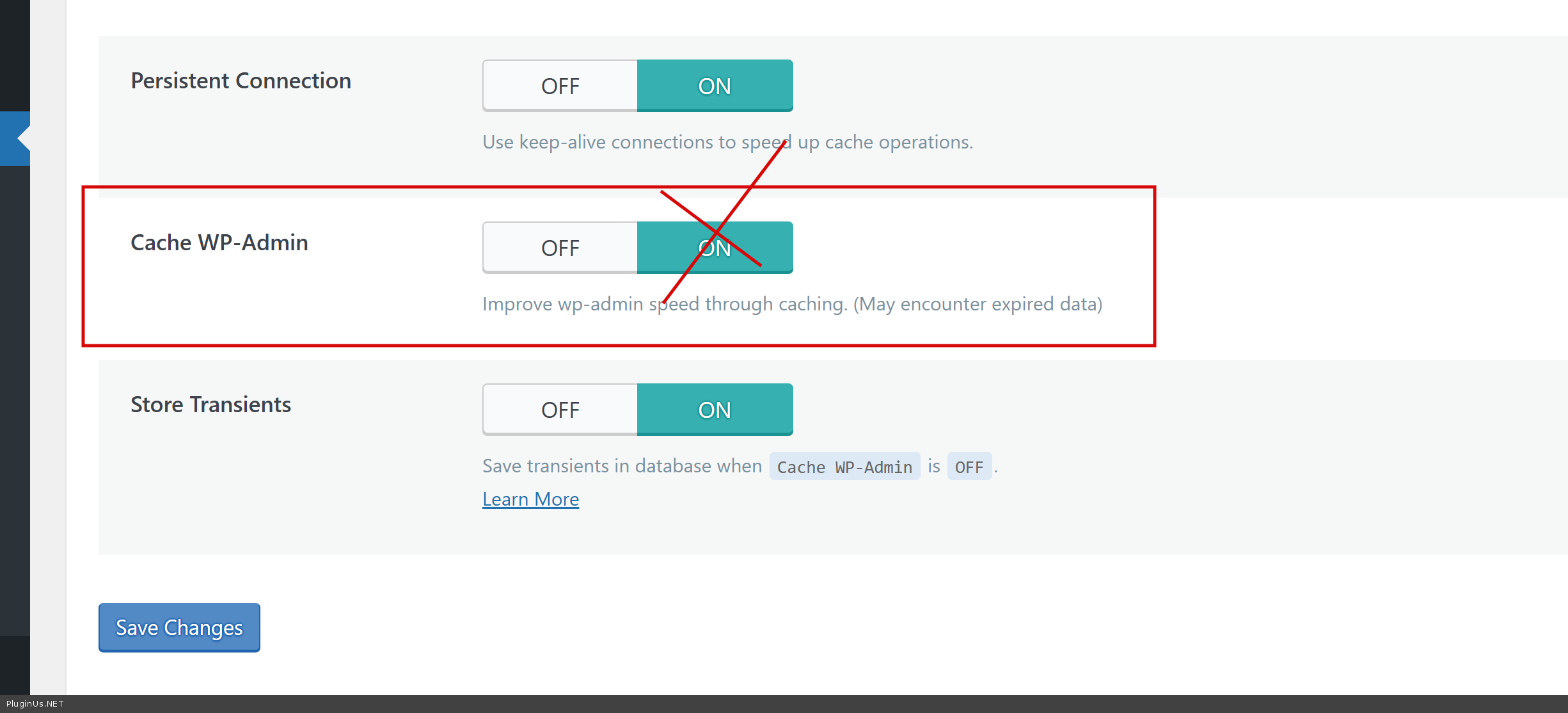
100% its db object cache (not html page), so I entered your stage site and looked litespeed object cache https://share.pluginus.net/image/i20260107134234.png - I disabled it and go on e-shop page: works, please do tests
p.s. never cache wp-admin part of the site
Hello
100% its db object cache (not html page), so I entered your stage site and looked litespeed object cache https://share.pluginus.net/image/i20260107134234.png - I disabled it and go on e-shop page: works, please do tests

p.s. never cache wp-admin part of the site
Quote from info@askit.gr on January 7, 2026, 15:29The original site have no cache.
CDN is disabled
Hostinger Cache is disabled
Litespeed plugin is disabled
I made new staging site and update the connection settings on Private Data.
When the problem ocured and click Save on Husky Filters Settings, the problem temporary solved.
Please help.
The original site have no cache.
CDN is disabled
Hostinger Cache is disabled
Litespeed plugin is disabled
I made new staging site and update the connection settings on Private Data.
When the problem ocured and click Save on Husky Filters Settings, the problem temporary solved.
Please help.
Quote from Alex Dovlatov on January 8, 2026, 13:17Hello
Can you please make video where I catch the issue, I did tests, and its works firn on my side: https://drive.google.com/file/d/11lL1FAFq8BhPLPOdQo99kZVnujLlm9WV/view?usp=sharing
Some ideas I have: you have browser cache on your PC, clean it OR try another browser. For any case I disabled Elementor as it has its own internal cache, but looks like its not related to the issue. Also I founs such strange text in dashboard panel:
maybe this theme do something specific, but its just another idea. So for now - I not cached the issue for the current moment of time ...
Hello
Can you please make video where I catch the issue, I did tests, and its works firn on my side: https://drive.google.com/file/d/11lL1FAFq8BhPLPOdQo99kZVnujLlm9WV/view?usp=sharing
Some ideas I have: you have browser cache on your PC, clean it OR try another browser. For any case I disabled Elementor as it has its own internal cache, but looks like its not related to the issue. Also I founs such strange text in dashboard panel:

maybe this theme do something specific, but its just another idea. So for now - I not cached the issue for the current moment of time ...
Quote from info@askit.gr on February 17, 2026, 19:44I cannot make video, but if you try to use the shop link 80% it wont work:
https://e-round.gr/e-shop/
The plugin Botiga Pro advanced options for product filters is Disabled.
We stop all the case plugins after your advise, Hostinger server side cache is off, plan cache is off, litespeed case is off BUT the problem continues!
The only think where the problem solved temporarily is to click "Save Changes" on Woocommerce -> Settings -> Product Filter Tab.
What happens when I click "Save Changes" and the problem is temporarily fixed?Exists some problem with Botiga Pro Theme?I suggest you to get in admin panel to investigate your plugin on production site.The page is down due to incorrect filters.
I cannot make video, but if you try to use the shop link 80% it wont work:
The plugin Botiga Pro advanced options for product filters is Disabled.
We stop all the case plugins after your advise, Hostinger server side cache is off, plan cache is off, litespeed case is off BUT the problem continues!
The only think where the problem solved temporarily is to click "Save Changes" on Woocommerce -> Settings -> Product Filter Tab.
Quote from Alex Dovlatov on February 18, 2026, 12:40Hello, ok, I have one idea - investigation of your site on my own hosting - share please wp-admin access to the alive site and I will install duplicator and will make clone of the site on my own hosting - there I will be investigate what is really wrong
For further support please add also actual purchase key to the privat data of this ticket
https://share.pluginus.net/image/i20230222134241.png
https://share.pluginus.net/image/i20230222134615.png
https://share.pluginus.net/image/i20230222134511.png
Hello, ok, I have one idea - investigation of your site on my own hosting - share please wp-admin access to the alive site and I will install duplicator and will make clone of the site on my own hosting - there I will be investigate what is really wrong
For further support please add also actual purchase key to the privat data of this ticket
https://share.pluginus.net/image/i20230222134241.png
Quote from info@askit.gr on February 18, 2026, 13:09I update the support request hidden data.
I install the dublicator.
I suggest to try to solve the problem to production site because the old test dont work like the production.
I will wait for your answer.
Thanks.
I update the support request hidden data.
I install the dublicator.
I suggest to try to solve the problem to production site because the old test dont work like the production.
I will wait for your answer.
Thanks.
Quote from Alex Dovlatov on February 19, 2026, 13:35Hello
For further support please add also actual purchase key to the privat data of this ticket
https://share.pluginus.net/image/i20230222134241.png
https://share.pluginus.net/image/i20230222134615.png
https://share.pluginus.net/image/i20230222134511.png
Just tried to make clone by duplicator - operation is failed
Install please next plugins (I have not permitted to do this):
- https://wordpress.org/plugins/wp-phpmyadmin-extension/
- https://wordpress.org/plugins/wpterm/
Also for any case share ftp to the site to let me download it if no one way will be working, but any way I need data base
Please share ACTUAL purchase key in the private area before
Hello
For further support please add also actual purchase key to the privat data of this ticket
https://share.pluginus.net/image/i20230222134241.png
https://share.pluginus.net/image/i20230222134615.png
https://share.pluginus.net/image/i20230222134511.png
Just tried to make clone by duplicator - operation is failed
Install please next plugins (I have not permitted to do this):
Also for any case share ftp to the site to let me download it if no one way will be working, but any way I need data base
Please share ACTUAL purchase key in the private area before
Quote from info@askit.gr on February 20, 2026, 19:40The plugin is already installed.
FTP is difficult to enabled. I must speak with technician.
I have 3 keys, i will put this to private.
The plugin is already installed.
FTP is difficult to enabled. I must speak with technician.
I have 3 keys, i will put this to private.
Quote from Alex Dovlatov on February 23, 2026, 14:32Hello
Thank you for sharing the keys, all is fine
I just tried to download site
BUT I have goo idea ->
Please follow these steps to create a backup via SSH console:
1. Run this single command:
cd /home/u686269684/domains/e-round.gr/public_html/test6 && zip -r wp-content/backup_$(date +%Y%m%d_%H%M%S).zip . --exclude "wp-content/ai1wm-backups/*"This will zip your entire site folder (excluding the large backups directory) and save the archive directly inside
wp-content/.2. Once done, run this to see the exact filename:
ls -lh /home/u686269684/domains/e-round.gr/public_html/test6/wp-content/backup_*.zip3. Please reply with the filename (something like
backup_20260223_143022.zip) and I'll handle the rest.
Hello
Thank you for sharing the keys, all is fine
I just tried to download site
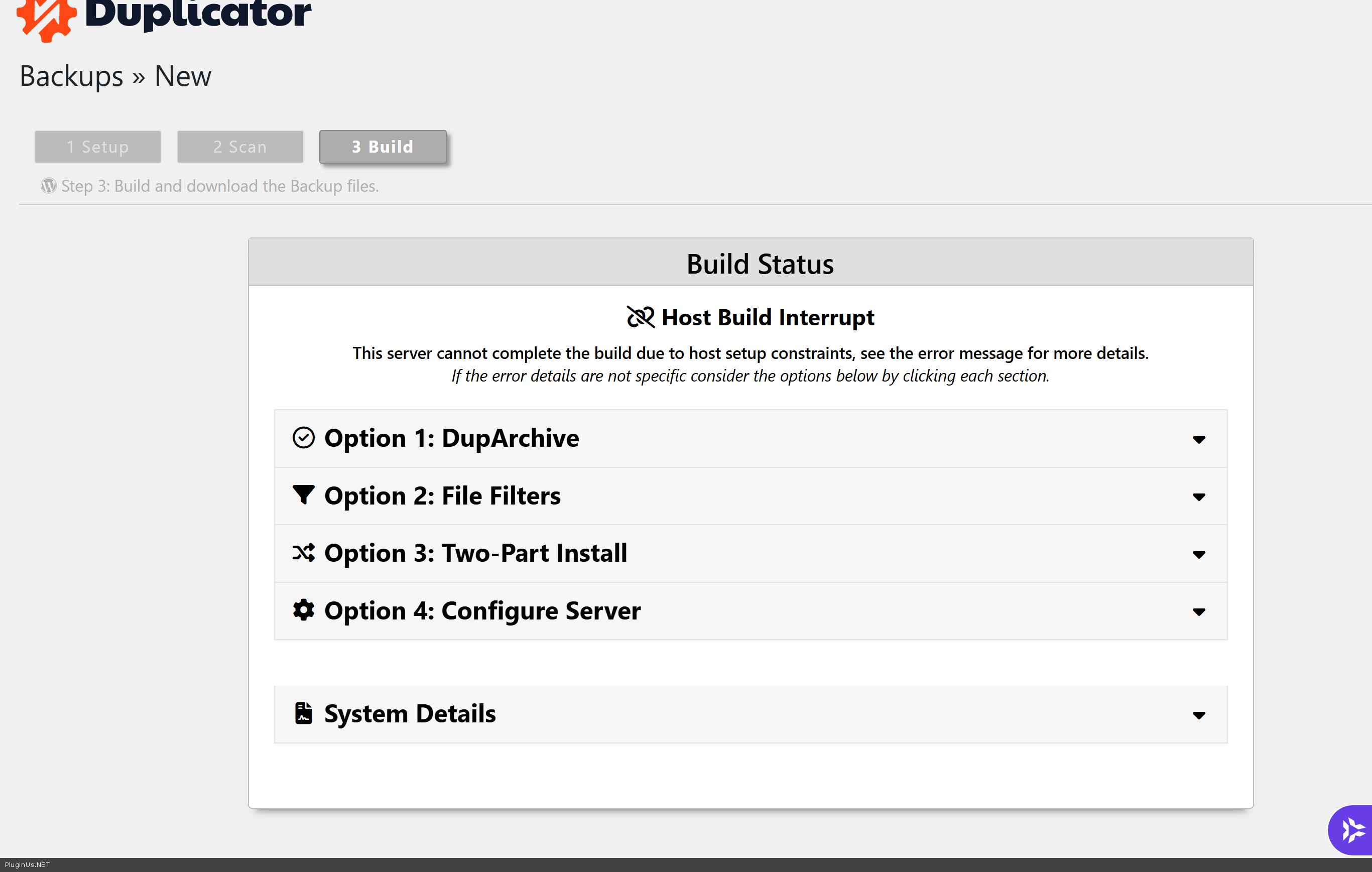
BUT I have goo idea ->
Please follow these steps to create a backup via SSH console:
1. Run this single command:
cd /home/u686269684/domains/e-round.gr/public_html/test6 && zip -r wp-content/backup_$(date +%Y%m%d_%H%M%S).zip . --exclude "wp-content/ai1wm-backups/*"This will zip your entire site folder (excluding the large backups directory) and save the archive directly inside wp-content/.
2. Once done, run this to see the exact filename:
ls -lh /home/u686269684/domains/e-round.gr/public_html/test6/wp-content/backup_*.zip3. Please reply with the filename (something like backup_20260223_143022.zip) and I'll handle the rest.