

new update 2.2.5 adjasment
The support doesn work on Saturdays and Sundays, so some Friday requests can be answered on Monday. If you have problems with registration ask help on contact us page pleaseIf you not got email within 24~36 business hours, firstly check your spam box, and if no any email from the support there - back to the forum and read answer here. DO NOT ANSWER ON EMAILS [noreply@pluginus.net] FROM THE FORUM!! Emails are just for your info, all answers should be published only here.
The support doesn work on Saturdays and Sundays, so some Friday requests can be answered on Monday.
Quote from bennycohe on March 19, 2021, 08:25Hi
The filter if very important to us, we like the way how it is work, and we are very careful with new update? https://myshopshop.com/beauty-and-personal-care/skin-care/
The new update is causing us display issues, We restored our previous preferred version until a solution was found.
- In the 2 attsched pictures you will see the differences in mobile view before and after the update. The new structure wastes space in mobile display, we do not need the "clear All" link and "category names" How to remove them from view?
- To remind you our template is RTL, which does not fit so well sometimes the filter structure. For this we try to use as less elements as possible in the filter area that will not cause a display disturbance. Although you helped us a bit with the CSS code, Any new change will disrupt the view.
- Like you know OR not we are using "BNE Flyout" pluging like a container, To have a nice and friendly mobile and desktop uses and they are working together. This is another reason we try to reduce additives that affect filter behavior. Of course we would prefer that WOOF will includes an integral plugin like the playout that you support and will fit any RTL format, Themes and more ... Then any changes and updates will include CSS views ATC...
After: https://1drv.ms/u/s!AlJM7dNlHfVYobQC-NV74_QvbPuasQ?e=23MtnN
Before: https://1drv.ms/u/s!AlJM7dNlHfVYobQBYTYHdgL6ANDaUg?e=hFe1Wo
Thanks Benny
Hi
The filter if very important to us, we like the way how it is work, and we are very careful with new update? https://myshopshop.com/beauty-and-personal-care/skin-care/
The new update is causing us display issues, We restored our previous preferred version until a solution was found.
- In the 2 attsched pictures you will see the differences in mobile view before and after the update. The new structure wastes space in mobile display, we do not need the"clear All" link and"category names" How to remove them from view?
- To remind you our template is RTL, which does not fit so well sometimes the filter structure. For this we try to use as less elements as possible in the filter area that will not cause a display disturbance. Although you helped us a bit with the CSS code, Any new change will disrupt the view.
- Like you know OR not we are using"BNE Flyout" pluging like a container, To have a nice and friendly mobile and desktop uses and they are working together. This is another reason we try to reduce additives that affect filter behavior. Of course we would prefer that WOOF will includes an integral plugin like the playout that you support and will fit any RTL format, Themes and more ... Then any changes and updates will include CSS views ATC...
After: https://1drv.ms/u/s!AlJM7dNlHfVYobQC-NV74_QvbPuasQ?e=23MtnN
Before: https://1drv.ms/u/s!AlJM7dNlHfVYobQBYTYHdgL6ANDaUg?e=hFe1Wo
Thanks Benny

Quote from Pablo Borysenco on March 19, 2021, 13:55Hello Benny
Please add CSS.woof_reset_button_2{display: none;}.woof_products_top_panel_ulli ul li:first-child{display: none;}
Hello Benny
Quote from bennycohe on March 19, 2021, 20:54HI Pablo
It is look great now, I played a bit with background Container color and underline, using the Hero CSS Plugin
https://1drv.ms/u/s!AlJM7dNlHfVYobQNEu02oBYAu68DrA
https://1drv.ms/u/s!AlJM7dNlHfVYobQOVzNyRv_eABchZw
There's a lot of new features, especially new Extension 'Sections'
Thanks Benny
HI Pablo
It is look great now, I played a bit with background Container color and underline, using the Hero CSS Plugin
https://1drv.ms/u/s!AlJM7dNlHfVYobQNEu02oBYAu68DrA
https://1drv.ms/u/s!AlJM7dNlHfVYobQOVzNyRv_eABchZw
There's a lot of new features, especially new Extension 'Sections'
Thanks Benny
Quote from Pablo Borysenco on March 22, 2021, 13:49Hello Benny
Welcome;)
Hello Benny
Welcome;)
Quote from bennycohe on March 22, 2021, 15:13Hi Pablo
One more thing, I hope you can answer me here on the following question, I just bought WOOBE - WooCommerce Bulk Editor and Products Manager, I watch all the tutorial videos and I could not find where to copy one column to another. I will explain:
- We are working with coustom taxnomy too, Like https://wordpress.org/plugins/woocommerce-wholesale-prices/ And very satisfied, we want to display 3 coustom fields frome this plugin and also Bulk copy prices from one column to another, I did not find an explanation for doing the copying action only.
Thanks alot, Benny
Hi Pablo
One more thing, I hope you can answer me here on the following question, I just bought WOOBE - WooCommerce Bulk Editor and Products Manager, I watch all the tutorial videos and I could not find where to copy one column to another. I will explain:
- We are working with coustom taxnomy too, Like https://wordpress.org/plugins/woocommerce-wholesale-prices/ And very satisfied, we want to display 3 coustom fields frome this plugin and also Bulk copy prices from one column to another, I did not find an explanation for doing the copying action only.
Thanks alot, Benny
Quote from bennycohe on March 22, 2021, 19:00Hi
Any way Pablo The plugin make me problems, After install thr plagin and tryinto to setup I have a server 500 Erorr like the picture attached
https://1drv.ms/u/s!AlJM7dNlHfVYobZr6P92FyXAzQ9GwA?e=ZKNOdX
I read the Info about Recommended min RAM: 256 MB and we have it, for now I deactivate the plugin
Thanks Benny
Hi
Any way Pablo The plugin make me problems, After install thr plagin and tryinto to setup I have a server 500 Erorr like the picture attached
https://1drv.ms/u/s!AlJM7dNlHfVYobZr6P92FyXAzQ9GwA?e=ZKNOdX
I read the Info about Recommended min RAM: 256 MB and we have it, for now I deactivate the plugin
Thanks Benny
Quote from Pablo Borysenco on March 23, 2021, 13:19Hello
Please drop me wp-admin+FTP access - https://c2n.me/43SC6rb.png ->https://c2n.me/42BAoj4.png
we want to display 3 coustom fields frome this plugin - https://bulk-editor.com/video-tutorials#video_1290
Hello
Please drop me wp-admin+FTP access - https://c2n.me/43SC6rb.png ->https://c2n.me/42BAoj4.png


we want to display 3 coustom fields frome this plugin - https://bulk-editor.com/video-tutorials#video_1290
Quote from bennycohe on March 23, 2021, 16:55Hi Pablo
Realy I prefer not to make special adjasment becouse we can see there is a conflict between liteSpeed cash server and WOOBE, After installing and activate WOOBE we can not work OR open liteSpeed cash server and WOOBE As well. both have the same white page and Erorr 500 serve.
Do you still think you can handle the problem without making significant changes, or special adjustments, Our preferences keep the processes as simple as possible
Thank you for the honest answer
Thanks Benny
Hi Pablo
Realy I prefer not to make special adjasment becouse we can see there is a conflict between liteSpeed cash server and WOOBE, After installing and activate WOOBE we can not work OR open liteSpeed cash server and WOOBE As well. both have the same white page and Erorr 500 serve.
Do you still think you can handle the problem without making significant changes, or special adjustments, Our preferences keep the processes as simple as possible
Thank you for the honest answer
Thanks Benny
Quote from Pablo Borysenco on March 24, 2021, 12:07Hello Benny
I do not know what the problem is. It is more likely that your server is weak or misconfigured.
What am I planning to do (you can also try it):
I want to install this plugin - https://wordpress.org/plugins/error-log-monitor/ - to see the error text in more detail
Hello Benny
I do not know what the problem is. It is more likely that your server is weak or misconfigured.
What am I planning to do (you can also try it):
I want to install this plugin - https://wordpress.org/plugins/error-log-monitor/ - to see the error text in more detail
Quote from bennycohe on March 28, 2021, 22:48HI Pablo
Sorry for the late answer but I can't find it myself, I prefer you do it for me please, I try the plugin on our second website and it is work like expected but in myshopshop.com were we need to work it is not, Please tell me when you need the admin logind I will do it for you
Thanks Benny
HI Pablo
Sorry for the late answer but I can't find it myself, I prefer you do it for me please, I try the plugin on our second website and it is work like expected but in myshopshop.com were we need to work it is not, Please tell me when you need the admin logind I will do it for you
Thanks Benny
Quote from Pablo Borysenco on March 29, 2021, 12:42Hello
Please add FTP+wp-admin access - https://c2n.me/43SC6rb.png -> https://c2n.me/42HBIt7.png - the next day our developer will check it
Hello
Please add FTP+wp-admin access - https://c2n.me/43SC6rb.png -> https://c2n.me/42HBIt7.png - the next day our developer will check it

Quote from bennycohe on March 29, 2021, 18:52HI
Your admin login in private data, The woobe is installed but inactive
Thanks Benny
HI
Your admin login in private data, The woobe is installed but inactive
Thanks Benny
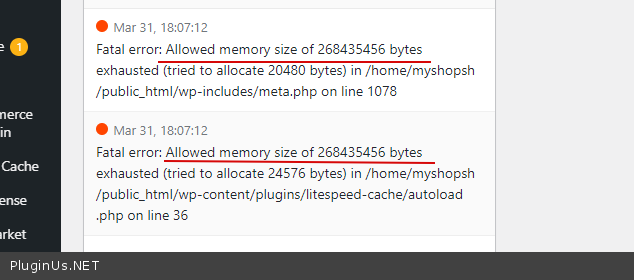
Quote from Pablo Borysenco on March 31, 2021, 17:13Hello Benny
yes, your server does not have enough resources - https://c2n.me/4bw3gbm.png
Hello Benny
yes, your server does not have enough resources - https://c2n.me/4bw3gbm.png
Quote from bennycohe on April 1, 2021, 00:30Hi Pablo
I did some steps include asking my hosting server support for help us about the issue
- They increased PHP memory limit to 350M on top of it is being defined explicitly on the sites conf file
--
[root@host ~]# grep -i memory_limit /opt/cpanel/ea-php74/root/etc/php.ini
memory_limit = 350M- Then I checked if the error message still exists = yes still exists
- Then they enabled debug mode on my site by setting following values in the wp-config.php file. It seemed it was already enabled, however.
--
//Start KH troubleshootdefine( 'WP_DEBUG_LOG', true );
// Enable Debug logging to the /wp-content/debug.log file
define( 'WP_DEBUG_LOG', true );// Disable display of errors and warnings
define( 'WP_DEBUG_DISPLAY', false );
@ini_set( 'display_errors', 0 );
//End KH troubleshoot
--There is No information was logged in to debug mode while the plugin returned 500 internal server error.
At this point, they would suggest to reach out to the plugin developer to see if they can enable some sort of debug mode within the plugin that can reveal any information.
They have disabled WordPress debug mode and plugin from our end.
Can you keep checking from this point, maybe find the problem? If not unfortunately I will cancel to use of the license and just make me a refund. Too bad I can't use the plugin. Because we liked the way how the plugin work, And do not understand why it is working on our other site There we do not need it.
Thanks Benny
Hi Pablo
I did some steps include asking my hosting server support for help us about the issue
- They increased PHP memory limit to 350M on top of it is being defined explicitly on the sites conf file
--
[root@host ~]# grep -i memory_limit /opt/cpanel/ea-php74/root/etc/php.ini
memory_limit = 350M - Then I checked if the error message still exists = yes still exists
- Then they enabled debug mode on my site by setting following values in the wp-config.php file. It seemed it was already enabled, however.
--
//Start KH troubleshootdefine( 'WP_DEBUG_LOG', true );
// Enable Debug logging to the /wp-content/debug.log file
define( 'WP_DEBUG_LOG', true );// Disable display of errors and warnings
define( 'WP_DEBUG_DISPLAY', false );
@ini_set( 'display_errors', 0 );
//End KH troubleshoot
--There is No information was logged in to debug mode while the plugin returned 500 internal server error.
At this point, they would suggest to reach out to the plugin developer to see if they can enable some sort of debug mode within the plugin that can reveal any information.
They have disabled WordPress debug mode and plugin from our end.
Can you keep checking from this point, maybe find the problem? If not unfortunately I will cancel to use of the license and just make me a refund. Too bad I can't use the plugin. Because we liked the way how the plugin work, And do not understand why it is working on our other site There we do not need it.
Thanks Benny
Quote from Pablo Borysenco on April 1, 2021, 12:41Hello Benny
And do not understand why it is working on our other site - I described to you the reason above.
Can I disable plugins on your site for a test?
Hello Benny
And do not understand why it is working on our other site - I described to you the reason above.
Can I disable plugins on your site for a test?
Quote from bennycohe on April 1, 2021, 20:50Hi, Sorry for the late answer
Please no, Even if it is found that the WOOBE conflicts with another plugin and needs special adjustment, I prefer not to touch it. All the plugins installed today are important to us and work in perfect harmony.
Please make a refound and We will keep working with our old "WooCommerce Advanced Bulk Edit" This plugin is less heavy, less functional than what you offer in WOOBE, So We were hoping to change the plugins because we prefer to work with you more, your service is fantastic, but it does not work for us with WOOBE.
Thanks Benny
Hi, Sorry for the late answer
Please no, Even if it is found that the WOOBE conflicts with another plugin and needs special adjustment, I prefer not to touch it. All the plugins installed today are important to us and work in perfect harmony.
Please make a refound and We will keep working with our old"WooCommerce Advanced Bulk Edit" This plugin is less heavy, less functional than what you offer in WOOBE, So We were hoping to change the plugins because we prefer to work with you more, your service is fantastic, but it does not work for us with WOOBE.
Thanks Benny
Quote from Pablo Borysenco on April 2, 2021, 11:26Hello Benny
Unfortunately, there are rules for refunds. And if the reason is incompatibility with a third-party plugin, I can't give the refund
Hello Benny
Unfortunately, there are rules for refunds. And if the reason is incompatibility with a third-party plugin, I can't give the refund
Quote from Pablo Borysenco on April 5, 2021, 11:26Hello Benny
Thank you for understanding
Hello Benny
Thank you for understanding
Quote from bennycohe on April 5, 2021, 12:32Hi
I have Opened a new support ticket for the issue below but Do not answer it and can also close it, I prefer to write here because it is related.
I think I found the Error problem 500 server when trying to work with WOOBE, But in this case we back to our old "WooCommerce Advanced Bulk Edit plugin" and we have the same problem issue, For now we prefer to use WCABE instead WOOBE.There is a Conflict plugins between WOOF and WCABE plugin we use. Ones we disable "WOOF" the WCABE workin like expected. We asked for support from the plugin developer and this is his answer:
.............................................................
........When I am using the plugin, an error is shown in the console: Failed to load resource: the server responded with a status of 500 (Internal Server Error).
.............................................................I provided him a admin and FTP access. this his answer:
.............................................................
........WOOF - WooCommerce Products Filter plugin is making a conflict with WCABE plugin. In order for the WCABE plugin to work, you will need to disable WOOF - WooCommerce Products Filter plugin.
.............................................................This is our full conversation in that link: https://1drv.ms/u/s!AlJM7dNlHfVYobgfzo2vsz5ilvx3Dg?e=GBhHQd
The main problen is The WCABE plugin can not save changes More than one product line, After the "Save" key is pressed And after refreshing the table with the "get products" key, The cells are saved. This action not working at all if we are tying to save more then 2 cells lines. In this case It is save only the first line changes and ignore the rest cells lines.
Look please A short video describing the problem: https://1drv.ms/v/s!AlJM7dNlHfVYobgIFtXhhpYGo8zxhQ?e=CVpu5N
I am trying to say the woof makes some 500 error server problem to WOOBE, WCABE and to other plugin I opened a support ticket about 3-4 month ago and we did not solve it Checkout Field Editor for WooCommerce Because I preferred to find other solution and not dig inside the problem.
Please help
Benny
Hi
I have Opened a new support ticket for the issue below but Do not answer it and can also close it, I prefer to write here because it is related.
I think I found the Error problem 500 server when trying to work with WOOBE, But in this case we back to our old"WooCommerce Advanced Bulk Edit plugin" and we have the same problem issue, For now we prefer to use WCABE instead WOOBE.
There is a Conflict plugins between WOOF and WCABE plugin we use. Ones we disable"WOOF" the WCABE workin like expected. We asked for support from the plugin developer and this is his answer:
.............................................................
........When I am using the plugin, an error is shown in the console: Failed to load resource: the server responded with a status of 500 (Internal Server Error).
.............................................................
I provided him a admin and FTP access. this his answer:
.............................................................
........WOOF - WooCommerce Products Filter plugin is making a conflict with WCABE plugin. In order for the WCABE plugin to work, you will need to disable WOOF - WooCommerce Products Filter plugin.
.............................................................
This is our full conversation in that link: https://1drv.ms/u/s!AlJM7dNlHfVYobgfzo2vsz5ilvx3Dg?e=GBhHQd
The main problen is The WCABE plugin can not save changes More than one product line, After the"Save" key is pressed And after refreshing the table with the"get products" key, The cells are saved. This action not working at all if we are tying to save more then 2 cells lines. In this case It is save only the first line changes and ignore the rest cells lines.
Look please A short video describing the problem: https://1drv.ms/v/s!AlJM7dNlHfVYobgIFtXhhpYGo8zxhQ?e=CVpu5N
I am trying to say the woof makes some 500 error server problem to WOOBE, WCABE and to other plugin I opened a support ticket about 3-4 month ago and we did not solve it Checkout Field Editor for WooCommerce Because I preferred to find other solution and not dig inside the problem.
Please help
Benny