

Nested filter behaviour
The support doesn work on Saturdays and Sundays, so some Friday requests can be answered on Monday. If you have problems with registration ask help on contact us page pleaseIf you not got email within 24~36 business hours, firstly check your spam box, and if no any email from the support there - back to the forum and read answer here. DO NOT ANSWER ON EMAILS [noreply@pluginus.net] FROM THE FORUM!! Emails are just for your info, all answers should be published only here.
The support doesn work on Saturdays and Sundays, so some Friday requests can be answered on Monday.

Quote from tech_BR on August 11, 2020, 13:09Hello,
we're using product categories as our filters and have 3 levels in total. Using the + and - buttons to open and close filters works perfectly fine, however, we're a bit confused about the behaviour when the categories are only selected without opening them.
When a first level filter is selected, the second level is opened automatically. When one of the second level categories is then selected, the first level collapses again because selecting it doesn't seem to apply the status "opened" like clicking the + does. Is this behaviour inteded? If so, is there a way to change this?
It creates a lot of confusion for our users because they can't see where in the filter tree they were exactly (and might not remember it). We've experienced this behaviour across browsers (Chrome, Firefox, ...) and operating systems (Windows, Mac, iOS, Android)
In addition to this, is there a way to collapse filter levels that aren't being used? If a user just opens all categories, for instance, there would be a lot of clutter (94 categories in total) and when they finally find what they are looking for and select (check) it, it would be great if the unused trees would collapse on their own instead of having to close them manually again. In order for this to work in theory, there would have to be a way to check the dependencies of the filter levels of course.
e.g. if you are in level 3, the corresponding level 1 + 2 should stay opened; otherwise we're experiencing the issue explained above
Thanks in advance!
Best regards
Steph
Hello,
we're using product categories as our filters and have 3 levels in total. Using the + and - buttons to open and close filters works perfectly fine, however, we're a bit confused about the behaviour when the categories are only selected without opening them.
When a first level filter is selected, the second level is opened automatically. When one of the second level categories is then selected, the first level collapses again because selecting it doesn't seem to apply the status"opened" like clicking the + does. Is this behaviour inteded? If so, is there a way to change this?
It creates a lot of confusion for our users because they can't see where in the filter tree they were exactly (and might not remember it). We've experienced this behaviour across browsers (Chrome, Firefox, ...) and operating systems (Windows, Mac, iOS, Android)
In addition to this, is there a way to collapse filter levels that aren't being used? If a user just opens all categories, for instance, there would be a lot of clutter (94 categories in total) and when they finally find what they are looking for and select (check) it, it would be great if the unused trees would collapse on their own instead of having to close them manually again. In order for this to work in theory, there would have to be a way to check the dependencies of the filter levels of course.
e.g. if you are in level 3, the corresponding level 1 + 2 should stay opened; otherwise we're experiencing the issue explained above
Thanks in advance!
Best regards
Steph

Quote from Pablo Borysenco on August 12, 2020, 10:55Hello Steph
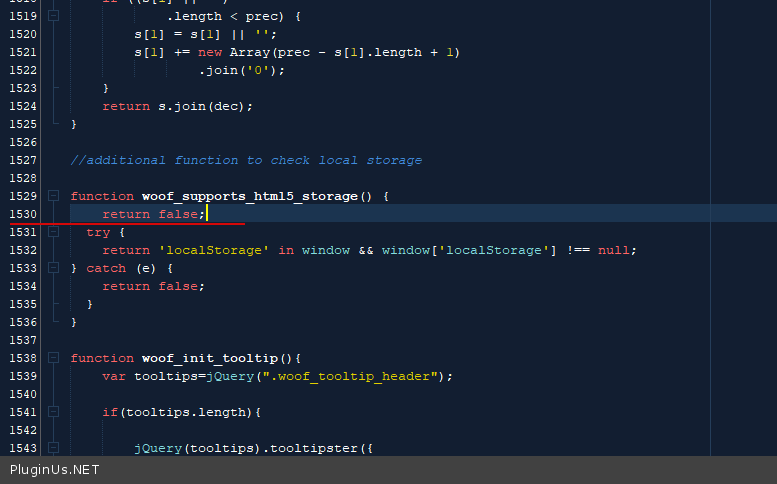
try in file - \wp-content\plugins\woocommerce-products-filter\js\front.js - add code - https://c2n.me/48J3agj.png
Hello Steph
try in file - \wp-content\plugins\woocommerce-products-filter\js\front.js - add code - https://c2n.me/48J3agj.png
Quote from tech_BR on August 13, 2020, 10:02Hi Pablo,
thanks that did the job on desktop! Unfortunately the behaviour is still the same on iOS and Android (tested on Chrome).
Is there a way to make this change update safe?
BR
Steph
Hi Pablo,
thanks that did the job on desktop! Unfortunately the behaviour is still the same on iOS and Android (tested on Chrome).
Is there a way to make this change update safe?
BR
Steph
Quote from Pablo Borysenco on August 13, 2020, 12:15Hello Steph
the behaviour is still the same on iOS and Android (tested on Chrome). - Please clear all cache
Is there a way to make this change update safe? - You can override this JS function.
Hello Steph
the behaviour is still the same on iOS and Android (tested on Chrome). - Please clear all cache
Is there a way to make this change update safe? - You can override this JS function.
Quote from tech_BR on August 17, 2020, 14:02Hi Pablo,
I've cleared the browser cache on both mobile devices multiple times but, unfortunately, the behaviour persists.
Clearing cookies additionally also didn't do anything.You mean we'll have to manually override the JS function after each update?
Is there some way this could be done automatically, perhaps with a job or something along those lines?BR
Steph
Hi Pablo,
I've cleared the browser cache on both mobile devices multiple times but, unfortunately, the behaviour persists.
Clearing cookies additionally also didn't do anything.
You mean we'll have to manually override the JS function after each update?
Is there some way this could be done automatically, perhaps with a job or something along those lines?
BR
Steph
Quote from Pablo Borysenco on August 18, 2020, 11:20Hello
I did test on my device - This works correctly
You mean we'll have to manually override the JS function after each update? - Read this please - https://webkul.com/blog/how-to-override-javascript-jquery-functions-and-events/
Hello
I did test on my device - This works correctly
You mean we'll have to manually override the JS function after each update? - Read this please - https://webkul.com/blog/how-to-override-javascript-jquery-functions-and-events/
Quote from tech_BR on August 20, 2020, 08:53Hi Pablo,
I've tried it with a crossbrowser testing tool and I have yet to encounter a mobile device where it works.
I've tried the following devices:
- Galaxy Tab S4 10.5, Android 8.1, Opera 51 & Firefox 68 & Chrome 78
- Huawei P20, Android Android 10, Chrome 84
- iPhone 11, iOS 13.5.1, Chrome 80 & Safari
- iPhone 8 Plus, iOS 13.4, Firefox 68
On each of the devices I've selected a first level item (without opening it with "+") and then a second level item. The first level item closes after the selection, just as it did before on desktop. It doesn't seem to be a caching problem.
Hi Pablo,
I've tried it with a crossbrowser testing tool and I have yet to encounter a mobile device where it works.
I've tried the following devices:
- Galaxy Tab S4 10.5, Android 8.1, Opera 51 & Firefox 68 & Chrome 78
- Huawei P20, Android Android 10, Chrome 84
- iPhone 11, iOS 13.5.1, Chrome 80 & Safari
- iPhone 8 Plus, iOS 13.4, Firefox 68
On each of the devices I've selected a first level item (without opening it with"+") and then a second level item. The first level item closes after the selection, just as it did before on desktop. It doesn't seem to be a caching problem.
Quote from Pablo Borysenco on August 20, 2020, 12:27Hello
Please drop me wp-admin+FTP access - https://c2n.me/43SC6rb.png ->https://c2n.me/42BAoj4.png
I will check it
Hello
Please drop me wp-admin+FTP access - https://c2n.me/43SC6rb.png ->https://c2n.me/42BAoj4.png


I will check it
Quote from tech_BR on September 3, 2020, 12:23Hi Pablo,
sorry for the late reply.
I've set up a testing page and included the necessary details in the private data.
Hi Pablo,
sorry for the late reply.
I've set up a testing page and included the necessary details in the private data.
Quote from Pablo Borysenco on September 4, 2020, 16:11Hello
I found the reason for this behavior.
You have a duplicate filter on the page( only one radio can be checked ) - https://c2n.me/48Yq4YU.png
So just delete widget for mobile devices. You can use this plugin - https://wordpress.org/plugins/widget-logic/
Hello
I found the reason for this behavior.
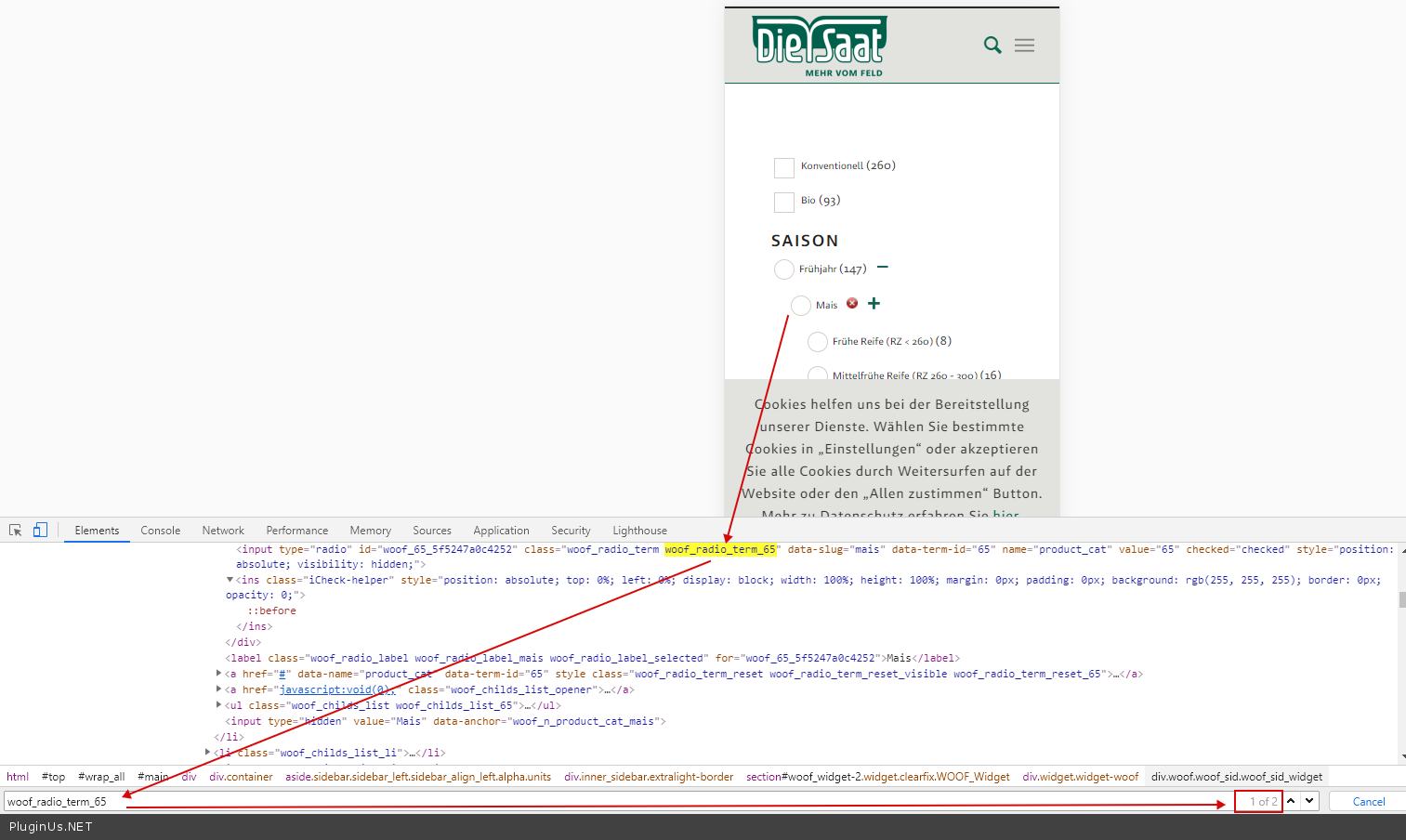
You have a duplicate filter on the page( only one radio can be checked ) - https://c2n.me/48Yq4YU.png
So just delete widget for mobile devices. You can use this plugin - https://wordpress.org/plugins/widget-logic/
Quote from tech_BR on September 7, 2020, 15:24Hi Pablo,
thanks, that did it!
Hi Pablo,
thanks, that did it!
Quote from Pablo Borysenco on September 8, 2020, 20:57Hello
Great!
Welcome;)
Hello
Great!
Welcome;)