Moving Sub-Categories Toggle to left of Items List while Block staying aligned
The support doesn work on Saturdays and Sundays, so some Friday requests can be answered on Monday. If you have problems with registration ask help on contact us page pleaseIf you not got email within 24~36 business hours, firstly check your spam box, and if no any email from the support there - back to the forum and read answer here. DO NOT ANSWER ON EMAILS [noreply@pluginus.net] FROM THE FORUM!! Emails are just for your info, all answers should be published only here.
The support doesn work on Saturdays and Sundays, so some Friday requests can be answered on Monday.

Quote from wpallweb on December 27, 2020, 18:28Hi,
I need help trying to Moving Sub-Categories Toggle to left of the Items List while the Block staying aligned.
I'm already familiar with the following for the front_toggle:
a.woof_front_toggle{float: left;margin-right: 15px;}I need a way to do this for: a.woo_childs_list_openerI've been playing around in INSPECT and can get close but can't get the alignment quite right.I want all of the Parent & Child items to align how they do by default but just want to shift the Sub-Categories Toggle(a.woo_childs_list_opener) to the left side while keeping all the items aligned. I don't mind if the ".woof_list li" has to shift right to accommodate the Toggle on the left side. I just need all Parent & Child items to stay aligned.Thanks in advance.wpallweb
Hi,
I need help trying to Moving Sub-Categories Toggle to left of the Items List while the Block staying aligned.
I'm already familiar with the following for the front_toggle:

Quote from Pablo Borysenco on December 28, 2020, 11:39Hello
drop me exact link to the issue
Hello
drop me exact link to the issue
Quote from wpallweb on December 28, 2020, 16:06I put the link in the Private data.
I put the link in the Private data.
Quote from wpallweb on December 29, 2020, 05:41Please use my development system instead. My client is working on adding items to their Production site and have it set to "Coming Soon".
I'll post the Development site in private data.
Please use my development system instead. My client is working on adding items to their Production site and have it set to"Coming Soon".
I'll post the Development site in private data.
Quote from Pablo Borysenco on December 29, 2020, 14:21Hello
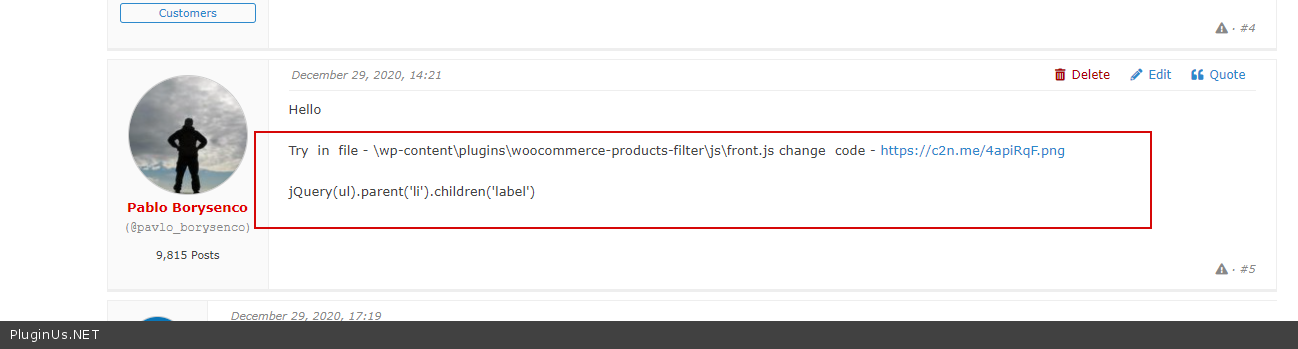
Try in file - \wp-content\plugins\woocommerce-products-filter\js\front.js change code - https://c2n.me/4apiRqF.png
jQuery(ul).parent('li').children('label')
Hello
Try in file - \wp-content\plugins\woocommerce-products-filter\js\front.js change code - https://c2n.me/4apiRqF.png
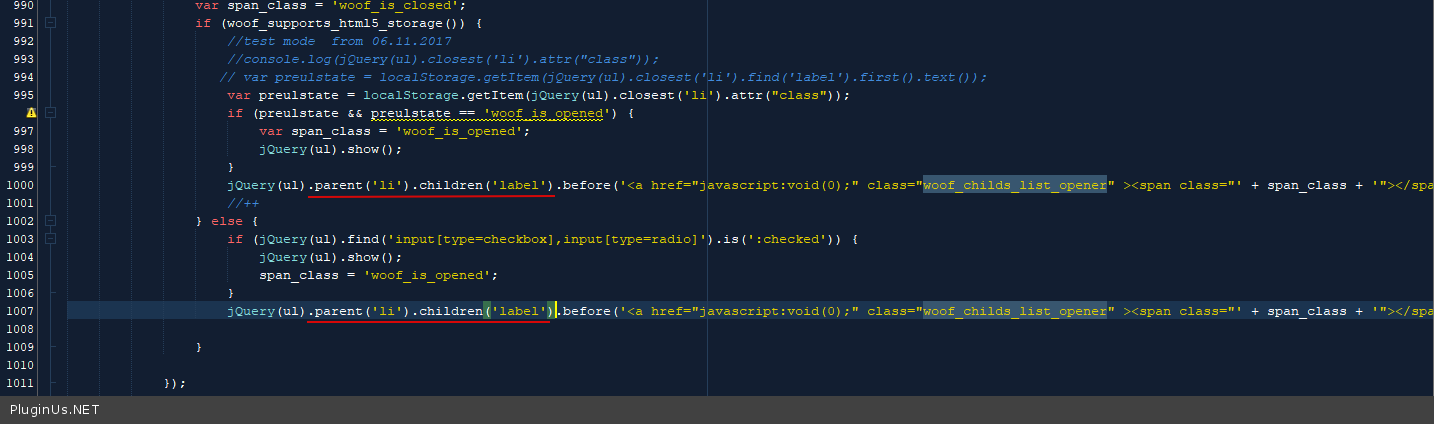
jQuery(ul).parent('li').children('label')
Quote from wpallweb on December 29, 2020, 17:19I added the code to the front.js.
Unfortunately, it did not work. Can you provide another suggestion, please?
  var span_class = 'woof_is_closed';
                if (woof_supports_html5_storage()) {
                    //test mode  from 06.11.2017
                    //console.log(jQuery(ul).closest('li').attr("class"));
                   // var preulstate = localStorage.getItem(jQuery(ul).closest('li').find('label').first().text());
                    var preulstate = localStorage.getItem(jQuery(ul).closest('li').attr("class"));
                    if (preulstate && preulstate == 'woof_is_opened') {
                        var span_class = 'woof_is_opened';
                        jQuery(ul).show();
                    }
                    jQuery(ul).before('<a href="javascript:void(0);" class="woof_childs_list_opener"><span class="' + span_class + '"></span></a>');
                    //++
                } else {
                    if (jQuery(ul).find('input[type=checkbox],input[type=radio]').is(':checked')) {
                        jQuery(ul).show();
                        span_class = 'woof_is_opened';
                    }
                    jQuery(ul).parent('li').children('label').before('<a href="javascript:void(0);" class="woof_childs_list_opener"><span class="' + span_class + '"></span></a>');

                }

            });

Thanks,
    wpallweb
I added the code to the front.js.
Unfortunately, it did not work. Can you provide another suggestion, please?
  var span_class = 'woof_is_closed';
                if (woof_supports_html5_storage()) {
                    //test mode  from 06.11.2017
                    //console.log(jQuery(ul).closest('li').attr("class"));
                   // var preulstate = localStorage.getItem(jQuery(ul).closest('li').find('label').first().text());
                    var preulstate = localStorage.getItem(jQuery(ul).closest('li').attr("class"));
                    if (preulstate && preulstate == 'woof_is_opened') {
                        var span_class = 'woof_is_opened';
                        jQuery(ul).show();
                    }
                    jQuery(ul).before('<a href="javascript:void(0);" class="woof_childs_list_opener"><span class="' + span_class + '"></span></a>');
                    //++
                } else {
                    if (jQuery(ul).find('input[type=checkbox],input[type=radio]').is(':checked')) {
                        jQuery(ul).show();
                        span_class = 'woof_is_opened';
                    }
                    jQuery(ul).parent('li').children('label').before('<a href="javascript:void(0);" class="woof_childs_list_opener"><span class="' + span_class + '"></span></a>');

                }

            });

Thanks,
wpallwebQuote from Pablo Borysenco on December 30, 2020, 13:03Hello
It works 100%. In this case, you should hire a developer who will insert the code for you.
Your code - https://c2n.me/4aq0sLu.png
Fix it and cleare all cache
Hello
It works 100%. In this case, you should hire a developer who will insert the code for you.
Your code - https://c2n.me/4aq0sLu.png
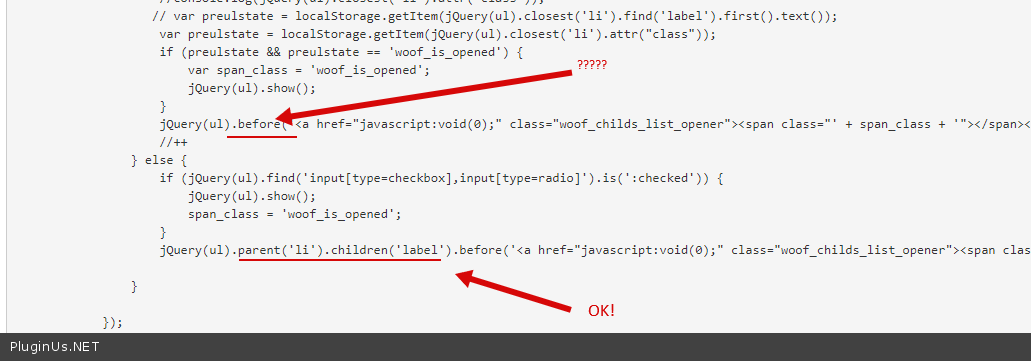
Fix it and cleare all cache
Quote from wpallweb on December 30, 2020, 17:31FYI:
- In your original example you ONLY had the change highlighted in 1 place: https://c2n.me/4apiRqF.png
- Yesterday, before your last message, I also thought that logically it should be in both places. I then made the change(changes in both places) and I tested and it DID NOT work. I then changed it again(change in 1 place) thinking maybe that's what you were indicating (only the 1 change).
- I have now made the change in BOTH places(again) as indicated in your last message. I've cleared all CACHE and it is NOT working.
Please advise.
wpallweb
FYI:
- In your original example you ONLY had the change highlighted in 1 place: https://c2n.me/4apiRqF.png
- Yesterday, before your last message, I also thought that logically it should be in both places. I then made the change(changes in both places) and I tested and it DID NOT work. I then changed it again(change in 1 place) thinking maybe that's what you were indicating (only the 1 change).
- I have now made the change in BOTH places(again) as indicated in your last message. I've cleared all CACHE and it is NOT working.
Please advise.
wpallweb
Quote from wpallweb on December 30, 2020, 17:34Continued:
                var span_class = 'woof_is_closed';
                if (woof_supports_html5_storage()) {
                    //test mode  from 06.11.2017
                    //console.log(jQuery(ul).closest('li').attr("class"));
                   // var preulstate = localStorage.getItem(jQuery(ul).closest('li').find('label').first().text());
                    var preulstate = localStorage.getItem(jQuery(ul).closest('li').attr("class"));
                    if (preulstate && preulstate == 'woof_is_opened') {
                        var span_class = 'woof_is_opened';
                        jQuery(ul).show();
                    }
                    jQuery(ul).parent('li').children('label').before('<a href="javascript:void(0);" class="woof_childs_list_opener"><span class="' + span_class + '"></span></a>');
                    //++
                } else {
                    if (jQuery(ul).find('input[type=checkbox],input[type=radio]').is(':checked')) {
                        jQuery(ul).show();
                        span_class = 'woof_is_opened';
                    }
                    jQuery(ul).parent('li').children('label').before('<a href="javascript:void(0);" class="woof_childs_list_opener"><span class="' + span_class + '"></span></a>');

                }
Continued:
                var span_class = 'woof_is_closed';
                if (woof_supports_html5_storage()) {
                    //test mode  from 06.11.2017
                    //console.log(jQuery(ul).closest('li').attr("class"));
                   // var preulstate = localStorage.getItem(jQuery(ul).closest('li').find('label').first().text());
                    var preulstate = localStorage.getItem(jQuery(ul).closest('li').attr("class"));
                    if (preulstate && preulstate == 'woof_is_opened') {
                        var span_class = 'woof_is_opened';
                        jQuery(ul).show();
                    }
                    jQuery(ul).parent('li').children('label').before('<a href="javascript:void(0);" class="woof_childs_list_opener"><span class="' + span_class + '"></span></a>');
                    //++
                } else {
                    if (jQuery(ul).find('input[type=checkbox],input[type=radio]').is(':checked')) {
                        jQuery(ul).show();
                        span_class = 'woof_is_opened';
                    }
                    jQuery(ul).parent('li').children('label').before('<a href="javascript:void(0);" class="woof_childs_list_opener"><span class="' + span_class + '"></span></a>');

}Quote from wpallweb on December 30, 2020, 17:35Not working, please advise.
wpallweb
Not working, please advise.
wpallweb
Quote from Pablo Borysenco on December 31, 2020, 12:42Hello
please double check this screenshot - https://c2n.me/4apiRqF.png and read this - https://c2n.me/4aqytBu.png
My test - https://c2n.me/4aqyALh
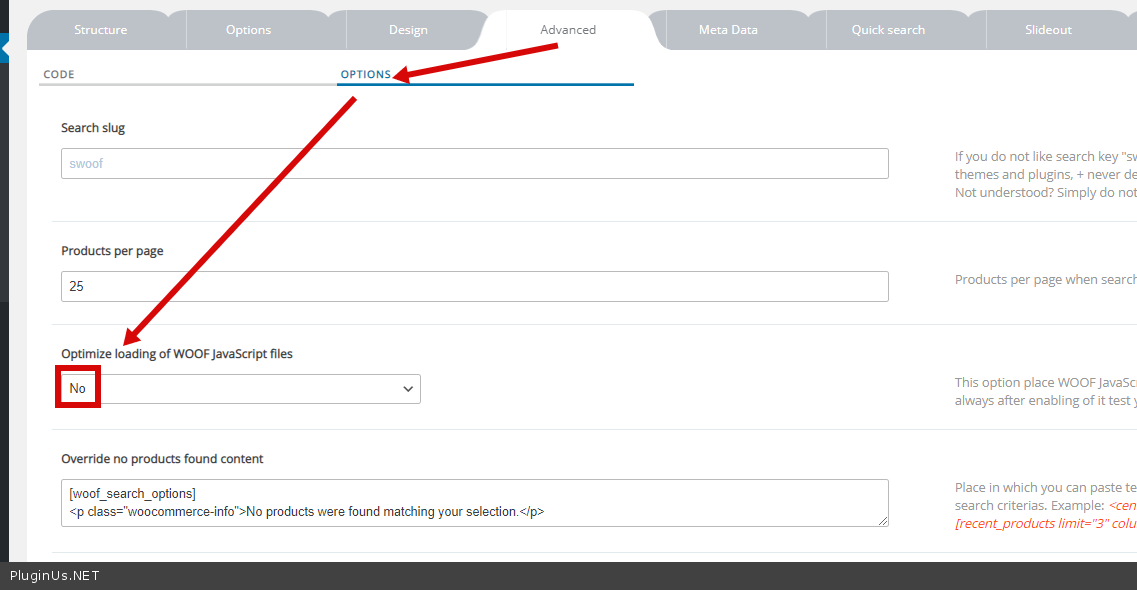
And check option - https://c2n.me/4aqyCCK.png
Hello
please double check this screenshot - https://c2n.me/4apiRqF.png and read this - https://c2n.me/4aqytBu.png
My test - https://c2n.me/4aqyALh
And check option - https://c2n.me/4aqyCCK.png