

Mouse Paste text in quick search doesnt work + search display
The support doesn work on Saturdays and Sundays, so some Friday requests can be answered on Monday. If you have problems with registration ask help on contact us page pleaseIf you not got email within 24~36 business hours, firstly check your spam box, and if no any email from the support there - back to the forum and read answer here. DO NOT ANSWER ON EMAILS [noreply@pluginus.net] FROM THE FORUM!! Emails are just for your info, all answers should be published only here.
The support doesn work on Saturdays and Sundays, so some Friday requests can be answered on Monday.

Quote from Julio on May 12, 2022, 20:18Hi Pablo:
I have 2 question's:
1.- How i do to capture RIGHT CLICK MOUSE + PASTE OPTION in quick search to show products, when i use CTRL+V keyboard Quick Search catch the text and show the search product BUT when i do the same text but with MOUSE RIGHT CLICK + PASTE OPTION doesnt happend. I test in your demo page and doesnt work either: https://demo.products-filter.com/quick-search/
2.- Taking your demo site again as an example: https://demo.products-filter.com/, how i could do to DON´T SHOW products untill the user write a search text and press SEARCH BUTTON, to our customer is confuse see products in the search page when nothing was enter.
Thks for your help.
Hi Pablo:
I have 2 question's:
1.- How i do to capture RIGHT CLICK MOUSE + PASTE OPTION in quick search to show products, when i use CTRL+V keyboard Quick Search catch the text and show the search product BUT when i do the same text but with MOUSE RIGHT CLICK + PASTE OPTION doesnt happend. I test in your demo page and doesnt work either: https://demo.products-filter.com/quick-search/
2.- Taking your demo site again as an example: https://demo.products-filter.com/, how i could do to DON´T SHOW products untill the user write a search text and press SEARCH BUTTON, to our customer is confuse see products in the search page when nothing was enter.
Thks for your help.

Quote from Pablo Borysenco on May 13, 2022, 12:13Hello
- Unfortunately the plugin does not have this feature. Please drop me exact link ti the issue
- there is no "Quick search" on this page
Hello
- Unfortunately the plugin does not have this feature. Please drop me exact link ti the issue
- there is no"Quick search" on this page
Quote from Julio on May 17, 2022, 19:12Thks for your help:
1.- My customer test the search (in this case are ISBN BOOK) copy the ISBN from a excel using her mouse and paste the ISBN in QUICK SEARCH field using the rigth click mouse but doesnt happend, but if she use ctrl+v quick search work without problem.
2.- I know this page (https://demo.products-filter.com/) is not a quick search, my question is about the products, how to DONT show products when the filter is empty.
Thks for your help:
1.- My customer test the search (in this case are ISBN BOOK) copy the ISBN from a excel using her mouse and paste the ISBN in QUICK SEARCH field using the rigth click mouse but doesnt happend, but if she use ctrl+v quick search work without problem.
2.- I know this page (https://demo.products-filter.com/) is not a quick search, my question is about the products, how to DONT show products when the filter is empty.
Quote from Pablo Borysenco on May 18, 2022, 13:12Hello
- ok! Unfortunately the plugin does not have this feature.
- when the filter is empty. - What do you mean "empty filter"? Empty text filter field or when there is no search query
Hello
- ok! Unfortunately the plugin does not have this feature.
- when the filter is empty. - What do you mean"empty filter"? Empty text filter field or when there is no search query
Quote from Julio on May 18, 2022, 18:10Hi Pablo:
2.- Name as you want, the idea is when the search is clean just not show products: https://www.bibliografica.com/busqueda/ try to search and clean that search and you will see, the page show products, we need no product shows when the search is empty.
Thank you
Hi Pablo:
2.- Name as you want, the idea is when the search is clean just not show products: https://www.bibliografica.com/busqueda/ try to search and clean that search and you will see, the page show products, we need no product shows when the search is empty.
Thank you
Quote from Pablo Borysenco on May 19, 2022, 11:01Hello
Please paste your license key here - https://share.pluginus.net/image/i20210618130558.png -> https://share.pluginus.net/image/i20210618130614.png
You can hide products with CSS. Read this - https://products-filter.com/manipulate-css-when-search-going
Hello
Please paste your license key here - https://share.pluginus.net/image/i20210618130558.png -> https://share.pluginus.net/image/i20210618130614.png


You can hide products with CSS. Read this - https://products-filter.com/manipulate-css-when-search-going
Quote from Julio on May 19, 2022, 19:21Hi Pablo:
Maybe im not clear, im try to explain:
1.- When the search page have NOT text to search or in other words THE SEARCH is empty, the page looks like this:
https://snipboard.io/XdvhFA.jpg?
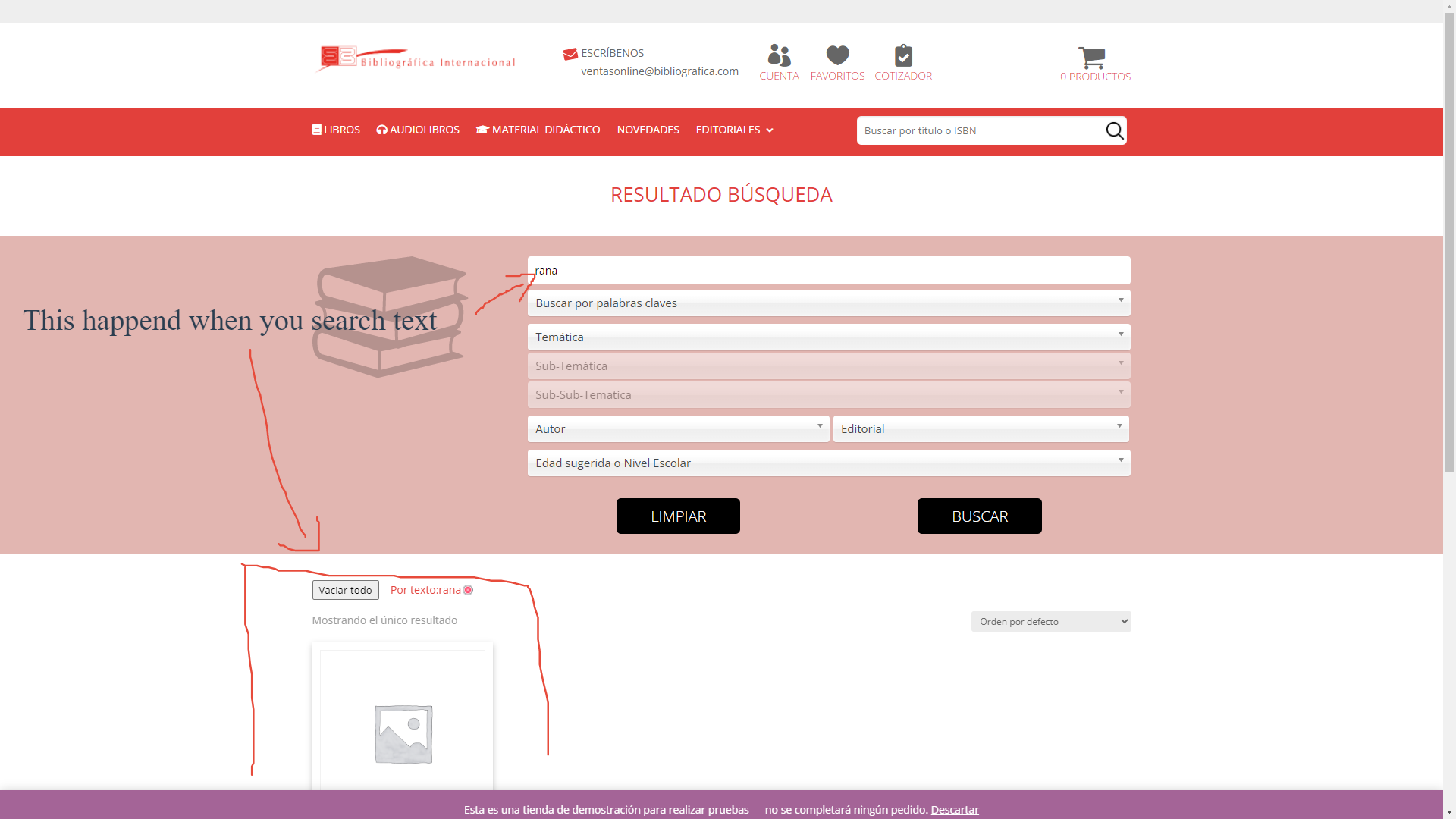
2.- This happend when you search a text (which is ok):
https://snipboard.io/SA8ktw.jpg?
BUT when your clean the search to search again this happend:
https://snipboard.io/W5bRFJ.jpg?
How i do to dont show products when the search is empty
Thks
Hi Pablo:
Maybe im not clear, im try to explain:
1.- When the search page have NOT text to search or in other words THE SEARCH is empty, the page looks like this:
https://snipboard.io/XdvhFA.jpg?

2.- This happend when you search a text (which is ok):
https://snipboard.io/SA8ktw.jpg?
BUT when your clean the search to search again this happend:
https://snipboard.io/W5bRFJ.jpg?

How i do to dont show products when the search is empty
Thks
Quote from Pablo Borysenco on May 20, 2022, 12:09Hello
Please paste your license key here - https://share.pluginus.net/image/i20210618130558.png -> https://share.pluginus.net/image/i20210618130614.png
Ok! The plugin does not have this feature. But you can try this solution - https://share.pluginus.net/image/i20220520100936.png
Hello
Please paste your license key here - https://share.pluginus.net/image/i20210618130558.png -> https://share.pluginus.net/image/i20210618130614.png
Ok! The plugin does not have this feature. But you can try this solution - https://share.pluginus.net/image/i20220520100936.png
