

Mobile responsive nad toggle | stroke
The support doesn work on Saturdays and Sundays, so some Friday requests can be answered on Monday. If you have problems with registration ask help on contact us page pleaseIf you not got email within 24~36 business hours, firstly check your spam box, and if no any email from the support there - back to the forum and read answer here. DO NOT ANSWER ON EMAILS [noreply@pluginus.net] FROM THE FORUM!! Emails are just for your info, all answers should be published only here.
The support doesn work on Saturdays and Sundays, so some Friday requests can be answered on Monday.

Quote from marin on December 8, 2021, 10:50Hi, I bought your add-on. Unfortunately I can't do mobile friendly and mobile toggle. I found this link: https://products-filter.com/hook/woof_block_toggle_state/, where should I paste this? Thank you.
Hi, I bought your add-on. Unfortunately I can't do mobile friendly and mobile toggle. I found this link: https://products-filter.com/hook/woof_block_toggle_state/, where should I paste this? Thank you.

Quote from Pablo Borysenco on December 8, 2021, 12:28Hello
Please paste it in functions.php of the current theme
Hello
Please paste it in functions.php of the current theme
Quote from marin on December 8, 2021, 12:44Dear Pablo, Nothing is happening, I have some conflicts on the website. Please, can you check - I've been trying for two days. :(
Dear Pablo, Nothing is happening, I have some conflicts on the website. Please, can you check - I've been trying for two days. :(
Quote from Pablo Borysenco on December 8, 2021, 13:21I checked it. It looks like you misunderstood what this code is for - this code works with this option - https://c2n.me/4egxCgm.png
What do you use to display the filter (widget/shortcode)?
I checked it. It looks like you misunderstood what this code is for - this code works with this option - https://c2n.me/4egxCgm.png
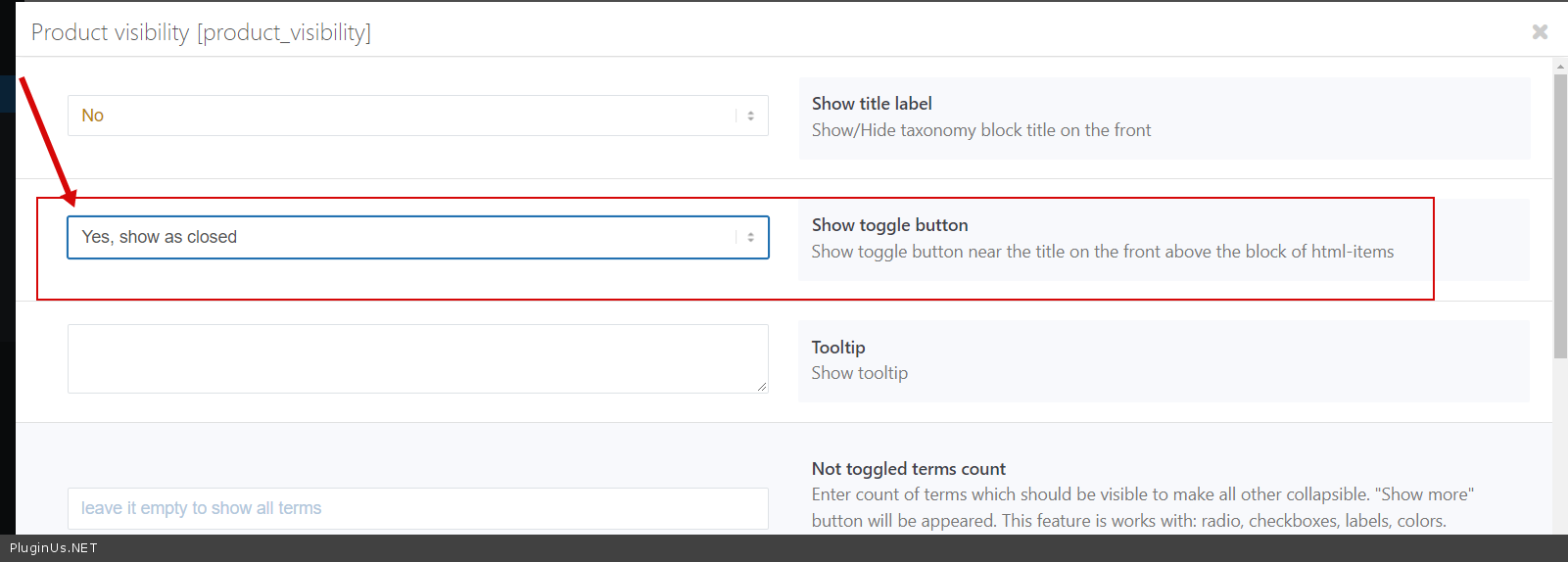
What do you use to display the filter (widget/shortcode)?
Quote from marin on December 8, 2021, 13:45Dear Pablo,
I want to make 4 columns on desktop: 1.Price 2.Category, 3. Color, 4.Size.
On mobile like this: https://i2.paste.pics/2b930f3388ad5b1870d12c38769610b6.pngThank you.
Dear Pablo,
I want to make 4 columns on desktop: 1.Price 2.Category, 3. Color, 4.Size.
On mobile like this: https://i2.paste.pics/2b930f3388ad5b1870d12c38769610b6.png

Thank you.
Quote from Pablo Borysenco on December 9, 2021, 12:26Hello
Please add this code in functions.php of the current theme
add_filter('woof_filter_shortcode_args', function($args){
if (wp_is_mobile()) {
$args['autohide'] = 1;
}return $args;
});
Hello
Please add this code in functions.php of the current theme
add_filter('woof_filter_shortcode_args', function($args){
if (wp_is_mobile()) {
$args['autohide'] = 1;
}
return $args;
});
Quote from marin on December 9, 2021, 21:23Dear Pablo,
1) It works now but the mobile filter is not responsive, check the image -> https://paste.pics/510494141e7869d0c261ab5648d6a3a9
2. How can I remove the filter frame and background on mobile / desktop background, check the image -> https://paste.pics/61f8b23959b3578cc1401ca3c2d5619c
3. How can I set a more modern price slider in another color like this -> https://paste.pics/af26d092fcba23bfde6ca50e32662024Thank you so much for your help.
Dear Pablo,
1) It works now but the mobile filter is not responsive, check the image -> https://paste.pics/510494141e7869d0c261ab5648d6a3a9
2. How can I remove the filter frame and background on mobile / desktop background, check the image -> https://paste.pics/61f8b23959b3578cc1401ca3c2d5619c
3. How can I set a more modern price slider in another color like this -> https://paste.pics/af26d092fcba23bfde6ca50e32662024
Thank you so much for your help.
Quote from Pablo Borysenco on December 10, 2021, 13:23Hello
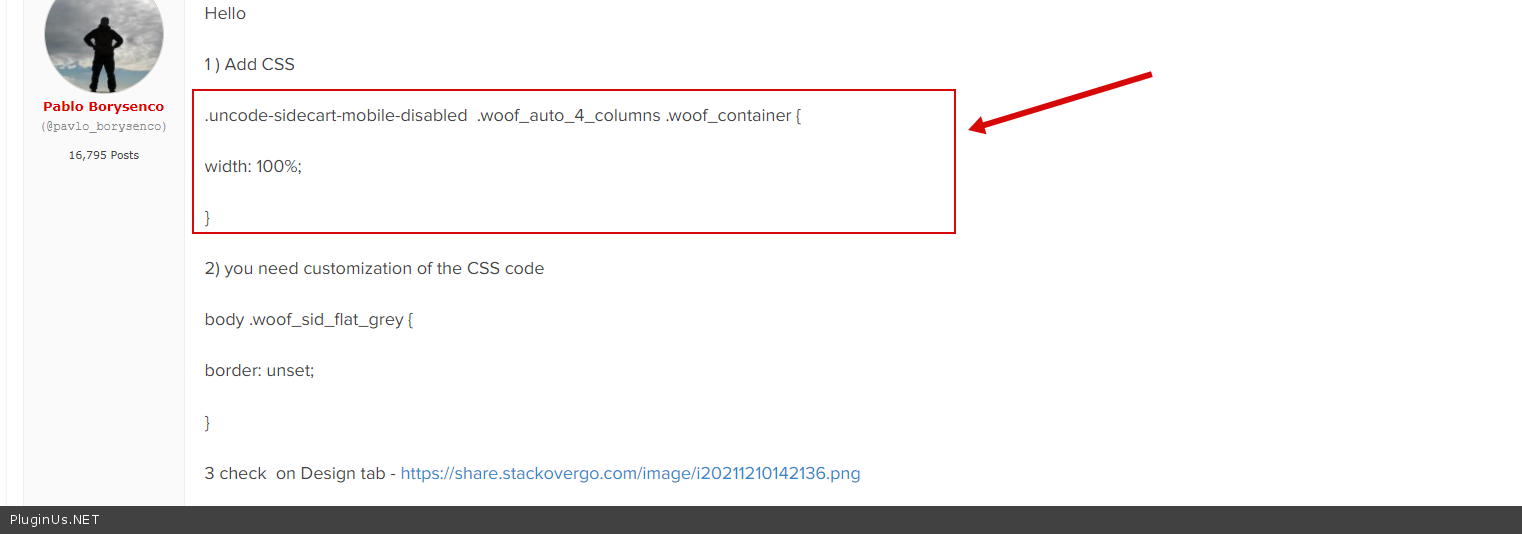
1 ) Add CSS
.uncode-sidecart-mobile-disabled .woof_auto_4_columns .woof_container {
width: 100%;
}
2) you need customization of the CSS code
body .woof_sid_flat_grey {
border: unset;
}
3 check on Design tab - https://share.pluginus.net/image/i20211210142136.png
Hello
1 ) Add CSS
.uncode-sidecart-mobile-disabled .woof_auto_4_columns .woof_container {
width: 100%;
}
2) you need customization of the CSS code
body .woof_sid_flat_grey {
border: unset;
}
3 check on Design tab - https://share.pluginus.net/image/i20211210142136.png

Quote from marin on December 10, 2021, 16:05Thanks Pablo, when i put this code .uncode-sidecart-mobile-disabled .woof_auto_4_columns .woof_container {
width: 100%; I have an error on the desktop, the filters are sorted one below the other. Check the image - https://paste.pics/FAEPFOn the desktop version they should be arranged vertically.
Regards.
Thanks Pablo, when i put this code .uncode-sidecart-mobile-disabled .woof_auto_4_columns .woof_container {
width: 100%; I have an error on the desktop, the filters are sorted one below the other. Check the image - https://paste.pics/FAEPF
On the desktop version they should be arranged vertically.
Regards.
Quote from Pablo Borysenco on December 13, 2021, 12:08Hello
Try to add in functions.php
add_filter('body_class', function($classes, $class) {
if (wp_is_mobile()) {
$classes[] = 'woof_is_mobile';
}
return $classes;
}, 10, 2);
And add CSS:
.woof_is_mobile .woof_auto_4_columns .woof_container {
width: 100%;
}
Hello
Try to add in functions.php
add_filter('body_class', function($classes, $class) {
if (wp_is_mobile()) {
$classes[] = 'woof_is_mobile';
}
return $classes;
}, 10, 2);
And add CSS:
.woof_is_mobile .woof_auto_4_columns .woof_container {
width: 100%;
}
Quote from marin on December 13, 2021, 12:51Dear Pablo, it's not working. Nothing is happening....
Dear Pablo, it's not working. Nothing is happening....
Quote from Pablo Borysenco on December 13, 2021, 13:18Please remove old CSS - https://c2n.me/4ejHw40.png
Please remove old CSS - https://c2n.me/4ejHw40.png
Quote from marin on December 13, 2021, 13:22Thank you Pablo, it's working now. :)
Another question how can I change the color of the ion range slider?
Thank you Pablo, it's working now. :)
Another question how can I change the color of the ion range slider?
Quote from Pablo Borysenco on December 14, 2021, 11:15Hello
To change the style of the slider ->Design tab -> https://share.pluginus.net/image/i20211214091454.png
Hello
To change the style of the slider ->Design tab -> https://share.pluginus.net/image/i20211214091454.png

Quote from marin on December 14, 2021, 11:55Dear Pablo, i need change color not a style.
Dear Pablo, i need change color not a style.
Quote from Pablo Borysenco on December 14, 2021, 12:13Hello
Use this code:
body .woof_sid_flat_grey .irs-bar, body .woof_sid_flat_dark .irs-bar {
border-top: 1px solid #97b6be;
border-bottom: 1px solid #97b6be;
background: #97b6be;
}body .woof_sid_flat_grey .irs-from, body .woof_sid_flat_grey .irs-to, body .woof_sid_flat_grey .irs-single {
color: #fff;
background: #97b6be;
}Use your color codes.
Hello
Use this code:
border-top: 1px solid #97b6be;
border-bottom: 1px solid #97b6be;
background: #97b6be;
}
color: #fff;
background: #97b6be;
}
Quote from marin on December 17, 2021, 17:19Thank You Pablo :)
Thank You Pablo :)
Quote from marin on January 5, 2022, 14:56Dear Pablo, I need another help. I have activated "show image of variation" but I have a product display error. a variation image appears above the product. check image - https://ibb.co/LNQh0G9
Dear Pablo, I need another help. I have activated"show image of variation" but I have a product display error. a variation image appears above the product. check image - https://ibb.co/LNQh0G9
Quote from Pablo Borysenco on January 6, 2022, 11:34Hello
It looks like the current theme is incompatible with this functionality. This can be if the theme uses custom templates for products and does not use standard hooks.
Hello
It looks like the current theme is incompatible with this functionality. This can be if the theme uses custom templates for products and does not use standard hooks.