

Mobile mode doesn't work
The support doesn work on Saturdays and Sundays, so some Friday requests can be answered on Monday. If you have problems with registration ask help on contact us page pleaseIf you not got email within 24~36 business hours, firstly check your spam box, and if no any email from the support there - back to the forum and read answer here. DO NOT ANSWER ON EMAILS [noreply@pluginus.net] FROM THE FORUM!! Emails are just for your info, all answers should be published only here.
The support doesn work on Saturdays and Sundays, so some Friday requests can be answered on Monday.

Quote from johnb on January 25, 2026, 01:41Hello,
The mobile mode seems not to trigger on my website.
I disabled all caching. Didn't work.
Enabled Browser-specific Caching. Didn't work either.
Used both "mobile_mode='1'" in an existing filter as well as [woof_mobile]. The regular filter kept showing up.
Removed the regular filter and used only [woof_mobile]. No filter appears.
Using: Divi with a child theme.
Hello,
The mobile mode seems not to trigger on my website.
I disabled all caching. Didn't work.
Enabled Browser-specific Caching. Didn't work either.
Used both"mobile_mode='1'" in an existing filter as well as [woof_mobile]. The regular filter kept showing up.
Removed the regular filter and used only [woof_mobile]. No filter appears.
Using: Divi with a child theme.

Quote from Alex Dovlatov on January 26, 2026, 14:41Hello John
Thank you for providing the details. Let me help you troubleshoot the mobile mode issue.
First, let me explain how HUSKY mobile mode works:
How Mobile Mode Works:
HUSKY mobile mode is designed for mobile devices where space is limited. When enabled:
- The filter is hidden by default on mobile devices
- A "Open filter" button appears (can be text, image, or both)
- When clicked, the filter slides out/shows
- A "Close filter" button appears to hide it again
Important: There is NO global "Enable Mobile Mode" setting in HUSKY options. Mobile mode is activated only through the shortcode attribute.
To help you, I need to understand what you're doing:
- Which shortcode are you using exactly?
[woof mobile_mode='1']?[woof_mobile]?- Something else?
- Where did you place this shortcode?
- In a page/post?
- In a widget?
- In your theme template?
- Do you have a regular
[woof]shortcode somewhere else on the same page?
- If yes, where is it located?
- How are you testing?
- Real mobile device (phone/tablet)?
- Browser Developer Tools mobile emulation (F12)?
- Can you provide a link to the page in the private section below?
- Please share the specific page URL where the mobile filter should appear
- This will help me check if the buttons are present but hidden by CSS
Note: The mobile filter button might be present on your page but invisible due to CSS styling or placement issues. I need to see the actual page to diagnose this.
Please provide these details and the page link in the private section, and I'll help you get it working!
Best regards
Hello John
Thank you for providing the details. Let me help you troubleshoot the mobile mode issue.
First, let me explain how HUSKY mobile mode works:
How Mobile Mode Works:
HUSKY mobile mode is designed for mobile devices where space is limited. When enabled:
- The filter is hidden by default on mobile devices
- A "Open filter" button appears (can be text, image, or both)
- When clicked, the filter slides out/shows
- A "Close filter" button appears to hide it again
Important: There is NO global"Enable Mobile Mode" setting in HUSKY options. Mobile mode is activated only through the shortcode attribute.
To help you, I need to understand what you're doing:
- Which shortcode are you using exactly?
[woof mobile_mode='1']?[woof_mobile]?- Something else?
- Where did you place this shortcode?
- In a page/post?
- In a widget?
- In your theme template?
- Do you have a regular
[woof]shortcode somewhere else on the same page?- If yes, where is it located?
- How are you testing?
- Real mobile device (phone/tablet)?
- Browser Developer Tools mobile emulation (F12)?
- Can you provide a link to the page in the private section below?
- Please share the specific page URL where the mobile filter should appear
- This will help me check if the buttons are present but hidden by CSS
Note: The mobile filter button might be present on your page but invisible due to CSS styling or placement issues. I need to see the actual page to diagnose this.
Please provide these details and the page link in the private section, and I'll help you get it working!
Best regards
Quote from johnb on January 28, 2026, 20:15Hi Alex,
To help you, I need to understand what you're doing:
- Which shortcode are you using exactly?
[woof mobile_mode='1']? I tried with this shortcode (plus some extra options) and didn't work.[woof_mobile]? I tried with this shortcode on its own as well and didn't work.- Something else?
- Where did you place this shortcode?
- In a page/post? In a column on my theme template.
- In a widget?
- In your theme template?
- Do you have a regular
[woof]shortcode somewhere else on the same page?
- If yes, where is it located? Yes. Just above the mobile short code. But since it made no difference, I have since removed it.
- How are you testing?
- Real mobile device (phone/tablet)? Real phone - mine and friends. Android and iOS.
- Browser Developer Tools mobile emulation (F12)? As well.
- Can you provide a link to the page in the private section below?
- Please share the specific page URL where the mobile filter should appear - Will provide as private data :)
Hi Alex,
To help you, I need to understand what you're doing:
- Which shortcode are you using exactly?
[woof mobile_mode='1']? I tried with this shortcode (plus some extra options) and didn't work.[woof_mobile]? I tried with this shortcode on its own as well and didn't work.- Something else?
- Where did you place this shortcode?
- In a page/post? In a column on my theme template.
- In a widget?
- In your theme template?
- Do you have a regular
[woof]shortcode somewhere else on the same page?- If yes, where is it located? Yes. Just above the mobile short code. But since it made no difference, I have since removed it.
- How are you testing?
- Real mobile device (phone/tablet)? Real phone - mine and friends. Android and iOS.
- Browser Developer Tools mobile emulation (F12)? As well.
- Can you provide a link to the page in the private section below?
- Please share the specific page URL where the mobile filter should appear - Will provide as private data :)
Quote from Alex Dovlatov on January 29, 2026, 21:06Hello John
You did all rigth. Just looked DOM of the site:
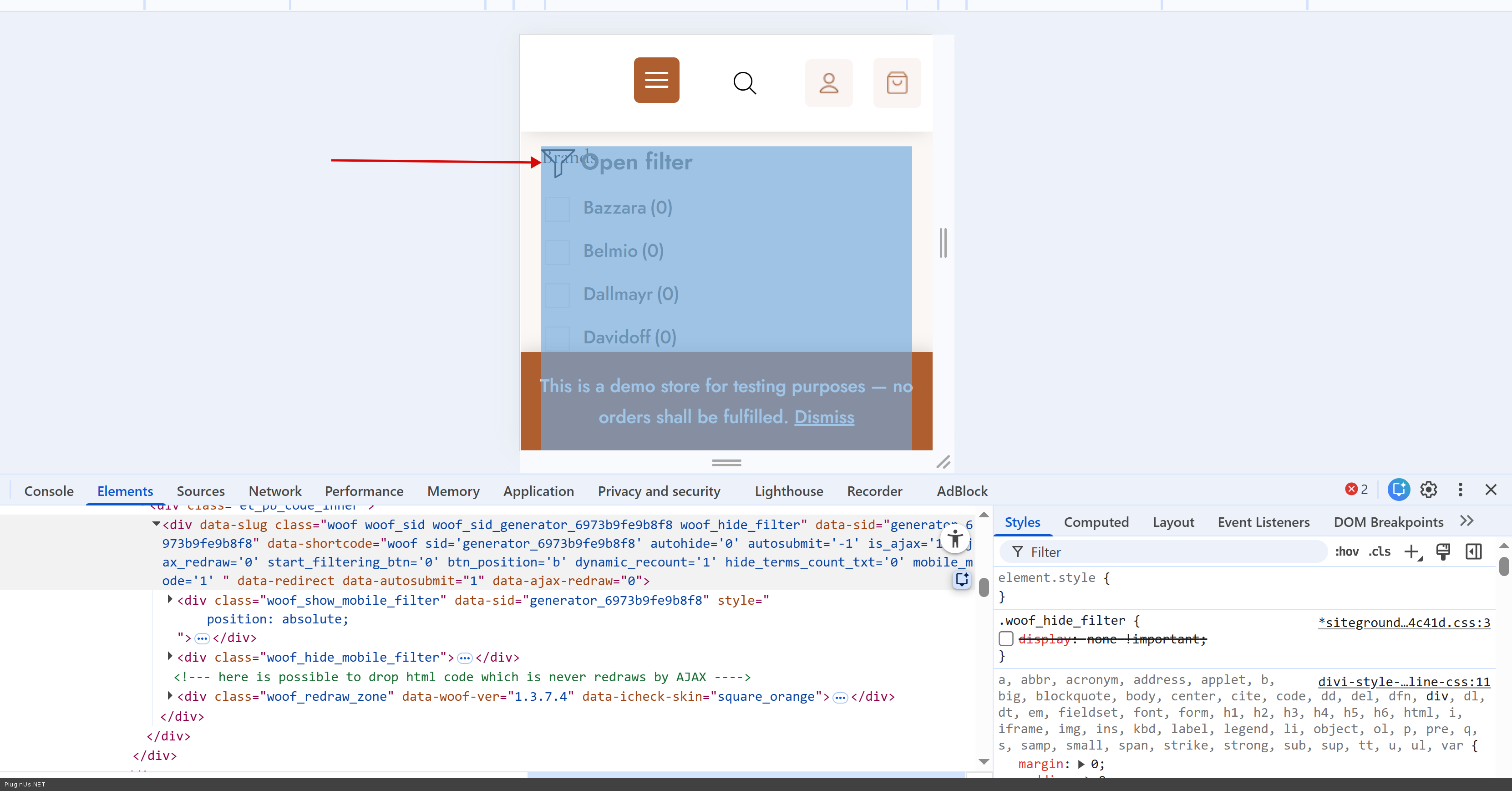
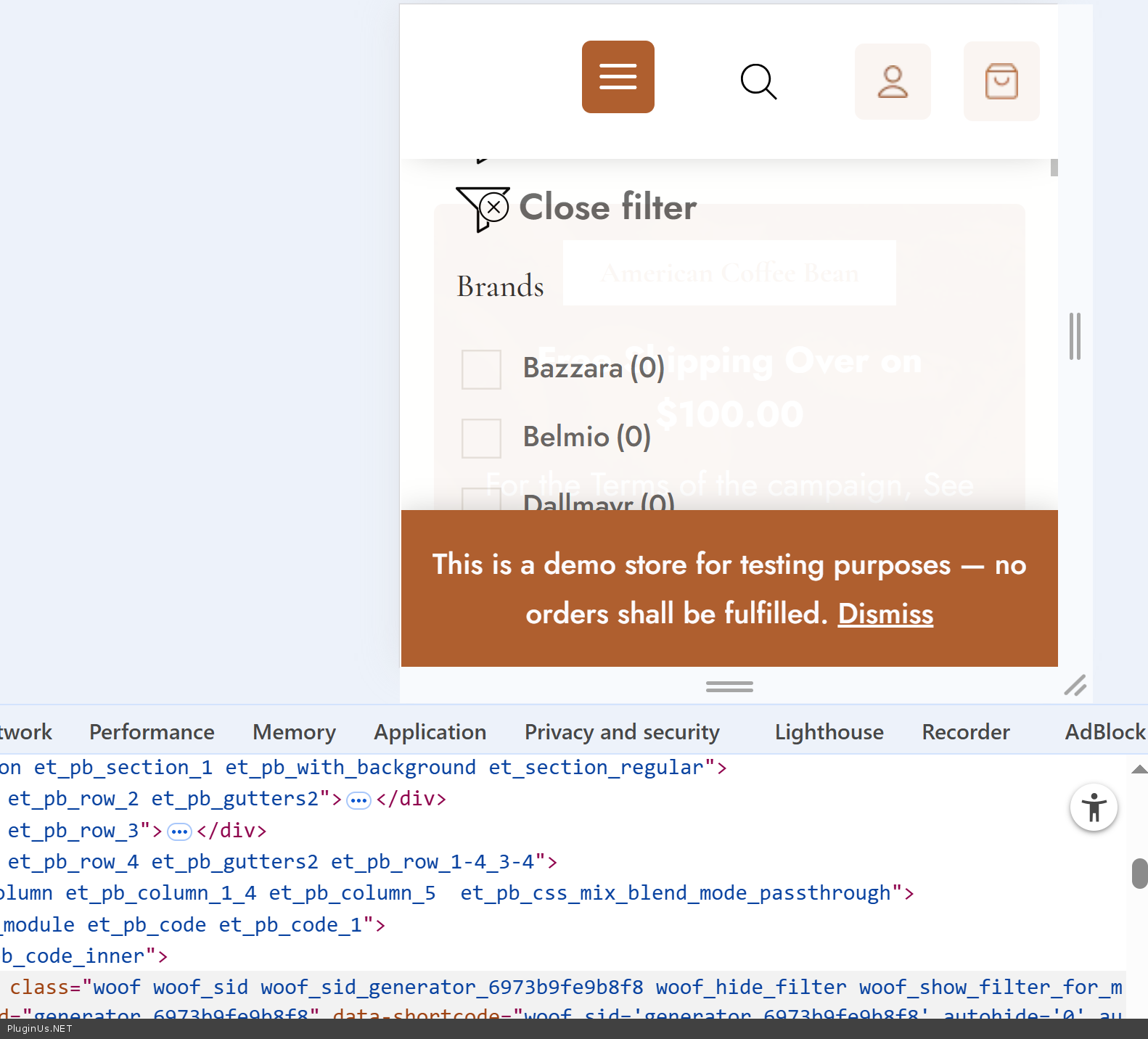
Mobile button is on its place, BUT isse is in css links optimizations! Exlude please file https://www.your_site.mt/wp-content/plugins/woocommerce-products-filter/css/front.css from optimization and you will see it:
Hello John
You did all rigth. Just looked DOM of the site:
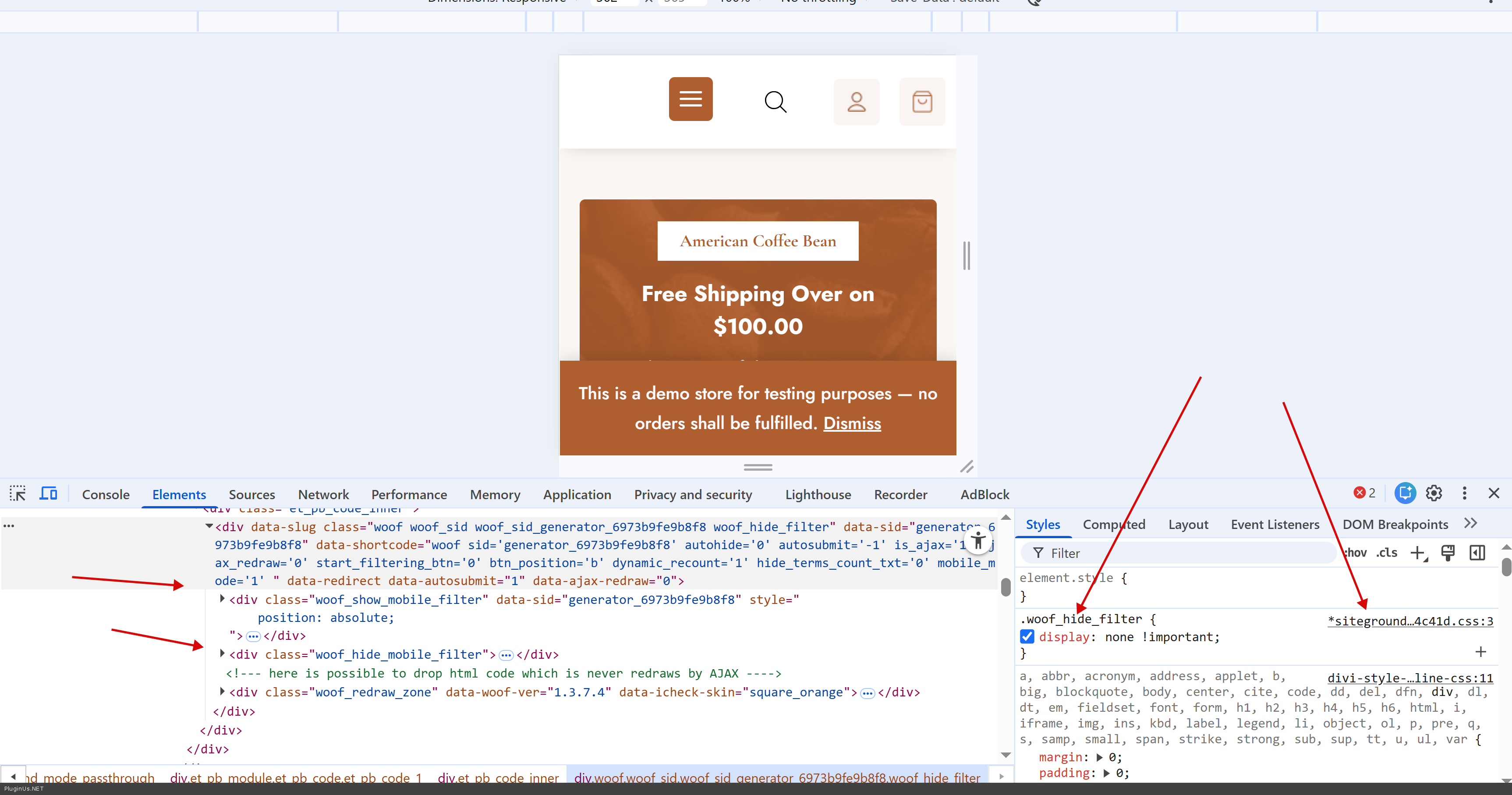
Mobile button is on its place, BUT isse is in css links optimizations! Exlude please file https://www.your_site.mt/wp-content/plugins/woocommerce-products-filter/css/front.css from optimization and you will see it:
Quote from Alex Dovlatov on January 29, 2026, 21:08Also you can provide wp-admin access to the site in the private area of the site to let me play with shortcodes and scripts to make things clear
https://share.pluginus.net/image/i20230222134241.png
https://share.pluginus.net/image/i20230222134615.png
Also you can provide wp-admin access to the site in the private area of the site to let me play with shortcodes and scripts to make things clear
https://share.pluginus.net/image/i20230222134241.png
https://share.pluginus.net/image/i20230222134615.png


Quote from johnb on January 29, 2026, 23:17Hi Alex,
I tried excluding the file you mentioned but still doesn't work. Earlier I had disabled all the caching and still had the same issue.
I sent you the login details :)
Hi Alex,
I tried excluding the file you mentioned but still doesn't work. Earlier I had disabled all the caching and still had the same issue.
I sent you the login details :)
Quote from Alex Dovlatov on January 30, 2026, 20:05Hello John
I entered the site, but I need permisson there to change code for plugins and themes:
should be like:
the same for themes section
So I did some tests, somewhere, something intersept javascript functionality, so I created custom shortcode:
/**
 * Custom mobile filter shortcode for WOOF
 * Usage: [woof_mobile_custom]
 */
add_shortcode('woof_mobile_custom', 'woof_mobile_custom_shortcode');

function woof_mobile_custom_shortcode($atts) {
// Parse attributes
    $atts = shortcode_atts(array(
        'button_text' => 'Filters',
        'button_color' => '#ff6b35',
        'button_position' => 'bottom-right' // bottom-right, bottom-left, top-right, top-left
            ), $atts);

// Generate unique ID for multiple instances
    $unique_id = 'woof_mobile_' . uniqid();

// Position styles
    $position_styles = '';
    switch ($atts['button_position']) {
        case 'bottom-left':
            $position_styles = 'bottom: 20px; left: 20px;';
            break;
        case 'top-right':
            $position_styles = 'top: 20px; right: 20px;';
            break;
        case 'top-left':
            $position_styles = 'top: 20px; left: 20px;';
            break;
        default: // bottom-right
            $position_styles = 'bottom: 20px; right: 20px;';
    }

    ob_start();
    ?>
    <div class="woof_custom_mobile_wrapper" id="<?php echo esc_attr($unique_id); ?>">
        <!-- Open button -->
        <button class="woof_custom_mobile_btn" style="<?php echo esc_attr($position_styles); ?> background: <?php echo esc_attr($atts['button_color']); ?>;">
            <span class="woof_mobile_icon">☰</span>
            <span class="woof_mobile_text"><?php echo esc_html($atts['button_text']); ?></span>
        </button>

        <!-- Overlay -->
        <div class="woof_custom_mobile_overlay"></div>

        <!-- Sidebar with filter -->
        <div class="woof_custom_mobile_sidebar">
            <div class="woof_custom_mobile_header">
                <h3><?php echo esc_html($atts['button_text']); ?></h3>
                <button class="woof_custom_mobile_close">✕</button>
            </div>
            <div class="woof_custom_mobile_content">
                <?php echo do_shortcode('[woof]'); ?>
            </div>
        </div>
    </div>

    <style>
        #<?php echo esc_attr($unique_id); ?> .woof_custom_mobile_btn {
            display: none;
            position: fixed;
            z-index: 999;
            color: white;
            border: none;
            border-radius: 50px;
            padding: 12px 20px;
            font-size: 16px;
            font-weight: bold;
            box-shadow: 0 4px 12px rgba(0,0,0,0.3);
            cursor: pointer;
            transition: all 0.3s ease;
        }

        #<?php echo esc_attr($unique_id); ?> .woof_custom_mobile_btn:hover {
            opacity: 0.9;
            transform: scale(1.05);
        }

        #<?php echo esc_attr($unique_id); ?> .woof_mobile_icon {
            font-size: 20px;
            margin-right: 8px;
        }

        /* Show button only on mobile */
        @media (max-width: 768px) {
            #<?php echo esc_attr($unique_id); ?> .woof_custom_mobile_btn {
                display: flex;
                align-items: center;
                justify-content: center;
            }
        }

        /* Overlay background */
        #<?php echo esc_attr($unique_id); ?> .woof_custom_mobile_overlay {
            display: none;
            position: fixed;
            top: 0;
            left: 0;
            width: 100%;
            height: 100%;
            background: rgba(0,0,0,0.5);
            z-index: 9998;
            opacity: 0;
            transition: opacity 0.3s ease;
        }

        #<?php echo esc_attr($unique_id); ?> .woof_custom_mobile_overlay.active {
            display: block;
            opacity: 1;
        }

        /* Sidebar panel */
        #<?php echo esc_attr($unique_id); ?> .woof_custom_mobile_sidebar {
            position: fixed;
            top: 0;
            left: -100%;
            width: 85%;
            max-width: 400px;
            height: 100%;
            background: white;
            z-index: 9999;
            overflow-y: auto;
            transition: left 0.3s ease;
            box-shadow: 2px 0 10px rgba(0,0,0,0.3);
        }

        #<?php echo esc_attr($unique_id); ?> .woof_custom_mobile_sidebar.active {
            left: 0;
        }

        /* Filter header */
        #<?php echo esc_attr($unique_id); ?> .woof_custom_mobile_header {
            display: flex;
            justify-content: space-between;
            align-items: center;
            padding: 20px;
            background: #f5f5f5;
            border-bottom: 1px solid #ddd;
            position: sticky;
            top: 0;
            z-index: 10;
        }

        #<?php echo esc_attr($unique_id); ?> .woof_custom_mobile_header h3 {
            margin: 0;
            font-size: 20px;
            font-weight: bold;
        }

        /* Close button */
        #<?php echo esc_attr($unique_id); ?> .woof_custom_mobile_close {
            background: transparent;
            border: none;
            font-size: 28px;
            cursor: pointer;
            color: #333;
            padding: 0;
            width: 30px;
            height: 30px;
            display: flex;
            align-items: center;
            justify-content: center;
            transition: color 0.2s;
        }

        #<?php echo esc_attr($unique_id); ?> .woof_custom_mobile_close:hover {
            color: <?php echo esc_attr($atts['button_color']); ?>;
        }

        /* Filter content */
        #<?php echo esc_attr($unique_id); ?> .woof_custom_mobile_content {
            padding: 20px;
        }

        /* Hide on desktop */
        @media (min-width: 769px) {
            #<?php echo esc_attr($unique_id); ?> {
                display: none;
            }
        }

        /* Disable body scroll when filter is open */
        body.woof_mobile_filter_open {
            overflow: hidden !important;
        }
    </style>

    <script>
        jQuery(document).ready(function ($) {
            var wrapper = $('#<?php echo esc_js($unique_id); ?>');

    // Open filter
            wrapper.find('.woof_custom_mobile_btn').on('click', function () {
                wrapper.find('.woof_custom_mobile_sidebar').addClass('active');
                wrapper.find('.woof_custom_mobile_overlay').addClass('active');
                $('body').addClass('woof_mobile_filter_open');
            });

    // Close by button
            wrapper.find('.woof_custom_mobile_close').on('click', function () {
                closeFilter();
            });

    // Close by overlay click
            wrapper.find('.woof_custom_mobile_overlay').on('click', function () {
                closeFilter();
            });

    // Close function
            function closeFilter() {
                wrapper.find('.woof_custom_mobile_sidebar').removeClass('active');
                wrapper.find('.woof_custom_mobile_overlay').removeClass('active');
                $('body').removeClass('woof_mobile_filter_open');
            }

    // Close by ESC key
            $(document).on('keydown', function (e) {
                if (e.key === 'Escape' && wrapper.find('.woof_custom_mobile_sidebar').hasClass('active')) {
                    closeFilter();
                }
            });
        });
    </script>
    <?php
    return ob_get_clean();
}
Please add this code to your functions.php (one time only):
[paste the code above]Then use this shortcode anywhere you want (page, widget, etc):
Basic usage:
[woof_mobile_custom]With custom options:
[woof_mobile_custom button_text="Filter Products" button_color="#e74c3c" button_position="bottom-left"]Available options:
- button_text: Text on the button (default: "Filters")
- button_color: Hex color code (default: "#ff6b35")
- button_position: Where to place button
* bottom-right (default)
* bottom-left
* top-right
* top-leftExamples:
Red button, bottom left:
[woof_mobile_custom button_text="Search" button_color="#e74c3c" button_position="bottom-left"]Blue button, custom text:
[woof_mobile_custom button_text="Find Products" button_color="#3498db"]The shortcode:
- Only shows on mobile devices (< 768px)
- Includes WOOF filter automatically
- Slides in from left side
- Has overlay background
- Can be used multiple times on same pageLet me know if you need any adjustments!
Hello John
I entered the site, but I need permisson there to change code for plugins and themes:
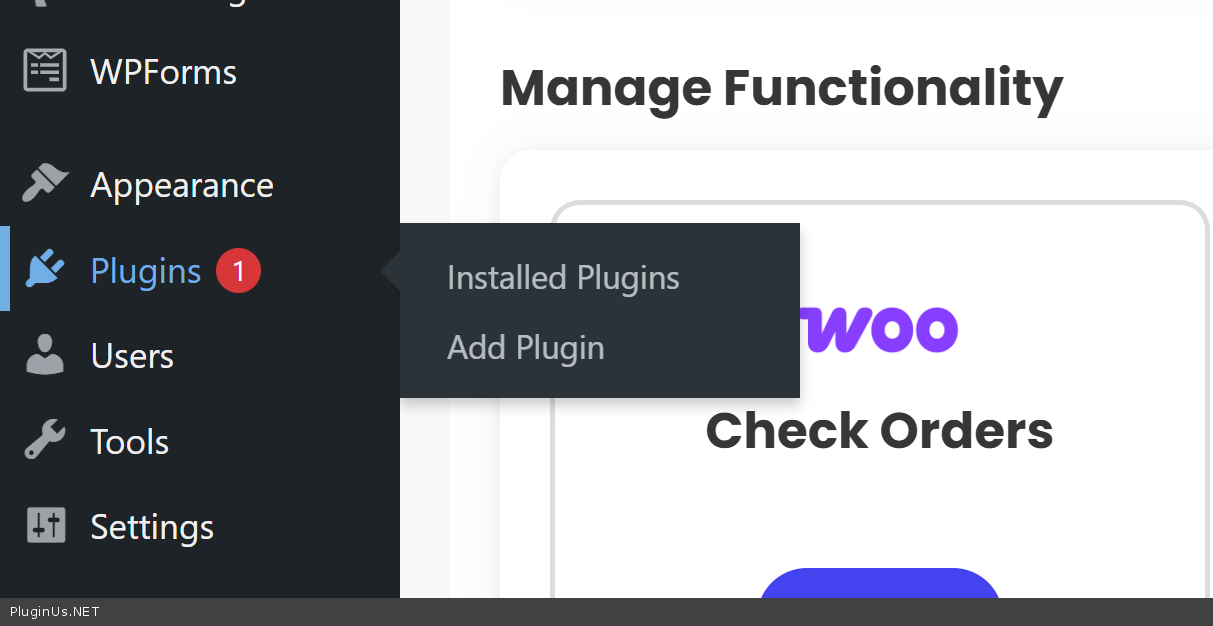
should be like:
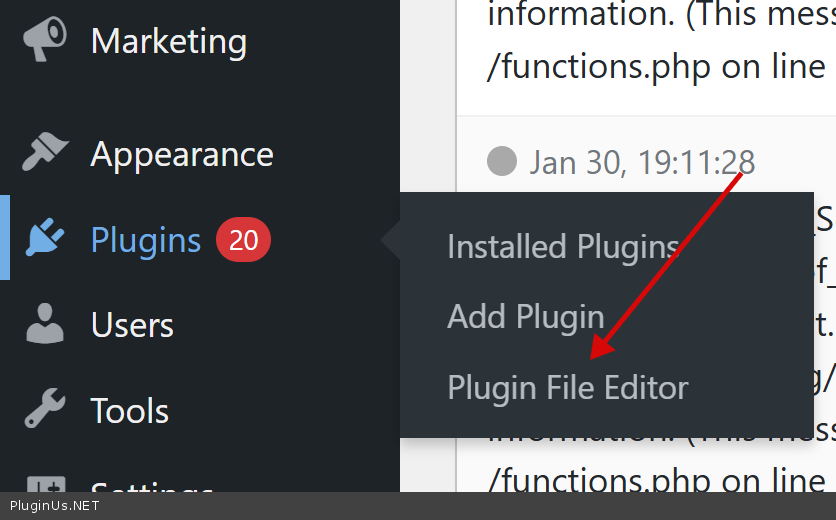
the same for themes section
So I did some tests, somewhere, something intersept javascript functionality, so I created custom shortcode:
/**
 * Custom mobile filter shortcode for WOOF
 * Usage: [woof_mobile_custom]
 */
add_shortcode('woof_mobile_custom', 'woof_mobile_custom_shortcode');

function woof_mobile_custom_shortcode($atts) {
// Parse attributes
    $atts = shortcode_atts(array(
        'button_text' => 'Filters',
        'button_color' => '#ff6b35',
        'button_position' => 'bottom-right' // bottom-right, bottom-left, top-right, top-left
            ), $atts);

// Generate unique ID for multiple instances
    $unique_id = 'woof_mobile_' . uniqid();

// Position styles
    $position_styles = '';
    switch ($atts['button_position']) {
        case 'bottom-left':
            $position_styles = 'bottom: 20px; left: 20px;';
            break;
        case 'top-right':
            $position_styles = 'top: 20px; right: 20px;';
            break;
        case 'top-left':
            $position_styles = 'top: 20px; left: 20px;';
            break;
        default: // bottom-right
            $position_styles = 'bottom: 20px; right: 20px;';
    }

    ob_start();
    ?>
    <div class="woof_custom_mobile_wrapper" id="<?php echo esc_attr($unique_id); ?>">
        <!-- Open button -->
        <button class="woof_custom_mobile_btn" style="<?php echo esc_attr($position_styles); ?> background: <?php echo esc_attr($atts['button_color']); ?>;">
            <span class="woof_mobile_icon">☰</span>
            <span class="woof_mobile_text"><?php echo esc_html($atts['button_text']); ?></span>
        </button>

        <!-- Overlay -->
        <div class="woof_custom_mobile_overlay"></div>

        <!-- Sidebar with filter -->
        <div class="woof_custom_mobile_sidebar">
            <div class="woof_custom_mobile_header">
                <h3><?php echo esc_html($atts['button_text']); ?></h3>
                <button class="woof_custom_mobile_close">✕</button>
            </div>
            <div class="woof_custom_mobile_content">
                <?php echo do_shortcode('[woof]'); ?>
            </div>
        </div>
    </div>

    <style>
        #<?php echo esc_attr($unique_id); ?> .woof_custom_mobile_btn {
            display: none;
            position: fixed;
            z-index: 999;
            color: white;
            border: none;
            border-radius: 50px;
            padding: 12px 20px;
            font-size: 16px;
            font-weight: bold;
            box-shadow: 0 4px 12px rgba(0,0,0,0.3);
            cursor: pointer;
            transition: all 0.3s ease;
        }

        #<?php echo esc_attr($unique_id); ?> .woof_custom_mobile_btn:hover {
            opacity: 0.9;
            transform: scale(1.05);
        }

        #<?php echo esc_attr($unique_id); ?> .woof_mobile_icon {
            font-size: 20px;
            margin-right: 8px;
        }

        /* Show button only on mobile */
        @media (max-width: 768px) {
            #<?php echo esc_attr($unique_id); ?> .woof_custom_mobile_btn {
                display: flex;
                align-items: center;
                justify-content: center;
            }
        }

        /* Overlay background */
        #<?php echo esc_attr($unique_id); ?> .woof_custom_mobile_overlay {
            display: none;
            position: fixed;
            top: 0;
            left: 0;
            width: 100%;
            height: 100%;
            background: rgba(0,0,0,0.5);
            z-index: 9998;
            opacity: 0;
            transition: opacity 0.3s ease;
        }

        #<?php echo esc_attr($unique_id); ?> .woof_custom_mobile_overlay.active {
            display: block;
            opacity: 1;
        }

        /* Sidebar panel */
        #<?php echo esc_attr($unique_id); ?> .woof_custom_mobile_sidebar {
            position: fixed;
            top: 0;
            left: -100%;
            width: 85%;
            max-width: 400px;
            height: 100%;
            background: white;
            z-index: 9999;
            overflow-y: auto;
            transition: left 0.3s ease;
            box-shadow: 2px 0 10px rgba(0,0,0,0.3);
        }

        #<?php echo esc_attr($unique_id); ?> .woof_custom_mobile_sidebar.active {
            left: 0;
        }

        /* Filter header */
        #<?php echo esc_attr($unique_id); ?> .woof_custom_mobile_header {
            display: flex;
            justify-content: space-between;
            align-items: center;
            padding: 20px;
            background: #f5f5f5;
            border-bottom: 1px solid #ddd;
            position: sticky;
            top: 0;
            z-index: 10;
        }

        #<?php echo esc_attr($unique_id); ?> .woof_custom_mobile_header h3 {
            margin: 0;
            font-size: 20px;
            font-weight: bold;
        }

        /* Close button */
        #<?php echo esc_attr($unique_id); ?> .woof_custom_mobile_close {
            background: transparent;
            border: none;
            font-size: 28px;
            cursor: pointer;
            color: #333;
            padding: 0;
            width: 30px;
            height: 30px;
            display: flex;
            align-items: center;
            justify-content: center;
            transition: color 0.2s;
        }

        #<?php echo esc_attr($unique_id); ?> .woof_custom_mobile_close:hover {
            color: <?php echo esc_attr($atts['button_color']); ?>;
        }

        /* Filter content */
        #<?php echo esc_attr($unique_id); ?> .woof_custom_mobile_content {
            padding: 20px;
        }

        /* Hide on desktop */
        @media (min-width: 769px) {
            #<?php echo esc_attr($unique_id); ?> {
                display: none;
            }
        }

        /* Disable body scroll when filter is open */
        body.woof_mobile_filter_open {
            overflow: hidden !important;
        }
    </style>

    <script>
        jQuery(document).ready(function ($) {
            var wrapper = $('#<?php echo esc_js($unique_id); ?>');

    // Open filter
            wrapper.find('.woof_custom_mobile_btn').on('click', function () {
                wrapper.find('.woof_custom_mobile_sidebar').addClass('active');
                wrapper.find('.woof_custom_mobile_overlay').addClass('active');
                $('body').addClass('woof_mobile_filter_open');
            });

    // Close by button
            wrapper.find('.woof_custom_mobile_close').on('click', function () {
                closeFilter();
            });

    // Close by overlay click
            wrapper.find('.woof_custom_mobile_overlay').on('click', function () {
                closeFilter();
            });

    // Close function
            function closeFilter() {
                wrapper.find('.woof_custom_mobile_sidebar').removeClass('active');
                wrapper.find('.woof_custom_mobile_overlay').removeClass('active');
                $('body').removeClass('woof_mobile_filter_open');
            }

    // Close by ESC key
            $(document).on('keydown', function (e) {
                if (e.key === 'Escape' && wrapper.find('.woof_custom_mobile_sidebar').hasClass('active')) {
                    closeFilter();
                }
            });
        });
    </script>
    <?php
    return ob_get_clean();
}
Please add this code to your functions.php (one time only):
[paste the code above]
Then use this shortcode anywhere you want (page, widget, etc):
Basic usage:
[woof_mobile_custom]
With custom options:
[woof_mobile_custom button_text="Filter Products" button_color="#e74c3c" button_position="bottom-left"]
Available options:
- button_text: Text on the button (default:"Filters")
- button_color: Hex color code (default:"#ff6b35")
- button_position: Where to place button
* bottom-right (default)
* bottom-left
* top-right
* top-left
Examples:
Red button, bottom left:
[woof_mobile_custom button_text="Search" button_color="#e74c3c" button_position="bottom-left"]
Blue button, custom text:
[woof_mobile_custom button_text="Find Products" button_color="#3498db"]
The shortcode:
- Only shows on mobile devices (< 768px)
- Includes WOOF filter automatically
- Slides in from left side
- Has overlay background
- Can be used multiple times on same page
Let me know if you need any adjustments!
Quote from johnb on January 30, 2026, 20:12Thank you Alex! I will try it soon and let you know. I have one more question and if it both are fixed with your plugin, I will purchase it now.
I have a product. I click on the brand. But instead of filtering by brand, I get all products again. Is there a way for the filter to automatically recognise that I'm filtering by the brand and hide all the other products and all filter options not related to that brand?
Let's say I click on brand X which has products in 3 categories. Can the filter show only that brand's products in the product list and hide all other categories except those 3?
Thank you Alex! I will try it soon and let you know. I have one more question and if it both are fixed with your plugin, I will purchase it now.
I have a product. I click on the brand. But instead of filtering by brand, I get all products again. Is there a way for the filter to automatically recognise that I'm filtering by the brand and hide all the other products and all filter options not related to that brand?
Let's say I click on brand X which has products in 3 categories. Can the filter show only that brand's products in the product list and hide all other categories except those 3?
Quote from johnb on January 30, 2026, 20:30P.S. I added the mobile code and it works!
The only adjustment needed is the positioning. It's basically hidden behind every element and only shows up when nothing is covering it. Both the button and the sliding panel. I tried putting a z-index of 300, I see the default is 9999 -- but still.
P.S. I added the mobile code and it works!
The only adjustment needed is the positioning. It's basically hidden behind every element and only shows up when nothing is covering it. Both the button and the sliding panel. I tried putting a z-index of 300, I see the default is 9999 -- but still.


Quote from Alex Dovlatov on February 2, 2026, 14:21Hello John
- CSS: not possible to resolve by z index, so I placed shortcode to footer using next code:
add_action('wp_footer', function() {
echo do_shortcode('[woof_mobile_custom]');
}); - now its fine, remove please shortode you placed in sidebar
- About Brands, not sure undertood you right, I just tested filtering: https://clip2net.com/s/4nDzECG
/shop/swoof/brand-bazzara/ - works- BUT if you mean let me enter any single product, for example here shop/coffee/nespresso-capsules/bazzara-dodicigrancru-nespresso-10-caps/ and show only filters related only for this current product - no, it is page of product, here no any filter requests are done and its shows what is shows, Unfortunately, this is not a built-in feature of WOOF. The filter widget always shows all available filter options by default ...
Hello John
- CSS: not possible to resolve by z index, so I placed shortcode to footer using next code:
add_action('wp_footer', function() {
echo do_shortcode('[woof_mobile_custom]');
}); - now its fine, remove please shortode you placed in sidebar
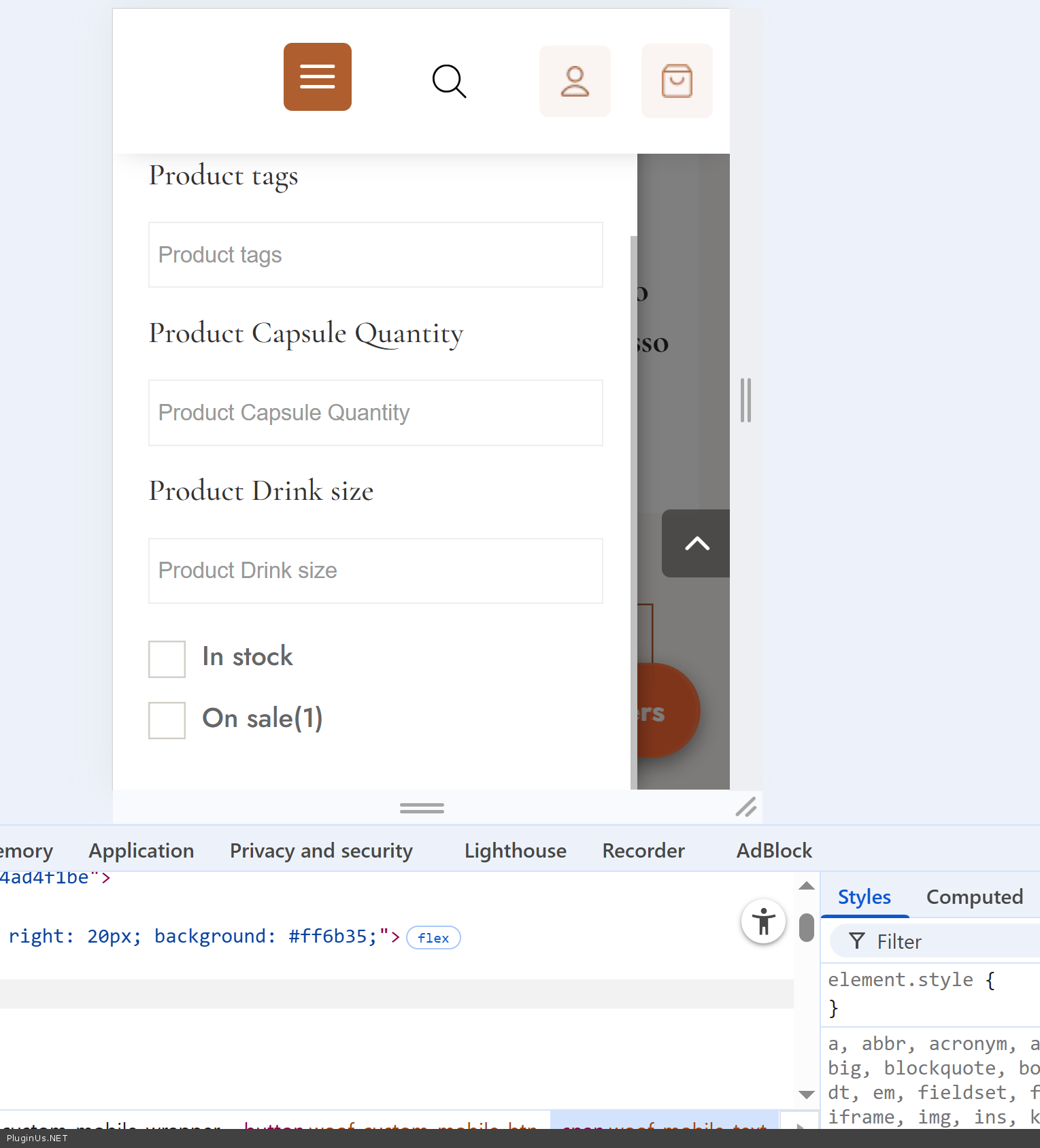
- About Brands, not sure undertood you right, I just tested filtering: https://clip2net.com/s/4nDzECG
/shop/swoof/brand-bazzara/ - works - BUT if you mean let me enter any single product, for example here shop/coffee/nespresso-capsules/bazzara-dodicigrancru-nespresso-10-caps/ and show only filters related only for this current product - no, it is page of product, here no any filter requests are done and its shows what is shows, Unfortunately, this is not a built-in feature of WOOF. The filter widget always shows all available filter options by default ...
Quote from johnb on February 2, 2026, 19:04Hi,
Thank you.
Now the filter works but there is a problem with the field sizes. They're all tiny.
Hi,
Thank you.
Now the filter works but there is a problem with the field sizes. They're all tiny.

Quote from Alex Dovlatov on February 3, 2026, 18:11Hello John
I modified code, and added there:
// FIX: Reinitialize Chosen/Select2 after sidebar is visible
    setTimeout(function() {
        // For Chosen
        wrapper.find('.woof_custom_mobile_content select.chosen-select').trigger('chosen:updated');

        // For Select2
        wrapper.find('.woof_custom_mobile_content select.select2-hidden-accessible').each(function() {
            $(this).select2('destroy').select2();
        });

        // Trigger WOOF redraw if needed
        if (typeof woof_current_values !== 'undefined') {
            $(document).trigger('woof_redraw_done');
        }
    }, 100);
Now it works fine:
Please reset your browser cache, full reset https://pluginus.net/how-to-reset-page-cache-in-the-browser/
Full code now is:
/**
 * Custom mobile filter shortcode for WOOF
 * Usage: [woof_mobile_custom]
 */
add_shortcode('woof_mobile_custom', 'woof_mobile_custom_shortcode');

function woof_mobile_custom_shortcode($atts) {
// Parse attributes
    $atts = shortcode_atts(array(
        'button_text' => 'Filters',
        'button_color' => '#ff6b35',
        'button_position' => 'bottom-right' // bottom-right, bottom-left, top-right, top-left
            ), $atts);

// Generate unique ID for multiple instances
    $unique_id = 'woof_mobile_' . uniqid();

// Position styles
    $position_styles = '';
    switch ($atts['button_position']) {
        case 'bottom-left':
            $position_styles = 'bottom: 20px; left: 20px;';
            break;
        case 'top-right':
            $position_styles = 'top: 20px; right: 20px;';
            break;
        case 'top-left':
            $position_styles = 'top: 20px; left: 20px;';
            break;
        default: // bottom-right
            $position_styles = 'bottom: 20px; right: 20px;';
    }

    ob_start();
    ?>
    <div class="woof_custom_mobile_wrapper" id="<?php echo esc_attr($unique_id); ?>">
        <!-- Open button -->
        <button class="woof_custom_mobile_btn" style="<?php echo esc_attr($position_styles); ?> background: <?php echo esc_attr($atts['button_color']); ?>;">
            <span class="woof_mobile_icon">☰</span>
            <span class="woof_mobile_text"><?php echo esc_html($atts['button_text']); ?></span>
        </button>

        <!-- Overlay -->
        <div class="woof_custom_mobile_overlay"></div>

        <!-- Sidebar with filter -->
        <div class="woof_custom_mobile_sidebar">
            <div class="woof_custom_mobile_header">
                <h3><?php echo esc_html($atts['button_text']); ?></h3>
                <button class="woof_custom_mobile_close">✕</button>
            </div>
            <div class="woof_custom_mobile_content">
                <?php echo do_shortcode('[woof]'); ?>
            </div>
        </div>
    </div>

    <style>
        #<?php echo esc_attr($unique_id); ?> .woof_custom_mobile_btn {
            display: none;
            position: fixed;
            z-index: 999;
            color: white;
            border: none;
            border-radius: 50px;
            padding: 12px 20px;
            font-size: 16px;
            font-weight: bold;
            box-shadow: 0 4px 12px rgba(0,0,0,0.3);
            cursor: pointer;
            transition: all 0.3s ease;
        }

        #<?php echo esc_attr($unique_id); ?> .woof_custom_mobile_btn:hover {
            opacity: 0.9;
            transform: scale(1.05);
        }

        #<?php echo esc_attr($unique_id); ?> .woof_mobile_icon {
            font-size: 20px;
            margin-right: 8px;
        }

        /* Show button only on mobile */
        @media (max-width: 768px) {
            #<?php echo esc_attr($unique_id); ?> .woof_custom_mobile_btn {
                display: flex;
                align-items: center;
                justify-content: center;
            }
        }

        /* Overlay background */
        #<?php echo esc_attr($unique_id); ?> .woof_custom_mobile_overlay {
            display: none;
            position: fixed;
            top: 0;
            left: 0;
            width: 100%;
            height: 100%;
            background: rgba(0,0,0,0.5);
            z-index: 9998;
            opacity: 0;
            transition: opacity 0.3s ease;
        }

        #<?php echo esc_attr($unique_id); ?> .woof_custom_mobile_overlay.active {
            display: block;
            opacity: 1;
        }

        /* Sidebar panel */
        #<?php echo esc_attr($unique_id); ?> .woof_custom_mobile_sidebar {
            position: fixed;
            top: 0;
            left: -100%;
            width: 85%;
            max-width: 400px;
            height: 100%;
            background: white;
            z-index: 9999;
            overflow-y: auto;
            transition: left 0.3s ease;
            box-shadow: 2px 0 10px rgba(0,0,0,0.3);
        }

        #<?php echo esc_attr($unique_id); ?> .woof_custom_mobile_sidebar.active {
            left: 0;
        }

        /* Filter header */
        #<?php echo esc_attr($unique_id); ?> .woof_custom_mobile_header {
            display: flex;
            justify-content: space-between;
            align-items: center;
            padding: 20px;
            background: #f5f5f5;
            border-bottom: 1px solid #ddd;
            position: sticky;
            top: 0;
            z-index: 10;
        }

        #<?php echo esc_attr($unique_id); ?> .woof_custom_mobile_header h3 {
            margin: 0;
            font-size: 20px;
            font-weight: bold;
        }

        /* Close button */
        #<?php echo esc_attr($unique_id); ?> .woof_custom_mobile_close {
            background: transparent;
            border: none;
            font-size: 28px;
            cursor: pointer;
            color: #333;
            padding: 0;
            width: 30px;
            height: 30px;
            display: flex;
            align-items: center;
            justify-content: center;
            transition: color 0.2s;
        }

        #<?php echo esc_attr($unique_id); ?> .woof_custom_mobile_close:hover {
            color: <?php echo esc_attr($atts['button_color']); ?>;
        }

        /* Filter content */
        #<?php echo esc_attr($unique_id); ?> .woof_custom_mobile_content {
            padding: 20px;
        }

        /* Hide on desktop */
        @media (min-width: 769px) {
            #<?php echo esc_attr($unique_id); ?> {
                display: none;
            }
        }

        /* Disable body scroll when filter is open */
        body.woof_mobile_filter_open {
            overflow: hidden !important;
        }
    </style>

    <script>
        jQuery(document).ready(function ($) {
            var wrapper = $('#<?php echo esc_js($unique_id); ?>');

    // Open filter
            wrapper.find('.woof_custom_mobile_btn').on('click', function () {
                wrapper.find('.woof_custom_mobile_sidebar').addClass('active');
                wrapper.find('.woof_custom_mobile_overlay').addClass('active');
                $('body').addClass('woof_mobile_filter_open');

				// FIX: Reinitialize Chosen/Select2 after sidebar is visible
    setTimeout(function() {
        // For Chosen
        wrapper.find('.woof_custom_mobile_content select.chosen-select').trigger('chosen:updated');

        // For Select2
        wrapper.find('.woof_custom_mobile_content select.select2-hidden-accessible').each(function() {
            $(this).select2('destroy').select2();
        });

        // Trigger WOOF redraw if needed
        if (typeof woof_current_values !== 'undefined') {
            $(document).trigger('woof_redraw_done');
        }
    }, 100);
            });

    // Close by button
            wrapper.find('.woof_custom_mobile_close').on('click', function () {
                closeFilter();
            });

    // Close by overlay click
            wrapper.find('.woof_custom_mobile_overlay').on('click', function () {
                closeFilter();
            });

    // Close function
            function closeFilter() {
                wrapper.find('.woof_custom_mobile_sidebar').removeClass('active');
                wrapper.find('.woof_custom_mobile_overlay').removeClass('active');
                $('body').removeClass('woof_mobile_filter_open');
            }

    // Close by ESC key
            $(document).on('keydown', function (e) {
                if (e.key === 'Escape' && wrapper.find('.woof_custom_mobile_sidebar').hasClass('active')) {
                    closeFilter();
                }
            });
        });
    </script>
    <?php
    return ob_get_clean();
}
Hello John
I modified code, and added there:
// FIX: Reinitialize Chosen/Select2 after sidebar is visible
    setTimeout(function() {
        // For Chosen
        wrapper.find('.woof_custom_mobile_content select.chosen-select').trigger('chosen:updated');

        // For Select2
        wrapper.find('.woof_custom_mobile_content select.select2-hidden-accessible').each(function() {
            $(this).select2('destroy').select2();
        });

        // Trigger WOOF redraw if needed
        if (typeof woof_current_values !== 'undefined') {
            $(document).trigger('woof_redraw_done');
        }
    }, 100);
Now it works fine:
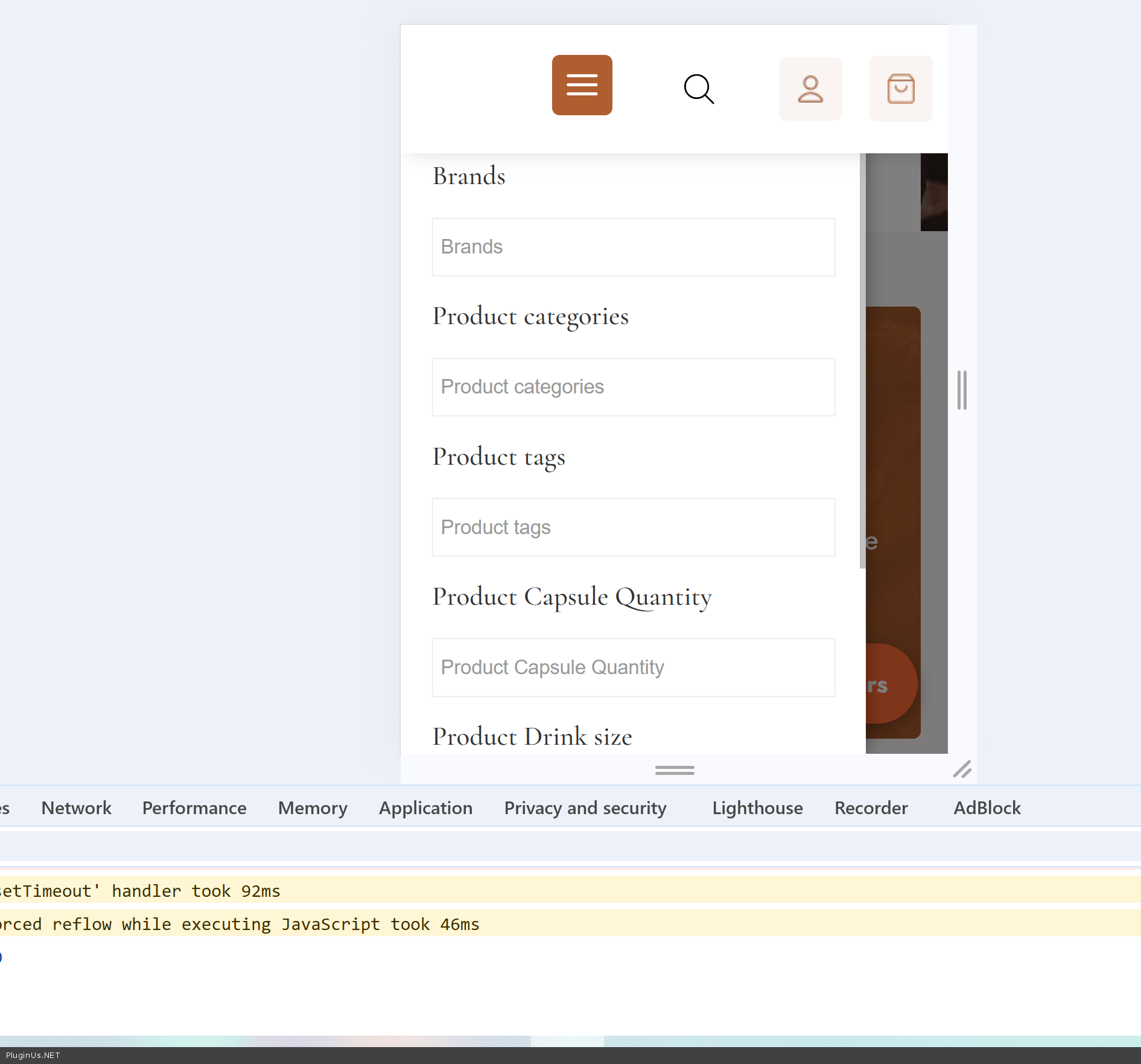
Please reset your browser cache, full reset https://pluginus.net/how-to-reset-page-cache-in-the-browser/
Full code now is:
/**
 * Custom mobile filter shortcode for WOOF
 * Usage: [woof_mobile_custom]
 */
add_shortcode('woof_mobile_custom', 'woof_mobile_custom_shortcode');

function woof_mobile_custom_shortcode($atts) {
// Parse attributes
    $atts = shortcode_atts(array(
        'button_text' => 'Filters',
        'button_color' => '#ff6b35',
        'button_position' => 'bottom-right' // bottom-right, bottom-left, top-right, top-left
            ), $atts);

// Generate unique ID for multiple instances
    $unique_id = 'woof_mobile_' . uniqid();

// Position styles
    $position_styles = '';
    switch ($atts['button_position']) {
        case 'bottom-left':
            $position_styles = 'bottom: 20px; left: 20px;';
            break;
        case 'top-right':
            $position_styles = 'top: 20px; right: 20px;';
            break;
        case 'top-left':
            $position_styles = 'top: 20px; left: 20px;';
            break;
        default: // bottom-right
            $position_styles = 'bottom: 20px; right: 20px;';
    }

    ob_start();
    ?>
    <div class="woof_custom_mobile_wrapper" id="<?php echo esc_attr($unique_id); ?>">
        <!-- Open button -->
        <button class="woof_custom_mobile_btn" style="<?php echo esc_attr($position_styles); ?> background: <?php echo esc_attr($atts['button_color']); ?>;">
            <span class="woof_mobile_icon">☰</span>
            <span class="woof_mobile_text"><?php echo esc_html($atts['button_text']); ?></span>
        </button>

        <!-- Overlay -->
        <div class="woof_custom_mobile_overlay"></div>

        <!-- Sidebar with filter -->
        <div class="woof_custom_mobile_sidebar">
            <div class="woof_custom_mobile_header">
                <h3><?php echo esc_html($atts['button_text']); ?></h3>
                <button class="woof_custom_mobile_close">✕</button>
            </div>
            <div class="woof_custom_mobile_content">
                <?php echo do_shortcode('[woof]'); ?>
            </div>
        </div>
    </div>

    <style>
        #<?php echo esc_attr($unique_id); ?> .woof_custom_mobile_btn {
            display: none;
            position: fixed;
            z-index: 999;
            color: white;
            border: none;
            border-radius: 50px;
            padding: 12px 20px;
            font-size: 16px;
            font-weight: bold;
            box-shadow: 0 4px 12px rgba(0,0,0,0.3);
            cursor: pointer;
            transition: all 0.3s ease;
        }

        #<?php echo esc_attr($unique_id); ?> .woof_custom_mobile_btn:hover {
            opacity: 0.9;
            transform: scale(1.05);
        }

        #<?php echo esc_attr($unique_id); ?> .woof_mobile_icon {
            font-size: 20px;
            margin-right: 8px;
        }

        /* Show button only on mobile */
        @media (max-width: 768px) {
            #<?php echo esc_attr($unique_id); ?> .woof_custom_mobile_btn {
                display: flex;
                align-items: center;
                justify-content: center;
            }
        }

        /* Overlay background */
        #<?php echo esc_attr($unique_id); ?> .woof_custom_mobile_overlay {
            display: none;
            position: fixed;
            top: 0;
            left: 0;
            width: 100%;
            height: 100%;
            background: rgba(0,0,0,0.5);
            z-index: 9998;
            opacity: 0;
            transition: opacity 0.3s ease;
        }

        #<?php echo esc_attr($unique_id); ?> .woof_custom_mobile_overlay.active {
            display: block;
            opacity: 1;
        }

        /* Sidebar panel */
        #<?php echo esc_attr($unique_id); ?> .woof_custom_mobile_sidebar {
            position: fixed;
            top: 0;
            left: -100%;
            width: 85%;
            max-width: 400px;
            height: 100%;
            background: white;
            z-index: 9999;
            overflow-y: auto;
            transition: left 0.3s ease;
            box-shadow: 2px 0 10px rgba(0,0,0,0.3);
        }

        #<?php echo esc_attr($unique_id); ?> .woof_custom_mobile_sidebar.active {
            left: 0;
        }

        /* Filter header */
        #<?php echo esc_attr($unique_id); ?> .woof_custom_mobile_header {
            display: flex;
            justify-content: space-between;
            align-items: center;
            padding: 20px;
            background: #f5f5f5;
            border-bottom: 1px solid #ddd;
            position: sticky;
            top: 0;
            z-index: 10;
        }

        #<?php echo esc_attr($unique_id); ?> .woof_custom_mobile_header h3 {
            margin: 0;
            font-size: 20px;
            font-weight: bold;
        }

        /* Close button */
        #<?php echo esc_attr($unique_id); ?> .woof_custom_mobile_close {
            background: transparent;
            border: none;
            font-size: 28px;
            cursor: pointer;
            color: #333;
            padding: 0;
            width: 30px;
            height: 30px;
            display: flex;
            align-items: center;
            justify-content: center;
            transition: color 0.2s;
        }

        #<?php echo esc_attr($unique_id); ?> .woof_custom_mobile_close:hover {
            color: <?php echo esc_attr($atts['button_color']); ?>;
        }

        /* Filter content */
        #<?php echo esc_attr($unique_id); ?> .woof_custom_mobile_content {
            padding: 20px;
        }

        /* Hide on desktop */
        @media (min-width: 769px) {
            #<?php echo esc_attr($unique_id); ?> {
                display: none;
            }
        }

        /* Disable body scroll when filter is open */
        body.woof_mobile_filter_open {
            overflow: hidden !important;
        }
    </style>

    <script>
        jQuery(document).ready(function ($) {
            var wrapper = $('#<?php echo esc_js($unique_id); ?>');

    // Open filter
            wrapper.find('.woof_custom_mobile_btn').on('click', function () {
                wrapper.find('.woof_custom_mobile_sidebar').addClass('active');
                wrapper.find('.woof_custom_mobile_overlay').addClass('active');
                $('body').addClass('woof_mobile_filter_open');

				// FIX: Reinitialize Chosen/Select2 after sidebar is visible
    setTimeout(function() {
        // For Chosen
        wrapper.find('.woof_custom_mobile_content select.chosen-select').trigger('chosen:updated');

        // For Select2
        wrapper.find('.woof_custom_mobile_content select.select2-hidden-accessible').each(function() {
            $(this).select2('destroy').select2();
        });

        // Trigger WOOF redraw if needed
        if (typeof woof_current_values !== 'undefined') {
            $(document).trigger('woof_redraw_done');
        }
    }, 100);
            });

    // Close by button
            wrapper.find('.woof_custom_mobile_close').on('click', function () {
                closeFilter();
            });

    // Close by overlay click
            wrapper.find('.woof_custom_mobile_overlay').on('click', function () {
                closeFilter();
            });

    // Close function
            function closeFilter() {
                wrapper.find('.woof_custom_mobile_sidebar').removeClass('active');
                wrapper.find('.woof_custom_mobile_overlay').removeClass('active');
                $('body').removeClass('woof_mobile_filter_open');
            }

    // Close by ESC key
            $(document).on('keydown', function (e) {
                if (e.key === 'Escape' && wrapper.find('.woof_custom_mobile_sidebar').hasClass('active')) {
                    closeFilter();
                }
            });
        });
    </script>
    <?php
    return ob_get_clean();
}
Quote from johnb on February 4, 2026, 21:07Thank you :) I purchased the plugin as promised.
May I ask you if this code will be integrated in the plugin? Just in case there will be some updates in the future that will overwrite the child functions.php and/or some WP update will break this code.
Thank you :) I purchased the plugin as promised.
May I ask you if this code will be integrated in the plugin? Just in case there will be some updates in the future that will overwrite the child functions.php and/or some WP update will break this code.
Quote from Alex Dovlatov on February 6, 2026, 13:02Hello John
Thank you very much :)
This is custom case, maybe will be reviewed later, but for any case we have suplemented the article https://products-filter.com/shortcode/woof_mobile/ and you will always will find code there!
Thank you ...
Hello John
Thank you very much :)
This is custom case, maybe will be reviewed later, but for any case we have suplemented the article https://products-filter.com/shortcode/woof_mobile/ and you will always will find code there!
Thank you ...
Quote from johnb on February 8, 2026, 21:53Hi Alex,
Just noticed one bug in that code. Basically the filter appears on every page. That's not a big problem but when choosing filter options, unless you're on a shop or category page, it redirects to the main page.
So, is there a way of either:
- Disabling the mobile filter button on pages where another woof code is not present? (for example, it detects the desktop filter so therefore the mobile filter button activates) OR
- Adding a code that disables the filter on that particular page? (if I don't want it showing on the privacy policy page) OR
- If filter options are chosen, they redirect to the correct filter results rather than taking you back to the homepage?
Thank you for your amazing help with fixing this!
Hi Alex,
Just noticed one bug in that code. Basically the filter appears on every page. That's not a big problem but when choosing filter options, unless you're on a shop or category page, it redirects to the main page.
So, is there a way of either:
- Disabling the mobile filter button on pages where another woof code is not present? (for example, it detects the desktop filter so therefore the mobile filter button activates) OR
- Adding a code that disables the filter on that particular page? (if I don't want it showing on the privacy policy page) OR
- If filter options are chosen, they redirect to the correct filter results rather than taking you back to the homepage?
Thank you for your amazing help with fixing this!
Quote from Alex Dovlatov on February 9, 2026, 14:52Hello John
Just tried to enter wp-admin but looks like link is expired, but any way, copy please code from here https://products-filter.com/shortcode/woof_mobile/ and replace it previous code, I made changes on this part:
You can replace only this code
Next, managing of appearring, here is the code you can use in file functons.php of the current wp theme:
add_action('wp_footer', function() {
    // Don't show on specific pages
    if (is_page('privacy-policy') || is_page('contact') || is_page('about')) {
        return;
    }

    // Only show on WooCommerce pages
    if (!is_shop() && !is_product_category() && !is_product_tag() && !is_product_taxonomy()) {
        return;
    }

    // Get shop page URL
    $shop_url = wc_get_page_permalink('shop');

    // Display mobile filter with redirect to shop page
    echo do_shortcode('[woof_mobile_custom redirect="' . $shop_url . '"]');
});
This code allows to manage where to show filter and where not, this code should be customized for you prefrences, you can play with page slugs and conditions there, pleaase test it ...
Hello John
Just tried to enter wp-admin but looks like link is expired, but any way, copy please code from here https://products-filter.com/shortcode/woof_mobile/ and replace it previous code, I made changes on this part:
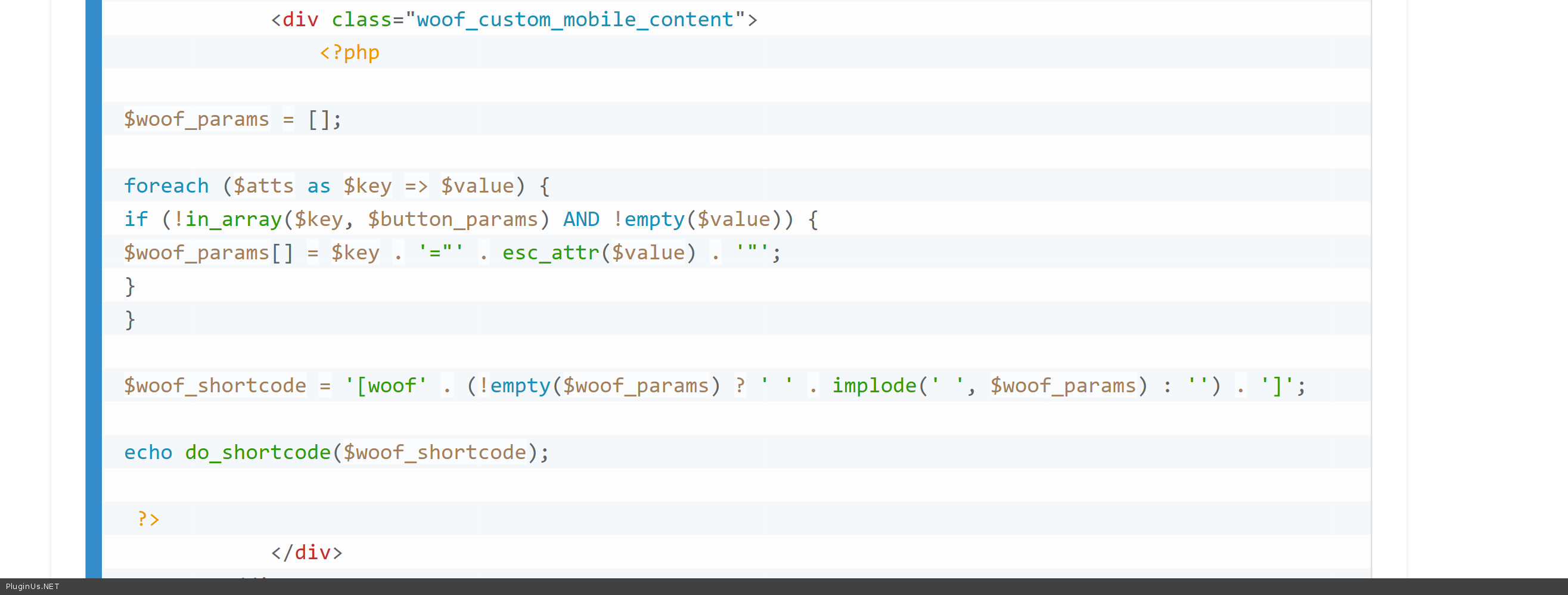
You can replace only this code
Next, managing of appearring, here is the code you can use in file functons.php of the current wp theme:
add_action('wp_footer', function() {
    // Don't show on specific pages
    if (is_page('privacy-policy') || is_page('contact') || is_page('about')) {
        return;
    }

    // Only show on WooCommerce pages
    if (!is_shop() && !is_product_category() && !is_product_tag() && !is_product_taxonomy()) {
        return;
    }

    // Get shop page URL
    $shop_url = wc_get_page_permalink('shop');

    // Display mobile filter with redirect to shop page
    echo do_shortcode('[woof_mobile_custom redirect="' . $shop_url . '"]');
});
This code allows to manage where to show filter and where not, this code should be customized for you prefrences, you can play with page slugs and conditions there, pleaase test it ...
Quote from johnb on February 11, 2026, 19:12Hi Alex,
I am unable to save this code due to an error. I shared the error in private. The login link works again!
Hi Alex,
I am unable to save this code due to an error. I shared the error in private. The login link works again!
Quote from Alex Dovlatov on February 12, 2026, 13:41Hello John
Just tried to enter wp-admin but its redirect me to main page wihout login to the site, or even better share tmp ftp acess to there ...
Hello John
Just tried to enter wp-admin but its redirect me to main page wihout login to the site, or even better share tmp ftp acess to there ...
Quote from johnb on February 20, 2026, 22:19Hi Alex,
Apologies. Link works now.
One more question. I got some feedback from users that they didn't notice the filter button or didn't know what it did (don't know how it's possible since it's huge and orange(!!!) but anyway).
Would it be possible for the button to sit on the edge of the page that when pressed opens the sidebar?
Alternatively, would it be possible to put a horizontal filter on top for mobile? Kind of the same way it's done with the large screen version but this time it's horizonal and sits above the product module on mobile?
Just wondering if it's possible.
Hi Alex,
Apologies. Link works now.
One more question. I got some feedback from users that they didn't notice the filter button or didn't know what it did (don't know how it's possible since it's huge and orange(!!!) but anyway).
Would it be possible for the button to sit on the edge of the page that when pressed opens the sidebar?
Alternatively, would it be possible to put a horizontal filter on top for mobile? Kind of the same way it's done with the large screen version but this time it's horizonal and sits above the product module on mobile?
Just wondering if it's possible.
Quote from Alex Dovlatov on February 23, 2026, 15:06Hell John
Great idea with the animated button — that should definitely catch users' attention!
Here's what to do: open your
functions.php, find the<style>block inside thewoof_mobile_custom_shortcodefunction, and locate this comment:/* Show button only on mobile */Right after the closing
}of that media query block, paste the following:/* Running lights effect around button */ #<?php echo esc_attr($unique_id); ?> .woof_custom_mobile_btn { animation: woof_btn_pulse 2s ease-in-out infinite; overflow: visible; z-index: 9999; } #<?php echo esc_attr($unique_id); ?> .woof_custom_mobile_btn::before { content: ''; position: absolute; inset: -4px; border-radius: 50px; background: conic-gradient( from 0deg, transparent 0deg, rgba(255,255,255,0.9) 60deg, transparent 120deg ); animation: woof_btn_run 1.5s linear infinite; pointer-events: none; z-index: -1; } #<?php echo esc_attr($unique_id); ?> .woof_custom_mobile_btn::after { content: ''; position: absolute; inset: 3px; border-radius: 46px; background: inherit; pointer-events: none; z-index: -1; } @keyframes woof_btn_run { from { transform: rotate(0deg); } to { transform: rotate(360deg); } } @keyframes woof_btn_pulse { 0% { box-shadow: 0 4px 12px rgba(255,107,53,0.4); } 50% { box-shadow: 0 6px 28px rgba(255,107,53,0.8); } 100% { box-shadow: 0 4px 12px rgba(255,107,53,0.4); } }
This will make the button glow and pulse while a dashed white border spins around it — hard to miss -> https://clip2net.com/s/4nIn1Vb
The colors match your existing orange button. If you'd like different colors just let me know.
Hell John
Great idea with the animated button — that should definitely catch users' attention!
Here's what to do: open your functions.php, find the <style> block inside the woof_mobile_custom_shortcode function, and locate this comment:
/* Show button only on mobile */Right after the closing } of that media query block, paste the following:
 /* Running lights effect around button */
#<?php echo esc_attr($unique_id); ?> .woof_custom_mobile_btn {
    animation: woof_btn_pulse 2s ease-in-out infinite;
    overflow: visible;
    z-index: 9999;
}

#<?php echo esc_attr($unique_id); ?> .woof_custom_mobile_btn::before {
    content: '';
    position: absolute;
    inset: -4px;
    border-radius: 50px;
    background: conic-gradient(
        from 0deg,
        transparent 0deg,
        rgba(255,255,255,0.9) 60deg,
        transparent 120deg
    );
    animation: woof_btn_run 1.5s linear infinite;
    pointer-events: none;
    z-index: -1;
}

#<?php echo esc_attr($unique_id); ?> .woof_custom_mobile_btn::after {
    content: '';
    position: absolute;
    inset: 3px;
    border-radius: 46px;
    background: inherit;
    pointer-events: none;
    z-index: -1;
}

@keyframes woof_btn_run {
    from { transform: rotate(0deg); }
    to   { transform: rotate(360deg); }
}

@keyframes woof_btn_pulse {
    0%   { box-shadow: 0 4px 12px rgba(255,107,53,0.4); }
    50%  { box-shadow: 0 6px 28px rgba(255,107,53,0.8); }
    100% { box-shadow: 0 4px 12px rgba(255,107,53,0.4); }
}
This will make the button glow and pulse while a dashed white border spins around it — hard to miss -> https://clip2net.com/s/4nIn1Vb
The colors match your existing orange button. If you'd like different colors just let me know.