mobile filter styling
The support doesn work on Saturdays and Sundays, so some Friday requests can be answered on Monday. If you have problems with registration ask help on contact us page pleaseIf you not got email within 24~36 business hours, firstly check your spam box, and if no any email from the support there - back to the forum and read answer here. DO NOT ANSWER ON EMAILS [noreply@pluginus.net] FROM THE FORUM!! Emails are just for your info, all answers should be published only here.
The support doesn work on Saturdays and Sundays, so some Friday requests can be answered on Monday.

Quote from ahm.you on July 15, 2022, 14:30Hello,
the plug in seems working good on destkop and mobile. I have elementor pro and Hello elementor as a theme.
I added this two shortcodes [woof mobile_mode=1 sid='my_filter'] & [woof_mobile]. I would like to style the mobile version but I don't know how to do it.
First of all I would like to have the filter slide in from the right side of the screen. I would like to have it full screen cause for now I can still see under the pop up half of the header.
To give you an idea, this is the link to test: http://circleglam.com/view-all/.
can someone help me with that :) ?
thank you for your patience :)
Hello,
the plug in seems working good on destkop and mobile. I have elementor pro and Hello elementor as a theme.
I added this two shortcodes [woof mobile_mode=1 sid='my_filter'] & [woof_mobile]. I would like to style the mobile version but I don't know how to do it.
First of all I would like to have the filter slide in from the right side of the screen. I would like to have it full screen cause for now I can still see under the pop up half of the header.
To give you an idea, this is the link to test: http://circleglam.com/view-all/.
can someone help me with that :) ?
thank you for your patience :)

Quote from Pablo Borysenco on July 18, 2022, 10:58Hello
Please paste your license key here - https://share.pluginus.net/image/i20210618130558.png -> https://share.pluginus.net/image/i20210618130614.png
Update the plugin to latest version - https://products-filter.com/how-to-make-auto-update-for-wordpress-plugins-and-themes-bought-on-envato
Hello
Please paste your license key here - https://share.pluginus.net/image/i20210618130558.png -> https://share.pluginus.net/image/i20210618130614.png


Update the plugin to latest version - https://products-filter.com/how-to-make-auto-update-for-wordpress-plugins-and-themes-bought-on-envato
Quote from ahm.you on July 18, 2022, 11:35Hello Pablo,
thank you for the answer.... I did paste the license key....
can you help me with my issue? :)
Hello Pablo,
thank you for the answer.... I did paste the license key....
can you help me with my issue? :)
Quote from Pablo Borysenco on July 18, 2022, 12:20Update the plugin to latest version - https://products-filter.com/how-to-make-auto-update-for-wordpress-plugins-and-themes-bought-on-envato
Try in file - \wp-content\plugins\woocommerce-products-filter\css\front.css - change this code - https://c2n.me/4gaN0MO.png
.woof_show_filter_for_mobile.woof {
opacity: 0.95;
position: fixed;
top: 0px;
background: white;
z-index: 9999;
overflow: auto;
height: 100%;
display: block !important;
width: 100%;
right: 100%;
padding: 30px;
padding-bottom: 100px;
animation: move_top .5s ease ;
animation-fill-mode: forwards;
}
@keyframes move_top {
100% {
//top: 30px;
right: 0px;
}
}
Update the plugin to latest version - https://products-filter.com/how-to-make-auto-update-for-wordpress-plugins-and-themes-bought-on-envato
Try in file - \wp-content\plugins\woocommerce-products-filter\css\front.css - change this code - https://c2n.me/4gaN0MO.png
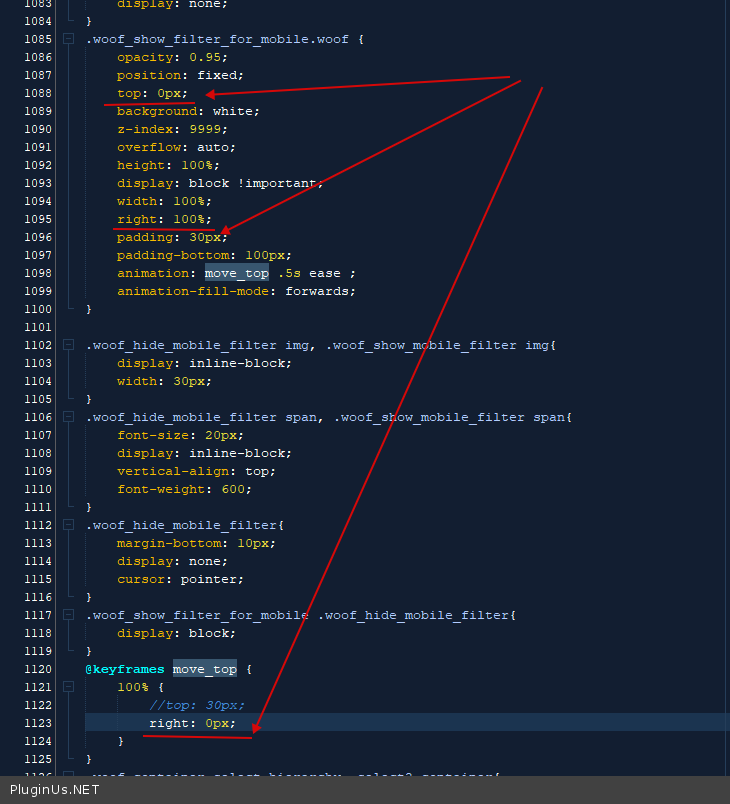
.woof_show_filter_for_mobile.woof {
opacity: 0.95;
position: fixed;
top: 0px;
background: white;
z-index: 9999;
overflow: auto;
height: 100%;
display: block !important;
width: 100%;
right: 100%;
padding: 30px;
padding-bottom: 100px;
animation: move_top .5s ease ;
animation-fill-mode: forwards;
}
@keyframes move_top {
100% {
//top: 30px;
right: 0px;
}
}
Quote from ahm.you on July 18, 2022, 14:41thank you pablo for your help and patience.....So I followed the steps and everythings looks fine...
I have another questions...i would like to have something like this on the mobile: 1) https://clip2net.com/s/4gaTYcO
2)https://clip2net.com/s/4gaU4b5
I don't mind about the font..I'm speaking about the structure...cause basically i hided the checkboxes on the destkop/tablet version. And I would likr to have a button with the counter and the change to set more then one filter per time.
Also another question..can you tell me how can i call the class of the icon and title that open the filter....cause i would like to float the button on the right side of the screen.
Really thank you for your patience
thank you pablo for your help and patience.....So I followed the steps and everythings looks fine...
I have another questions...i would like to have something like this on the mobile: 1) https://clip2net.com/s/4gaTYcO
2)https://clip2net.com/s/4gaU4b5
I don't mind about the font..I'm speaking about the structure...cause basically i hided the checkboxes on the destkop/tablet version. And I would likr to have a button with the counter and the change to set more then one filter per time.
Also another question..can you tell me how can i call the class of the icon and title that open the filter....cause i would like to float the button on the right side of the screen.
Really thank you for your patience
Quote from ahm.you on July 18, 2022, 20:10Hello Pablo...I managed to do almost what i want to do....but I have 4 questions for the mobile version:
- is there a way to put the "clean filter button" before categories list? I would like to put it near the close filter icon
- how can I change the style of the checkboxes? can I even change the style of the active one?
- can i have a submit button that includes the count of product that I'll find with the selected filter?
- do you have a shortcode that show the terms that i checked on the filter? I would like to have in the product Archive page a title that change dynamically when I click on a specific filter. for example if I'm looking for shoes and jackets I should see a text that says result for shoes and jackets.
really thanks for your help....you sould have the website url
:)
Hello Pablo...I managed to do almost what i want to do....but I have 4 questions for the mobile version:
- is there a way to put the"clean filter button" before categories list? I would like to put it near the close filter icon
- how can I change the style of the checkboxes? can I even change the style of the active one?
- can i have a submit button that includes the count of product that I'll find with the selected filter?
- do you have a shortcode that show the terms that i checked on the filter? I would like to have in the product Archive page a title that change dynamically when I click on a specific filter. for example if I'm looking for shoes and jackets I should see a text that says result for shoes and jackets.
really thanks for your help....you sould have the website url
:)
Quote from Pablo Borysenco on July 19, 2022, 12:46Hello
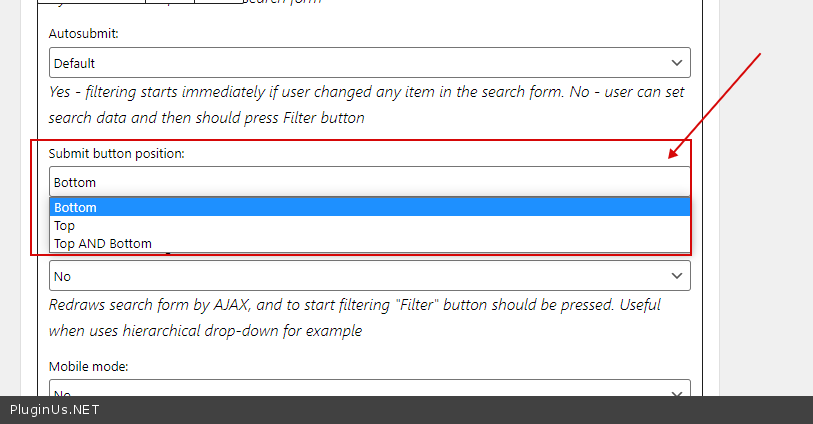
- On the widget settings you can choose the position of the buttons - https://c2n.me/4gbn3D9.png
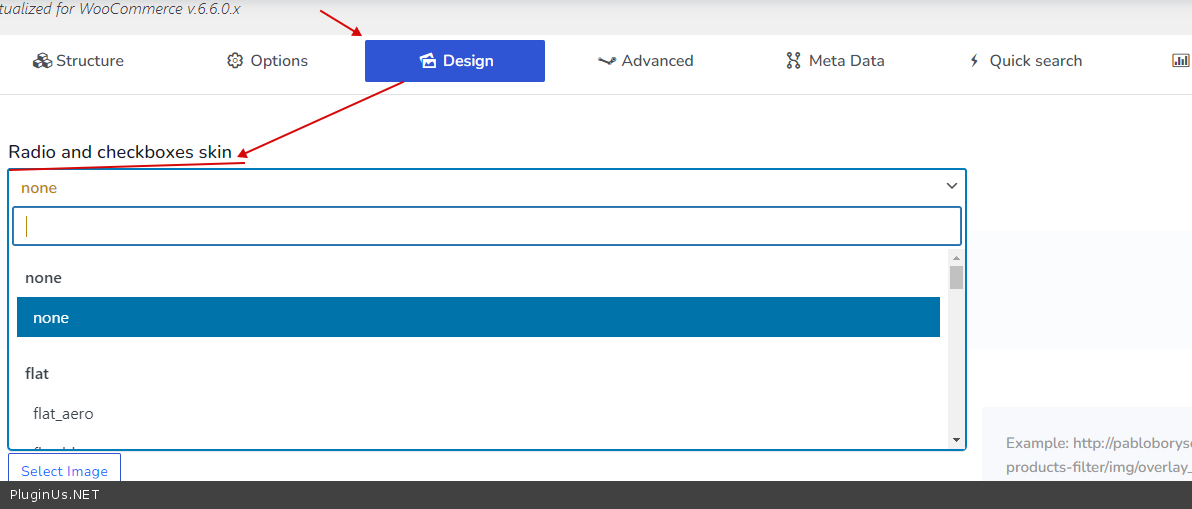
- Use this option - https://c2n.me/4gbn8Zm.png OR use custom css
- unfortunately the plugin does not have this feature
- You can use this extension - https://products-filter.com/extencion/seo-url-request
Hello
- On the widget settings you can choose the position of the buttons - https://c2n.me/4gbn3D9.png
- Use this option - https://c2n.me/4gbn8Zm.png OR use custom css
- unfortunately the plugin does not have this feature
- You can use this extension - https://products-filter.com/extencion/seo-url-request