

Mobile check /uncheck label issue
The support doesn work on Saturdays and Sundays, so some Friday requests can be answered on Monday. If you have problems with registration ask help on contact us page pleaseIf you not got email within 24~36 business hours, firstly check your spam box, and if no any email from the support there - back to the forum and read answer here. DO NOT ANSWER ON EMAILS [noreply@pluginus.net] FROM THE FORUM!! Emails are just for your info, all answers should be published only here.
The support doesn work on Saturdays and Sundays, so some Friday requests can be answered on Monday.

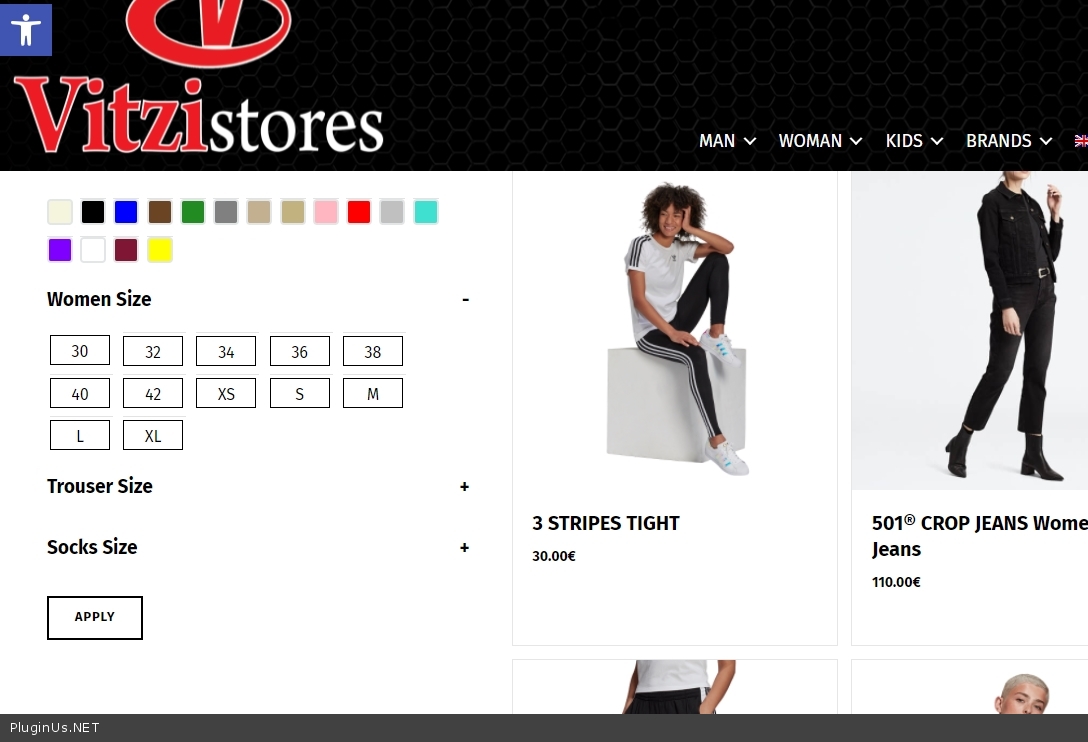
Quote from Giannis on December 27, 2021, 11:44Hello Pablo and thank you for the awesome plugin. So we have an issue with the label box during check and uncheck (only in mobile -desktop behavior is normal). I guess there is something I forgot to check from the settings, but if you want to have a better look here is a link.
Hello Pablo and thank you for the awesome plugin. So we have an issue with the label box during check and uncheck (only in mobile -desktop behavior is normal). I guess there is something I forgot to check from the settings, but if you want to have a better look here is a link.
Quote from Giannis on December 27, 2021, 12:04And here is the Custom CCS code i use for my filter labels, if helps you.
.woof_list_label .woof_label_term {
display: block;
color: #ffffff ;
background-color: white;
border: 1px solid #000;
margin: 3px 3px 3px 0;
padding: 3px 4px;
width: 60px;
height: 30px;
line-height: 25px;
text-align: center;
overflow: hidden;
text-decoration: none;
cursor: pointer;
}.woof_list_label li .woof_label_term:hover, .woof_list_label li .woof_label_term:checked {
background-color: #34495e;
border-color: #34495e;
color: #fff !important;
}
And here is the Custom CCS code i use for my filter labels, if helps you.
.woof_list_label .woof_label_term {
display: block;
color: #ffffff ;
background-color: white;
border: 1px solid #000;
margin: 3px 3px 3px 0;
padding: 3px 4px;
width: 60px;
height: 30px;
line-height: 25px;
text-align: center;
overflow: hidden;
text-decoration: none;
cursor: pointer;
}
.woof_list_label li .woof_label_term:hover, .woof_list_label li .woof_label_term:checked {
background-color: #34495e;
border-color: #34495e;
color: #fff !important;
}

Quote from Pablo Borysenco on December 27, 2021, 12:53Hello
Please add CSS:
body .woof_list_label .woof_label_term {background-color: white;
}
and clear all cache
Hello
Please add CSS:
background-color: white;
}
and clear all cache
Quote from Giannis on December 27, 2021, 13:24Hello Pablo, copy the above CSS and clear all cache, but my issue still remains. Did you visit the link I send you on the first post?
Hello Pablo, copy the above CSS and clear all cache, but my issue still remains. Did you visit the link I send you on the first post?
Quote from Giannis on December 27, 2021, 21:32Also, I noticed that if uncheck a filter label and tap somewhere else it comes to the default color.
Also, I noticed that if uncheck a filter label and tap somewhere else it comes to the default color.
Quote from Pablo Borysenco on December 28, 2021, 11:44Hello
Did you visit the link I send you on the first post? - Oh sure!
My test - https://c2n.me/4etnXk3.jpg - everything seems to be working correctly
I noticed that if uncheck a filter label and tap somewhere else it comes to the default color. - Can you create a video with the issue?
Hello
Did you visit the link I send you on the first post? - Oh sure!
My test - https://c2n.me/4etnXk3.jpg - everything seems to be working correctly
I noticed that if uncheck a filter label and tap somewhere else it comes to the default color. - Can you create a video with the issue?
Quote from Giannis on December 29, 2021, 12:01Hello Pablo,
From your image, I noticed that you visited the site using a desktop. At desktop mode, it works correctly as I said in my first post. The problem is while you try to choose a filter from mobile. Please visit the site using your mobile and not your desktop and if you cant see it i will send you the video.
Hello Pablo,
From your image, I noticed that you visited the site using a desktop. At desktop mode, it works correctly as I said in my first post. The problem is while you try to choose a filter from mobile. Please visit the site using your mobile and not your desktop and if you cant see it i will send you the video.
Quote from Pablo Borysenco on December 29, 2021, 14:20Hello
Ok! My test - https://c2n.me/4eua5PT.mp4
Hello
Ok! My test - https://c2n.me/4eua5PT.mp4
Quote from Giannis on December 29, 2021, 15:34I didn't say that have an issue with the toggle function. Please try to choose a size (label-box). CSS code I provided previous is about the term, not the toggle. (choose one of the following terms : shoe size or socks size or pants size or woman size or man size). for example: check-choose 42 from shoe size and try to uncheck it
I didn't say that have an issue with the toggle function. Please try to choose a size (label-box). CSS code I provided previous is about the term, not the toggle. (choose one of the following terms : shoe size or socks size or pants size or woman size or man size). for example: check-choose 42 from shoe size and try to uncheck it
Quote from Giannis on December 30, 2021, 01:52I fix the issue. Please put more effort to support because the plugin needs the customers and the customers need the plugin. I made the hover CSS style the same with unchecked CSS style to bypass the issue in mobile view.
I fix the issue. Please put more effort to support because the plugin needs the customers and the customers need the plugin. I made the hover CSS style the same with unchecked CSS style to bypass the issue in mobile view.
Quote from Giannis on December 30, 2021, 11:21Please only help me to disable the hover function in mobile view using CSS. Is this possible?
Please only help me to disable the hover function in mobile view using CSS. Is this possible?
Quote from Pablo Borysenco on December 30, 2021, 12:29Hello
CSS code I provided previous is about the term, not the toggle. - Yes I know! And I was doing a test with labels(check/uncheck) - I have not seen the error
only help me to disable the hover function in mobile view using CSS - Not sure if hover works for the touchpod.
.woof_list_label .woof_label_term:hover{
color: black !important;
background-color: white !important;
border: 1px solid #fff !important;
}
Hello
CSS code I provided previous is about the term, not the toggle. - Yes I know! And I was doing a test with labels(check/uncheck) - I have not seen the error
only help me to disable the hover function in mobile view using CSS - Not sure if hover works for the touchpod.
.woof_list_label .woof_label_term:hover{
color: black !important;
background-color: white !important;
border: 1px solid #fff !important;
}
Quote from Giannis on December 31, 2021, 17:55Hello Pablo.
For the rest of the users. Solution for touch screens (mobile-tables) for this issue is to make hover function the same with unchecked using CSS. Hover is not functional with mobile or tablets and clients will not be able to understand what they choose.
Hello Pablo.
For the rest of the users. Solution for touch screens (mobile-tables) for this issue is to make hover function the same with unchecked using CSS. Hover is not functional with mobile or tablets and clients will not be able to understand what they choose.
Quote from Pablo Borysenco on January 3, 2022, 13:15Hello
Ok! Can you repeat this error on this site? - https://demo.products-filter.com/
Hello
Ok! Can you repeat this error on this site? - https://demo.products-filter.com/