

Menu expands, collapses
The support doesn work on Saturdays and Sundays, so some Friday requests can be answered on Monday. If you have problems with registration ask help on contact us page pleaseIf you not got email within 24~36 business hours, firstly check your spam box, and if no any email from the support there - back to the forum and read answer here. DO NOT ANSWER ON EMAILS [noreply@pluginus.net] FROM THE FORUM!! Emails are just for your info, all answers should be published only here.
The support doesn work on Saturdays and Sundays, so some Friday requests can be answered on Monday.

Quote from gloris on June 21, 2021, 22:57I bought the premium version
I want to create a different page for each type of product
"Arduino, Raspberry, Micro:bit"
On each page I insert [woof autosubmit=1 taxonomies=product_cat:46,47] or [woof autosubmit=1 taxonomies=product_cat:55,56]
Since the articles are classified with sub_Category and sub_sub_Category I see that if I click + the menu expands and shows the Sub_Sub and when I click - the menu collapses
While if I click the sub_category_01 text, the search for articles starts
Instead, I want to extend or close the menu by clicking on "sub_category 01" (like clicking + or -)
Finally, I want that by clicking sub_sub_category_01 a new page will be shown with the same expanded menu column and on the right the articles that result from the searchSee shop.isieng.com and then click Arduino
I bought the premium version
I want to create a different page for each type of product
"Arduino, Raspberry, Micro:bit"
On each page I insert [woof autosubmit=1 taxonomies=product_cat:46,47] or [woof autosubmit=1 taxonomies=product_cat:55,56]
Since the articles are classified with sub_Category and sub_sub_Category I see that if I click + the menu expands and shows the Sub_Sub and when I click - the menu collapses
While if I click the sub_category_01 text, the search for articles starts
Instead, I want to extend or close the menu by clicking on"sub_category 01" (like clicking + or -)
Finally, I want that by clicking sub_sub_category_01 a new page will be shown with the same expanded menu column and on the right the articles that result from the search
See shop.isieng.com and then click Arduino

Quote from Pablo Borysenco on June 22, 2021, 12:03Hello
Please paste your license key here - https://share.pluginus.net/image/i20210618130558.png -> https://share.pluginus.net/image/i20210618130614.png
I want to extend or close the menu by clicking on "sub_category 01" (like clicking + or -) - Unfortunately the plugin does not have this feature.
Finally, I want that by clicking sub_sub_category_01 a new page will be shown with the same expanded menu column - Please describe it in more detail
Hello
Please paste your license key here - https://share.pluginus.net/image/i20210618130558.png -> https://share.pluginus.net/image/i20210618130614.png


I want to extend or close the menu by clicking on"sub_category 01" (like clicking + or -) - Unfortunately the plugin does not have this feature.
Finally, I want that by clicking sub_sub_category_01 a new page will be shown with the same expanded menu column - Please describe it in more detail
Quote from gloris on June 22, 2021, 13:46Hello
I entered what I asked for
Hello
I entered what I asked for
Quote from Pablo Borysenco on June 23, 2021, 09:58Hello
Unfortunately your key is not valid, please check it
Please provide me the php code to insert - unfortunately we do not have a ready-made solution for you. If you have experience in programming, I can tell you how to do it. If you have no experience in programming, you should hire developers
Hello
Unfortunately your key is not valid, please check it
Please provide me the php code to insert - unfortunately we do not have a ready-made solution for you. If you have experience in programming, I can tell you how to do it. If you have no experience in programming, you should hire developers
Quote from gloris on June 23, 2021, 13:31Hello Yes i have programming experience i ask you to help me
Hello
Yes i have programming experience
i ask you to help me
Quote from Pablo Borysenco on June 24, 2021, 10:06Hello
Please add the correct license key
Hello
Please add the correct license key
Quote from gloris on June 24, 2021, 15:37Hello
I entered what I asked for
Hello
I entered what I asked for
Quote from Pablo Borysenco on June 25, 2021, 12:37Hello
In file - wp-content\plugins\woocommerce-products-filter\views\html_types\checkbox.php delete attribute for - https://c2n.me/4cv5eXG.png - on <label> tag
and add triger in file -wp-content\plugins\woocommerce-products-filter\js\front.js - here - https://c2n.me/4cv5x4G.png
an example
jQuery('.woof_childs_list_li > label').on('click', function(){
jQuery(this).next('.woof_childs_list_opener').trigger('click');
})
Hello
In file - wp-content\plugins\woocommerce-products-filter\views\html_types\checkbox.php delete attribute for - https://c2n.me/4cv5eXG.png - on <label> tag
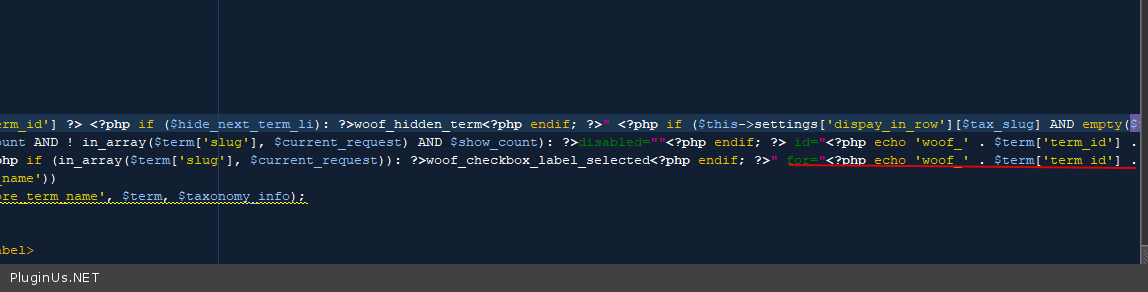
and add triger in file -wp-content\plugins\woocommerce-products-filter\js\front.js - here - https://c2n.me/4cv5x4G.png
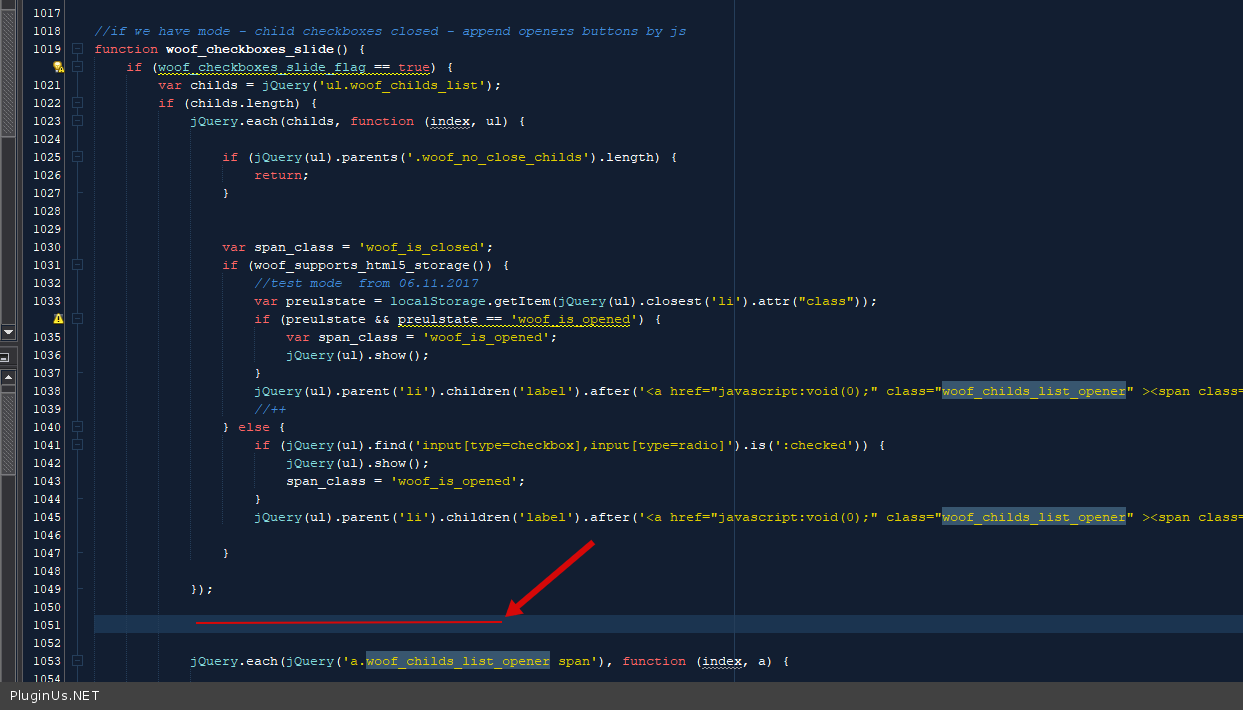
an example
jQuery('.woof_childs_list_li > label').on('click', function(){
jQuery(this).next('.woof_childs_list_opener').trigger('click');
})
Quote from gloris on June 26, 2021, 11:24Hello
I tried as indicated but it doesn't work for me
http://shop.stemtech.it/arduino/
these are the changes made on checkbox.php http://c2n.me/4cvB7EY
these are the changes made on front.js http://c2n.me/4cvB46m
Hello
I tried as indicated but it doesn't work for me
http://shop.stemtech.it/arduino/
these are the changes made on checkbox.php http://c2n.me/4cvB7EY
these are the changes made on front.js http://c2n.me/4cvB46m
Quote from Pablo Borysenco on June 28, 2021, 12:40Hello
I gave you not a ready-made solution, but a diy how to implement it
If you decide to use radio, check file - \wp-content\plugins\woocommerce-products-filter\views\html_types\radio.php
Hello
I gave you not a ready-made solution, but a diy how to implement it
If you decide to use radio, check file - \wp-content\plugins\woocommerce-products-filter\views\html_types\radio.php
Quote from gloris on June 30, 2021, 08:07Hello
I deleted For = ... in the radio.php file
I have run many tests with the code to insert in front.js but the result does not change
I think the problem is in this lin: jQuery(this).next('.woof_childs_list_opener').trigger('click');
I beg you to help me find the solution I would be really grateful because I am stuck and I can not go on
Hello
I deleted For = ... in the radio.php file
I have run many tests with the code to insert in front.js but the result does not change
I think the problem is in this lin: jQuery(this).next('.woof_childs_list_opener').trigger('click');
I beg you to help me find the solution I would be really grateful because I am stuck and I can not go on
Quote from Pablo Borysenco on June 30, 2021, 13:14Hello
Try to use this code:
jQuery(this).next('.woof_childs_list_opener').find('span').trigger('click');
Hello
Try to use this code:
jQuery(this).next('.woof_childs_list_opener').find('span').trigger('click');
Quote from gloris on July 1, 2021, 08:06Hello
I thank you now the menu works fine
Now I have this problem
In the arduino page I used this schotcode: [woof autosubmit=1 taxonomies=product_cat:46,47 redirect='http://shop.stemtech.it/arduinoprod/']
as you can see when I click a "sub sub cat arduino" the arduinoprod page opens
On this page I have put these 2 shortcodes:
[woof autosubmit=1 taxonomies=product_cat:46,47]
[woof_products per_page=8 columns=4 is_ajax=0 taxonomies=product_cat:46,47]the [woof ..] shortcode works fine
[woof_product ...] as you can see, it does not filter anything and does not paginate with 4 columnsdoing wrong?
Hello
I thank you now the menu works fine
Now I have this problem
In the arduino page I used this schotcode: [woof autosubmit=1 taxonomies=product_cat:46,47 redirect='http://shop.stemtech.it/arduinoprod/']
as you can see when I click a"sub sub cat arduino" the arduinoprod page opens
On this page I have put these 2 shortcodes:
[woof autosubmit=1 taxonomies=product_cat:46,47]
[woof_products per_page=8 columns=4 is_ajax=0 taxonomies=product_cat:46,47]
the [woof ..] shortcode works fine
[woof_product ...] as you can see, it does not filter anything and does not paginate with 4 columns
doing wrong?
Quote from Pablo Borysenco on July 1, 2021, 12:18Hello
Please drop me wp-admin access- https://share.pluginus.net/image/i20210618130558.png -> https://share.pluginus.net/image/i20210618130637.png
and does not paginate with 4 columns - it only depends on your current template(theme) - https://share.pluginus.net/image/i20210701131823.png
Hello
Please drop me wp-admin access- https://share.pluginus.net/image/i20210618130558.png -> https://share.pluginus.net/image/i20210618130637.png

and does not paginate with 4 columns - it only depends on your current template(theme) - https://share.pluginus.net/image/i20210701131823.png

Quote from Pablo Borysenco on July 2, 2021, 12:10Hello
please do a test - http://shop.stemtech.it/test-woof/ - My test - https://c2n.me/4czAtvv
try to watch a video - https://products-filter.com/video-tutorials/#video_beGT6p_look
Hello
please do a test - http://shop.stemtech.it/test-woof/ - My test - https://c2n.me/4czAtvv
try to watch a video - https://products-filter.com/video-tutorials/#video_beGT6p_look
Quote from gloris on July 3, 2021, 21:59Hi
thanks for the code now works fine
when I load the "Arduino" page for the first time (browser cache cleared) the menu collapsed
I click the first menu item to expand the menu
Now if I reload the page (I click Microbit and then Arduino) the menu remains expanded
I want the menu to resume collapsed
How can it be done?
Hi
thanks for the code now works fine
when I load the"Arduino" page for the first time (browser cache cleared) the menu collapsed
I click the first menu item to expand the menu
Now if I reload the page (I click Microbit and then Arduino) the menu remains expanded
I want the menu to resume collapsed
How can it be done?
Quote from Pablo Borysenco on July 5, 2021, 13:29Hello
Yes, this is the section state memory. To turn it off - wp-content\plugins\woocommerce-products-filter\js\front.js - add code - https://share.pluginus.net/image/i20210705142948.png
Hello
Yes, this is the section state memory. To turn it off - wp-content\plugins\woocommerce-products-filter\js\front.js - add code - https://share.pluginus.net/image/i20210705142948.png
