PluginUs.Net - Business Tools for WooCommerce and WordPress

[realize your idea - make your dreams come true]

Support Forum

You need to log-in to create request (topic) to the support

Jump to top of the page after filtering

The support doesn work on Saturdays and Sundays, so some Friday requests can be answered on Monday. If you have problems with registration ask help on contact us page please
If you not got email within 24~36 business hours, firstly check your spam box, and if no any email from the support there - back to the forum and read answer here. DO NOT ANSWER ON EMAILS [noreply@pluginus.net] FROM THE FORUM!! Emails are just for your info, all answers should be published only here.
The support doesn work on Saturdays and Sundays, so some Friday requests can be answered on Monday.

Hi,

we have the problem that the page does not jump to the top after using the shop filter. Is it possible to set the side view to just go all the way up, i.e. not end at the top product line?

If you use any filter on this page you'll see the issue: https://www.simple-sample.de/shop/?swoof=1&pa_produktart=whisky

Hello

My  test  - https://c2n.me/4eEyd3x - it looks like it works

Hi Pablo,

yes, it scrolls to the top, but not to the very top of the page. It scrolls barely above the first line of products. So the search bar and title is not visible.

It would be good if the page scrolls back to the top so that all content is fully visible.

Hello

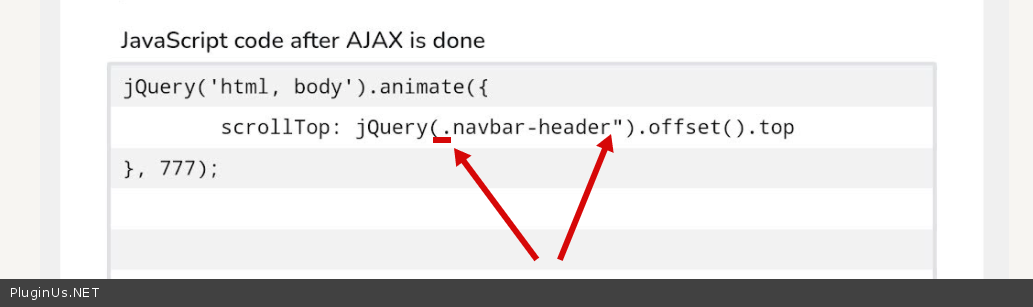
Ok! Change  selector  in  your  code to '.navbar-header'

Hi Pablo,

thank you for the feedback. Unfortunately that does not work.

After I changed that, the filter is no longer executed with AJAX but reloaded normally. I left it as it is now so you can check it.

Screenshot of the code: https://www.dropbox.com/s/smuldxpdzxp8up5/Bildschirmfoto%202022-01-20%20um%2017.00.44.png?dl=0

After changing the code, the sliders on the home page stopped working. Turned off AJAX for WOOF, deleted the code, emptied the cache, now it's working again.

Maybe I added the wrong code/selector here?


Hello

https://c2n.me/4eG5oRd.png - You missed a quote

Hi Pablo,

I had already tried that. Then unfortunately the view stays completely down and does not go up.

Hello

Please  drop  me wp-admin access - https://share.pluginus.net/image/i20210618130558.png -> https://share.pluginus.net/image/i20210618130637.png

Hi Pablo,

I just added the wp-admin access.

Hello

My test - https://c2n.me/4eIhIf0

Hi Pablo,

on desktop it works fine, thanks!

Unfortunately not on mobile yet, the view remains at the bottom.

Tested on Android 11 Galaxy Z Fold 3 and iOS 15.2.1

Please  clear all cache

We already cleared the cache, tried different devices and browsers. But the issue still occurs.

When we filter and select a different page (e.g. jump from 1 to 2), then the view is still at the bottom of the page and doesn't go up.

Hello

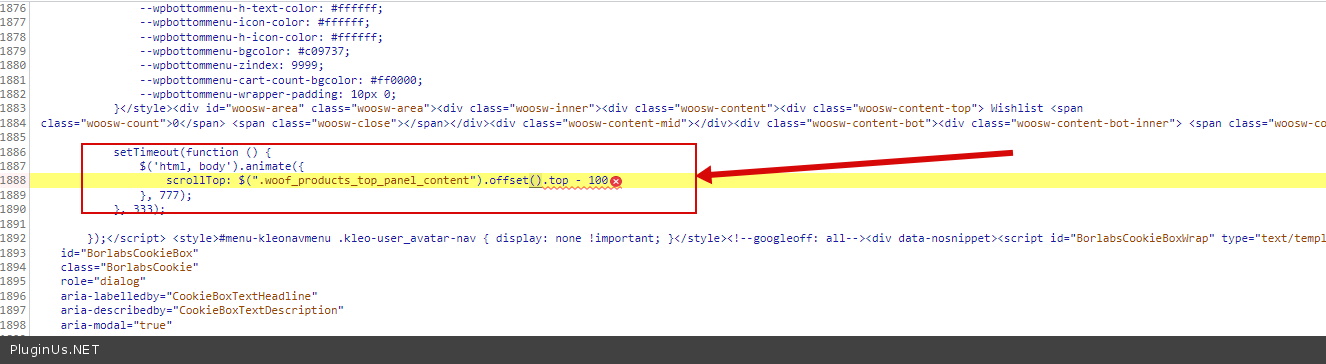
Please delete  your  custom  code - https://c2n.me/4eJ6Nh4.png - this code causes a JS error for mobile devices - this may be the reason why my code does not work