

Issues with custom meta fields
The support doesn work on Saturdays and Sundays, so some Friday requests can be answered on Monday. If you have problems with registration ask help on contact us page pleaseIf you not got email within 24~36 business hours, firstly check your spam box, and if no any email from the support there - back to the forum and read answer here. DO NOT ANSWER ON EMAILS [noreply@pluginus.net] FROM THE FORUM!! Emails are just for your info, all answers should be published only here.
The support doesn work on Saturdays and Sundays, so some Friday requests can be answered on Monday.

Quote from Helena on March 8, 2021, 01:18Hello,
I have 2 custom meta fields: one field is for setting regular resellers price and the other one is for setting sale resellers price. Meta keys are correct but I've encountered the following issues:
- When using the bulk edit tools panel, some options are missing in the custom meta fields as compared to the default regular price field and sale price field. Illustrations with those screenshots:
https://ibb.co/tLz7hg8
https://ibb.co/5cjqSgt
2.When I set sale price for resellers using the bulk edit tools panel, the values are saved in backend but they don't show on frontend. Yet, I don't encounter that issue with the other custom meta field nor with the default sale price field.
Thanks in advance for your help,
Best regards
Hello,
I have 2 custom meta fields: one field is for setting regular resellers price and the other one is for setting sale resellers price. Meta keys are correct but I've encountered the following issues:
- When using the bulk edit tools panel, some options are missing in the custom meta fields as compared to the default regular price field and sale price field. Illustrations with those screenshots:
2.When I set sale price for resellers using the bulk edit tools panel, the values are saved in backend but they don't show on frontend. Yet, I don't encounter that issue with the other custom meta field nor with the default sale price field.
Thanks in advance for your help,
Best regards

Quote from Pablo Borysenco on March 8, 2021, 10:19Hello
- Yes. Because these meta fields are not related to standard prices
- the values are saved in backend - So my plugin is working correctly and changes prices. it looks like a cache. Try to clear all cache and transient
Hello
- Yes. Because these meta fields are not related to standard prices
- the values are saved in backend - So my plugin is working correctly and changes prices. it looks like a cache. Try to clear all cache and transient
Quote from Helena on March 9, 2021, 01:30Hello,
Thank you for your reply.
- Ok, so for example, as sale price for resellers, if I want to set a 20% discount on the regular resellers price, I have to enter the exact amount of sale price since I can't set 20 and choose "regular price for resellers minus %"?
- I installed the plugin WP-Optimize and it seems better, but so far, it only works for products with variations of 2 attributes. For products with variations of just 1 attribute, sale price for resellers still doesn't show. I will ask the developer of the variations grid plugin about this issue. There may be a link between the two.
Best regards
Hello,
Thank you for your reply.
- Ok, so for example, as sale price for resellers, if I want to set a 20% discount on the regular resellers price, I have to enter the exact amount of sale price since I can't set 20 and choose"regular price for resellers minus %"?
- I installed the plugin WP-Optimize and it seems better, but so far, it only works for products with variations of 2 attributes. For products with variations of just 1 attribute, sale price for resellers still doesn't show. I will ask the developer of the variations grid plugin about this issue. There may be a link between the two.
Best regards
Quote from Pablo Borysenco on March 9, 2021, 11:03Hello
1 Please read this - https://bulk-editor.com/document/woocommerce-products-meta-fields/
Set this field as string - https://c2n.me/4be8wDj.png and copy the price data into this field
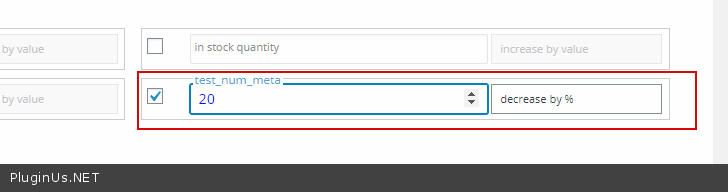
Then set this meta as number - https://c2n.me/4be8EPq.png now you can change this number - https://c2n.me/4be8GZY.png
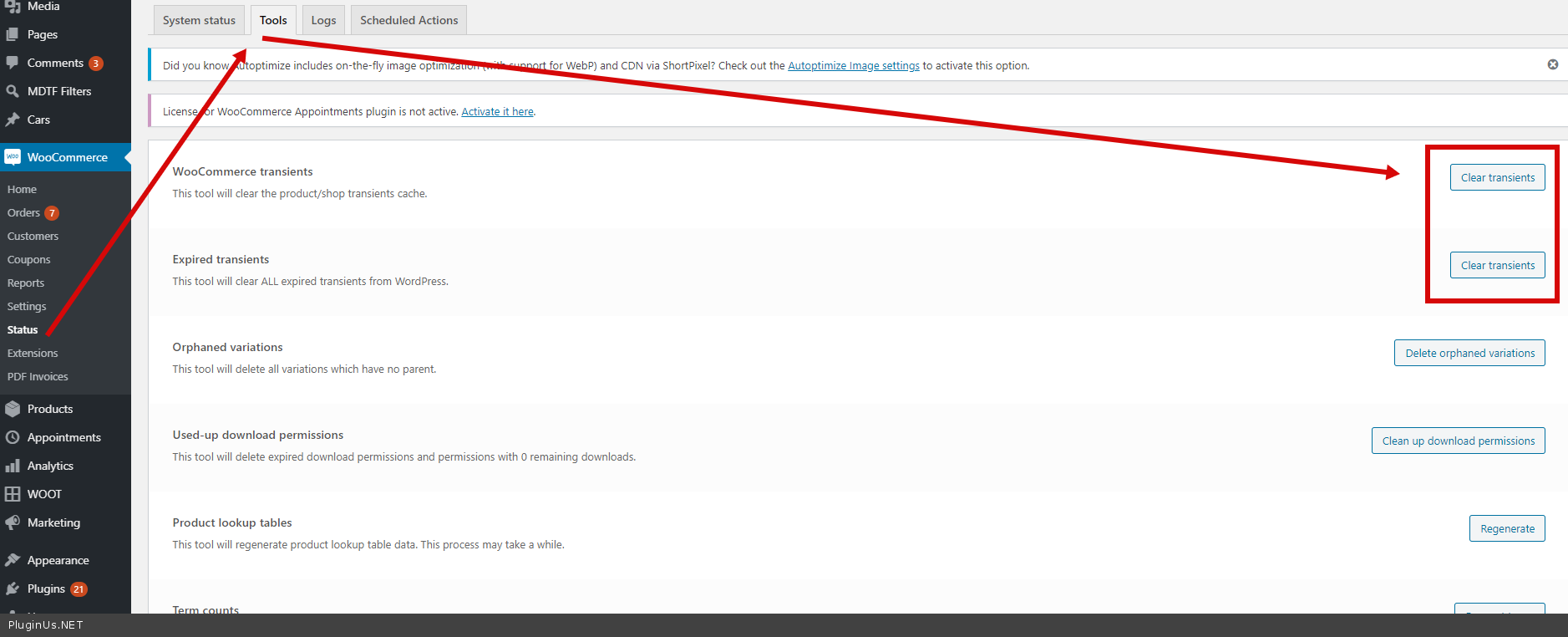
2 have you tried cleaning the transient? - https://c2n.me/4be8SYy.png
Hello
1 Please read this - https://bulk-editor.com/document/woocommerce-products-meta-fields/
Set this field as string - https://c2n.me/4be8wDj.png and copy the price data into this field

Then set this meta as number - https://c2n.me/4be8EPq.png now you can change this number - https://c2n.me/4be8GZY.png

2 have you tried cleaning the transient? - https://c2n.me/4be8SYy.png
Quote from Helena on March 9, 2021, 18:36Hello,
Thank you for your reply.
- I don't know if I did everything correctly but after having completed the procedure, the options in the fields remain unchanged: I can choose between "increase/decrease by value" and "increase/decrease by %" but I still can't set a price in relation to another one. What I mean is this: I have 2 meta fields: b2bking_regular_product_price_group_717 (= regular price for resellers) and b2bking_sale_product_price_group_717 (= sale price for resellers)
Let's say I set 100 € as regular price for resellers, and I want to set a 20% discount (on the regular price for resellers) as sale price for resellers. Unlike the default price fields where you can choose "regular price minus value" or "regular price minus %", there are no such options in the meta fields. If I just set 20 and select "decrease by %", it doesn't work since it's not related to anything.
- Yes, but it still doesn't work. I'll let you know as soon as I receive an answer from the developer of the third-party plugin.
Best regards
Hello,
Thank you for your reply.
- I don't know if I did everything correctly but after having completed the procedure, the options in the fields remain unchanged: I can choose between"increase/decrease by value" and"increase/decrease by %" but I still can't set a price in relation to another one. What I mean is this: I have 2 meta fields: b2bking_regular_product_price_group_717 (= regular price for resellers) and b2bking_sale_product_price_group_717 (= sale price for resellers)
Let's say I set 100 € as regular price for resellers, and I want to set a 20% discount (on the regular price for resellers) as sale price for resellers. Unlike the default price fields where you can choose"regular price minus value" or"regular price minus %", there are no such options in the meta fields. If I just set 20 and select"decrease by %", it doesn't work since it's not related to anything.
- Yes, but it still doesn't work. I'll let you know as soon as I receive an answer from the developer of the third-party plugin.
Best regards
Quote from Pablo Borysenco on March 10, 2021, 10:43Hello
- Ok! Read my message again please and watch my video - https://c2n.me/4bf3NBe
Hello
- Ok! Read my message again please and watch my video - https://c2n.me/4bf3NBe
Quote from Helena on March 11, 2021, 00:59Hello,
Ah, thank you! Now, I understand better. So, I guess everytime I need to set a price in relation to another one, I have to repeat this method?
There's something though: Once I set the meta field as string, whenever I activate the "variations" button for products, the meta field is not showing in the Bulk edit panel. If I deactivate the "variations" button, the meta is showing again.
Hello,
Ah, thank you! Now, I understand better. So, I guess everytime I need to set a price in relation to another one, I have to repeat this method?
There's something though: Once I set the meta field as string, whenever I activate the"variations" button for products, the meta field is not showing in the Bulk edit panel. If I deactivate the"variations" button, the meta is showing again.
Quote from Pablo Borysenco on March 11, 2021, 10:46Hello
Oh! Yes. I will pass this to the developers
Hello
Oh! Yes. I will pass this to the developers
Quote from Pablo Borysenco on March 11, 2021, 19:32Hello
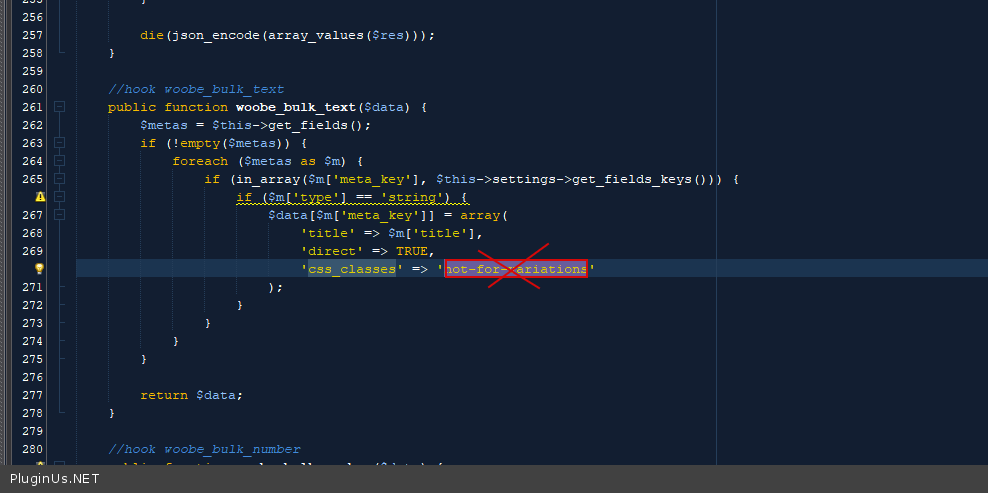
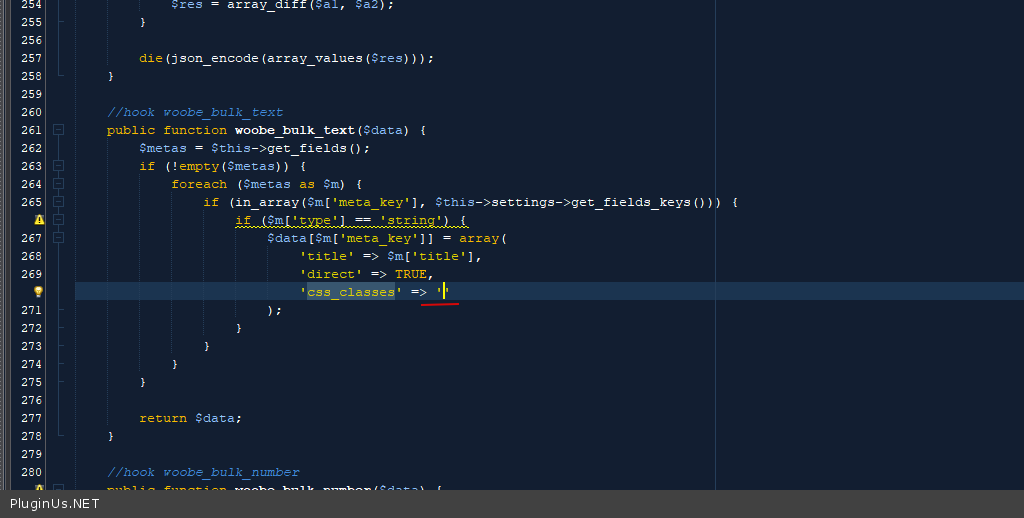
Please try in file - \wp-content\plugins\woocommerce-bulk-editor\ext\meta\meta.php - delete this code - https://c2n.me/4bgAZDZ.png - it should look like this - https://c2n.me/4bgAXBt.png
and do a test
Hello
Please try in file - \wp-content\plugins\woocommerce-bulk-editor\ext\meta\meta.php - delete this code - https://c2n.me/4bgAZDZ.png - it should look like this - https://c2n.me/4bgAXBt.png
and do a test
Quote from Helena on March 12, 2021, 01:29Hello Pablo,
Thank you! It works fine now. :)
Best regards
Hello Pablo,
Thank you! It works fine now. :)
Best regards
Quote from Pablo Borysenco on March 12, 2021, 12:51Hello Helena
Welcome;)
Hello Helena
Welcome;)