

Issue with filters
The support doesn work on Saturdays and Sundays, so some Friday requests can be answered on Monday. If you have problems with registration ask help on contact us page pleaseIf you not got email within 24~36 business hours, firstly check your spam box, and if no any email from the support there - back to the forum and read answer here. DO NOT ANSWER ON EMAILS [noreply@pluginus.net] FROM THE FORUM!! Emails are just for your info, all answers should be published only here.
The support doesn work on Saturdays and Sundays, so some Friday requests can be answered on Monday.

Quote from Christos on March 25, 2021, 13:30Hello, i just purchased woof woocommerce products filter pro.
I have it on a chromium template that uses the free version. I have an eshop with product tires.
I have on homepage 4 filters: Category / dimension / flat / brand.
When i choose a dimension it doesnt show on category flat and brand only the values that are available on this dimension. It shows everything. I am sending you ss with my settings
Structure
https://drive.google.com/file/d/1_0dP2NrVxAtEP9uFMIuZ5cvE5iQ3x-xe/view?usp=sharing
Options
https://drive.google.com/file/d/1YYOZjBsLPTugH3TvfiE70asHXMG9XMYu/view?usp=sharing
Advanced
https://drive.google.com/file/d/1TeEH2m0L3vRZm5Z5HA5Ovw3SAslmMdfy/view?usp=sharing
Can you please help me?
Best Regards
Chris
Hello, i just purchased woof woocommerce products filter pro.
I have it on a chromium template that uses the free version. I have an eshop with product tires.
I have on homepage 4 filters: Category / dimension / flat / brand.
When i choose a dimension it doesnt show on category flat and brand only the values that are available on this dimension. It shows everything. I am sending you ss with my settings
Structure
https://drive.google.com/file/d/1_0dP2NrVxAtEP9uFMIuZ5cvE5iQ3x-xe/view?usp=sharing
Options
https://drive.google.com/file/d/1YYOZjBsLPTugH3TvfiE70asHXMG9XMYu/view?usp=sharing
Advanced
https://drive.google.com/file/d/1TeEH2m0L3vRZm5Z5HA5Ovw3SAslmMdfy/view?usp=sharing
Can you please help me?
Best Regards
Chris

Quote from Pablo Borysenco on March 26, 2021, 13:07Hello Chris
Paste your license key here - https://c2n.me/43SC6rb.png -> https://c2n.me/42HBIt7.png and wp-admin access - https://c2n.me/42BAoj4.png
Please describe in more detail what I have to do to get this error.
Hello Chris
Paste your license key here - https://c2n.me/43SC6rb.png -> https://c2n.me/42HBIt7.png and wp-admin access - https://c2n.me/42BAoj4.png



Please describe in more detail what I have to do to get this error.
Quote from Christos on March 29, 2021, 08:38Hello
issue 1:
i use this shortcode on my homepage
[woof sid="home_page" tax_only="product_cat,pa_megethos,pwb-brand,pa_flat" autosubmit="1" ajax_redraw="1" is_ajax="1"] for some reason pa_megethos does not appear on the search ven though it has values and the same settings with pa_flat that appears properly.
Issue 2:
on my product archive https://preview.deventum.com/maxxis/shop-2/ i have overrided the template so i can get all products as table with specific acf fields. When i try to sort them i get a url like
?swoof=1&orderby=price&paged=1 and this returns my product output to grid. if i delete the paged=1
Issue 3: When i use any sort options on the header of the page i get the filters orderby:pa-diaststaseis-desc price range and the button clear all.
the price range shouldnt appear and when i press clear all it does not disappear. Even if i press x it does not dissapear.
Issue4: i have a float bar with woocommerce filters. When i choose it works but i cant see them on the header as choosen filters like i do on sorting.
Best Regards
Chris
Hello
issue 1:
i use this shortcode on my homepage
[woof sid="home_page" tax_only="product_cat,pa_megethos,pwb-brand,pa_flat" autosubmit="1" ajax_redraw="1" is_ajax="1"] for some reason pa_megethos does not appear on the search ven though it has values and the same settings with pa_flat that appears properly.
Issue 2:
on my product archive https://preview.deventum.com/maxxis/shop-2/ i have overrided the template so i can get all products as table with specific acf fields. When i try to sort them i get a url like
?swoof=1&orderby=price&paged=1 and this returns my product output to grid. if i delete the paged=1
Issue 3: When i use any sort options on the header of the page i get the filters orderby:pa-diaststaseis-desc price range and the button clear all.
the price range shouldnt appear and when i press clear all it does not disappear. Even if i press x it does not dissapear.
Issue4: i have a float bar with woocommerce filters. When i choose it works but i cant see them on the header as choosen filters like i do on sorting.
Best Regards
Chris
Quote from Pablo Borysenco on March 29, 2021, 13:05Hello Chris
- video with the issue - https://c2n.me/4btTzK5
- Please read this - https://products-filter.com/hook/woof_template_part/ OR disable ajax mode
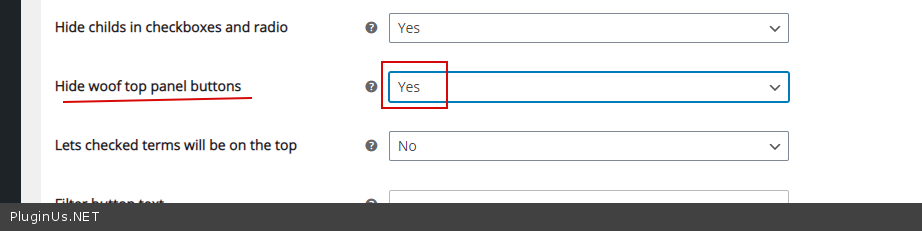
- Check option please - https://c2n.me/4btTQoN.png
- https://c2n.me/4btTTfB.png - my plugin has nothing to do with this filter
Hello Chris
- video with the issue - https://c2n.me/4btTzK5
- Please read this - https://products-filter.com/hook/woof_template_part/ OR disable ajax mode
- Check option please - https://c2n.me/4btTQoN.png
- https://c2n.me/4btTTfB.png - my plugin has nothing to do with this filter
Quote from Christos on March 29, 2021, 14:08Ok with 1,2 I used your filter for 4
Now i have extra question:
3. i dont want to disable the full bar. i just get an option price range that does not dissapear
4. even though on front i have the woof form as drop downs i want on the https://preview.deventum.com/maxxis/shop-2/ to be as checkboxes, the same fields though. Is this possible?
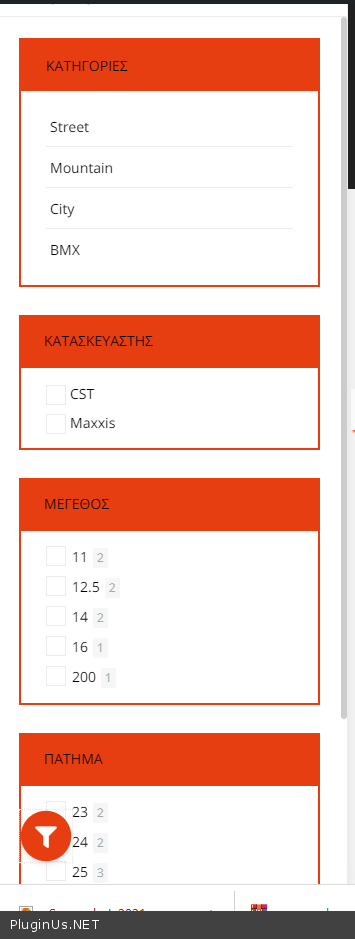
Also even though i have them inside if i choose brand i can see it on the activated filters but it doesnt filter my results. Only when i use the autosumbit=0 and press the bottom (you can see the sidebar if your press the fliter icon on the bottom left)
Ok with 1,2 I used your filter for 4
Now i have extra question:
3. i dont want to disable the full bar. i just get an option price range that does not dissapear
4. even though on front i have the woof form as drop downs i want on the https://preview.deventum.com/maxxis/shop-2/ to be as checkboxes, the same fields though. Is this possible?
Also even though i have them inside if i choose brand i can see it on the activated filters but it doesnt filter my results. Only when i use the autosumbit=0 and press the bottom (you can see the sidebar if your press the fliter icon on the bottom left)
Quote from Pablo Borysenco on March 30, 2021, 11:30Hello
3. Yes, it looks like you are using some kind of customization of the code. min_price=160&max_price=1000 - you do pre-filtering - remove it
4 https://preview.deventum.com/maxxis/shop-2/ - My filter does not exist on this page. I'm 100% sure of that.
you can see the sidebar if your press the fliter icon on the bottom left - Ok! And I see a third party filter. This is not my filter
Hello
3. Yes, it looks like you are using some kind of customization of the code. min_price=160&max_price=1000 - you do pre-filtering - remove it
4 https://preview.deventum.com/maxxis/shop-2/ - My filter does not exist on this page. I'm 100% sure of that.
you can see the sidebar if your press the fliter icon on the bottom left - Ok! And I see a third party filter. This is not my filter
Quote from Christos on March 31, 2021, 09:373. you where right! it was the price filter of woocommerce the default on. Fixed
4. Also you where right. My apologies i didnt put the new filters. On this i have the issue that when i choose category for example it gets on the filters nav on header but it doesnt filter the products until i press filter. Also even though on homepage i have it as drop down in the sidebar i would like to have it as checkbox or radio button. Is this possible? https://preview.deventum.com/maxxis/shop-2
3. you where right! it was the price filter of woocommerce the default on. Fixed
4. Also you where right. My apologies i didnt put the new filters. On this i have the issue that when i choose category for example it gets on the filters nav on header but it doesnt filter the products until i press filter. Also even though on homepage i have it as drop down in the sidebar i would like to have it as checkbox or radio button. Is this possible? https://preview.deventum.com/maxxis/shop-2
Quote from Pablo Borysenco on March 31, 2021, 12:56Hello
i have it as drop down in the sidebar i would like to have it as checkbox or radio button. - Unfortunately no.
You added filters incorrectly on this page. You should add the filter as one shortcode - [woof tax_only='product_cat,pwb-brand,pa_flat' autosubmit='1']
Hello
i have it as drop down in the sidebar i would like to have it as checkbox or radio button. - Unfortunately no.
You added filters incorrectly on this page. You should add the filter as one shortcode - [woof tax_only='product_cat,pwb-brand,pa_flat' autosubmit='1']
Quote from Christos on April 21, 2021, 13:08Hello,
everything works pefect and you have a great plugin to be honest. If in the future you ll give the ability to have different styles on each page for the filters it would be awesome.
I have a request although i know its not your obligation to help with customizations.
I have an attribute (pa_dimensions) with values 21x40/2.43, 210/1/240/2.x43 etc.
On the dropdown search I would like someon eto right for example 2140 and give me the result above. Meaning to ingore anything that is not a number on the results. If you can help me or point to me where you create the regex on the attribute dropdown searchIf you dont feel like helping i totally understand that its not a support request and not your obligation to do so.
Thanks in advance
Hello,
everything works pefect and you have a great plugin to be honest. If in the future you ll give the ability to have different styles on each page for the filters it would be awesome.
I have a request although i know its not your obligation to help with customizations.
I have an attribute (pa_dimensions) with values 21x40/2.43, 210/1/240/2.x43 etc.
On the dropdown search I would like someon eto right for example 2140 and give me the result above. Meaning to ingore anything that is not a number on the results. If you can help me or point to me where you create the regex on the attribute dropdown search
If you dont feel like helping i totally understand that its not a support request and not your obligation to do so.
Thanks in advance
Quote from Pablo Borysenco on April 22, 2021, 10:54Hello
Unfortunately, I'm not sure that I understood you correctly
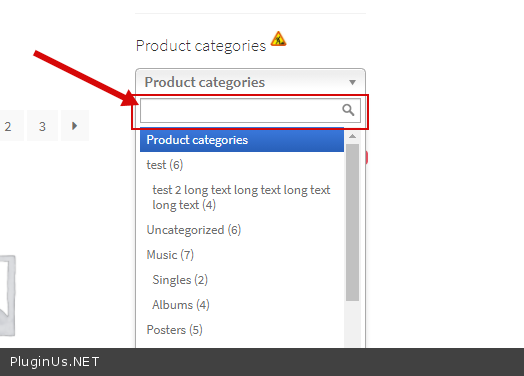
Do you mean this search - https://c2n.me/4bMULZQ.png - In this case, I cannot help you, because we are using a third party library for dropdowns
Hello
Unfortunately, I'm not sure that I understood you correctly
Do you mean this search - https://c2n.me/4bMULZQ.png - In this case, I cannot help you, because we are using a third party library for dropdowns
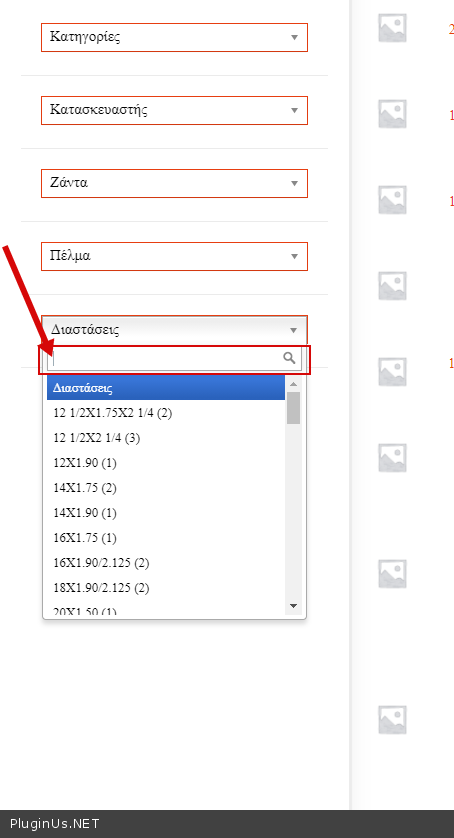
Quote from Christos on April 22, 2021, 11:57I mean the dropdowns that you can see here https://preview.deventum.com/maxxis/shop-2/ that are created from the shortcode [woof tax_only="product_cat,pwb-brand,pa_flat,pa_megethos,pa_diastaseis" autosubmit="1" ajax_redraw="0" is_ajax="1"] and are woocommerce default product attributes. you can see the floating sidebar on the page i mentioned if you press the filtre round icon on the bottom right
i am sending a screenshot https://drive.google.com/file/d/1xc6Qvx8aabrRZ1MpOhnGJRat77itsIfm/view?usp=sharing
I mean the dropdowns that you can see here https://preview.deventum.com/maxxis/shop-2/ that are created from the shortcode [woof tax_only="product_cat,pwb-brand,pa_flat,pa_megethos,pa_diastaseis" autosubmit="1" ajax_redraw="0" is_ajax="1"] and are woocommerce default product attributes. you can see the floating sidebar on the page i mentioned if you press the filtre round icon on the bottom right
i am sending a screenshot https://drive.google.com/file/d/1xc6Qvx8aabrRZ1MpOhnGJRat77itsIfm/view?usp=sharing
Quote from Pablo Borysenco on April 22, 2021, 12:29Ok! If you mean this - https://c2n.me/4bN297K.png - In this case, I cannot help you, because we are using a third party library for dropdowns
Ok! If you mean this - https://c2n.me/4bN297K.png - In this case, I cannot help you, because we are using a third party library for dropdowns
Quote from Christos on May 27, 2021, 09:14Hello,
without touching anything a new problem came up.
On https://preview.deventum.com/maxxis/shop-2/ when i press page 2 or 3 or whatever i get https://preview.deventum.com/maxxis/shop-2/?swoof=1&paged=3 and the quantity boxes on my grid do not work. If i refresh the page the url turns to https://preview.deventum.com/maxxis/shop-2/page/3/?swoof=1 and it works like charm. This came suddenly and i cant find out what is wrong. I have setted the pagination through the plugin using 30 products per page
Hello,
without touching anything a new problem came up.
On https://preview.deventum.com/maxxis/shop-2/ when i press page 2 or 3 or whatever i get https://preview.deventum.com/maxxis/shop-2/?swoof=1&paged=3 and the quantity boxes on my grid do not work. If i refresh the page the url turns to https://preview.deventum.com/maxxis/shop-2/page/3/?swoof=1 and it works like charm. This came suddenly and i cant find out what is wrong. I have setted the pagination through the plugin using 30 products per page
Quote from Pablo Borysenco on May 27, 2021, 13:23Hello
the quantity boxes on my grid - describe in more detail what it is
Perhaps the current template is not compatible with ajax mode
Try to disable ajax mode
Hello
the quantity boxes on my grid - describe in more detail what it is
Perhaps the current template is not compatible with ajax mode
Try to disable ajax mode