

Issue displaying category
The support doesn work on Saturdays and Sundays, so some Friday requests can be answered on Monday. If you have problems with registration ask help on contact us page pleaseIf you not got email within 24~36 business hours, firstly check your spam box, and if no any email from the support there - back to the forum and read answer here. DO NOT ANSWER ON EMAILS [noreply@pluginus.net] FROM THE FORUM!! Emails are just for your info, all answers should be published only here.
The support doesn work on Saturdays and Sundays, so some Friday requests can be answered on Monday.

Quote from dawebguy on October 5, 2020, 14:39Hi,
I’m using the free version of your plugin and looking to upgrade to premium but having a issue. I’ve read your documentation and previous comments but it doesnt work. I need to display a specific category on a specific page only.
I used the shortcode [woof taxonomies=product_cat:36] .. I confirmed the product category is assigned the ID 36. Still no luck. Any thoughts on why this is so?
URL is: https://orizonindustryltd.com/product-category/formica/
Please see screenshots:
https://prnt.sc/utg7f9 (Filter not showing)
https://prnt.sc/utg9nl (Code on page in sidebar. The sidebar works but the code does not)
https://prnt.sc/utgbc3 (Category page)I await your response.
Hi,
I’m using the free version of your plugin and looking to upgrade to premium but having a issue. I’ve read your documentation and previous comments but it doesnt work. I need to display a specific category on a specific page only.
I used the shortcode [woof taxonomies=product_cat:36] .. I confirmed the product category is assigned the ID 36. Still no luck. Any thoughts on why this is so?
URL is: https://orizonindustryltd.com/product-category/formica/
Please see screenshots:
https://prnt.sc/utg7f9 (Filter not showing)
https://prnt.sc/utg9nl (Code on page in sidebar. The sidebar works but the code does not)
https://prnt.sc/utgbc3 (Category page)
I await your response.

Quote from Pablo Borysenco on October 6, 2020, 12:28Hello
If you use "WOOF by category" please disable it
Drop me screenshots of the plugin settings
Hello
If you use "WOOF by category" please disable it
Drop me screenshots of the plugin settings
Quote from dawebguy on October 6, 2020, 14:13Hi,
It is disabled. Here is the settings:
Structure Settings:
https://prnt.sc/uu28rwOptions Settings:
https://prnt.sc/uu29q6
Hi,
It is disabled. Here is the settings:
Structure Settings:
https://prnt.sc/uu28rw
Options Settings:
https://prnt.sc/uu29q6
Quote from Pablo Borysenco on October 7, 2020, 10:43Hello
Try to activate filters - https://c2n.me/49lvapK.png
Please watch a video - https://products-filter.com/video-tutorials#video_beGT6p_look
Hello
Try to activate filters - https://c2n.me/49lvapK.png
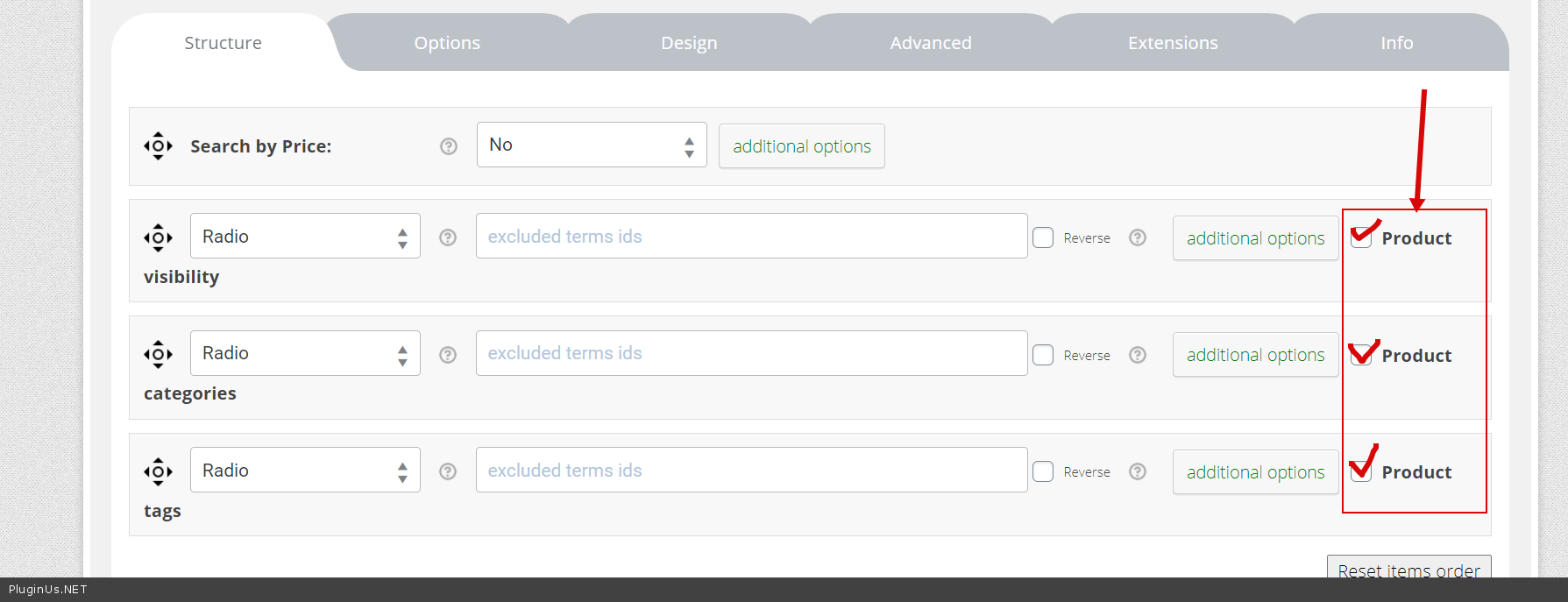
Please watch a video - https://products-filter.com/video-tutorials#video_beGT6p_look
Quote from dawebguy on October 7, 2020, 17:27Hello.
Yes I understand that but it still doesn't solve my issue as the other categories are displaying.
I activated "Product Categories" only which shows the categories which is great:
https://prnt.sc/uuu7aa
The categories are shown. However I need only "Formica" to be shown on this page:
https://prnt.sc/uuupq2On a next page I may only need "Tools" to be shown on the page and so on. So the code [woof taxonomies=product_cat:36] was to restrict the category to Formica only but its not working.
Hello.
Yes I understand that but it still doesn't solve my issue as the other categories are displaying.
I activated"Product Categories" only which shows the categories which is great:
The categories are shown. However I need only"Formica" to be shown on this page:
https://prnt.sc/uuupq2
On a next page I may only need"Tools" to be shown on the page and so on. So the code [woof taxonomies=product_cat:36] was to restrict the category to Formica only but its not working.
Quote from Pablo Borysenco on October 8, 2020, 12:06Hello
Use woof widget(no shortcode) on this page
Test - https://demo.products-filter.com/product-category/clothing/man/ AND https://demo.products-filter.com/product-category/clothing/man/pullover/
Hello
Use woof widget(no shortcode) on this page
Test - https://demo.products-filter.com/product-category/clothing/man/ AND https://demo.products-filter.com/product-category/clothing/man/pullover/
Quote from dawebguy on October 8, 2020, 17:11Thank you for the reply but that does not make a difference.
Here is the woof widget added to the widgets area: https://prnt.sc/uvk7cj
Here is the widget added to the page: https://prnt.sc/uvk1yrAs you can see there is no difference: https://prnt.sc/uvk80p
I know there is an option to "exclude categories" in the woof settings however that would exclude categories wherever the widget is added. I just want the option to show one category on one shop page. If it is Formica I want Formica category. If it's Tools, I want the tools category. I thought the shortcode would have worked but its not.
Thank you for the reply but that does not make a difference.
Here is the woof widget added to the widgets area: https://prnt.sc/uvk7cj
Here is the widget added to the page: https://prnt.sc/uvk1yr
As you can see there is no difference: https://prnt.sc/uvk80p
I know there is an option to"exclude categories" in the woof settings however that would exclude categories wherever the widget is added. I just want the option to show one category on one shop page. If it is Formica I want Formica category. If it's Tools, I want the tools category. I thought the shortcode would have worked but its not.
Quote from Pablo Borysenco on October 9, 2020, 13:42Hello
Please check options - https://c2n.me/49nuZAI.png
Add widget here - https://orizonindustryltd.com/product-category/formica/ and I will check it
Hello
Please check options - https://c2n.me/49nuZAI.png
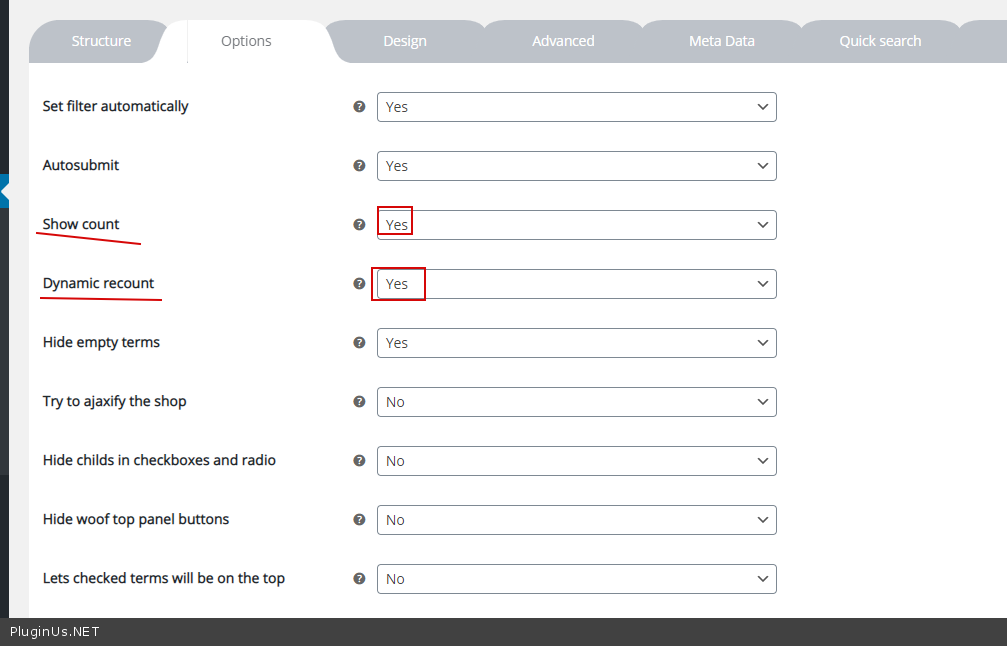
Add widget here - https://orizonindustryltd.com/product-category/formica/ and I will check it
Quote from dawebguy on October 12, 2020, 08:00Hi,
I enabled the settings however I cannot set a widget for the category page (don't believe the theme allows me to either). Is there another solution? Or anyway it can be applied via a page? Like how I have it on this page with the widget: https://bit.ly/3lEBYci
Hi,
I enabled the settings however I cannot set a widget for the category page (don't believe the theme allows me to either). Is there another solution? Or anyway it can be applied via a page? Like how I have it on this page with the widget: https://bit.ly/3lEBYci
Quote from Pablo Borysenco on October 12, 2020, 12:49Hello
Very important! for the filter to show only child categories, the widget must be on the category page! The plugin must understand that it is on a category page
Hello
Very important! for the filter to show only child categories, the widget must be on the category page! The plugin must understand that it is on a category page