PluginUs.Net - Business Tools for WooCommerce and WordPress

[realize your idea - make your dreams come true]

Support Forum

You need to log-in to create request (topic) to the support

Is there a way to show the sibling child categories on the category page?

The support doesn work on Saturdays and Sundays, so some Friday requests can be answered on Monday. If you have problems with registration ask help on contact us page please
If you not got email within 24~36 business hours, firstly check your spam box, and if no any email from the support there - back to the forum and read answer here. DO NOT ANSWER ON EMAILS [noreply@pluginus.net] FROM THE FORUM!! Emails are just for your info, all answers should be published only here.
The support doesn work on Saturdays and Sundays, so some Friday requests can be answered on Monday.

Is there a way to show the sibling child categories on the category page?

The reason we need this, is that we have technical categories for filtering, which intersects with different other categories.
But such a filter is not showing up. Seems like it gets only current category children. Maybe there are some options to achieve this?


Hello

Unfortunately on the taxonomy page the plugin only shows child elements

To change this behavior you need code customization.

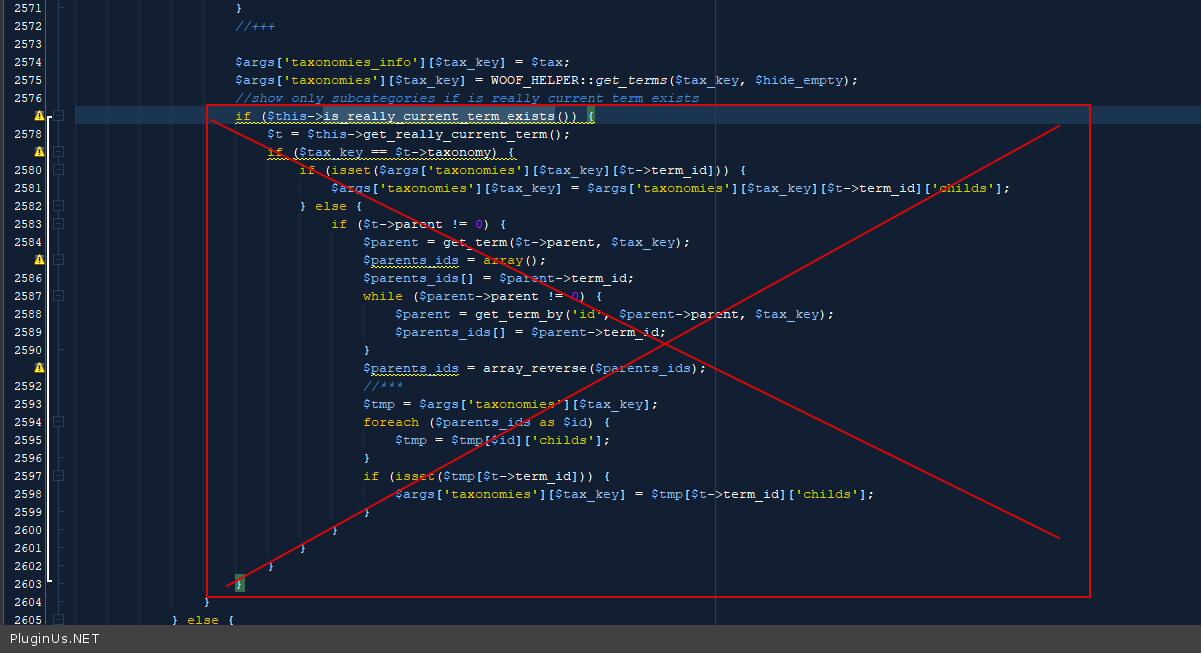
Try  in  file -wp-content\plugins\woocommerce-products-filter\index.php delete  this  code - https://c2n.me/4dXoe0h.png

We need to show only these two categories.

https://prnt.sc/1z5w0zc
I set the IDs in"excluded terms ids" and check reverse checkbox, but nothing happens.
I assume"reverse" checkbox mean to INCLUDE categories, right?

Hello

Please  drop me  exact  link to the issue