

Image term as round image
The support doesn work on Saturdays and Sundays, so some Friday requests can be answered on Monday. If you have problems with registration ask help on contact us page pleaseIf you not got email within 24~36 business hours, firstly check your spam box, and if no any email from the support there - back to the forum and read answer here. DO NOT ANSWER ON EMAILS [noreply@pluginus.net] FROM THE FORUM!! Emails are just for your info, all answers should be published only here.
The support doesn work on Saturdays and Sundays, so some Friday requests can be answered on Monday.

Quote from raunhar on January 4, 2021, 08:53https://www.stone-veneers.net/new/product-category/clothing/tshirts/?swoof=1&pa_color=blue&really_curr_tax=17-product_cat
I need to show round images in the filters just like in:
https://aoyingmat.com/en/categoria-producto/natural-stone
And I need to show counter also next to the image, just like in the mentioned site.
I have enabled Show Counter.
Please suggest.
I need to show round images in the filters just like in:
https://aoyingmat.com/en/categoria-producto/natural-stone
And I need to show counter also next to the image, just like in the mentioned site.
I have enabled Show Counter.
Please suggest.

Quote from Pablo Borysenco on January 4, 2021, 11:56Hello
Paste your license key here - https://c2n.me/43SC6rb.png -> https://c2n.me/42HBIt7.png
In this case, you need customization of the code.
Hello
Paste your license key here - https://c2n.me/43SC6rb.png -> https://c2n.me/42HBIt7.png


In this case, you need customization of the code.
Quote from raunhar on January 4, 2021, 12:37target design: https://aoyingmat.com/en/categoria-producto/natural-stone?id=filteren&wpf=1&pa_color=rusty&pa_origen=china-en
target design: https://aoyingmat.com/en/categoria-producto/natural-stone?id=filteren&wpf=1&pa_color=rusty&pa_origen=china-en
Quote from Pablo Borysenco on January 5, 2021, 11:34Hello
You need code customization.
Read this - https://products-filter.com/can-i-override-any-extension-view-file-for-my-site-needs/
Change CSS code of images:
border: 0px solid #e2e6e7;
border-radius: 50%;
Result - https://c2n.me/4asi7RW.jpg
Hello
You need code customization.
Read this - https://products-filter.com/can-i-override-any-extension-view-file-for-my-site-needs/
Change CSS code of images:
border: 0px solid #e2e6e7;
border-radius: 50%;
Result - https://c2n.me/4asi7RW.jpg
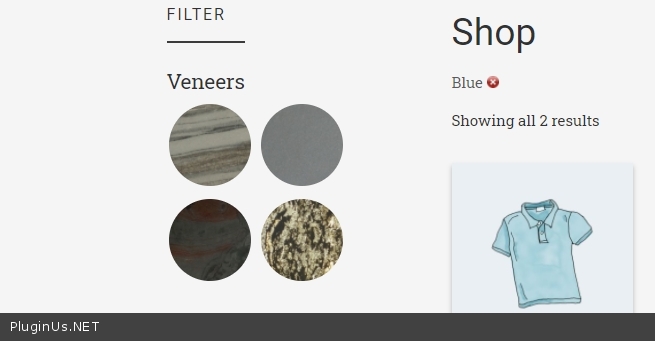
Quote from raunhar on January 5, 2021, 12:06I am using Customizr theme, and there is no such path (my_child_theme/woof/ext/image/views/woof.php)
I am using Customizr theme, and there is no such path (my_child_theme/woof/ext/image/views/woof.php)
Quote from Pablo Borysenco on January 6, 2021, 11:46Hello
and there is no such path (my_child_theme/woof/ext/image/views/woof.php) - Of course you should create it. You should hire a developer
Hello
and there is no such path (my_child_theme/woof/ext/image/views/woof.php) - Of course you should create it. You should hire a developer
Quote from raunhar on January 6, 2021, 12:36If I had to hire a developer, I would have gone for a free filter plugin (themify or some thing else) and get it modified. By purchasing, I expect some help.
If I had to hire a developer, I would have gone for a free filter plugin (themify or some thing else) and get it modified. By purchasing, I expect some help.
Quote from raunhar on January 6, 2021, 13:07And how do I show the Counter next to the image instead of on Hover.
Like in:
https://aoyingmat.com/en/products
And how do I show the Counter next to the image instead of on Hover.
Like in:
Quote from Pablo Borysenco on January 7, 2021, 12:07Hello
If I had to hire a developer, I would have gone for a free filter plugin - You bought a license to use the plugin. BUT code customization is not included in support.
If you have programming experience, I will be happy to help you( or your employee ) solve this problem. But I can't do all the work for you.
As I described above - you should change the template of this filter. so as not to repeat this after every plugin update - create new template in your child theme - https://products-filter.com/can-i-override-any-extension-view-file-for-my-site-needs/
You can take an example template - \wp-content\plugins\woocommerce-products-filter\ext\image\views\woof.php
Hello
If I had to hire a developer, I would have gone for a free filter plugin - You bought a license to use the plugin. BUT code customization is not included in support.
If you have programming experience, I will be happy to help you( or your employee ) solve this problem. But I can't do all the work for you.
As I described above - you should change the template of this filter. so as not to repeat this after every plugin update - create new template in your child theme - https://products-filter.com/can-i-override-any-extension-view-file-for-my-site-needs/
You can take an example template - \wp-content\plugins\woocommerce-products-filter\ext\image\views\woof.php
Quote from raunhar on January 7, 2021, 13:05tried that also, but no change. Instead the images also disappeared. I also tried adding into additional CSS.
The following is final additional css in the plugin:
.woof_color_term{
border-radius: 80px !important;
}.woof_color_term:hover{
border-color: #444;
border-style: dotted;
}
.woof_image_term{
width: 86px !important;
height: 86px !important;
border: 0px solid #e2e6e7;
border-radius: 80px;
}
tried that also, but no change. Instead the images also disappeared. I also tried adding into additional CSS.
The following is final additional css in the plugin:
.woof_color_term{
border-radius: 80px !important;
}
.woof_color_term:hover{
border-color: #444;
border-style: dotted;
}
.woof_image_term{
width: 86px !important;
height: 86px !important;
border: 0px solid #e2e6e7;
border-radius: 80px;
}
Quote from raunhar on January 7, 2021, 13:22I have currently disabled the pluggin as I am trying the Themify Filter
I have currently disabled the pluggin as I am trying the Themify Filter
Quote from Pablo Borysenco on January 8, 2021, 11:32Hello
tried that also, but no change. Instead the images also disappeared. - then you did something wrong. You can drop me screenshots of your custom template(code)
Hello
tried that also, but no change. Instead the images also disappeared. - then you did something wrong. You can drop me screenshots of your custom template(code)
Quote from raunhar on January 8, 2021, 12:33https://www.dropbox.com/s/lchtl9jea9of89l/woof.png?dl=0
the code
https://www.dropbox.com/s/lchtl9jea9of89l/woof.png?dl=0

the code
Quote from Pablo Borysenco on January 8, 2021, 13:23I mean \wp-content\plugins\woocommerce-products-filter\ext\image\views\woof.php
I mean \wp-content\plugins\woocommerce-products-filter\ext\image\views\woof.php