PluginUs.Net - Business Tools for WooCommerce and WordPress

[realize your idea - make your dreams come true]

Support Forum

You need to log-in to create request (topic) to the support

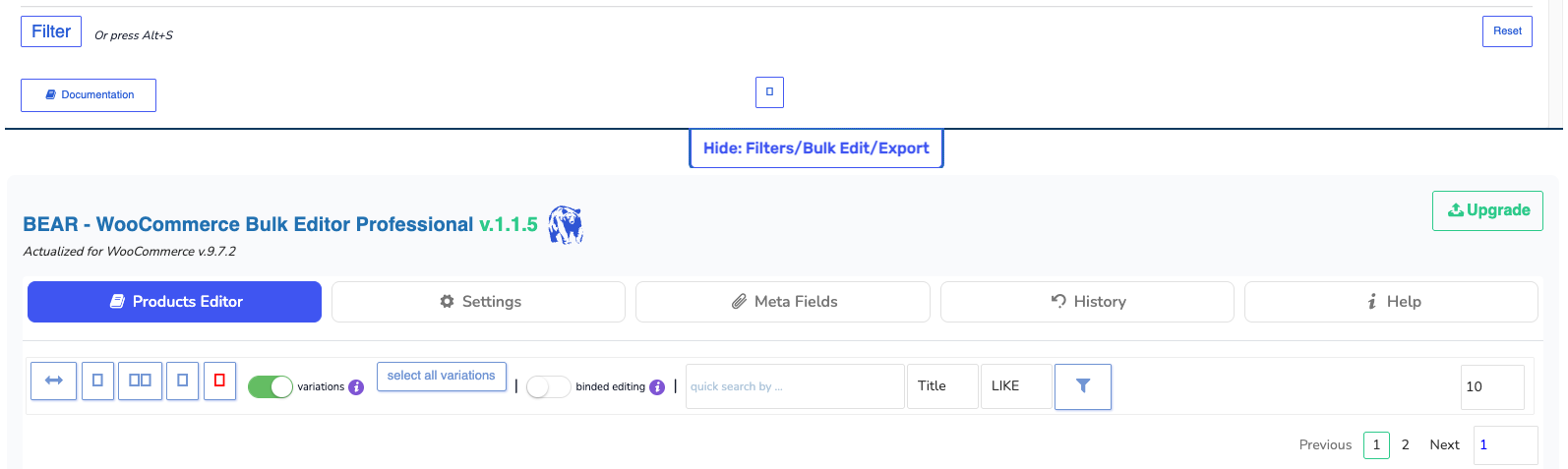
Icons not showing correctly

The support doesn work on Saturdays and Sundays, so some Friday requests can be answered on Monday. If you have problems with registration ask help on contact us page please
If you not got email within 24~36 business hours, firstly check your spam box, and if no any email from the support there - back to the forum and read answer here. DO NOT ANSWER ON EMAILS [noreply@pluginus.net] FROM THE FORUM!! Emails are just for your info, all answers should be published only here.
The support doesn work on Saturdays and Sundays, so some Friday requests can be answered on Monday.

Icons are not showing correctly. I have just installed this today.

Version 1.1.5 installed
Woocommerce Version 9.7.2
Server is using PHP 7.4


BEAR-Icons not showing

Hello Luke

Most common causes:

  1. Caching plugin - if you're using any cache plugin (WP Rocket, W3 Total Cache, etc.), please clear all cache and try again
  2. Plugin conflict - another plugin may be blocking the icon fonts from loading
  3. AdBlocker/Browser extension - sometimes these block icon resources

Please try these steps:

  1. Check browser console for errors:
    • Press F12 in your browser
    • Go to"Console" tab
    • Take a screenshot if you see any red errors
    • Also check"Network" tab to see if any files are failing to load
  2. Try in incognito/private mode:
    • This will help determine if it's a browser extension issue
  3. Clear all cache:

Could you please try these steps and let me know the results? If you can send me a screenshot of the browser console (F12 -> Console tab), that would be very helpful for diagnosing the exact issue.