
HUSKY – Advanced searching by Text and sku not working
The support doesn work on Saturdays and Sundays, so some Friday requests can be answered on Monday. If you have problems with registration ask help on contact us page pleaseIf you not got email within 24~36 business hours, firstly check your spam box, and if no any email from the support there - back to the forum and read answer here. DO NOT ANSWER ON EMAILS [noreply@pluginus.net] FROM THE FORUM!! Emails are just for your info, all answers should be published only here.
The support doesn work on Saturdays and Sundays, so some Friday requests can be answered on Monday.

Quote from natalia.fernandes on July 8, 2022, 12:08Hello!
I needed to do a search by name or sku within the category of this genre and present the search like this (widget in store):
 https://activex.pt/wp-content/uploads/2022/06/teste.png
You said that is possible, like this:
Please warch this video – https://products-filter.com/video#beGT6p_look
Use this extension – https://share.pluginus.net/image/i20220623113653.png
and it worked but i updated the plugin and it stopped working. This is the page:
https://demo.prestipecas.com/categoria-produto/airbag/airbag-banco/page/2/
What can i do now?
Thanks


Hello!
I needed to do a search by name or sku within the category of this genre and present the search like this (widget in store):
 https://activex.pt/wp-content/uploads/2022/06/teste.png
You said that is possible, like this:
Please warch this video – https://products-filter.com/video#beGT6p_look
Use this extension – https://share.pluginus.net/image/i20220623113653.png
and it worked but i updated the plugin and it stopped working. This is the page:
https://demo.prestipecas.com/categoria-produto/airbag/airbag-banco/page/2/
What can i do now?
Thanks

Quote from Pablo Borysenco on July 11, 2022, 10:39Hello
describe in more detail what should i do to get the error
And paste wp-admin access - https://share.pluginus.net/image/i20210618130558.png ->https://share.pluginus.net/image/i20210618130637.png
Hello
describe in more detail what should i do to get the error
And paste wp-admin access - https://share.pluginus.net/image/i20210618130558.png ->https://share.pluginus.net/image/i20210618130637.png


Quote from natalia.fernandes on July 11, 2022, 10:42there is no error. the extension was searching for sku within the category and since I updated the plugin it is no longer there.
there is no error. the extension was searching for sku within the category and since I updated the plugin it is no longer there.Quote from Pablo Borysenco on July 11, 2022, 11:45Ok! what i wanted (describe in more detail what should i do to get the error) : Which SKU should I enter and which product should be shown/hidden
Ok! what i wanted (describe in more detail what should i do to get the error) : Which SKU should I enter and which product should be shown/hidden
Quote from natalia.fernandes on July 11, 2022, 11:48all! Example:
Search in this page the sku of the firt product- 87845:
https://demo.prestipecas.com/categoria-produto/airbag/airbag-cortina/page/3/
There is no result
all! Example:
Search in this page the sku of the firt product- 87845:
https://demo.prestipecas.com/categoria-produto/airbag/airbag-cortina/page/3/
There is no result
Quote from Pablo Borysenco on July 11, 2022, 13:29Hello
Ok! Please drop me a link to teh product with this SKU
Hello
Ok! Please drop me a link to teh product with this SKU
Quote from natalia.fernandes on July 11, 2022, 14:43https://demo.prestipecas.com/loja/airbag/airbag-cortina/airbag-cortina-1495298080/
https://demo.prestipecas.com/loja/airbag/airbag-cortina/airbag-cortina-1495298080/
Quote from Pablo Borysenco on July 12, 2022, 12:24Hello
ok! Please drop me screenshots of the Husky settings OR better wp-admin access - https://share.pluginus.net/image/i20210618130558.png -> https://share.pluginus.net/image/i20210618130637.png - I will check it
Hello
ok! Please drop me screenshots of the Husky settings OR better wp-admin access - https://share.pluginus.net/image/i20210618130558.png -> https://share.pluginus.net/image/i20210618130637.png - I will check it
Quote from natalia.fernandes on July 12, 2022, 13:01i will give the access:
PRIVATE DATA!
i will give the access:
PRIVATE DATA!
Quote from Pablo Borysenco on July 13, 2022, 11:14Hello
This is an open forum! I strongly recommend changing access as soon as possible
In the previous message, I showed where to add access - https://c2n.me/4g8BISK.png
Hello
This is an open forum! I strongly recommend changing access as soon as possible
In the previous message, I showed where to add access - https://c2n.me/4g8BISK.png

Quote from natalia.fernandes on July 13, 2022, 12:32ok, i already did that, see please, i have some urgency!
ok, i already did that, see please, i have some urgency!Quote from natalia.fernandes on July 13, 2022, 18:30let it go, I bought the plugin...
but I don't think it's correct! it worked in the free version and it stopped working!
let it go, I bought the plugin...
but I don't think it's correct! it worked in the free version and it stopped working!Quote from Pablo Borysenco on July 14, 2022, 11:50Hello
Please do a test
My test - https://c2n.me/4g9dNmw.mp4
Hello
Please do a test
My test - https://c2n.me/4g9dNmw.mp4
Quote from natalia.fernandes on July 14, 2022, 12:04as I said: I bought the plugin! so it works!
as I said: I bought the plugin! so it works!Quote from Pablo Borysenco on July 14, 2022, 12:19I understood you. But this is not related to the purchase of the license.
Paid and free versions have the same code for text search.
You just bought the plugin with a new version (2.2.9 - https://products-filter.com/changelog) - this new version includes some text search fixes.
Free version will be updated tonight. if you update the free version to 1.2.9 - this will work the same
We do not force users to switch to the paid version.
In any case, I would help you fix this no matter what version of the plugin you are using.
I understood you. But this is not related to the purchase of the license.
Paid and free versions have the same code for text search.
You just bought the plugin with a new version (2.2.9 - https://products-filter.com/changelog) - this new version includes some text search fixes.
Free version will be updated tonight. if you update the free version to 1.2.9 - this will work the same
We do not force users to switch to the paid version.
In any case, I would help you fix this no matter what version of the plugin you are using.
Quote from natalia.fernandes on July 14, 2022, 12:38what you said is not correct.
These were the options i had with the free version:
https://prestipecas.com/ERRO.JPG
what you said is not correct.
These were the options i had with the free version:
https://prestipecas.com/ERRO.JPG


Quote from Ross on July 14, 2022, 13:04Hello Natalia
Looks like we have misunderstanding in concepts "does not work", and "is absent" in the system. Search by SKU was locked all the times in free version, and in new text search HUSKY it is still locked
But if to activate old text search version https://clip2net.com/s/4g9h4M5 - it is still there. Sorry for confusion but all things still on their places as it been, but new features had been added. Thank you for purchasing premium version of WOOF!
Hello Natalia
Looks like we have misunderstanding in concepts"does not work", and"is absent" in the system. Search by SKU was locked all the times in free version, and in new text search HUSKY it is still locked 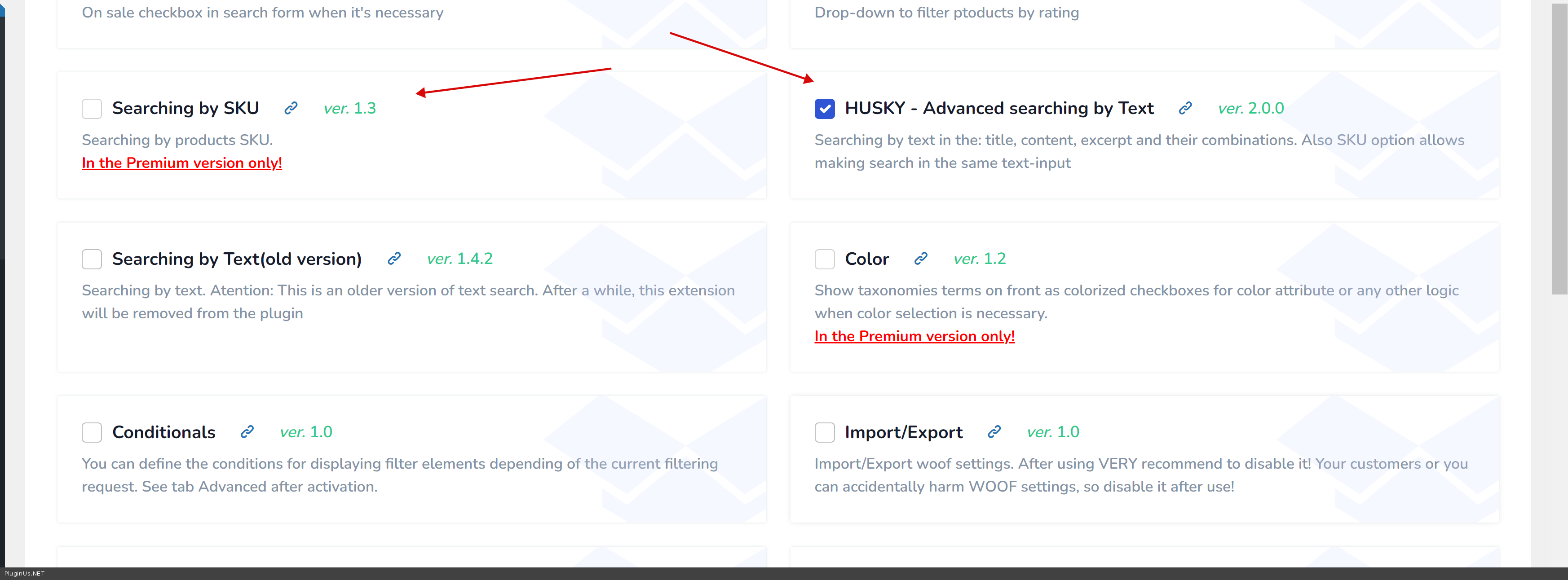
But if to activate old text search version https://clip2net.com/s/4g9h4M5 - it is still there. Sorry for confusion but all things still on their places as it been, but new features had been added. Thank you for purchasing premium version of WOOF!