

https://hoboko.co.uk/ product filter has stopped working
The support doesn work on Saturdays and Sundays, so some Friday requests can be answered on Monday. If you have problems with registration ask help on contact us page pleaseIf you not got email within 24~36 business hours, firstly check your spam box, and if no any email from the support there - back to the forum and read answer here. DO NOT ANSWER ON EMAILS [noreply@pluginus.net] FROM THE FORUM!! Emails are just for your info, all answers should be published only here.
The support doesn work on Saturdays and Sundays, so some Friday requests can be answered on Monday.

Quote from James on April 12, 2021, 08:18On https://hoboko.co.uk/ the product filter has stopped working
purchase code PRIVATE DATA
It was working fine and has now stopped you gave us some support to allow it to only show in stock by default and has worked for 6 months and now stopped. Any ideas?
On https://hoboko.co.uk/ the product filter has stopped working
purchase code PRIVATE DATA
It was working fine and has now stopped you gave us some support to allow it to only show in stock by default and has worked for 6 months and now stopped. Any ideas?

Quote from Pablo Borysenco on April 12, 2021, 14:30Hello
I did a test - https://c2n.me/4bEVUQD - the filter looks like it works
Hello
I did a test - https://c2n.me/4bEVUQD - the filter looks like it works
Quote from James on April 12, 2021, 18:53The filter is not recognising that things are out of stock, and, the plugin settings do not load at all, just show a load icon. Is it possible to pass you login details so you can see the issue?
The filter is not recognising that things are out of stock, and, the plugin settings do not load at all, just show a load icon. Is it possible to pass you login details so you can see the issue?
Quote from James on April 12, 2021, 21:53The client says "For example the trousers. When the large long is selected - It just comes shows all of the trousers I have in stock.
If you choose a size of Agni skirt it just shows all of them.There is no selecting going on "It is ignoring stock and as the plugin settings won't load, there is clearly an issue. How do we get support, and for you to be able to log in, with a public forum where i can't share login info?
The client says"For example the trousers. When the large long is selected - It just comes shows all of the trousers I have in stock.
Quote from Pablo Borysenco on April 13, 2021, 11:57Hello
Please drop me wp-admin access - https://c2n.me/43SC6rb.png ->https://c2n.me/42BAoj4.png
Hello
Please drop me wp-admin access - https://c2n.me/43SC6rb.png ->https://c2n.me/42BAoj4.png


Quote from James on April 13, 2021, 12:05I don't understand? There are two links to a png, that go nowhere, how do I send the login?
I don't understand? There are two links to a png, that go nowhere, how do I send the login?
Quote from James on April 14, 2021, 13:29Still waiting on a reply from you. I need to send you logins but, - https://c2n.me/43SC6rb.png ->https://c2n.me/42BAoj4.png just linked to 2 images. Have you not got an email address or other way of sending? The issue needs sorting as the size filter is not working properly
Still waiting on a reply from you. I need to send you logins but, - https://c2n.me/43SC6rb.png ->https://c2n.me/42BAoj4.png just linked to 2 images. Have you not got an email address or other way of sending? The issue needs sorting as the size filter is not working properly
Quote from James on April 14, 2021, 16:48I have found the hidden data button, not very obvious, please log in and see what is wrong.. Size filter is not working at all, changes nothing eg mens shirts, colour works and shows only the selected, but clicking any size makes no difference and the options you helped is set make it default to showing in stock only on a search, so, unless something has changed there I have no idea. Also as the cleint says "
"The large long trousers is an easy one to see as I only have about 6 colours in that size - all blue. "
I have found the hidden data button, not very obvious, please log in and see what is wrong.. Size filter is not working at all, changes nothing eg mens shirts, colour works and shows only the selected, but clicking any size makes no difference and the options you helped is set make it default to showing in stock only on a search, so, unless something has changed there I have no idea. Also as the cleint says"
Quote from Pablo Borysenco on April 15, 2021, 11:16Hello
Ok! Link to your site - https://c2n.me/4bHBc0r.jpg
Hello
Ok! Link to your site - https://c2n.me/4bHBc0r.jpg
Quote from James on April 15, 2021, 11:58client must have been updating stuff, and it got stuck on updates - live again now
client must have been updating stuff, and it got stuck on updates - live again now
Quote from Pablo Borysenco on April 15, 2021, 12:12Check access please - https://c2n.me/4bHFNLB.png
Check access please - https://c2n.me/4bHFNLB.png
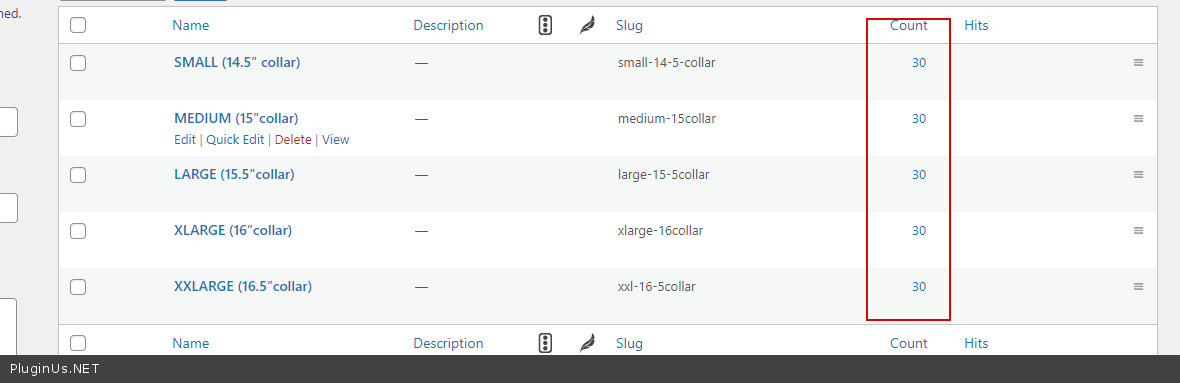
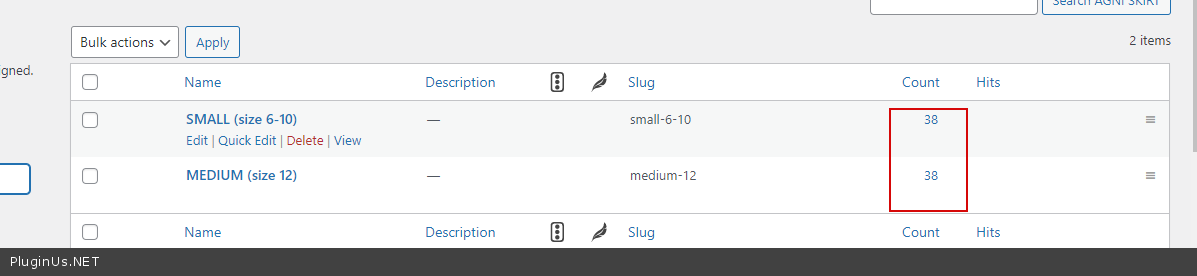
Quote from Pablo Borysenco on April 15, 2021, 12:31Size filter is not working at all, - No, this filter works fine. Since you have customized the products - https://c2n.me/4bHGAz0.png + https://c2n.me/4bHGCYA.png + https://c2n.me/4bHGFFF.png + https://c2n.me/4bHGIHN.png + https://c2n.me/4bHGLaq.png - this means all products have all attribute options
"The large long trousers is an easy one to see as I only have about 6 colours in that size - all blue. " - https://c2n.me/4bHGZ5c.mp4
Please try to watch a video - https://products-filter.com/video-tutorials/#video_beGT6p_look
Size filter is not working at all, - No, this filter works fine. Since you have customized the products - https://c2n.me/4bHGAz0.png + https://c2n.me/4bHGCYA.png + https://c2n.me/4bHGFFF.png + https://c2n.me/4bHGIHN.png + https://c2n.me/4bHGLaq.png - this means all products have all attribute options
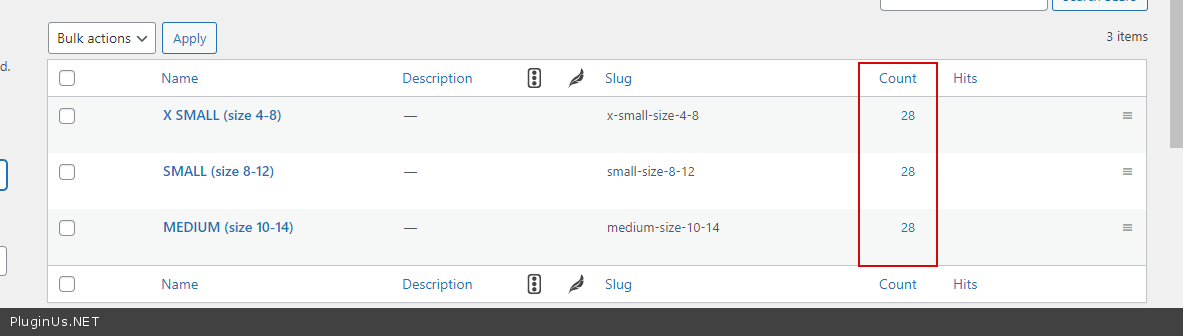
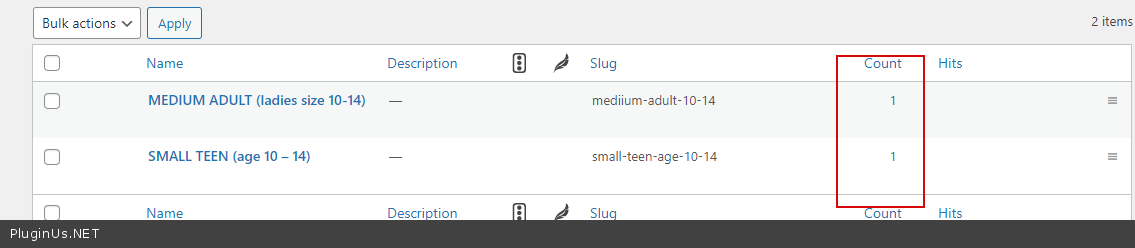
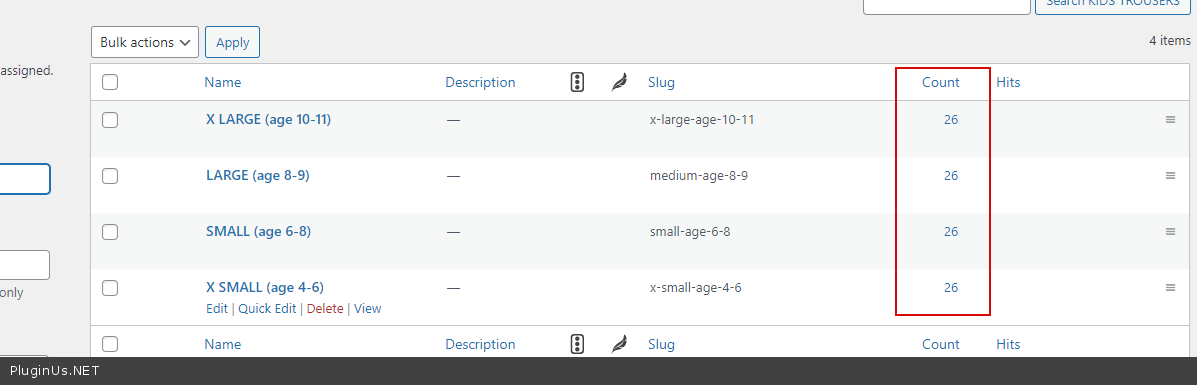
"The large long trousers is an easy one to see as I only have about 6 colours in that size - all blue." - https://c2n.me/4bHGZ5c.mp4
Please try to watch a video - https://products-filter.com/video-tutorials/#video_beGT6p_look
Quote from James on April 15, 2021, 21:11Hi, I have passed this to my client who has been adding her products. You did pass us code that ensured it only showed in stock by default,which seems to have gone? Your screenshot video shows the in stock button. Can this be enabled by default as it was very important to my client and we spent a lot of time sorting with you back in October? Thanks
Hi, I have passed this to my client who has been adding her products. You did pass us code that ensured it only showed in stock by default,which seems to have gone? Your screenshot video shows the in stock button. Can this be enabled by default as it was very important to my client and we spent a lot of time sorting with you back in October? Thanks
Quote from Pablo Borysenco on April 16, 2021, 12:51Hello
You did pass us code that ensured it only showed in stock by default,which seems to have gone? - Maybe! I cannot be responsible for how you use custom code
Read this please - https://products-filter.com/manipulate-search-data-options/
Hello
You did pass us code that ensured it only showed in stock by default,which seems to have gone? - Maybe! I cannot be responsible for how you use custom code
Read this please - https://products-filter.com/manipulate-search-data-options/