
How to edit variations of a specific product
The support doesn work on Saturdays and Sundays, so some Friday requests can be answered on Monday. If you have problems with registration ask help on contact us page pleaseIf you not got email within 24~36 business hours, firstly check your spam box, and if no any email from the support there - back to the forum and read answer here. DO NOT ANSWER ON EMAILS [noreply@pluginus.net] FROM THE FORUM!! Emails are just for your info, all answers should be published only here.
The support doesn work on Saturdays and Sundays, so some Friday requests can be answered on Monday.

Quote from Kevin on January 22, 2026, 21:57My scenario that I bought the plugin to help me with. I have a product which is Rubber Gym Floor Tiles. I created 2 products one that is for "Gym Floor Tiles 24 x 24" and one for "Gym Floor Tiles 47x47" Each product has an attribute of Size (6mm, 8mm, 9mm , 12mm, 18mm) and Color (has about 9 options) I need to set the weight for all 6mm to one value, a different value for 8mm, etc.
I bought this thinking that I could filter the product and all its variation based on an attribute of size (not global attribute) and then get a list that would allow me to update the weight then move on to the next size, repeat, repeat, etc.
I have not been able to find anything in the documentation nor can I find anything but global attributes.
What am I doing wrong or does the plugin not do this and I need to return it?
Thanks!
My scenario that I bought the plugin to help me with. I have a product which is Rubber Gym Floor Tiles. I created 2 products one that is for"Gym Floor Tiles 24 x 24" and one for"Gym Floor Tiles 47x47" Each product has an attribute of Size (6mm, 8mm, 9mm , 12mm, 18mm) and Color (has about 9 options) I need to set the weight for all 6mm to one value, a different value for 8mm, etc.
I bought this thinking that I could filter the product and all its variation based on an attribute of size (not global attribute) and then get a list that would allow me to update the weight then move on to the next size, repeat, repeat, etc.
I have not been able to find anything in the documentation nor can I find anything but global attributes.
What am I doing wrong or does the plugin not do this and I need to return it?
Thanks!

Quote from Alex Dovlatov on January 23, 2026, 12:49Hello Kevin
I understand your frustration. Here's what you need to do:
First - Fix your product structure:
You created two separate products ("Gym Floor Tiles 24x24" and "Gym Floor Tiles 47x47"), but that's wrong. You should have ONE product called "Rubber Gym Floor Tiles" with variations. The sizes (24x24, 47x47), thicknesses (6mm, 8mm, etc.), and colors should all be variation attributes, not separate products.
Combine these two products into one. This is crucial for BEAR to work properly.
Second - Use BEAR's Filters:
Once you have the right structure:
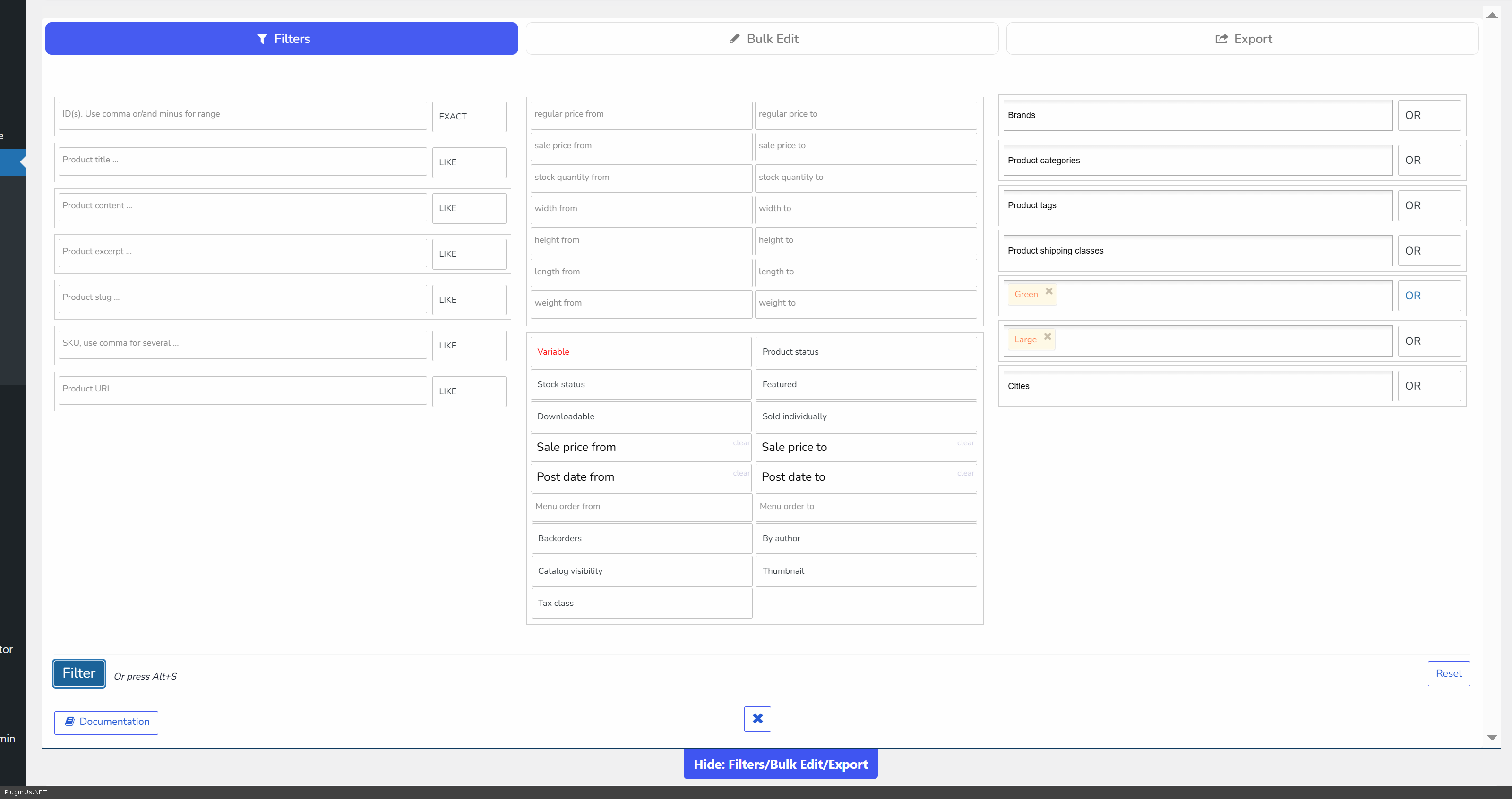
- Go to the Filters tab in BEAR
- Select the attribute you want to filter by (Thickness, Color, Size, etc.)
- Choose the value (e.g., "6mm")
- BEAR will show you all variations matching that filter
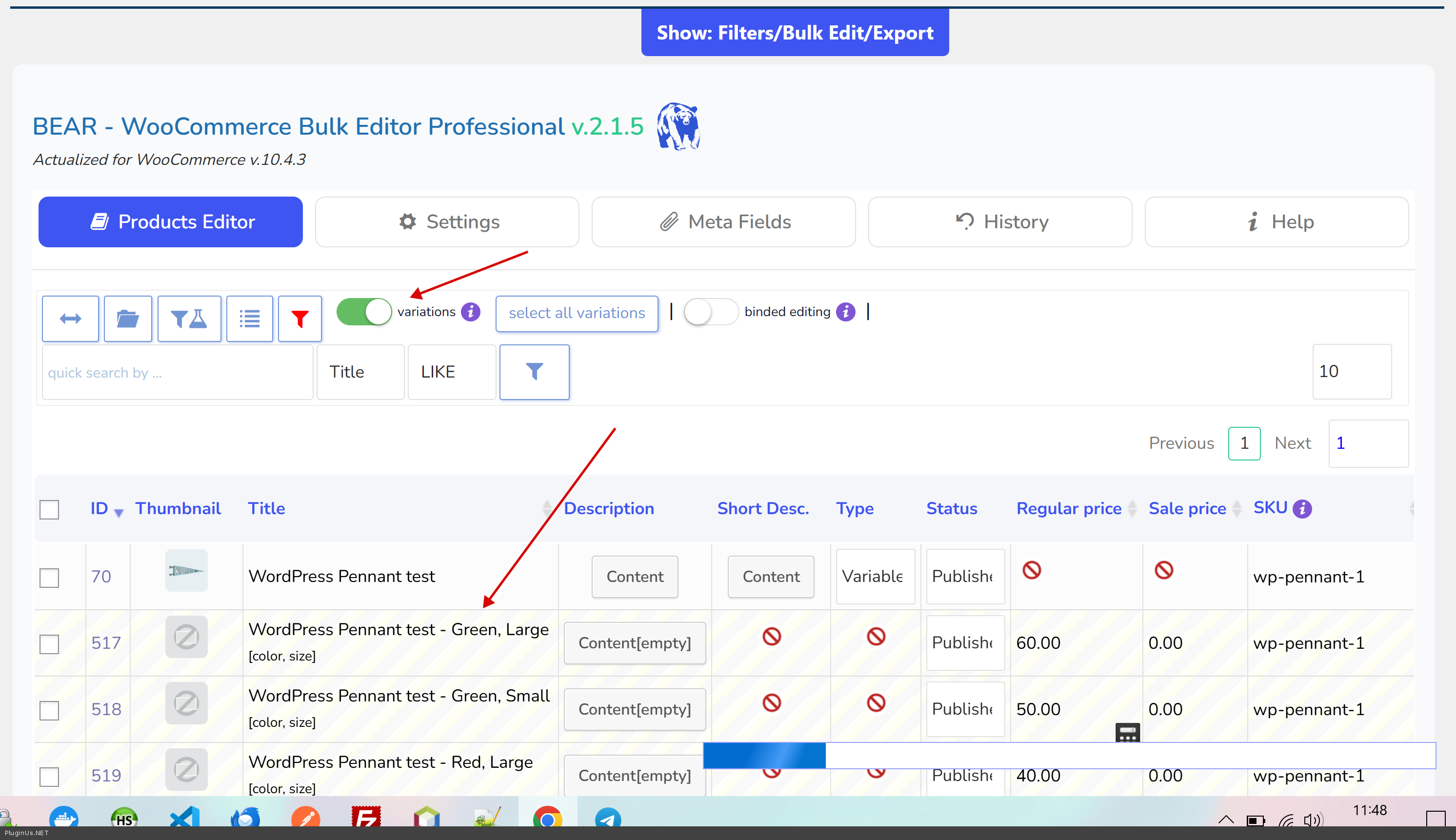
- Toggle the "Variations" switch ON to see all variations at once
- Select all the filtered variations
- Bulk update the weight
- Repeat for the next thickness value (8mm, 12mm, etc.)
That's it. The filters + variations toggle is exactly what you bought BEAR for.
Make sure your attributes are global attributes (created in Products > Attributes), not local ones.
p.s.
Place please actual purchase code of the plugin into the private area of this ticket:
https://share.pluginus.net/image/i20230222134241.png
https://share.pluginus.net/image/i20230222134615.png
https://share.pluginus.net/image/i20230222134511.png
Hello Kevin
I understand your frustration. Here's what you need to do:
First - Fix your product structure:
You created two separate products ("Gym Floor Tiles 24x24" and"Gym Floor Tiles 47x47"), but that's wrong. You should have ONE product called"Rubber Gym Floor Tiles" with variations. The sizes (24x24, 47x47), thicknesses (6mm, 8mm, etc.), and colors should all be variation attributes, not separate products.
Combine these two products into one. This is crucial for BEAR to work properly.
Second - Use BEAR's Filters:
Once you have the right structure:
- Go to the Filters tab in BEAR
- Select the attribute you want to filter by (Thickness, Color, Size, etc.)
- Choose the value (e.g.,"6mm")
- BEAR will show you all variations matching that filter
- Toggle the "Variations" switch ON to see all variations at once
- Select all the filtered variations
- Bulk update the weight
- Repeat for the next thickness value (8mm, 12mm, etc.)
That's it. The filters + variations toggle is exactly what you bought BEAR for.
Make sure your attributes are global attributes (created in Products > Attributes), not local ones.
p.s.
Place please actual purchase code of the plugin into the private area of this ticket:
https://share.pluginus.net/image/i20230222134241.png
https://share.pluginus.net/image/i20230222134615.png
https://share.pluginus.net/image/i20230222134511.png


Quote from Kevin on February 5, 2026, 20:45Alex,
I have done as you told me to but it does not allow me to access / change fields like weight, dimensions, etc. What am I missing or does this plugin not allow one to bulk edit the variable products other than what is shown on that screen? If so can you respond to my email request and let me refund this as it will not work for what I need and I need to move to something else.
Thanks in advance for your assistance,
Kevin
Alex,
I have done as you told me to but it does not allow me to access / change fields like weight, dimensions, etc. What am I missing or does this plugin not allow one to bulk edit the variable products other than what is shown on that screen? If so can you respond to my email request and let me refund this as it will not work for what I need and I need to move to something else.
Thanks in advance for your assistance,
Kevin
Quote from Alex Dovlatov on February 6, 2026, 12:43Hello, Kevin!
Please read this: https://bulk-editor.com/woocommerce-products-bulk-edit + https://bulk-editor.com/manipulations-with-variable-products-and-their-variations
You need to find and add the field in the "Settings" tab: https://share.pluginus.net/image/i20260206123928.png — the same goes for other fields.
Click the "Switch" toolbar for variations: https://share.pluginus.net/image/i20260206124145.png
Refunds: You can request a refund on Envato, and your request will be reviewed (accepted or rejected).
Hello, Kevin!
Please read this: https://bulk-editor.com/woocommerce-products-bulk-edit + https://bulk-editor.com/manipulations-with-variable-products-and-their-variations
You need to find and add the field in the"Settings" tab: https://share.pluginus.net/image/i20260206123928.png — the same goes for other fields.

Click the"Switch" toolbar for variations: https://share.pluginus.net/image/i20260206124145.png

Refunds: You can request a refund on Envato, and your request will be reviewed (accepted or rejected).
Quote from Kevin on February 9, 2026, 19:39Alex,
Thank you. That helped for the one product that I just setup that uses global attributes but not any of the many I have that have product level attributes. I appreciate your help and will request through Envato. (Not an issue with you or the product but it does not work with my setup)
Thanks again!
Alex,
Thank you. That helped for the one product that I just setup that uses global attributes but not any of the many I have that have product level attributes. I appreciate your help and will request through Envato. (Not an issue with you or the product but it does not work with my setup)
Thanks again!
Quote from Alex Dovlatov on February 10, 2026, 16:22Hello Kevin
You are Welcome!
Hello Kevin
You are Welcome!