How to create a hierarchical product filter
The support doesn work on Saturdays and Sundays, so some Friday requests can be answered on Monday. If you have problems with registration ask help on contact us page pleaseIf you not got email within 24~36 business hours, firstly check your spam box, and if no any email from the support there - back to the forum and read answer here. DO NOT ANSWER ON EMAILS [noreply@pluginus.net] FROM THE FORUM!! Emails are just for your info, all answers should be published only here.
The support doesn work on Saturdays and Sundays, so some Friday requests can be answered on Monday.
Quote from Chris on November 21, 2020, 02:06Hi, please can you point me to a detailed resource showing how I can create a hierarchical product filter? I need the choices in the first filter to update the options that follow - I hope this plugin is capable of doing that…
Hi, please can you point me to a detailed resource showing how I can create a hierarchical product filter? I need the choices in the first filter to update the options that follow - I hope this plugin is capable of doing that…

Quote from Pablo Borysenco on November 23, 2020, 13:53Hello
There are two filter options. I don't know which one is right for you
- Step by step filter: Please read this - https://products-filter.com/extencion/woocommerce-step-by-step-filter/
- hierarchical dropdown - https://products-filter.com/extencion/hierarchy-drop-down/
Hello
There are two filter options. I don't know which one is right for you
- Step by step filter: Please read this - https://products-filter.com/extencion/woocommerce-step-by-step-filter/
- hierarchical dropdown - https://products-filter.com/extencion/hierarchy-drop-down/
Quote from Chris on November 26, 2020, 02:02Thank you - I'm trying to follow the instructions but the shortcode is just appearing on page and not activating the plug in, I've also activated the extension.
Could you check that my code is correct?
[woof_step autosubmit=0 filter_type=1 by_step="pa_script-type, pa_cast-size,pa_cast-breakdown, pa_genre, pa_theme" selector=’.woof‘ img_behavior=’prepend‘ autosubmit=1]
https://www.smithscripts.co.uk/woof-test-2/
Thank you - I'm trying to follow the instructions but the shortcode is just appearing on page and not activating the plug in, I've also activated the extension.
Could you check that my code is correct?
[woof_step autosubmit=0 filter_type=1 by_step="pa_script-type, pa_cast-size,pa_cast-breakdown, pa_genre, pa_theme" selector=’.woof‘ img_behavior=’prepend‘ autosubmit=1]
https://www.smithscripts.co.uk/woof-test-2/

Quote from Pablo Borysenco on November 26, 2020, 13:16Hello
it looks like you inserted the shortcode incorrectly
Paste your license key here - https://c2n.me/43SC6rb.png -> https://c2n.me/42HBIt7.png and wp-admin access - https://c2n.me/42BAoj4.png I will check it
Hello
it looks like you inserted the shortcode incorrectly
Paste your license key here - https://c2n.me/43SC6rb.png -> https://c2n.me/42HBIt7.png and wp-admin access - https://c2n.me/42BAoj4.png I will check it



Quote from Chris on November 26, 2020, 13:42Thanks Pablo, I've added the details, I appreciate your support.
Thanks Pablo, I've added the details, I appreciate your support.
Quote from Chris on November 27, 2020, 12:38Hi Pablo, Have you had a chance to have a look yet?
Hi Pablo, Have you had a chance to have a look yet?
Quote from Pablo Borysenco on November 27, 2020, 14:35Hello
Please add the license key
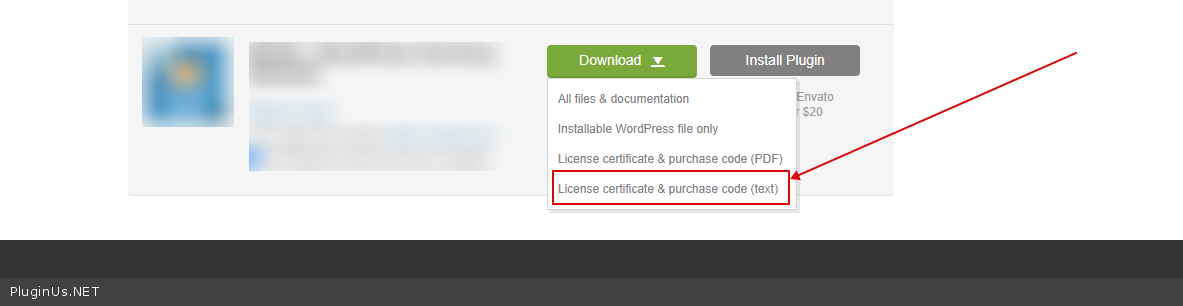
To get license key - https://codecanyon.net/downloads -> https://c2n.me/49ZXJv0.png
Hello
Please add the license key
To get license key - https://codecanyon.net/downloads -> https://c2n.me/49ZXJv0.png
Quote from Chris on November 27, 2020, 14:41just added - sorry i put the wrong one!
just added - sorry i put the wrong one!
Quote from Pablo Borysenco on November 30, 2020, 14:44Hello
Please do a test
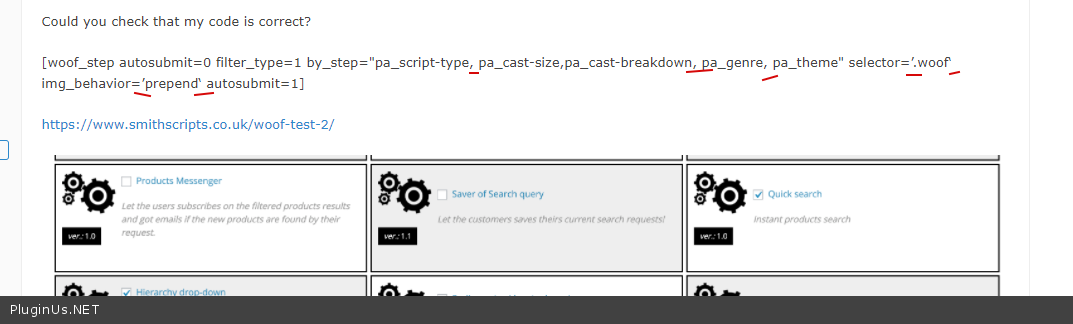
you inserted a shortcode with extra spaces and invalid characters - https://c2n.me/4a1MgCM.png
Hello
Please do a test
you inserted a shortcode with extra spaces and invalid characters - https://c2n.me/4a1MgCM.png
Quote from Chris on November 30, 2020, 17:47Brilliant, it seems to be working better now - but it is showing a blank page for the filter results? Can I choose to show the results at any point during the filtering?
Thanks, Chris
Brilliant, it seems to be working better now - but it is showing a blank page for the filter results? Can I choose to show the results at any point during the filtering?
Thanks, Chris
Quote from Pablo Borysenco on December 1, 2020, 13:55Hello
but it is showing a blank page for the filter results? - because this page does not show products at all - https://www.smithscripts.co.uk/shop/ OR use attribute redirect and paste a link to the page with products
OR
https://www.smithscripts.co.uk/woof-test-2/ - on this page you can add shortcode [woof_products] - https://products-filter.com/shortcode/woof_products/
Can I choose to show the results at any point during the filtering? - Unfortunately no.
Hello
but it is showing a blank page for the filter results? - because this page does not show products at all - https://www.smithscripts.co.uk/shop/ OR use attribute redirect and paste a link to the page with products
OR
https://www.smithscripts.co.uk/woof-test-2/ - on this page you can add shortcode [woof_products] - https://products-filter.com/shortcode/woof_products/
Can I choose to show the results at any point during the filtering? - Unfortunately no.
Quote from Chris on December 1, 2020, 14:28Please can you show me how to display the results of the search - I do not understand the answer you have given above… Once the customer has been through the filter I need the results displayed so they can buy their chosen script. Please help!
Please can you show me how to display the results of the search - I do not understand the answer you have given above… Once the customer has been through the filter I need the results displayed so they can buy their chosen script. Please help!
Quote from Pablo Borysenco on December 2, 2020, 13:02Hello
Please just paste the shortcode [woof_products ] on your page
OR fix your theme/ the shop page should show products - https://www.smithscripts.co.uk/shop/ - in your case it is a blank page
Hello
Please just paste the shortcode [woof_products ] on your page
OR fix your theme/ the shop page should show products - https://www.smithscripts.co.uk/shop/ - in your case it is a blank page
Quote from Chris on December 9, 2020, 23:29Hi Pablo,
I'm afraid my client isnt very happy with the result of this:
https://www.smithscripts.co.uk/woof-test-2/
He feels it is too slow and not user friendly enough - how can I request a refund?
Thanks,
Chris
Hi Pablo,
I'm afraid my client isnt very happy with the result of this:
https://www.smithscripts.co.uk/woof-test-2/
He feels it is too slow and not user friendly enough - how can I request a refund?
Thanks,
Chris
Quote from Pablo Borysenco on December 10, 2020, 13:48Hello
Unfortunately, this is not a reason for refund.
He feels it is too slow - It mainly depends on your server. Read this please - https://products-filter.com/searching-is-slow/
Hello
Unfortunately, this is not a reason for refund.
He feels it is too slow - It mainly depends on your server. Read this please - https://products-filter.com/searching-is-slow/
Quote from Chris on December 10, 2020, 14:23Hi Pablo,
The plugin doesnt seem to be able to do what he wants it to do - he wants to be able to select attributes that narrow down the choices plus he wants to be able to select more than one attribute at a time - please can you help show if this is possible?
Hi Pablo,
The plugin doesnt seem to be able to do what he wants it to do - he wants to be able to select attributes that narrow down the choices plus he wants to be able to select more than one attribute at a time - please can you help show if this is possible?
Quote from Pablo Borysenco on December 11, 2020, 12:27Hello
Please firstly try to watch this video - https://products-filter.com/video-tutorials#video_beGT6p_look
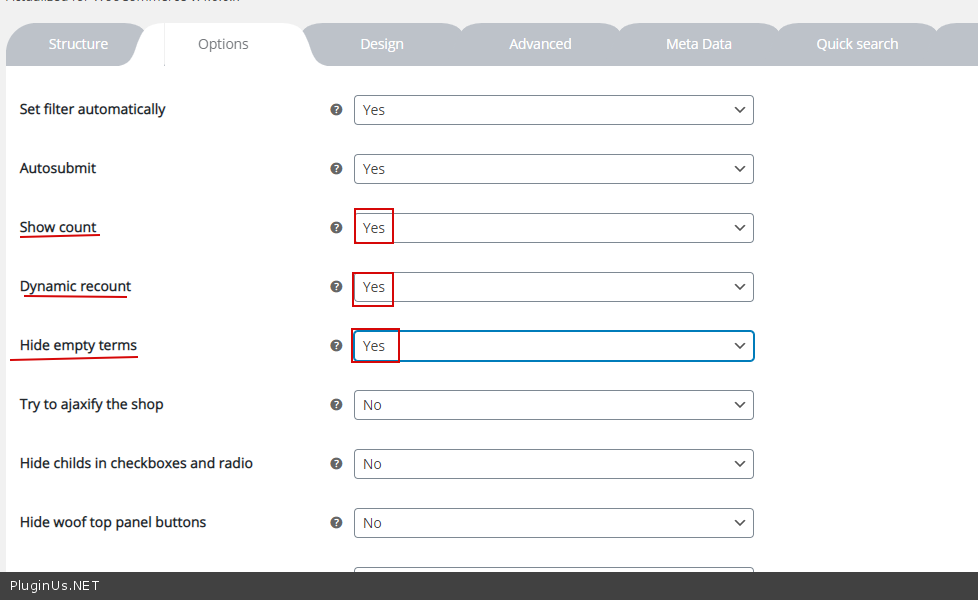
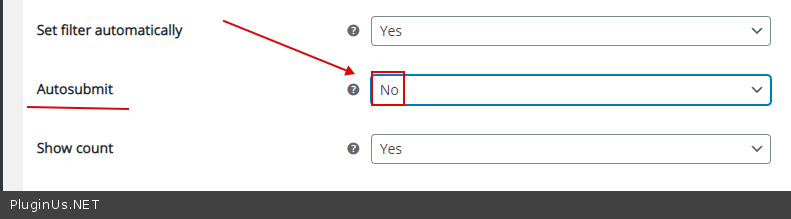
Check options - https://c2n.me/4abxYHY.png AND https://c2n.me/4aby1Sl.png
Hello
Please firstly try to watch this video - https://products-filter.com/video-tutorials#video_beGT6p_look
Check options - https://c2n.me/4abxYHY.png AND https://c2n.me/4aby1Sl.png