

How to add custom html to filter container and where is "JavaScript code after AJAX is done" code stored
The support doesn work on Saturdays and Sundays, so some Friday requests can be answered on Monday. If you have problems with registration ask help on contact us page pleaseIf you not got email within 24~36 business hours, firstly check your spam box, and if no any email from the support there - back to the forum and read answer here. DO NOT ANSWER ON EMAILS [noreply@pluginus.net] FROM THE FORUM!! Emails are just for your info, all answers should be published only here.
The support doesn work on Saturdays and Sundays, so some Friday requests can be answered on Monday.

Quote from nikolai on January 21, 2021, 03:39I have several filters, one of them is asking for user to insert a number which then filters the products that have an attribute value equal to or greater than this number. I have also limited the input to only accept a number by editing the plugin code. I have used the Thomas Depole WP Child Plugin Tool so not to have edited the native WOOF code. I have now created an html radio button to select between metric and imperial measurement. Once the user selects the imperial radio button I will convert the number back to metric to use for the purpose of filtering. How would I go about adding the html radio button to be populated in the woof_redraw_zone or container. I can do this via CSS but feel that is a bit prone to viewing error dependent upon screen size.
Also, just for organization and consistency purposes, I prefer to keep my code separate rather than via the JS code after ajax is done. I would just as soon move this to its own woof-child as that is where I have already started to store my plugin modifications. Currently I have code that when a filter value changes in the first filter it updates the page title to the value selected and if in a category then adds the category name as well.
I have several filters, one of them is asking for user to insert a number which then filters the products that have an attribute value equal to or greater than this number. I have also limited the input to only accept a number by editing the plugin code. I have used the Thomas Depole WP Child Plugin Tool so not to have edited the native WOOF code. I have now created an html radio button to select between metric and imperial measurement. Once the user selects the imperial radio button I will convert the number back to metric to use for the purpose of filtering. How would I go about adding the html radio button to be populated in the woof_redraw_zone or container. I can do this via CSS but feel that is a bit prone to viewing error dependent upon screen size.
Also, just for organization and consistency purposes, I prefer to keep my code separate rather than via the JS code after ajax is done. I would just as soon move this to its own woof-child as that is where I have already started to store my plugin modifications. Currently I have code that when a filter value changes in the first filter it updates the page title to the value selected and if in a category then adds the category name as well.

Quote from Pablo Borysenco on January 21, 2021, 13:14Hello
please read this - https://products-filter.com/can-i-override-any-extension-view-file-for-my-site-needs/ AND https://products-filter.com/hook/woof_html_types_view_checkbox/ AND https://products-filter.com/hook/woof_html_types_view_mselect/ AND https://products-filter.com/hook/woof_html_types_view_radio/ AND https://products-filter.com/hook/woof_html_types_view_select/
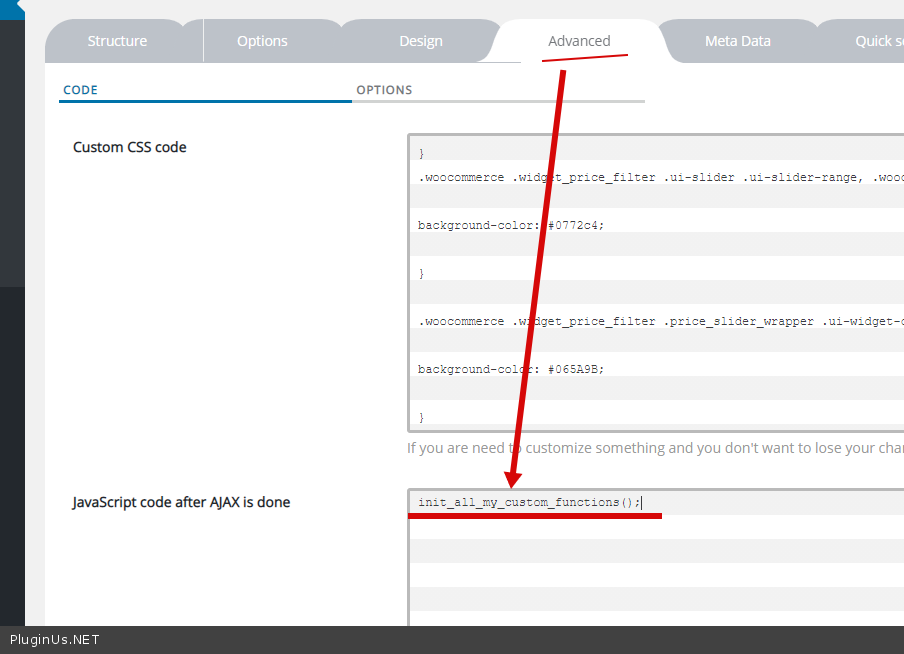
prefer to keep my code separate rather than via the JS code after ajax is done - oK! Just add your custom function - https://c2n.me/4aDKVBW.png and use this function wherever it suits you
Hello
please read this - https://products-filter.com/can-i-override-any-extension-view-file-for-my-site-needs/ AND https://products-filter.com/hook/woof_html_types_view_checkbox/ AND https://products-filter.com/hook/woof_html_types_view_mselect/ AND https://products-filter.com/hook/woof_html_types_view_radio/ AND https://products-filter.com/hook/woof_html_types_view_select/
prefer to keep my code separate rather than via the JS code after ajax is done - oK! Just add your custom function - https://c2n.me/4aDKVBW.png and use this function wherever it suits you
Quote from nikolai on January 21, 2021, 18:57For overriding the JS code after ajax is done, what is the actual file structure? What is simplest for me is to just copy the file path and file to the woof-child. See attached image on what I did for the changes I made to text. I wouldn't need to trigger the code from the JS code after ajax is done then. This also would allow me to keep a bit of standardization on how I am handling other plugins so that is why it would be my preferred approach.
https://drive.google.com/file/d/1FZPtSeKlnlNeLXfksk_j5ImfqAf06-0o/view?usp=sharing
For overriding the JS code after ajax is done, what is the actual file structure? What is simplest for me is to just copy the file path and file to the woof-child. See attached image on what I did for the changes I made to text. I wouldn't need to trigger the code from the JS code after ajax is done then. This also would allow me to keep a bit of standardization on how I am handling other plugins so that is why it would be my preferred approach.
https://drive.google.com/file/d/1FZPtSeKlnlNeLXfksk_j5ImfqAf06-0o/view?usp=sharing
Quote from nikolai on January 21, 2021, 19:36Or can you provide the definition and where the init_all_my_custom_functions(). Or where this function would look for it.
Or can you provide the definition and where the init_all_my_custom_functions(). Or where this function would look for it.
Quote from Pablo Borysenco on January 22, 2021, 13:00Hello
Please try to read this - https://products-filter.com/can-i-override-any-extension-view-file-for-my-site-needs/
In my previous there are articles on how to do this! All templates are overridden only in the theme (child theme)
Or can you provide the definition and where the init_all_my_custom_functions() - This is just an example. Insert this function with your custom code wherever you want. But this function will be called in " JS code after ajax is done"
For your customization, you should hire a developer
Hello
Please try to read this - https://products-filter.com/can-i-override-any-extension-view-file-for-my-site-needs/
In my previous there are articles on how to do this! All templates are overridden only in the theme (child theme)
Or can you provide the definition and where the init_all_my_custom_functions() - This is just an example. Insert this function with your custom code wherever you want. But this function will be called in" JS code after ajax is done"
For your customization, you should hire a developer
Quote from nikolai on January 22, 2021, 20:35Hi again and thanks for your help. My programming partner (Alex Steiner) and I are novice coders but are just getting into wordpress. So very much still in the learning process. Just as everyone starts somewhere, this is the first part we are tackling. So that is the reason for the many questions.
For clarification, I have inserted my function dynamicOnSelectTitle(); in to storefront-child > assets > js > footer.js. In the woof JavaScript code after AJAX is done I have dynamicOnSelectTitle();. Is this what you meant by placing it in the theme-child? I have tried this as a self-invoking function as well but that shouldn't be needed as JavaScript code after AJAX is done is calling it and should be initializing it.
I am still seeing a ReferenceError: dynamicOnSelectTitle is not defined. Should I be including a src for reference when I call the function from JavaScript code after AJAX is done? Can you post a sample of something similar you have done?
Below is my function. You can test it by just dropping the code in to the JavaScript code after AJAX is done. This works just fine. Also, note that I do have a script in my functions.php onLoadPageTitle() that is identical that handles the execution of the code on page load. The js that we are attempting to isolate in its own file is to handle the filter select.
Also, note that you will get an error on the home page as we haven't added the code yet to ignore samplepage or not to execute when the value is null.
function dynamicOnSelectTitle() {machineEl = document.getElementsByClassName('woof_select woof_select_pa_machine')[0];processEl = document.getElementsByClassName('woof_select woof_select_pa_processing')[0];optionMachine = machineEl.querySelector("option[selected='selected']");optionProcess = processEl.querySelector("option[selected='selected']");if (optionMachine != null) {machineValue = optionMachine.innerHTML;}else {machineValue = "";}if (optionProcess != null) {processValue = optionProcess.innerHTML;}else {processValue = "";}result = document.getElementsByClassName('woocommerce-products-header__title page-title')[0];result.innerHTML = machineValue + " " + processValue;}I do realize that the simplest method is just to place the function in to the JavaScript code after AJAX is done section but we do have quite a bit more customizing that we need to do so by resolving this we can really start to dive in to the modifications. We may look at writing an extension or two once we have the filter modifications working as intended.Thanks for all your help so far.
Hi again and thanks for your help. My programming partner (Alex Steiner) and I are novice coders but are just getting into wordpress. So very much still in the learning process. Just as everyone starts somewhere, this is the first part we are tackling. So that is the reason for the many questions.
For clarification, I have inserted my function dynamicOnSelectTitle(); in to storefront-child > assets > js > footer.js. In the woof JavaScript code after AJAX is done I have dynamicOnSelectTitle();. Is this what you meant by placing it in the theme-child? I have tried this as a self-invoking function as well but that shouldn't be needed as JavaScript code after AJAX is done is calling it and should be initializing it.
I am still seeing a ReferenceError: dynamicOnSelectTitle is not defined. Should I be including a src for reference when I call the function from JavaScript code after AJAX is done? Can you post a sample of something similar you have done?
Below is my function. You can test it by just dropping the code in to the JavaScript code after AJAX is done. This works just fine. Also, note that I do have a script in my functions.php onLoadPageTitle() that is identical that handles the execution of the code on page load. The js that we are attempting to isolate in its own file is to handle the filter select.
Also, note that you will get an error on the home page as we haven't added the code yet to ignore samplepage or not to execute when the value is null.
Quote from nikolai on January 23, 2021, 00:38Sorry replace with previous code mentioned with;
(function() {
machineEl = document.getElementsByClassName('woof_select woof_select_pa_machine')[0];
processEl = document.getElementsByClassName('woof_select woof_select_pa_processing')[0];
optionMachine = machineEl.querySelector("option[selected='selected']");
optionProcess = processEl.querySelector("option[selected='selected']");
if (optionMachine != null) {
machineValue = optionMachine.innerHTML;
}
else {
machineValue = "";
}
if (optionProcess != null) {
processValue = optionProcess.innerHTML;
}
else {
processValue = "";
}
result = document.getElementsByClassName('woocommerce-products-header__title page-title')[0];
result.innerHTML = machineValue + " " + processValue;
})()
Sorry replace with previous code mentioned with;
(function() {
machineEl = document.getElementsByClassName('woof_select woof_select_pa_machine')[0];
processEl = document.getElementsByClassName('woof_select woof_select_pa_processing')[0];
optionMachine = machineEl.querySelector("option[selected='selected']");
optionProcess = processEl.querySelector("option[selected='selected']");
if (optionMachine != null) {
machineValue = optionMachine.innerHTML;
}
else {
machineValue ="";
}
if (optionProcess != null) {
processValue = optionProcess.innerHTML;
}
else {
processValue ="";
}
result = document.getElementsByClassName('woocommerce-products-header__title page-title')[0];
result.innerHTML = machineValue +"" + processValue;
})()
Quote from Pablo Borysenco on January 25, 2021, 15:46Hello
Unfortunately I am not a teacher
I am still seeing a ReferenceError: dynamicOnSelectTitle is not defined. - then you have not included a file with this function or you connected it late
Should I be including a src for reference when - No/ this is a standard JS function call
Hello
Unfortunately I am not a teacher
I am still seeing a ReferenceError: dynamicOnSelectTitle is not defined. - then you have not included a file with this function or you connected it late
Should I be including a src for reference when - No/ this is a standard JS function call