
How can we show the specific category products first?
The support doesn work on Saturdays and Sundays, so some Friday requests can be answered on Monday. If you have problems with registration ask help on contact us page pleaseIf you not got email within 24~36 business hours, firstly check your spam box, and if no any email from the support there - back to the forum and read answer here. DO NOT ANSWER ON EMAILS [noreply@pluginus.net] FROM THE FORUM!! Emails are just for your info, all answers should be published only here.
The support doesn work on Saturdays and Sundays, so some Friday requests can be answered on Monday.

Quote from Lokendra on September 29, 2020, 12:40Hi,Hope you are well!We would like to customize the Exam Paper page so when you land on this page, we can customize which papers you can see.Because it's alphabetical at the moment, users only see the first ones from the letter A. We would like to show a range of exams from all the top, most popular schools.Please find the website URLs here Exam PapersI have also tried to use the below shortcode to display the specific category exams.[products limit="8" product_category category="forest-school, clsg" columns="4" orderby="date" order="desc"]But it doesn't disapper when we do the search filter so can we disapper this when we use the search filter? Looking forward to hearing from you! Thanks Lokendra
But it doesn't disapper when we do the search filter so can we disapper this when we use the search filter?
Looking forward to hearing from you!

Thanks
Lokendra
Quote from Lokendra on September 29, 2020, 17:24Actually we want to highlight specific exam papers.
Actually we want to highlight specific exam papers.

Quote from Pablo Borysenco on September 30, 2020, 11:26Hello
Try to use [woof_products] - https://products-filter.com/shortcode/woof_products/ attribute: taxonomies
and [woof] (to show filter) wit the same attribute : taxonomies - https://products-filter.com/shortcode/woof/
My plugin does not affect product sorting
Hello
Try to use [woof_products] - https://products-filter.com/shortcode/woof_products/ attribute: taxonomies
and [woof] (to show filter) wit the same attribute : taxonomies - https://products-filter.com/shortcode/woof/
My plugin does not affect product sorting
Quote from Lokendra on October 8, 2020, 15:22Thanks for your reply!
Can you help me to appear the specific products on the shop page by using [woof_products]?
When I try to use this shortcode [products ids="16523, 15916, 15642, 15169"]. It works perfectly. But the filter is not working properly.
Can you let me know how I can appear the above products through their ids by using [woof_products]? Maybe it will work perfectly by using it.
Thanks for your reply!
Can you help me to appear the specific products on the shop page by using [woof_products]?
When I try to use this shortcode [products ids="16523, 15916, 15642, 15169"]. It works perfectly. But the filter is not working properly.
Can you let me know how I can appear the above products through their ids by using [woof_products]? Maybe it will work perfectly by using it.
Quote from Pablo Borysenco on October 9, 2020, 13:37Hello
It works perfectly. But the filter is not working properly. - The filter should work with a standard shortcode. Describe the problem in more detail please
unfortunately [woof_products] does not have this feature
Hello
It works perfectly. But the filter is not working properly. - The filter should work with a standard shortcode. Describe the problem in more detail please
unfortunately [woof_products] does not have this feature
Quote from Lokendra on October 10, 2020, 13:38Hi,
Thanks for your reply.
Please have a look into this URL https://ibb.co/vsmkDNC
We are using the shortcode however the first code is appearing only the four products by using their ids.
And the second code is displaying all the products.
But when we come to our shop page and filter it to find a specific result. It doesn't work well. Look at this. https://ibb.co/6P0RL2F
I have selected 11+ and school Alleyn's but the first one is giving wrong results [products ids="16523, 15916, 15642, 15169"] whereas the second one works fine. [woof_products per_page=10]
This is shop test URLs https://metalrockseducation.co.uk/shop-test/
Looking forward to hearing from you.
Thanks
Lokendra
Hi,
Thanks for your reply.
Please have a look into this URL https://ibb.co/vsmkDNC
We are using the shortcode however the first code is appearing only the four products by using their ids.
And the second code is displaying all the products.
But when we come to our shop page and filter it to find a specific result. It doesn't work well. Look at this. https://ibb.co/6P0RL2F
I have selected 11+ and school Alleyn's but the first one is giving wrong results [products ids="16523, 15916, 15642, 15169"] whereas the second one works fine. [woof_products per_page=10]
This is shop test URLs https://metalrockseducation.co.uk/shop-test/
Looking forward to hearing from you.
Thanks
Lokendra
Quote from Pablo Borysenco on October 12, 2020, 12:28Hello Lokendra
Do you are using comparison logic as AND?
Hello Lokendra
Do you are using comparison logic as AND?
Quote from Lokendra on October 12, 2020, 14:58Hi,
Yes, we are using the AND because we do select multiple options at the same time otherwise it doesn't filter the multiple records.
Thanks
Lokendra
Hi,
Yes, we are using the AND because we do select multiple options at the same time otherwise it doesn't filter the multiple records.
Thanks
Lokendra
Quote from Pablo Borysenco on October 13, 2020, 17:12Hello Lokendra
Try in file - \wp-content\plugins\woocommerce-products-filter\index.php - add code - https://c2n.me/49qmeOu.png
$tax_relations = apply_filters('woof_main_query_tax_relations', array());
if (!empty($tax_relations)) {
$tax_query = $query_args['tax_query'] ;
foreach ($tax_query as $key => $value) {
if (isset($value['taxonomy'])) {
if (in_array($value['taxonomy'], array_keys($tax_relations))) {
if (count($tax_query[$key]['terms'])) {
$tax_query[$key]['operator'] = $tax_relations[$value['taxonomy']];
$tax_query[$key]['include_children'] = 0;
}
}
}
}
$query_args['tax_query'] = $tax_query;
}
Hello Lokendra
Try in file - \wp-content\plugins\woocommerce-products-filter\index.php - add code - https://c2n.me/49qmeOu.png
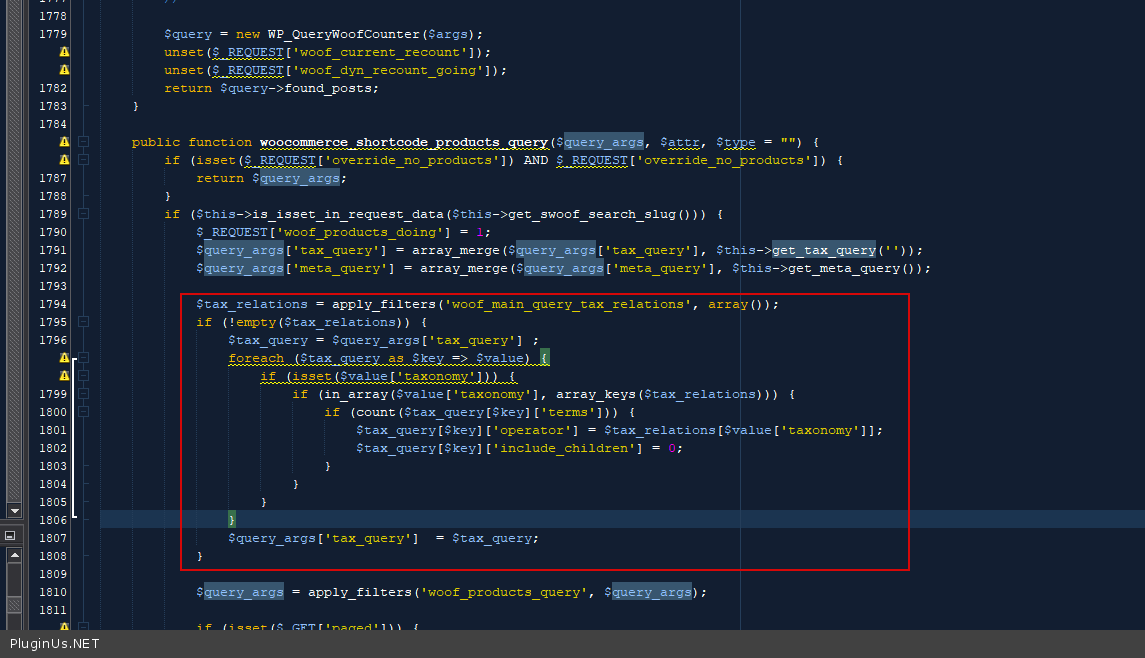
$tax_relations = apply_filters('woof_main_query_tax_relations', array());
if (!empty($tax_relations)) {
$tax_query = $query_args['tax_query'] ;
foreach ($tax_query as $key => $value) {
if (isset($value['taxonomy'])) {
if (in_array($value['taxonomy'], array_keys($tax_relations))) {
if (count($tax_query[$key]['terms'])) {
$tax_query[$key]['operator'] = $tax_relations[$value['taxonomy']];
$tax_query[$key]['include_children'] = 0;
}
}
}
}
$query_args['tax_query'] = $tax_query;
}