Hierarchy Filtering
The support doesn work on Saturdays and Sundays, so some Friday requests can be answered on Monday. If you have problems with registration ask help on contact us page pleaseIf you not got email within 24~36 business hours, firstly check your spam box, and if no any email from the support there - back to the forum and read answer here. DO NOT ANSWER ON EMAILS [noreply@pluginus.net] FROM THE FORUM!! Emails are just for your info, all answers should be published only here.
The support doesn work on Saturdays and Sundays, so some Friday requests can be answered on Monday.

Quote from seankwatkins on January 21, 2021, 20:48Hi,
I have client who we built a website for that has over 9,000 products. I created the table here https://enginerus.com/parts-shop/ - I desperately need hierarchy filtering so when the user selects Product year, the next dropdown (product make) is filtered through hierarchy by what year they selected and so on. I have tried reading and researching documentation but it is not clear to me on how to accomplish this.
Please help!
Thanks,
Sean
Hi,
I have client who we built a website for that has over 9,000 products. I created the table here https://enginerus.com/parts-shop/ - I desperately need hierarchy filtering so when the user selects Product year, the next dropdown (product make) is filtered through hierarchy by what year they selected and so on. I have tried reading and researching documentation but it is not clear to me on how to accomplish this.
Please help!
Thanks,
Sean

Quote from Pablo Borysenco on January 22, 2021, 13:07Hello Sean
Paste your license key here - https://c2n.me/43SC6rb.png -> https://c2n.me/42HBIt7.png
Drop me exact link to the issue
Did you read this? - https://demo.products-filter.com/working-with-hierarchy-drop-down/
This works with hierarchical taxonomy - https://demo.products-filter.com/wp-content/uploads/2016/01/how-244-2.png
Hello Sean
Paste your license key here - https://c2n.me/43SC6rb.png -> https://c2n.me/42HBIt7.png


Drop me exact link to the issue
Did you read this? - https://demo.products-filter.com/working-with-hierarchy-drop-down/
This works with hierarchical taxonomy - https://demo.products-filter.com/wp-content/uploads/2016/01/how-244-2.png

Quote from seankwatkins on January 26, 2021, 19:18https://enginerus.com/parts-shop/
and yes I read all of the articles and it just doesn't make sense as of now.
https://enginerus.com/parts-shop/
and yes I read all of the articles and it just doesn't make sense as of now.
Quote from Pablo Borysenco on January 27, 2021, 13:06Hello
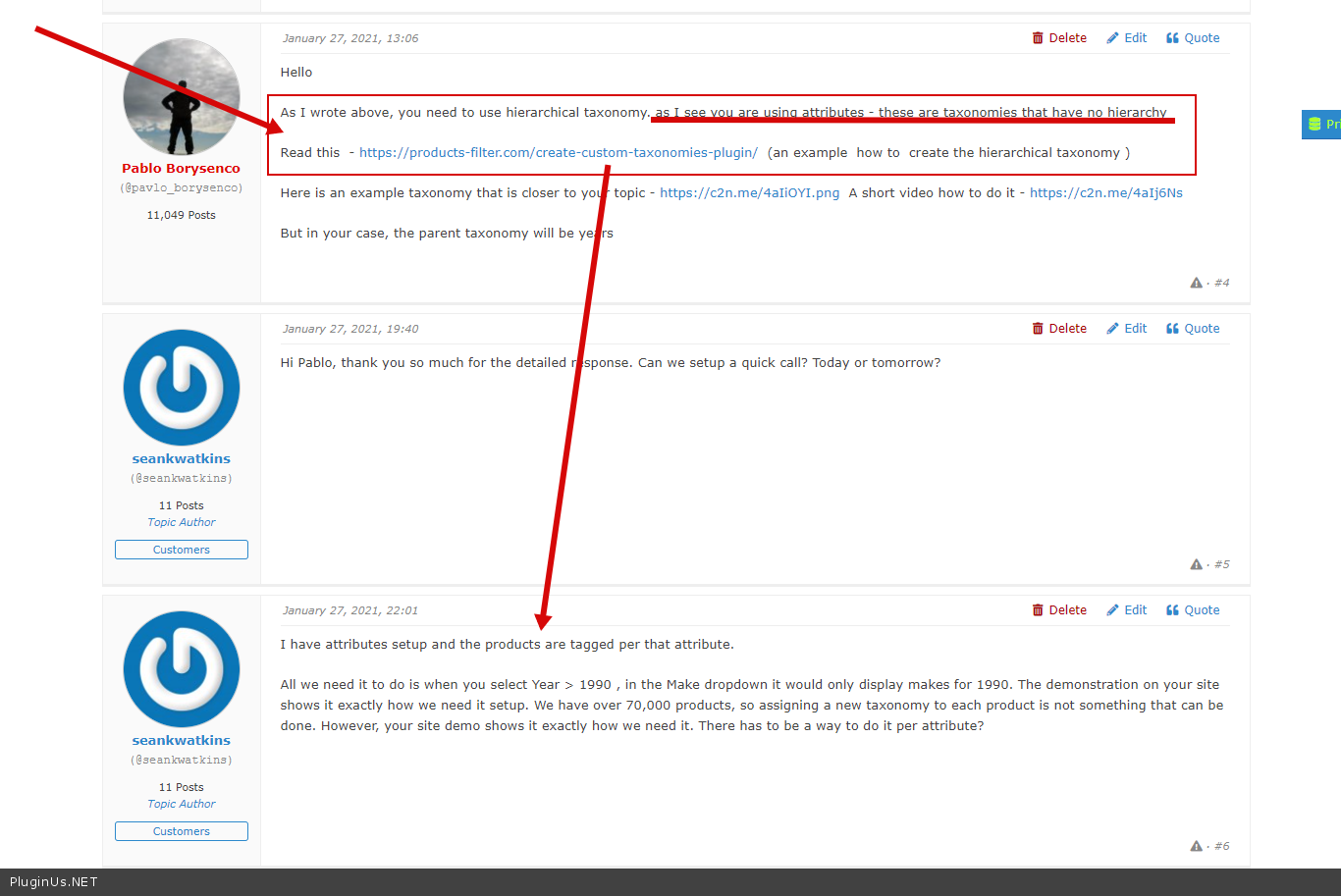
As I wrote above, you need to use hierarchical taxonomy. as I see you are using attributes - these are taxonomies that have no hierarchy
Read this - https://products-filter.com/create-custom-taxonomies-plugin/ (an example how to create the hierarchical taxonomy )
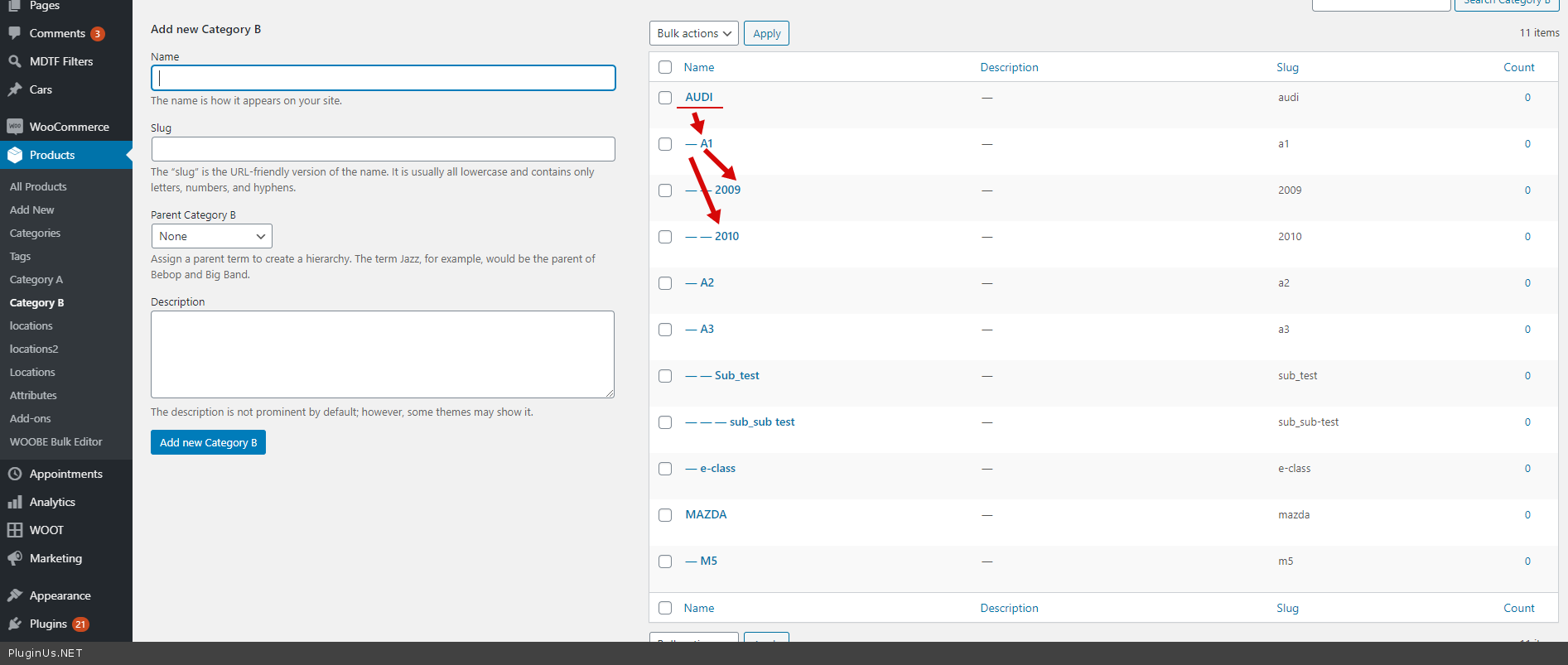
Here is an example taxonomy that is closer to your topic - https://c2n.me/4aIiOYI.png A short video how to do it - https://c2n.me/4aIj6Ns
But in your case, the parent taxonomy will be years
Hello
As I wrote above, you need to use hierarchical taxonomy. as I see you are using attributes - these are taxonomies that have no hierarchy
Read this - https://products-filter.com/create-custom-taxonomies-plugin/ (an example how to create the hierarchical taxonomy )
Here is an example taxonomy that is closer to your topic - https://c2n.me/4aIiOYI.png A short video how to do it - https://c2n.me/4aIj6Ns
But in your case, the parent taxonomy will be years
Quote from seankwatkins on January 27, 2021, 19:40Hi Pablo, thank you so much for the detailed response. Can we setup a quick call? Today or tomorrow?
Hi Pablo, thank you so much for the detailed response. Can we setup a quick call? Today or tomorrow?
Quote from seankwatkins on January 27, 2021, 22:01I have attributes setup and the products are tagged per that attribute.
All we need it to do is when you select Year > 1990 , in the Make dropdown it would only display makes for 1990. The demonstration on your site shows it exactly how we need it setup. We have over 70,000 products, so assigning a new taxonomy to each product is not something that can be done. However, your site demo shows it exactly how we need it. There has to be a way to do it per attribute?
I have attributes setup and the products are tagged per that attribute.
All we need it to do is when you select Year > 1990 , in the Make dropdown it would only display makes for 1990. The demonstration on your site shows it exactly how we need it setup. We have over 70,000 products, so assigning a new taxonomy to each product is not something that can be done. However, your site demo shows it exactly how we need it. There has to be a way to do it per attribute?
Quote from Pablo Borysenco on January 28, 2021, 12:38Hello
Can we setup a quick call? - Unfortunately not. support only on the forum.
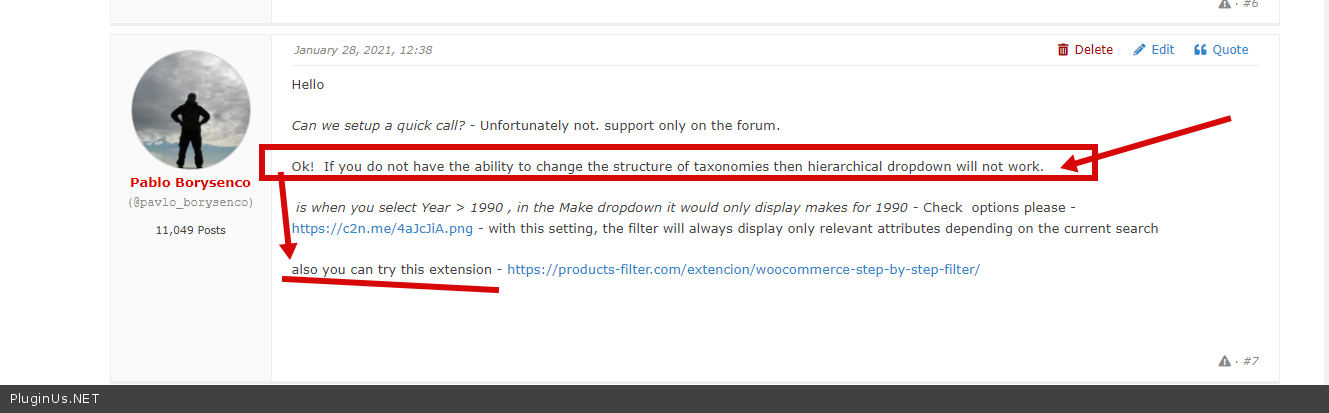
Ok! If you do not have the ability to change the structure of taxonomies then hierarchical dropdown will not work.
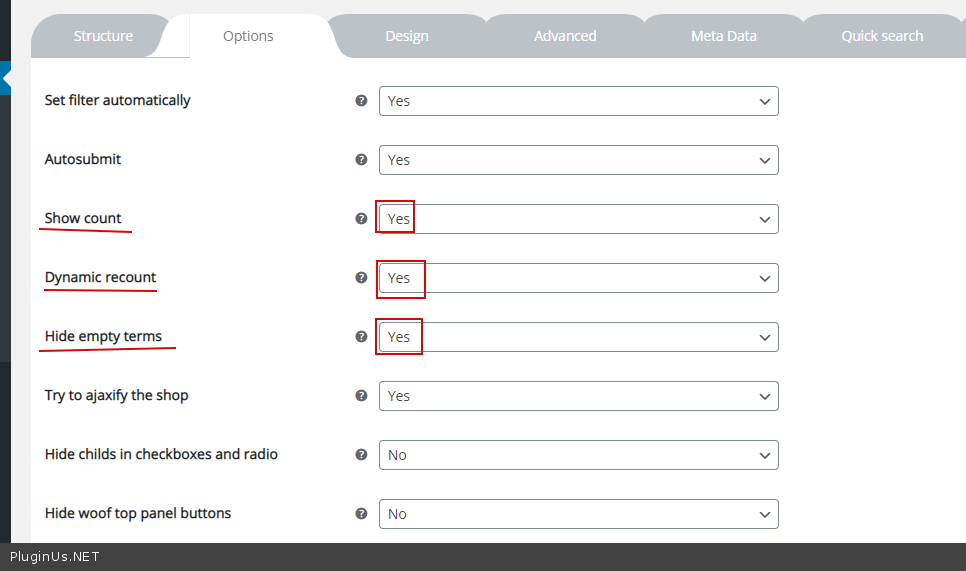
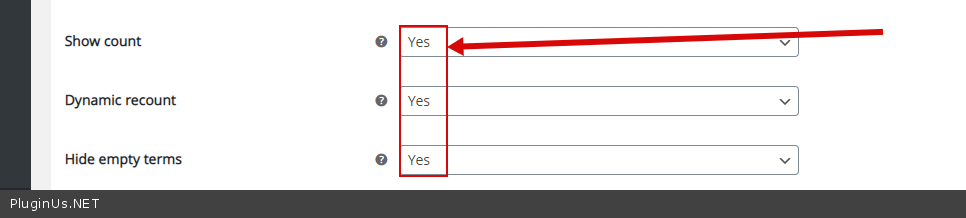
is when you select Year > 1990 , in the Make dropdown it would only display makes for 1990 - Check options please - https://c2n.me/4aJcJiA.png - with this setting, the filter will always display only relevant attributes depending on the current search
also you can try this extension - https://products-filter.com/extencion/woocommerce-step-by-step-filter/
Hello
Can we setup a quick call? - Unfortunately not. support only on the forum.
Ok! If you do not have the ability to change the structure of taxonomies then hierarchical dropdown will not work.
is when you select Year > 1990 , in the Make dropdown it would only display makes for 1990 - Check options please - https://c2n.me/4aJcJiA.png - with this setting, the filter will always display only relevant attributes depending on the current search
also you can try this extension - https://products-filter.com/extencion/woocommerce-step-by-step-filter/
Quote from seankwatkins on February 16, 2021, 22:12Can someone please login to our WordPress website and tell us a step-by-step instructions on what we need to download / do in order to get this filter working properly please? We have purchased nearly all of the supported plugins in order to get this to function as it should.
Thanks,
Sean
Can someone please login to our WordPress website and tell us a step-by-step instructions on what we need to download / do in order to get this filter working properly please? We have purchased nearly all of the supported plugins in order to get this to function as it should.
Thanks,
Sean
Quote from Pablo Borysenco on February 17, 2021, 12:29Hello Sean
Paste your license key fo WOOF here - https://c2n.me/43SC6rb.png -> https://c2n.me/42HBIt7.png and wp-admin access - https://c2n.me/42BAoj4.png
I gave you all the articles describing how to set it up
setting up your site is not included in the support
Hello Sean
Paste your license key fo WOOF here - https://c2n.me/43SC6rb.png -> https://c2n.me/42HBIt7.png and wp-admin access - https://c2n.me/42BAoj4.png

I gave you all the articles describing how to set it up
setting up your site is not included in the support
Quote from seankwatkins on February 17, 2021, 19:08I understand, any additional help would be Greatly appreciated as we have been at this for over a month now.
Thanks,
Sean
The information requested is in the Private Data for this Topic tab.
I understand, any additional help would be Greatly appreciated as we have been at this for over a month now.
Thanks,
Sean
The information requested is in the Private Data for this Topic tab.
Quote from Pablo Borysenco on February 18, 2021, 12:36Hello Sean
You wrote in support of the filter WOOF So please add your license key for WOOF (not WOOT)
You don't even have this plugin included
and WOOT - does not have such a feature, it is a plugin for displaying products in a table
Hello Sean
You wrote in support of the filter WOOF So please add your license key for WOOF (not WOOT)
You don't even have this plugin included
and WOOT - does not have such a feature, it is a plugin for displaying products in a table
Quote from seankwatkins on February 18, 2021, 20:08Hi Pablo,
I have added our purchase code and license key. Were you able to login and see how we have our store set up? Will WOOF work? We just need this function to work and we will purchase any additional plugins and/or tech support needed to get these drop downs in the top of the tables (filters) to work as we expect them to work. Again, we appreciate your help as this is for a fairly large client of ours. If we need additional cost, please let me know - We just need to get this all to work properly.
Thanks,
Sean
Hi Pablo,
I have added our purchase code and license key. Were you able to login and see how we have our store set up? Will WOOF work? We just need this function to work and we will purchase any additional plugins and/or tech support needed to get these drop downs in the top of the tables (filters) to work as we expect them to work. Again, we appreciate your help as this is for a fairly large client of ours. If we need additional cost, please let me know - We just need to get this all to work properly.
Thanks,
Sean
Quote from Pablo Borysenco on February 19, 2021, 12:22Hello Sean
Your WOOF key - is not valid please check it
Please try to read this - https://products-filter.com/extencion/woocommerce-step-by-step-filter/
Hello Sean
Your WOOF key - is not valid please check it
Please try to read this - https://products-filter.com/extencion/woocommerce-step-by-step-filter/
Quote from seankwatkins on February 19, 2021, 18:31Pablo, we purchased WOOF but as it did not work for us, my manager may have cancelled it. I have followed the setup processes over and over and they are not exactly clear to me. If we purchase WOOF again, can you reassure me that what we are trying to accomplish will work - and can you please provide a little assistance with this process. We have been trying to accomplish this now over 2 months. Again, we can compensate if that is needed - we are at the point where we have to get this to working.
Thanks,
Sean
Pablo, we purchased WOOF but as it did not work for us, my manager may have cancelled it. I have followed the setup processes over and over and they are not exactly clear to me. If we purchase WOOF again, can you reassure me that what we are trying to accomplish will work - and can you please provide a little assistance with this process. We have been trying to accomplish this now over 2 months. Again, we can compensate if that is needed - we are at the point where we have to get this to working.
Thanks,
Sean
Quote from seankwatkins on February 19, 2021, 19:32We just repurchased WOOF. New key is in the private data.
We just repurchased WOOF. New key is in the private data.
Quote from Pablo Borysenco on February 22, 2021, 12:10Hello
Please install the paid version of the plugin(delete the free version)
Check option - https://c2n.me/4b32z2z.png
And do a test on this page - https://enginesrusonline.com/test-woof/
Hello
Please install the paid version of the plugin(delete the free version)
Check option - https://c2n.me/4b32z2z.png
And do a test on this page - https://enginesrusonline.com/test-woof/
Quote from seankwatkins on February 22, 2021, 19:55I have uploaded an image here: https://prnt.sc/1040nnl
This seems to be working for us now, thank you!
Couple of last questions:
A.) How do we get all of the filters to appear at once (year, make and model) not one at a time, but to follow the one at a time filter order process. For example now they are hidden until you make the first option, we would want all of them to show all at once but work as you have it now.
B.) The product tables aren't loading below after making your selection. Is this simply because you don't have the product table shortcode inserted under the filter?
Again, we greatly appreciate the support you have given us.
Sean
I have uploaded an image here: https://prnt.sc/1040nnl
This seems to be working for us now, thank you!
Couple of last questions:
A.) How do we get all of the filters to appear at once (year, make and model) not one at a time, but to follow the one at a time filter order process. For example now they are hidden until you make the first option, we would want all of them to show all at once but work as you have it now.
B.) The product tables aren't loading below after making your selection. Is this simply because you don't have the product table shortcode inserted under the filter?
Again, we greatly appreciate the support you have given us.
Sean
Quote from Pablo Borysenco on February 23, 2021, 13:39Hello Sean
A) unfortunately this type of filter does not have this feature
B) Yes. I only made test settings. to show the table use the shortcode
Hello Sean
A) unfortunately this type of filter does not have this feature
B) Yes. I only made test settings. to show the table use the shortcode
Quote from seankwatkins on February 23, 2021, 19:48Hello Pablo,
I am pretty sure on your website you have a demonstration of it in that format. Even if we did it grey like this: https://prnt.sc/104z5k4
Hello Pablo,
I am pretty sure on your website you have a demonstration of it in that format. Even if we did it grey like this: https://prnt.sc/104z5k4
Quote from Pablo Borysenco on February 24, 2021, 13:13Hello
Please read my previous posts - https://c2n.me/4b4F9f3.png AND https://c2n.me/4b4FhDn.png - as I described above, to get this kind of filter you need to change the structure of taxonomies
Hello
Please read my previous posts - https://c2n.me/4b4F9f3.png AND https://c2n.me/4b4FhDn.png - as I described above, to get this kind of filter you need to change the structure of taxonomies