
hierarchical filter not getting past first selection
The support doesn work on Saturdays and Sundays, so some Friday requests can be answered on Monday. If you have problems with registration ask help on contact us page pleaseIf you not got email within 24~36 business hours, firstly check your spam box, and if no any email from the support there - back to the forum and read answer here. DO NOT ANSWER ON EMAILS [noreply@pluginus.net] FROM THE FORUM!! Emails are just for your info, all answers should be published only here.
The support doesn work on Saturdays and Sundays, so some Friday requests can be answered on Monday.

Quote from mattm on May 13, 2020, 21:31I am sure I am doing something wrong but I have set up products to be categorized hierarchically but the search tool only allows the first selection to work all others are greyed out. Please advise. https://manselldesign.ca/OLDsixth/
I am sure I am doing something wrong but I have set up products to be categorized hierarchically but the search tool only allows the first selection to work all others are greyed out. Please advise. https://manselldesign.ca/OLDsixth/

Quote from Pablo Borysenco on May 14, 2020, 13:49Hello
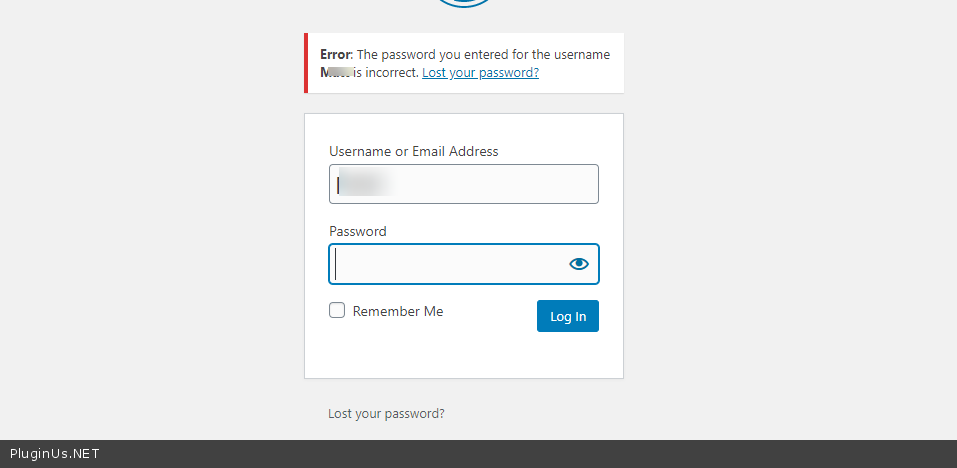
please check your wp-admin access - https://c2n.me/47vO4mH.png
Please activate autosubmit - https://c2n.me/47vOeD2.png
Hello
please check your wp-admin access - https://c2n.me/47vO4mH.png
Please activate autosubmit - https://c2n.me/47vOeD2.png
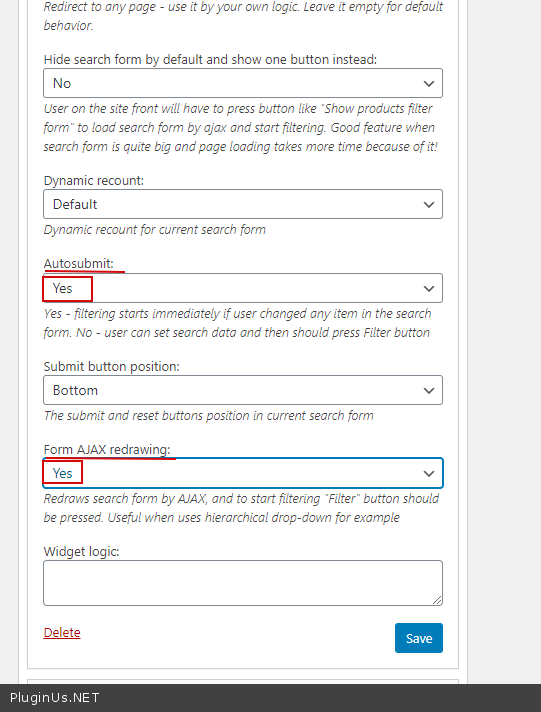
Quote from mattm on May 19, 2020, 04:29OK I have updates password and activated autosubmit. Seems to work for first level of hierarchy but not beyond.
OK I have updates password and activated autosubmit. Seems to work for first level of hierarchy but not beyond.
Quote from Pablo Borysenco on May 19, 2020, 12:15Hello
https://c2n.me/47AuMOD.png - Because you hid other taxonomies. Delete it and everything will work correctly
Hello
https://c2n.me/47AuMOD.png - Because you hid other taxonomies. Delete it and everything will work correctly
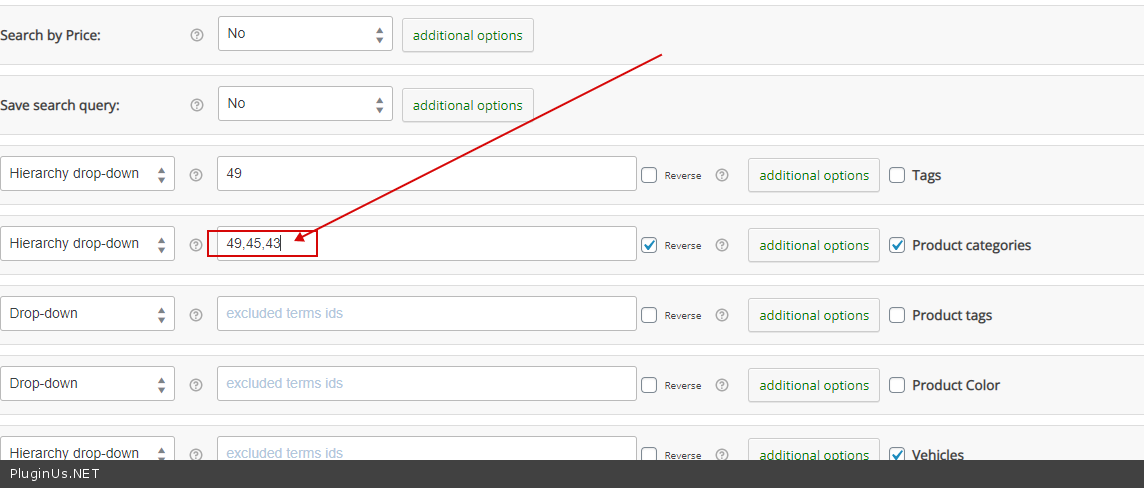
Quote from mattm on May 19, 2020, 16:17Hmm ok I have done the reverse and chosento hide the categories I don't want to show. That works. Now I want to be able to edit the drop down selectors to say "choose your make"/ "choose your model" / "choose your year" / "choose your category"
Hmm ok I have done the reverse and chosento hide the categories I don't want to show. That works. Now I want to be able to edit the drop down selectors to say"choose your make"/"choose your model" /"choose your year" /"choose your category"
Quote from Pablo Borysenco on May 20, 2020, 11:31Hello
Read this please - https://c2n.me/47BC451.png
Hello
Read this please - https://c2n.me/47BC451.png
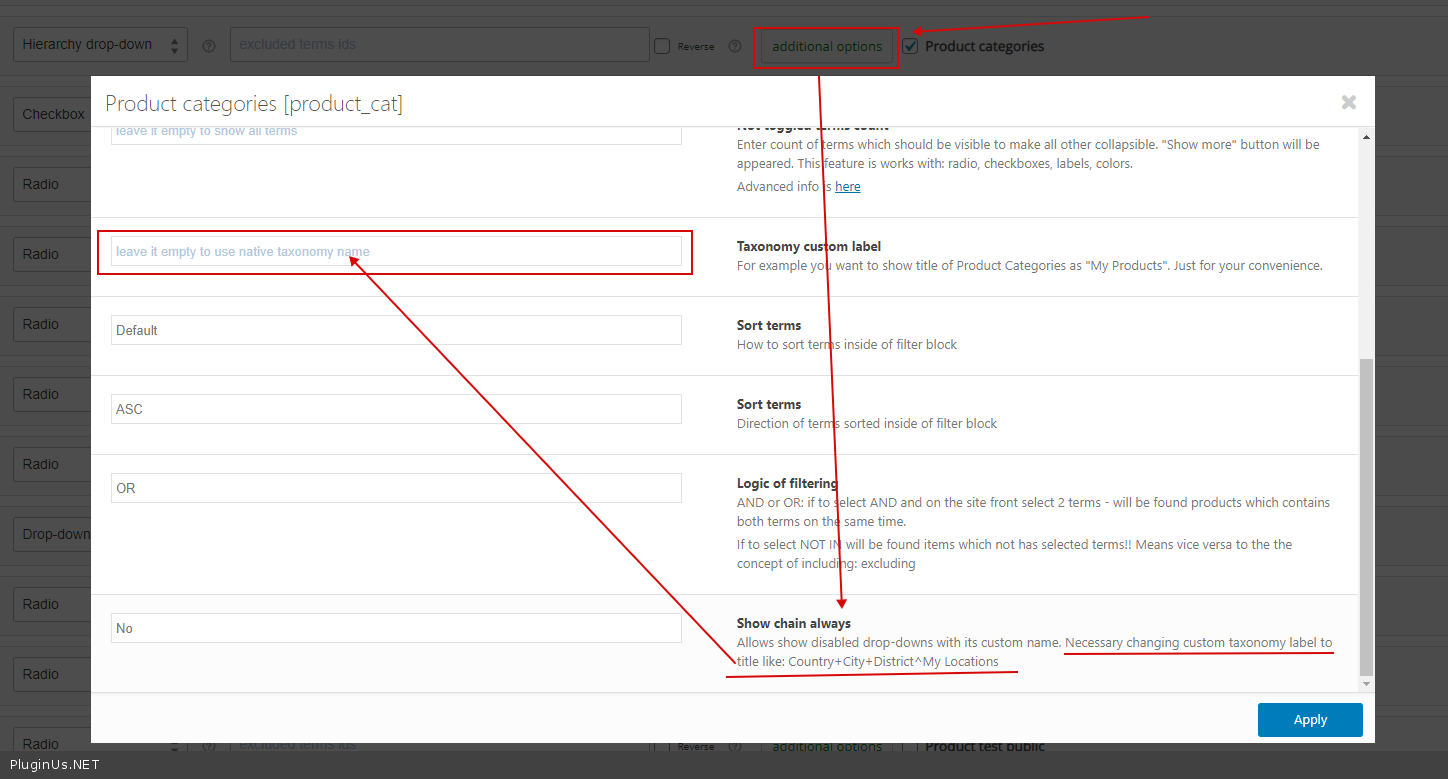
Quote from mattm on May 20, 2020, 16:17OK that works (but what does the "My Locations" part do? Also I have a couple more questions. Can I have the first 3 drop downs always open / visible and can I add a label above the Search by SKU input field - see attached. Thanks
OK that works (but what does the"My Locations" part do? Also I have a couple more questions. Can I have the first 3 drop downs always open / visible and can I add a label above the Search by SKU input field - see attached. Thanks
Quote from Pablo Borysenco on May 21, 2020, 12:32Hello
Please watch a video - https://products-filter.com/video-tutorials#video_beGT6p_look
but what does the "My Locations" part do? - this is for filter title
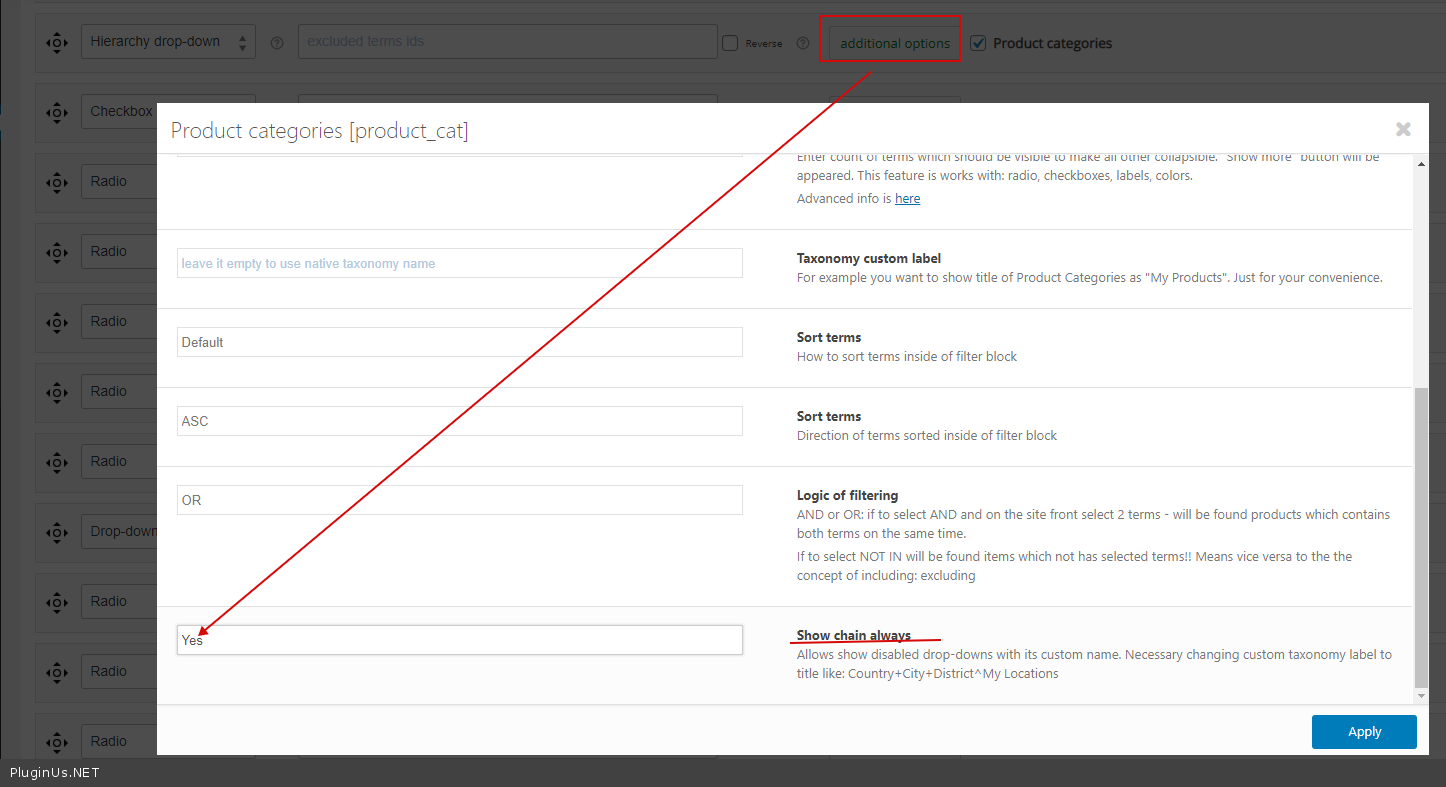
Can I have the first 3 drop downs always open - https://c2n.me/47CS8Fp.png But unfortunately there is no way to limit the number of chine
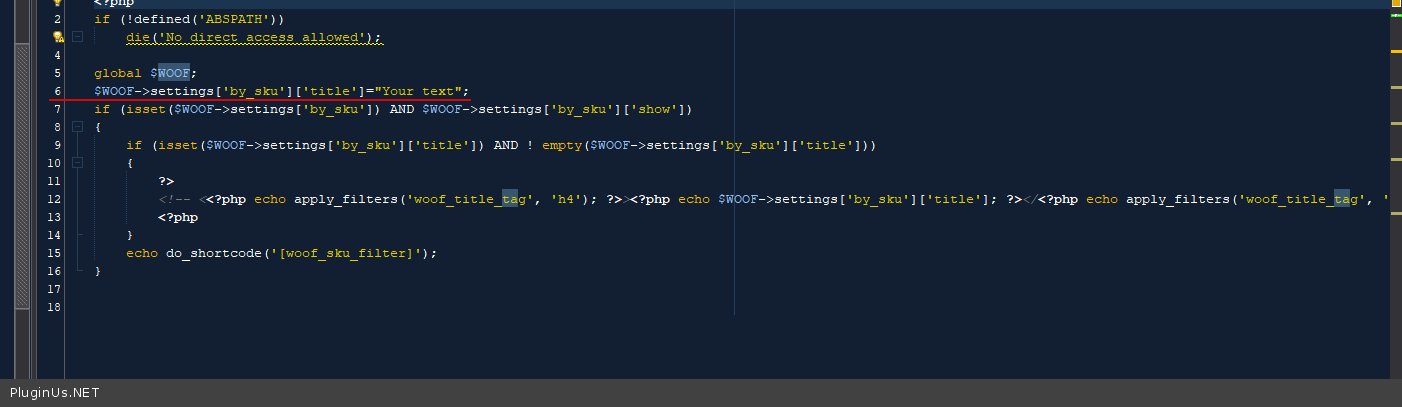
I add a label above the Search by SKU input field - in file \woocommerce-products-filter\ext\by_sku\views\woof.php - add code - https://c2n.me/47CSSDv.png
Hello
Please watch a video - https://products-filter.com/video-tutorials#video_beGT6p_look
but what does the"My Locations" part do? - this is for filter title
Can I have the first 3 drop downs always open - https://c2n.me/47CS8Fp.png But unfortunately there is no way to limit the number of chine
I add a label above the Search by SKU input field - in file \woocommerce-products-filter\ext\by_sku\views\woof.php - add code - https://c2n.me/47CSSDv.png
Quote from mattm on May 21, 2020, 16:37OK thanks drop downs open now. I added code to woof.php but no change.
OK thanks drop downs open now. I added code to woof.php but no change.
Quote from Pablo Borysenco on May 22, 2020, 13:01Hello
Please add FTP access
Hello
Please add FTP access
Quote from Pablo Borysenco on May 25, 2020, 12:13Hello
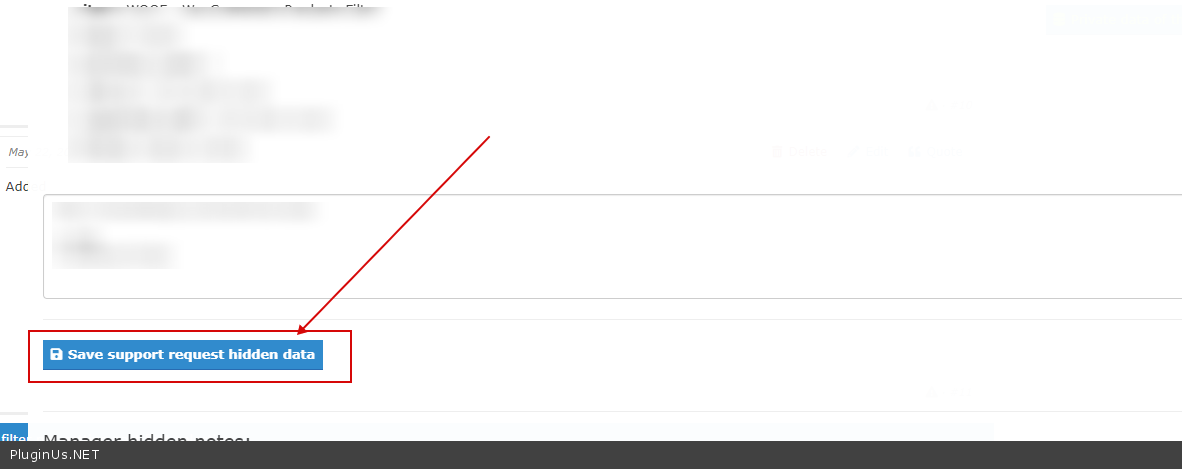
Please add FTP access and don't forget to click - https://c2n.me/47GgOCE.png
Hello
Please add FTP access and don't forget to click - https://c2n.me/47GgOCE.png
Quote from mattm on May 25, 2020, 15:01OK sorry - yes this is done.
OK sorry - yes this is done.
Quote from Pablo Borysenco on May 26, 2020, 16:44Hello
Please check your FTP access - 530 Login authentication failed
Hello
Please check your FTP access - 530 Login authentication failed
Quote from mattm on May 26, 2020, 17:50Hmm ok I changed the password and resaved the private data for the topic. Thanks
Hmm ok I changed the password and resaved the private data for the topic. Thanks
Quote from Pablo Borysenco on May 27, 2020, 11:17Hello
I checked it - https://c2n.me/47IxGm9.jpg - it looks like you added the code and it works correctly
Hello
I checked it - https://c2n.me/47IxGm9.jpg - it looks like you added the code and it works correctly

Quote from mattm on May 27, 2020, 15:14No - I needed to show the client so I just faked the description to look like that with CSS. Here it is without the css.
It would be nice to get that label to work!
Thanks!
No - I needed to show the client so I just faked the description to look like that with CSS. Here it is without the css.

It would be nice to get that label to work!
Thanks!
Quote from mattm on May 27, 2020, 19:33I am not too worried about that if you are not able to address it. I do have another question however. The client is asking for there to be a search window at the top of the page. I have added shortcode for woof_text_filter on the header and it works to bring up a small number of search results but how can I get to the results of the search without having to scroll down the homepage and selecting submit?
I am not too worried about that if you are not able to address it. I do have another question however. The client is asking for there to be a search window at the top of the page. I have added shortcode for woof_text_filter on the header and it works to bring up a small number of search results but how can I get to the results of the search without having to scroll down the homepage and selecting submit?
Quote from Pablo Borysenco on May 28, 2020, 15:01Hello
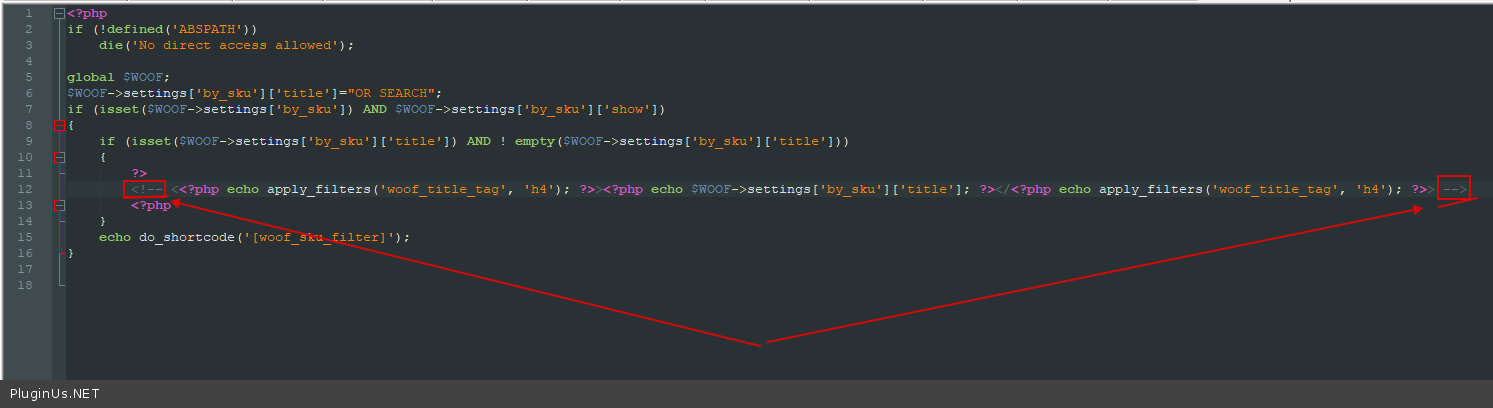
Delete this code - https://c2n.me/47K1614.png - result - https://c2n.me/47K1aKx.jpg
I have added shortcode for woof_text_filter - It seems I did not understand you. Can you add screenshots?
Hello
Delete this code - https://c2n.me/47K1614.png - result - https://c2n.me/47K1aKx.jpg

I have added shortcode for woof_text_filter - It seems I did not understand you. Can you add screenshots?
Quote from mattm on May 28, 2020, 15:42OK the client asked for a text search in the top header area (see screenshot). It works ok on non-homepage pages but because the homepage has a "select" button on the main form it does not work.
OK the client asked for a text search in the top header area (see screenshot). It works ok on non-homepage pages but because the homepage has a"select" button on the main form it does not work.