

Hierarchal Dropdown not display
The support doesn work on Saturdays and Sundays, so some Friday requests can be answered on Monday. If you have problems with registration ask help on contact us page pleaseIf you not got email within 24~36 business hours, firstly check your spam box, and if no any email from the support there - back to the forum and read answer here. DO NOT ANSWER ON EMAILS [noreply@pluginus.net] FROM THE FORUM!! Emails are just for your info, all answers should be published only here.
The support doesn work on Saturdays and Sundays, so some Friday requests can be answered on Monday.

Quote from Kelenwa on January 25, 2021, 09:42Hello Pablo,
As regards to my last year of our renewal of Support Service for WOOF for a period of One year. Which, I contacted my client to let him provide the fund for the renewal. But, we both mistakenly purchase another product of yours with its support service of "One Year". This is because, he chose to purchase it himself. Although error on my part for sending him the wrong link.
Yes, we need the plugin he purchased also. But, at the moment, it is because of the Hierarchal Dropdown no more displaying on the Front-end as it used before it disappear, which I don't really know why. And it very important for us to bring back the Hierarchal Dropdown on the front-end as is very much of great important to my client. So, I sincerely need your assistant to bring it to front-end.
In the private section you will see the details of the purchased WOOF data and the WooCommerce Extra Product Option (with the company's account or Username).
I really need the Hierarchal Filter working again. At least to cushion my error of sending him the wrong link. Which after everything. I can telling to still renew the WOOF support service moving. Because, we surely need the WooCommerce Extra Product Option. But getting the WOOF working again is paramount.
I await your quick response.
Hello Pablo,
As regards to my last year of our renewal of Support Service for WOOF for a period of One year. Which, I contacted my client to let him provide the fund for the renewal. But, we both mistakenly purchase another product of yours with its support service of "One Year". This is because, he chose to purchase it himself. Although error on my part for sending him the wrong link.
Yes, we need the plugin he purchased also. But, at the moment, it is because of the Hierarchal Dropdown no more displaying on the Front-end as it used before it disappear, which I don't really know why. And it very important for us to bring back the Hierarchal Dropdown on the front-end as is very much of great important to my client. So, I sincerely need your assistant to bring it to front-end.
In the private section you will see the details of the purchased WOOF data and the WooCommerce Extra Product Option (with the company's account or Username).
I really need the Hierarchal Filter working again. At least to cushion my error of sending him the wrong link. Which after everything. I can telling to still renew the WOOF support service moving. Because, we surely need the WooCommerce Extra Product Option. But getting the WOOF working again is paramount.
I await your quick response.
Quote from Kelenwa on January 25, 2021, 10:24Here are the Screenshots where the Hierarchal Dropdown was showing:
http://prnt.sc/xl6jd4
http://prnt.sc/xlbjh2
Here are the Screenshots where the Hierarchal Dropdown was showing:

Quote from Pablo Borysenco on January 25, 2021, 16:42Hello
Insert the second license code
Please try to watch a video - https://products-filter.com/video-tutorials/#video_beGT6p_look
Read this - https://products-filter.com/shortcode/woof/
You are using the wrong shortcode on the homepage - https://prnt.sc/xl6jd4
http://prnt.sc/xlbjh2 - you have no Hierarchal Dropdown filter at all - https://c2n.me/4aGH075.png - so it shouldn't show
Perhaps the reason is that you disabled the custom taxonomy plugin - https://c2n.me/4aGH99n.png
Please update plugin to latest version - https://products-filter.com/how-to-make-auto-update-for-wordpress-plugins-and-themes-bought-on-envato/
Hello
Insert the second license code
Please try to watch a video - https://products-filter.com/video-tutorials/#video_beGT6p_look
Read this - https://products-filter.com/shortcode/woof/
You are using the wrong shortcode on the homepage - https://prnt.sc/xl6jd4
http://prnt.sc/xlbjh2 - you have no Hierarchal Dropdown filter at all - https://c2n.me/4aGH075.png - so it shouldn't show
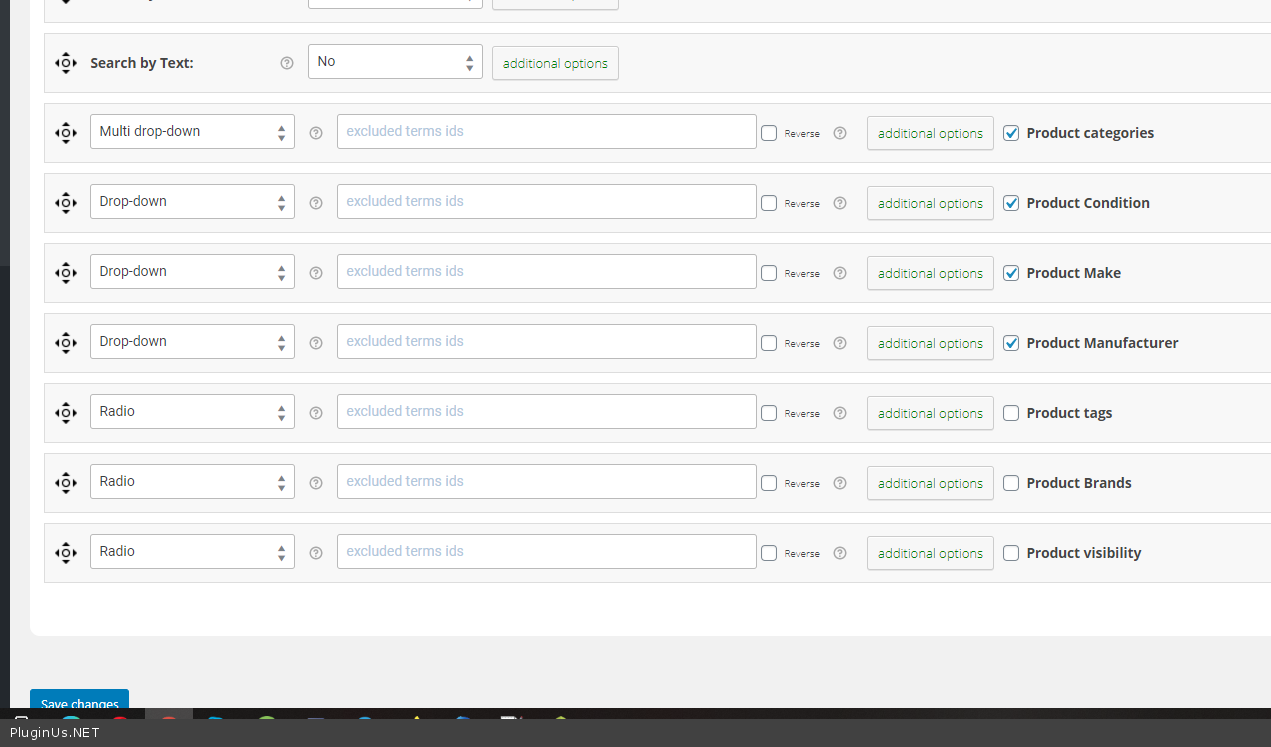
Perhaps the reason is that you disabled the custom taxonomy plugin - https://c2n.me/4aGH99n.png
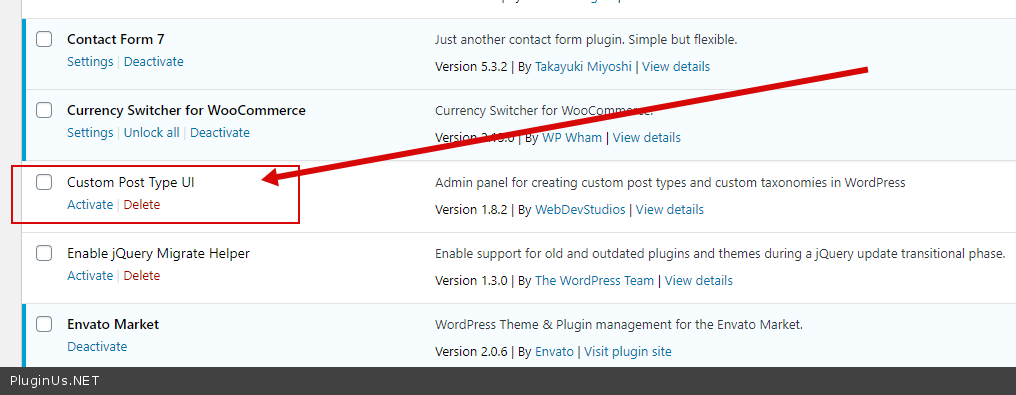
Please update plugin to latest version - https://products-filter.com/how-to-make-auto-update-for-wordpress-plugins-and-themes-bought-on-envato/
Quote from Kelenwa on January 25, 2021, 18:44Hello Pablo,
Thank for your kind guidance. I was able to get it fixed. Is now displaying as it ought to.
Having said that, I will have to now find a way to pacify him of the slight error we did by purchasing WooCommerce Extra Product Option instead of WOOF using his company's name.
That said, two things will happen either will he go on to fund the renewal on this presence WOOF of this license we are using or he goes on to purchase another license using his company's name still. So;
- If he chooses to fund the renewal of the current license; we will like to pay for a year instead of six month. There's no option for a year support license but six month only. How do we do that, pay for a year?
- If he chooses to get a new one with his company's name just has he did with WooCommerce Extra Product Option. How do I get use this license of WOOF on another project?
I await your kind response soon.
Hello Pablo,
Thank for your kind guidance. I was able to get it fixed. Is now displaying as it ought to.
Having said that, I will have to now find a way to pacify him of the slight error we did by purchasing WooCommerce Extra Product Option instead of WOOF using his company's name.
That said, two things will happen either will he go on to fund the renewal on this presence WOOF of this license we are using or he goes on to purchase another license using his company's name still. So;
- If he chooses to fund the renewal of the current license; we will like to pay for a year instead of six month. There's no option for a year support license but six month only. How do we do that, pay for a year?
- If he chooses to get a new one with his company's name just has he did with WooCommerce Extra Product Option. How do I get use this license of WOOF on another project?
I await your kind response soon.
Quote from Pablo Borysenco on January 26, 2021, 13:43Hello
- All prices on the envato page. If there is no support for a year, then there is no way to buy it
- You should give me a new domain
Hello
- All prices on the envato page. If there is no support for a year, then there is no way to buy it
- You should give me a new domain
Quote from Kelenwa on January 26, 2021, 16:51Alright. Thank you for everything
Alright. Thank you for everything
Quote from Pablo Borysenco on January 27, 2021, 12:34Hello
Welcome;)
Hello
Welcome;)