PluginUs.Net - Business Tools for WooCommerce and WordPress

[realize your idea - make your dreams come true]

Support Forum

You need to log-in to create request (topic) to the support

Hide Footer TR and Sorting

The support doesn work on Saturdays and Sundays, so some Friday requests can be answered on Monday. If you have problems with registration ask help on contact us page please
If you not got email within 24~36 business hours, firstly check your spam box, and if no any email from the support there - back to the forum and read answer here. DO NOT ANSWER ON EMAILS [noreply@pluginus.net] FROM THE FORUM!! Emails are just for your info, all answers should be published only here.
The support doesn work on Saturdays and Sundays, so some Friday requests can be answered on Monday.

Greetings - First, thanks for making this because no other table plugin supports showing simple products associated with a grouped product in a table! This is a game-changer for our new web project, which has thousands of products.

Question: We realize we can use custom CSS to hide stuff, but is there a toggle in the settings or a shortcode attribute we can use to hide the bottom row, which duplicates the headings, and the up/down sorting arrows? Many of our tables are short, with just a few rows, which makes the bottom row unnecessary.

Thanks,
MT

Hello

Unfortunately the plugin does not have this feature.

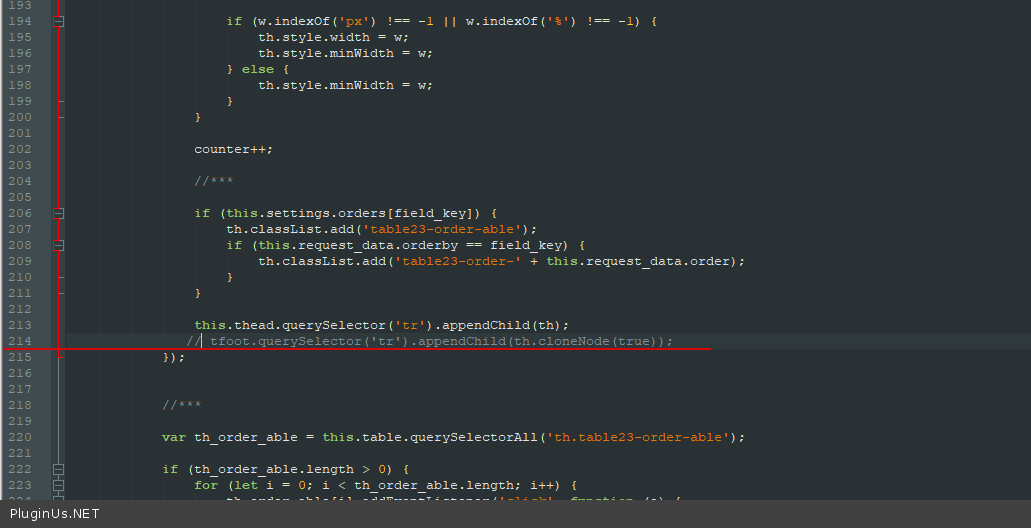
You  can  comment this  code: https://c2n.me/48LKaN6.png In file  - \wp-content\plugins\woot-products-tables\assets\js\data-table-23

But  better use  CSS

Got it, thanks.

Hello

Welcome;)