

Get Filters in the Sidebar to Show Only Options Relating to the Results of the Previous Selection
The support doesn work on Saturdays and Sundays, so some Friday requests can be answered on Monday. If you have problems with registration ask help on contact us page pleaseIf you not got email within 24~36 business hours, firstly check your spam box, and if no any email from the support there - back to the forum and read answer here. DO NOT ANSWER ON EMAILS [noreply@pluginus.net] FROM THE FORUM!! Emails are just for your info, all answers should be published only here.
The support doesn work on Saturdays and Sundays, so some Friday requests can be answered on Monday.

Quote from kiltykiltykilt on August 16, 2021, 20:15Hi,
I have the filter widget in the sidebar which shows all the available filters to begin with.
Once a filter is selected, the results are shown on the page, however when the results are presented to the customer, the same original filters are still available for selection on the sidebar widget. But some of the original filters are no longer needed because of the new filtered results the customer is now viewing.
Please can you help me show (in the sidebar widget) only the filters needed that relate to the results of the previous filter.
For example : if my inventory is this...
Inventory = 4x T shirts, 3x Hats, 0x Leather Belts, 2x Silk Scarf (1x80cm, 1x100cm)
And my filters are this...
Filter 1 Product Categories - (T-shirts, Hats, Belts, Scarves)
Filter 2 Size - (Small, Medium, Large) - This relates to 'T-shirts' and 'Hats' only
Filter 3 Length - (50cm, 60cm, 80cm, 100cm) - This relates to category 'Belts' and Silk Scarves only
Filter 4 Material – (Leather, Canvas, Silk) - This relates to Belts and Scarves Only
All filters 1, 2, 3 and 4 are visible in the side bar widget.
If 'T-Shirts' are selected, all the 4 T-Shirts show up on the main page.
Now after the filter has loaded the results I would like only Filter 1 and Filter 2 to be visible in the sidebar, because Filter 3 and 4 are no longer needed.
However, the widget in the sidebar still shows the All the four filter options.
The filters also show the number of items in stock next to each filter checkbox. In This example filter 4 shows (2) next to the ‘silk’ checkbox because of the 2 x silk scarf.
Because all four filters are still visible and there is a (2) next to the Filter 4 ‘silk’ option, the customer might then click the ‘silk’ option and then the customer is left with zero results because there are no ‘Silk’ ‘T-shirts’
How can we ensure that if a Filter attribute is selected, ‘eg. TShirts, then only the filters with attributes relating to that are shown.
Also, how can we ensure that in the filters that stay visible, that only the attributes that are available are shown and selectable in the filter.
Example 2. In the same shop,
If initially, Filter 4 – Silk (2) was selected.. Then the 2 silk scarves would be shown
Then I would only want filters 1 and 3 to be showing afterwards. Showing my options for length.
But in filter 3 visible in the sidebar, I only want 80cm and 100cm boxes showing as there are no 50cm or 60cm scarves available.
This seems to be a logical filter progression which most websites operate, but I cannot seem to find any tutorials on how to get my Woof to work in this way. There are so many things Woof can do but unfortunately I must be missing something.
Please can you help. I would be most grateful if you could let me know how I can get this to work properly.
Thanks a lot.
Hi,
I have the filter widget in the sidebar which shows all the available filters to begin with.
Once a filter is selected, the results are shown on the page, however when the results are presented to the customer, the same original filters are still available for selection on the sidebar widget. But some of the original filters are no longer needed because of the new filtered results the customer is now viewing.
Please can you help me show (in the sidebar widget) only the filters needed that relate to the results of the previous filter.
For example : if my inventory is this...
Inventory = 4x T shirts, 3x Hats, 0x Leather Belts, 2x Silk Scarf (1x80cm, 1x100cm)
And my filters are this...
Filter 1 Product Categories - (T-shirts, Hats, Belts, Scarves)
Filter 2 Size - (Small, Medium, Large) - This relates to 'T-shirts' and 'Hats' only
Filter 3 Length - (50cm, 60cm, 80cm, 100cm) - This relates to category 'Belts' and Silk Scarves only
Filter 4 Material – (Leather, Canvas, Silk) - This relates to Belts and Scarves Only
All filters 1, 2, 3 and 4 are visible in the side bar widget.
If 'T-Shirts' are selected, all the 4 T-Shirts show up on the main page.
Now after the filter has loaded the results I would like only Filter 1 and Filter 2 to be visible in the sidebar, because Filter 3 and 4 are no longer needed.
However, the widget in the sidebar still shows the All the four filter options.
The filters also show the number of items in stock next to each filter checkbox. In This example filter 4 shows (2) next to the ‘silk’ checkbox because of the 2 x silk scarf.
Because all four filters are still visible and there is a (2) next to the Filter 4 ‘silk’ option, the customer might then click the ‘silk’ option and then the customer is left with zero results because there are no ‘Silk’ ‘T-shirts’
How can we ensure that if a Filter attribute is selected, ‘eg. TShirts, then only the filters with attributes relating to that are shown.
Also, how can we ensure that in the filters that stay visible, that only the attributes that are available are shown and selectable in the filter.
Example 2. In the same shop,
If initially, Filter 4 – Silk (2) was selected.. Then the 2 silk scarves would be shown
Then I would only want filters 1 and 3 to be showing afterwards. Showing my options for length.
But in filter 3 visible in the sidebar, I only want 80cm and 100cm boxes showing as there are no 50cm or 60cm scarves available.
This seems to be a logical filter progression which most websites operate, but I cannot seem to find any tutorials on how to get my Woof to work in this way. There are so many things Woof can do but unfortunately I must be missing something.
Please can you help. I would be most grateful if you could let me know how I can get this to work properly.
Thanks a lot.

Quote from Pablo Borysenco on August 17, 2021, 12:34Hello
Please watch a video - https://products-filter.com/video#beGT6p_look
Check options - https://share.pluginus.net/image/i20210817133401.png
Hello
Please watch a video - https://products-filter.com/video#beGT6p_look
Check options - https://share.pluginus.net/image/i20210817133401.png

Quote from kiltykiltykilt on August 18, 2021, 03:16Hi,
Thank you for the reply. I did watch the videos many times but nothing seemed to be working properly
I'm happy to say I eventually found it was the dynamic recount setting in the sidebar widget conflicting with the main settings, so the filter is working much better now.
I have another question relating to the sidebar.
Is there any way I can
Hi,
Thank you for the reply. I did watch the videos many times but nothing seemed to be working properly
I'm happy to say I eventually found it was the dynamic recount setting in the sidebar widget conflicting with the main settings, so the filter is working much better now.
I have another question relating to the sidebar.
Is there any way I can
Quote from kiltykiltykilt on August 18, 2021, 03:39Hi,
Thank you for the reply. I did watch the videos many times but nothing seemed to be working properly.
I'm happy to say I eventually found it was the dynamic recount setting in the sidebar widget conflicting with the main settings, so the filter is working much better now and non related attributes are being hidden once a selection is made so that's great :-)
I have another question relating to the sidebar.
When attributes are selected, they appear in red at the top of the main page with a radio button and a cross next to it to delete the search attribute. This is very useful but it looks intrusive in that position.
Is there any way we can move these into the sidebar so they stack up at the top of the sidebar above the filter widget?
Thanks in advance for your help.
Hi,
Thank you for the reply. I did watch the videos many times but nothing seemed to be working properly.
I'm happy to say I eventually found it was the dynamic recount setting in the sidebar widget conflicting with the main settings, so the filter is working much better now and non related attributes are being hidden once a selection is made so that's great :-)
I have another question relating to the sidebar.
When attributes are selected, they appear in red at the top of the main page with a radio button and a cross next to it to delete the search attribute. This is very useful but it looks intrusive in that position.
Is there any way we can move these into the sidebar so they stack up at the top of the sidebar above the filter widget?
Thanks in advance for your help.
Quote from Pablo Borysenco on August 18, 2021, 13:12Hello
Yes! Please check this option - https://c2n.me/4d2X8Rl.png
And to show it use shortcode - https://products-filter.com/shortcode/woof_search_options
Hello
Yes! Please check this option - https://c2n.me/4d2X8Rl.png
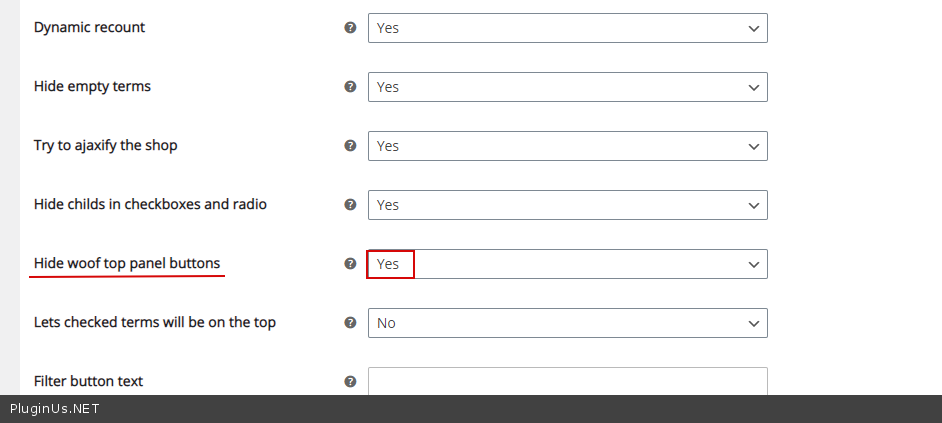
And to show it use shortcode - https://products-filter.com/shortcode/woof_search_options
Quote from kiltykiltykilt on August 18, 2021, 14:36That's great! Thank you very much :-)
That's great! Thank you very much :-)
Quote from Pablo Borysenco on August 19, 2021, 12:47Hello
Welcome;)
Hello
Welcome;)