

Footer problems
The support doesn work on Saturdays and Sundays, so some Friday requests can be answered on Monday. If you have problems with registration ask help on contact us page pleaseIf you not got email within 24~36 business hours, firstly check your spam box, and if no any email from the support there - back to the forum and read answer here. DO NOT ANSWER ON EMAILS [noreply@pluginus.net] FROM THE FORUM!! Emails are just for your info, all answers should be published only here.
The support doesn work on Saturdays and Sundays, so some Friday requests can be answered on Monday.

Quote from samo on May 18, 2021, 10:29Hi Pablo,
WOOF is causing troubleshooting of the footer at my page. I know that because I checked all the plugins at my site. Footers on all the sites are displayed correctly only Wocommerce pages (and category pages of Woocommerce) do not display the footer correctly. Is there a Woocommerce incompatibility or how can I fix it?
Kind regards, Samo
Hi Pablo,
WOOF is causing troubleshooting of the footer at my page. I know that because I checked all the plugins at my site. Footers on all the sites are displayed correctly only Wocommerce pages (and category pages of Woocommerce) do not display the footer correctly. Is there a Woocommerce incompatibility or how can I fix it?
Kind regards, Samo

Quote from Pablo Borysenco on May 18, 2021, 11:52Hello Samo
It looks like your current theme has an incorrect template.
Please install another theme to test
Drop me exact link to the issue
Hello Samo
It looks like your current theme has an incorrect template.
Please install another theme to test
Drop me exact link to the issue
Quote from samo on May 19, 2021, 07:47Hi,
I don't understand what incorrect template do you mean. The site in question is: https://test.klubgurmanov.si/sl_si/trgovina/
If you check other sites the footer is OK. I know WOOF is in conflict somehow because if I disable it, the footer appears correctly. That is not the answer though, because I like and need WOOF! :)
I contacted also DIVI theme (Elegant themes and they too don't know what do you mean under incorrect template.
Kind regards, Samo
Hi,
I don't understand what incorrect template do you mean. The site in question is: https://test.klubgurmanov.si/sl_si/trgovina/
If you check other sites the footer is OK. I know WOOF is in conflict somehow because if I disable it, the footer appears correctly. That is not the answer though, because I like and need WOOF! :)
I contacted also DIVI theme (Elegant themes and they too don't know what do you mean under incorrect template.
Kind regards, Samo
Quote from Pablo Borysenco on May 19, 2021, 11:12Hello Samo
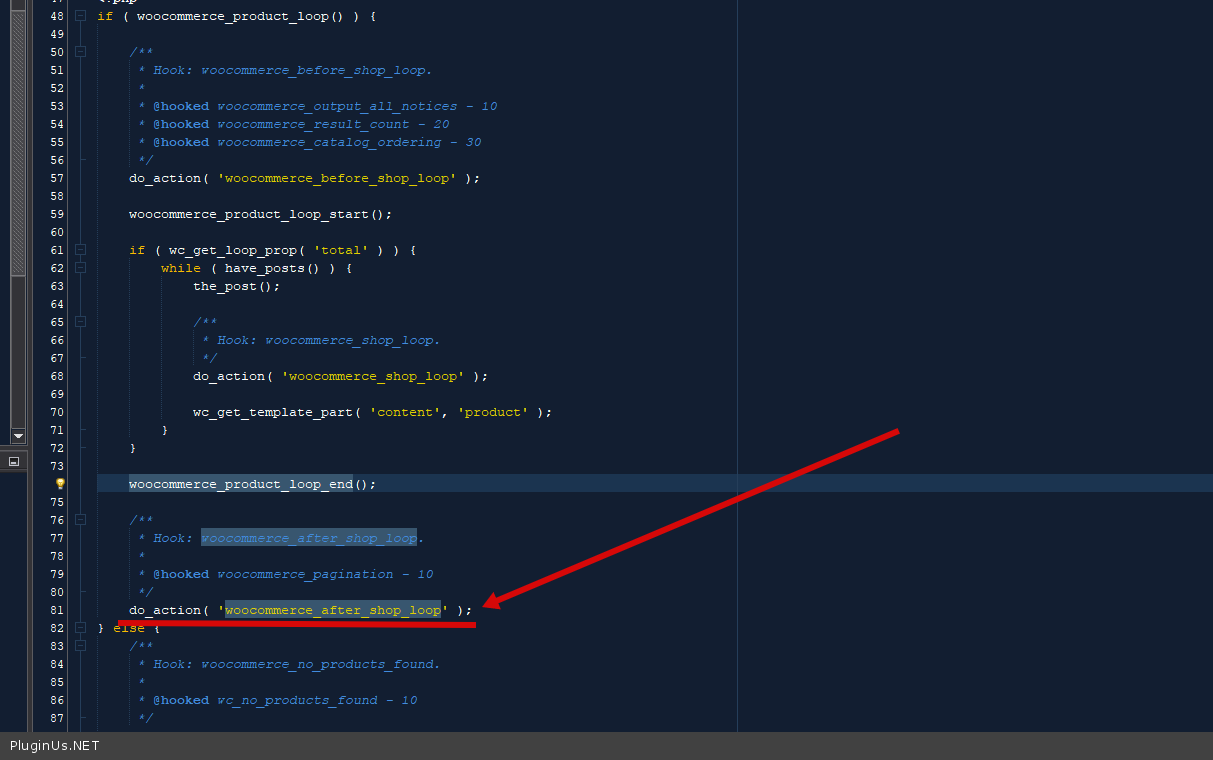
the problem is that they only one use hook in the template - woocommerce_before_shop_loop
But if they are using this hook, then one should insert - woocommerce_after_shop_loop
You can check it easily, find the store template in the theme and insert this hook as in the example of the standard template - https://c2n.me/4c4Q0Te.png - Or drop me wp-admin+FTP access I will demonstrate it
OR
Disable Ajax mode on the filter settings
Hello Samo
the problem is that they only one use hook in the template - woocommerce_before_shop_loop
But if they are using this hook, then one should insert - woocommerce_after_shop_loop
You can check it easily, find the store template in the theme and insert this hook as in the example of the standard template - https://c2n.me/4c4Q0Te.png - Or drop me wp-admin+FTP access I will demonstrate it
OR
Disable Ajax mode on the filter settings
Quote from samo on May 19, 2021, 12:06Hi,
I've searched through ftp files but don't know which file I should change / where it should be located? Can you please tell,..and I think I'll manage.
Can you also copy in the whole after-shop-loop?
Kind regards,
Samo
Hi,
I've searched through ftp files but don't know which file I should change / where it should be located? Can you please tell,..and I think I'll manage.
Can you also copy in the whole after-shop-loop?
Kind regards,
Samo
Quote from Pablo Borysenco on May 19, 2021, 12:15the file names depend on the theme, I think it should be in the templates folder. possible names: archive-product or products
there should be a hook in this template - 'woocommerce_before_shop_loop' ( https://share.pluginus.net/image/i20210519131509.png )
Can you also copy in the whole after-shop-loop?
do_action( 'woocommerce_after_shop_loop' );
the file names depend on the theme, I think it should be in the templates folder. possible names: archive-product or products
there should be a hook in this template - 'woocommerce_before_shop_loop' ( https://share.pluginus.net/image/i20210519131509.png )

Can you also copy in the whole after-shop-loop?
do_action( 'woocommerce_after_shop_loop' );
Quote from samo on May 19, 2021, 13:16I don't find the appropriate file. I've send you the private data for accessing ftp and wp.
Please help.
I don't find the appropriate file. I've send you the private data for accessing ftp and wp.
Please help.
Quote from samo on May 20, 2021, 10:17As you offered: drop me wp-admin+FTP access I will demonstrate it
I granted you the access to wp and ftp. Could we get in contact to resolve this matter. I am sure it's easy for you, but I just can't fix it.
Thanks a lot!
As you offered: drop me wp-admin+FTP access I will demonstrate it
I granted you the access to wp and ftp. Could we get in contact to resolve this matter. I am sure it's easy for you, but I just can't fix it.
Thanks a lot!
Quote from Pablo Borysenco on May 20, 2021, 12:01Hello
Please add pswd to wp-admin
and check FTP access
Hello
Please add pswd to wp-admin
and check FTP access
Quote from samo on May 21, 2021, 11:01Hi :)
Username in password are sent.
FTP should be fine,.
Hi :)
Username in password are sent.
FTP should be fine,.
Quote from Pablo Borysenco on May 21, 2021, 13:09Hello
Unfortunately FTP doesn't work. Perhaps you have an IP restriction
Added my IP to private data
Hello
Unfortunately FTP doesn't work. Perhaps you have an IP restriction
Added my IP to private data
Quote from samo on May 21, 2021, 13:15Probably you have to add IP to hosts:
added to private data
:) Sorry for my clumsiness,.I'm learning every day :)
Probably you have to add IP to hosts:
added to private data
:) Sorry for my clumsiness,.I'm learning every day :)
Quote from Pablo Borysenco on May 24, 2021, 11:35Hello
unfortunately FTP access does not work
Hello
unfortunately FTP access does not work
Quote from samo on May 24, 2021, 12:25I edited cPanel domain settings so that you don't need hosts file anymore and I tested with a friend and it really should work now (hopefully). The only thing is that you might get a warning that the name of the host does not match the certificate.
I edited cPanel domain settings so that you don't need hosts file anymore and I tested with a friend and it really should work now (hopefully). The only thing is that you might get a warning that the name of the host does not match the certificate.
Quote from Pablo Borysenco on May 25, 2021, 10:49Hello
The only thing is that you might get a warning that the name of the host does not match the certificate - I mean FTP access. it still doesn't work
You can drop me a folder with your theme templates
Hello
The only thing is that you might get a warning that the name of the host does not match the certificate - I mean FTP access. it still doesn't work
You can drop me a folder with your theme templates
Quote from samo on May 25, 2021, 11:10Unbelievable. I can't figure out why. It worked when testing with my friend.
How can I send you a folder? - I couldn't put it into the private data..
Unbelievable. I can't figure out why. It worked when testing with my friend.
How can I send you a folder? - I couldn't put it into the private data..
Quote from Pablo Borysenco on May 25, 2021, 12:22try using a file transfer service by link Google drive, DropBox .....
try using a file transfer service by link Google drive, DropBox .....
Quote from samo on May 25, 2021, 12:46Of course. The link is in private data.
Of course. The link is in private data.
Quote from Pablo Borysenco on May 26, 2021, 16:05Hello
Please do a test
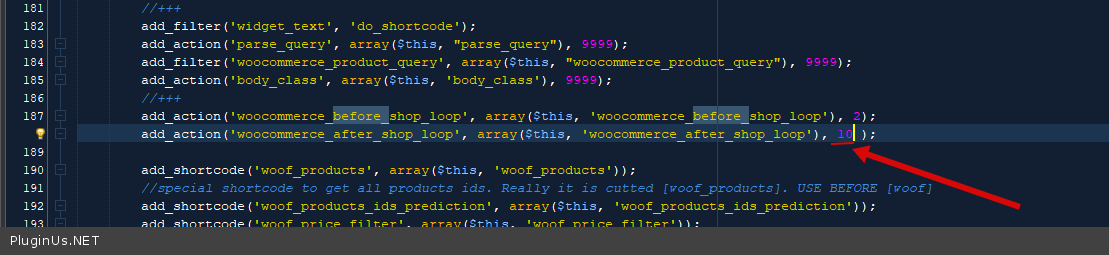
I changed the code in file - \wp-content\plugins\new-woocommerce-products-filter\index.php - ( https://c2n.me/4cam1KG.png )
Hello
Please do a test
I changed the code in file - \wp-content\plugins\new-woocommerce-products-filter\index.php - ( https://c2n.me/4cam1KG.png )
Quote from samo on May 27, 2021, 11:39Pablo,
That solved the problem! A Big Thank You!
Pablo,
That solved the problem! A Big Thank You!