

flag not appearing, compatibility with other plugins
The support doesn work on Saturdays and Sundays, so some Friday requests can be answered on Monday. If you have problems with registration ask help on contact us page pleaseIf you not got email within 24~36 business hours, firstly check your spam box, and if no any email from the support there - back to the forum and read answer here. DO NOT ANSWER ON EMAILS [noreply@pluginus.net] FROM THE FORUM!! Emails are just for your info, all answers should be published only here.
The support doesn work on Saturdays and Sundays, so some Friday requests can be answered on Monday.

Quote from maxprofit on October 6, 2021, 21:05Hi,
1 flags don’t appear in the dropdown box unless I click the box like this https://social101.tinytake.com/msc/NTkxMDc3NV8xODA0MjIzMA
https://social101.tinytake.com/msc/NTkxMDc3Nl8xODA0MjIzMQ[woocs style=1 show_flags=1 width=’150px’ flag_position=’LEft’ txt_type=’code’]
2 Looks like there’s some compatibility issue with booster and YITH’s frequently bought together. what’s a solution?
I use this Booster plugin’s short code to display product prices on non-woocommerce landing pages built with thrive architect.
<p style=”font-size:25px;font-weight: bold;color:#9c0c0c”>[wcj_product_price multiply_by=”0.5062″ product_id=”####”]</p>
and Yith shortcode: [ywfbt_form product_id=”####”]
and the currencies don’t change according to the currency selected by your plugin.
https://social101.tinytake.com/msc/NTkxMDgyNl8xODA0MjM3NA
https://social101.tinytake.com/msc/NTkxMDgxNV8xODA0MjM0OA
noticed that it changes only when I reselect the currency.
do you have shortcode to display regular or sale price and/or multiply by like this [wcj_product_price multiply_by=”0.5062″ product_id=”####”] and change to a selected currency on any pages or posts?
3. there's a few seconds, sometimes about 5 sec delay before the currency switches to the IP location country. how to remove the delay?
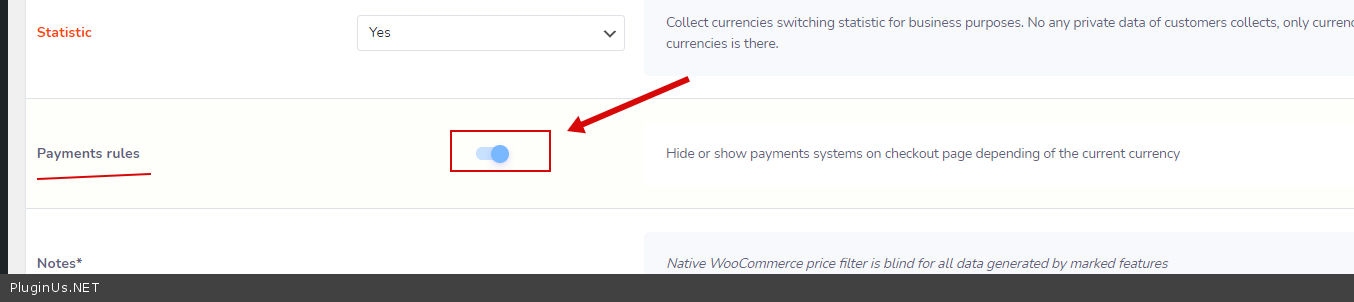
4. Payments rules
Rules to hide/show payment gates on the checkout page depending of the current currency<=where's this? i cant seem to find this feature
5. the geo detection is sometime inaccurate. we use cloudflare cdn, cloudways varnish, wp rocket. how to fix this?
thanks
Hi,
1 flags don’t appear in the dropdown box unless I click the box like this https://social101.tinytake.com/msc/NTkxMDc3NV8xODA0MjIzMA
https://social101.tinytake.com/msc/NTkxMDc3Nl8xODA0MjIzMQ
[woocs style=1 show_flags=1 width=’150px’ flag_position=’LEft’ txt_type=’code’]
2 Looks like there’s some compatibility issue with booster and YITH’s frequently bought together. what’s a solution?
I use this Booster plugin’s short code to display product prices on non-woocommerce landing pages built with thrive architect.
<p style=”font-size:25px;font-weight: bold;color:#9c0c0c”>[wcj_product_price multiply_by=”0.5062″ product_id=”####”]</p>
and Yith shortcode: [ywfbt_form product_id=”####”]
and the currencies don’t change according to the currency selected by your plugin.
https://social101.tinytake.com/msc/NTkxMDgyNl8xODA0MjM3NA
https://social101.tinytake.com/msc/NTkxMDgxNV8xODA0MjM0OA
noticed that it changes only when I reselect the currency.
do you have shortcode to display regular or sale price and/or multiply by like this [wcj_product_price multiply_by=”0.5062″ product_id=”####”] and change to a selected currency on any pages or posts?
3. there's a few seconds, sometimes about 5 sec delay before the currency switches to the IP location country. how to remove the delay?
4. Payments rules
Rules to hide/show payment gates on the checkout page depending of the current currency
<=where's this? i cant seem to find this feature
5. the geo detection is sometime inaccurate. we use cloudflare cdn, cloudways varnish, wp rocket. how to fix this?
thanks
Quote from maxprofit on October 6, 2021, 21:266 the page layout appears broken while your dropdown menu loads after switching currency. how to fix?
7. after selecting i.e. AUD on a page and checkout, the currency changes to i.e. CHF at checkout. and the dropdown on checkout page looks broken. how to fix?
fyi we use aerocheckout
6 the page layout appears broken while your dropdown menu loads after switching currency. how to fix?
7. after selecting i.e. AUD on a page and checkout, the currency changes to i.e. CHF at checkout. and the dropdown on checkout page looks broken. how to fix?
fyi we use aerocheckout

Quote from Pablo Borysenco on October 7, 2021, 11:46Hello
Please watch a video - https://currency-switcher.com/video#video_1
wp-admin Link to your site - https://c2n.me/4dA4box.png
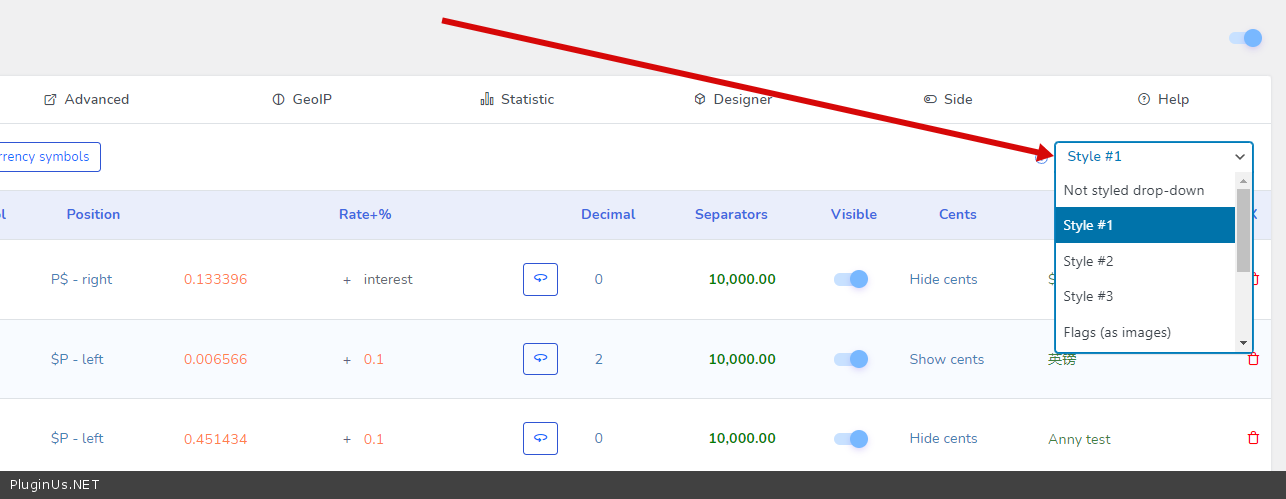
- change the switcher type. This type of switcher has no picture in this place
- Oh sure. This plugin is built for woocommerce and does not work with third party pricing
- Plugin checks current page after full load. if the page is cached and the currency is incorrect, the plugin redraws prices in ajax mode. The whole point is that the plugin does this only after the page is fully loaded. You should increase your page load speed (optimize)
- Check this option(Advanced tab) please - https://c2n.me/4dA5frF.png
- Read this - https://currency-switcher.com/using-geolocation-causes-problems-doesnt-seem-to-work-for-me
- Please add CSS .woocs-style-1-dropdown-menu{display: none;}
- i can't repeat this error
Hello
Please watch a video - https://currency-switcher.com/video#video_1
wp-admin Link to your site - https://c2n.me/4dA4box.png
- change the switcher type. This type of switcher has no picture in this place
- Oh sure. This plugin is built for woocommerce and does not work with third party pricing
- Plugin checks current page after full load. if the page is cached and the currency is incorrect, the plugin redraws prices in ajax mode. The whole point is that the plugin does this only after the page is fully loaded. You should increase your page load speed (optimize)
- Check this option(Advanced tab) please - https://c2n.me/4dA5frF.png
- Read this - https://currency-switcher.com/using-geolocation-causes-problems-doesnt-seem-to-work-for-me
- Please add CSS .woocs-style-1-dropdown-menu{display: none;}
- i can't repeat this error
Quote from maxprofit on October 7, 2021, 20:34admin link: go to mydomain.com/dvw instead of /wp-admin
3. page loads within less than 1 second. it must be your plugin delay issue
no shortcode to display product price in selected currency in any post pages? cannot make it compatible with booster?
if so, we'd need to cancel and request a refund...
admin link: go to mydomain.com/dvw instead of /wp-admin
3. page loads within less than 1 second. it must be your plugin delay issue
no shortcode to display product price in selected currency in any post pages? cannot make it compatible with booster?
if so, we'd need to cancel and request a refund...
Quote from maxprofit on October 7, 2021, 20:371 can you just tell me what to do to change? your videos are pretty long. i dont have time to watch those videos to find one answer.
7 it happens on MOBILE phones including iphone 6
1 can you just tell me what to do to change? your videos are pretty long. i dont have time to watch those videos to find one answer.
7 it happens on MOBILE phones including iphone 6
Quote from maxprofit on October 7, 2021, 20:535 followed instruction. still showing wrong curreyncy
6 still it makes layout look wierd while loading
5 followed instruction. still showing wrong curreyncy
6 still it makes layout look wierd while loading
Quote from maxprofit on October 7, 2021, 21:288 just noticing a coupon doesn't get applied in some currencies i.e. JPY
8 just noticing a coupon doesn't get applied in some currencies i.e. JPY
Quote from Pablo Borysenco on October 8, 2021, 13:10Hello
no shortcode to display product price in selected currency in any post pages? cannot make it compatible with booster? - Incompatibility with a third party plugin is not a reason for the refund. Also, if the plugin does not have a function that we did not announce and did not describe in the documentation (which was invented by the user) - this is not a reason for the refund.
1 Unfortunately the plugin setting is not included in the support. To customize the plugin as you need, you should watch the video or read the documentation - https://currency-switcher.com/
Use this [woocs show_flags=1 width='150px' flag_position=left txt_type='code'] - and change the view of the switcher - https://c2n.me/4dAZMyw.png
3 If you disagree with me for the test, disable all cache and do the test
5 Ok! Drop me a link to the page ( which you created for the test as described in the article with shortcodes [woocs_geo_hello][woocs_show_current_currency] )
6 Describe in more detail what is wrong with the template
8 Do you use standard coupons, no third party plugins?
Hello
no shortcode to display product price in selected currency in any post pages? cannot make it compatible with booster? - Incompatibility with a third party plugin is not a reason for the refund. Also, if the plugin does not have a function that we did not announce and did not describe in the documentation (which was invented by the user) - this is not a reason for the refund.
1 Unfortunately the plugin setting is not included in the support. To customize the plugin as you need, you should watch the video or read the documentation - https://currency-switcher.com/
Use this [woocs show_flags=1 width='150px' flag_position=left txt_type='code'] - and change the view of the switcher - https://c2n.me/4dAZMyw.png
3 If you disagree with me for the test, disable all cache and do the test
5 Ok! Drop me a link to the page ( which you created for the test as described in the article with shortcodes [woocs_geo_hello][woocs_show_current_currency] )
6 Describe in more detail what is wrong with the template
8 Do you use standard coupons, no third party plugins?