Fixed prices does not work
The support doesn work on Saturdays and Sundays, so some Friday requests can be answered on Monday. If you have problems with registration ask help on contact us page pleaseIf you not got email within 24~36 business hours, firstly check your spam box, and if no any email from the support there - back to the forum and read answer here. DO NOT ANSWER ON EMAILS [noreply@pluginus.net] FROM THE FORUM!! Emails are just for your info, all answers should be published only here.
The support doesn work on Saturdays and Sundays, so some Friday requests can be answered on Monday.

Quote from dchase on December 8, 2025, 05:25Hi support, the following short code fails to work [wpcs_price type=”fixed” value=”USD:29,CAD:40,GBP:23,EUR:27,AUD:45,NZD:47,SGD:39“]
When the short-code applied, the rate for our service on our pricing page appears as $0.
I am following instructions provided under the Fixed prices heading on this page https://wp-currency.com/shortcode/wpcs_price/
Please advise.
Hi support, the following short code fails to work [wpcs_price type=”fixed” value=”USD:29,CAD:40,GBP:23,EUR:27,AUD:45,NZD:47,SGD:39“]
When the short-code applied, the rate for our service on our pricing page appears as $0.
I am following instructions provided under the Fixed prices heading on this page https://wp-currency.com/shortcode/wpcs_price/
Please advise.
Quote from dchase on December 8, 2025, 05:45resolved by removing the quotes around the word fixed and the currency values. so this fixes the issue [wpcs_price type=fixed value=USD:29,CAD:40,GBP:23,EUR:27,AUD:45,NZD:47,SGD:39]
resolved by removing the quotes around the word fixed and the currency values. so this fixes the issue [wpcs_price type=fixed value=USD:29,CAD:40,GBP:23,EUR:27,AUD:45,NZD:47,SGD:39]
Quote from dchase on December 8, 2025, 06:04On another note, the following shortcode displays $none on the site [wpcs_price type=fixed meta_value=CAD:2.10,USD:1.50,AUD:2.50,GBP:1.20,EUR:1.5,NZD:3,SGD:2.00]
what's wrong in this code?
On another note, the following shortcode displays $none on the site [wpcs_price type=fixed meta_value=CAD:2.10,USD:1.50,AUD:2.50,GBP:1.20,EUR:1.5,NZD:3,SGD:2.00]
what's wrong in this code?

Quote from Alex Dev on December 9, 2025, 14:31Quote from dchase on December 8, 2025, 06:04On another note, the following shortcode displays $none on the site [wpcs_price type=fixed meta_value=CAD:2.10,USD:1.50,AUD:2.50,GBP:1.20,EUR:1.5,NZD:3,SGD:2.00]
what's wrong in this code?
Hello
You're using the wrong parameter. meta_value should contain the meta field key name, not the currency values. Please use value instead:
[wpcs_price type=fixed value=CAD:2.10,USD:1.50,AUD:2.50,GBP:1.20,EUR:1.5,NZD:3,SGD:2.00]Document: https://wp-currency.com/shortcode/wpcs_price
Quote from dchase on December 8, 2025, 06:04On another note, the following shortcode displays $none on the site [wpcs_price type=fixed meta_value=CAD:2.10,USD:1.50,AUD:2.50,GBP:1.20,EUR:1.5,NZD:3,SGD:2.00]
what's wrong in this code?
Hello
You're using the wrong parameter. meta_value should contain the meta field key name, not the currency values. Please use value instead:
[wpcs_price type=fixed value=CAD:2.10,USD:1.50,AUD:2.50,GBP:1.20,EUR:1.5,NZD:3,SGD:2.00]
Quote from dchase on December 19, 2025, 10:07Please advise on the best way to display prices without cents in one section of the pricing page while showing cents in another section.
Specifically, we want the main subscription plan to show as $50/mo (no cents), but add-ons listed below to include cents, e.g., $1.15/mo.
We are using this short-code for the subscription plan section: [wpcs_price type=fixed value=CAD:70,USD:50,AUD:77,GBP:40,EUR:45,NZD:90,SGD:70], and this code for one of the add-on sections: [wpcs_price type=fixed value=CAD:1.75,USD:1.30,AUD:2.00,GBP:1.00,EUR:1.25,NZD:2.20,SGD:1.70]/mo
What is the recommended approach?
Thank you!
Please advise on the best way to display prices without cents in one section of the pricing page while showing cents in another section.
Specifically, we want the main subscription plan to show as $50/mo (no cents), but add-ons listed below to include cents, e.g., $1.15/mo.
We are using this short-code for the subscription plan section: [wpcs_price type=fixed value=CAD:70,USD:50,AUD:77,GBP:40,EUR:45,NZD:90,SGD:70], and this code for one of the add-on sections: [wpcs_price type=fixed value=CAD:1.75,USD:1.30,AUD:2.00,GBP:1.00,EUR:1.25,NZD:2.20,SGD:1.70]/mo
What is the recommended approach?
Thank you!
Quote from Alex Dev on December 19, 2025, 14:22Hello
Its not possible from th ox, but its good idea and we implemented it into the plugin code, update will be later, but now you can do next:
- add name for your shortcodes:
[wpcs_price type=fixed value=EUR:45,USD:70 name='sh1'][wpcs_price type=fixed value=EUR:1.45,USD:1.70 name='sh2']
any name you want, doesn matter which ones
- go to index.php file of the plugin
- find and replace function wpcs_price:
public function wpcs_price($atts) {
        extract(shortcode_atts(array('value' => 0, 'meta_value' => '', 'type' => 'notfixed', 'post_id' => 0, 'fix_currency' => ''), $atts));
        //add price from meta field

        if (empty($post_id) || $post_id == 0) {
            $post_id = get_the_ID();
        } elseif (empty($meta_value)) {
            $meta_value = 'wpcs_price';
        }

        if (!empty($meta_value)) {
            $value = get_post_meta($post_id, $meta_value, true);
        }

        //***
        $tmp_currency = $this->current_currency;
        $all_currencies = $this->get_currencies();

        if ($fix_currency && isset($all_currencies[$fix_currency])) {
            $this->storage->set_val('wpcs_current_currency', $fix_currency);
            $this->current_currency = $fix_currency;
        }

        if ($type === 'fixed') {
            //if we doesn want to convert prices and for each currency show its own fixed amount
            $values = explode(',', $value);
            if (!empty($values)) {
                $fixed_values = array();
                foreach ($values as $v) {
                    $tmp = explode(':', $v);
                    $fixed_values[$tmp[0]] = $tmp[1];
                }
                $price_html = $this->price_html(isset($fixed_values[$this->current_currency]) ? $this->format_price_numeric($fixed_values[$this->current_currency], $this->current_currency) : 'none',
                                array('amount' => $value, 'as_is' => true, 'fixed_values' => $fixed_values));

                return apply_filters('wpcs_shortcode_price_html_manipulation', $price_html, $atts, $this->current_currency);
            } else {
                return 'none';
            }
        }
        if (!$value) {
            return apply_filters('wpcs_price_free_text', "");
        }
        //+++

        $price_html = $this->price_html($this->price($value), array('amount' => $value));
        $price_html = apply_filters('wpcs_shortcode_price_html_manipulation', $price_html, $atts, $this->current_currency);

        if ($tmp_currency != $this->current_currency) {
            $this->storage->set_val('wpcs_current_currency', $tmp_currency);
            $this->current_currency = $tmp_currency;
        }
        return $price_html;
    }
- open file functions.php of your current wp theme and place there next code:
add_filter('wpcs_shortcode_price_html_manipulation', function($price_html, $atts, $current_currency){

    if(isset($atts['name'])){
        switch ($atts['name']){
            case 'sh1':
                $price_html = preg_replace('/\.\d{2}/', '', $price_html);
                break;
            default :
                //you can add more cases if need
                break;
        }
    }

    return $price_html;
}, 10, 3);
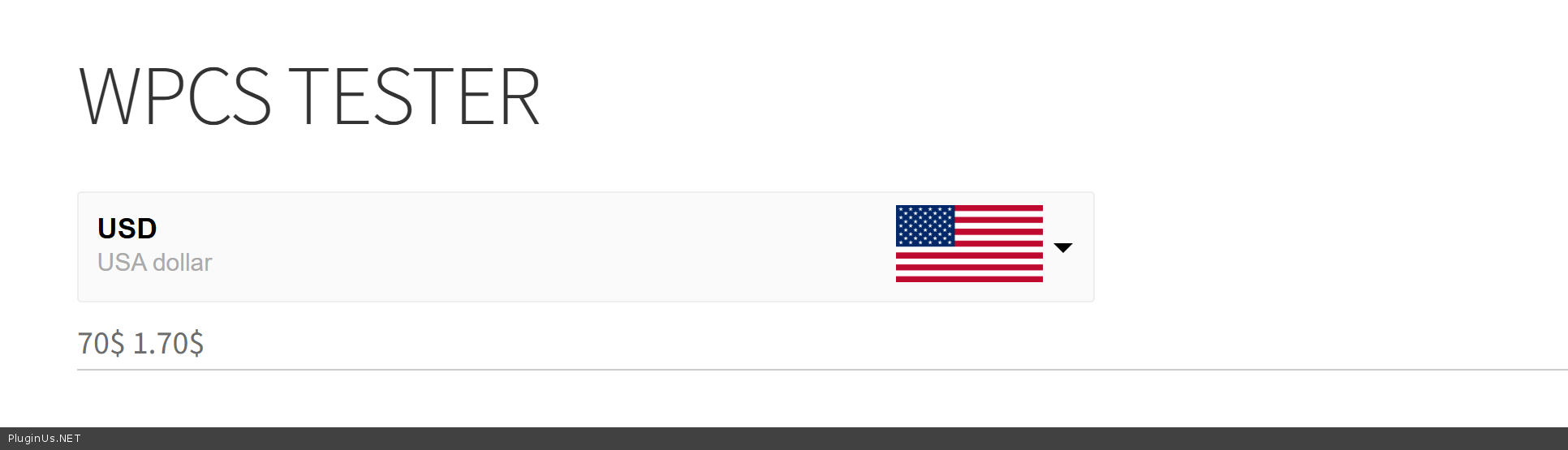
- works:
Hello
Its not possible from th ox, but its good idea and we implemented it into the plugin code, update will be later, but now you can do next:
- add name for your shortcodes:
[wpcs_price type=fixed value=EUR:45,USD:70 name='sh1'][wpcs_price type=fixed value=EUR:1.45,USD:1.70 name='sh2']
any name you want, doesn matter which ones
- go to index.php file of the plugin
- find and replace function wpcs_price:
public function wpcs_price($atts) { extract(shortcode_atts(array('value' => 0, 'meta_value' => '', 'type' => 'notfixed', 'post_id' => 0, 'fix_currency' => ''), $atts)); //add price from meta field if (empty($post_id) || $post_id == 0) { $post_id = get_the_ID(); } elseif (empty($meta_value)) { $meta_value = 'wpcs_price'; } if (!empty($meta_value)) { $value = get_post_meta($post_id, $meta_value, true); } //*** $tmp_currency = $this->current_currency; $all_currencies = $this->get_currencies(); if ($fix_currency && isset($all_currencies[$fix_currency])) { $this->storage->set_val('wpcs_current_currency', $fix_currency); $this->current_currency = $fix_currency; } if ($type === 'fixed') { //if we doesn want to convert prices and for each currency show its own fixed amount $values = explode(',', $value); if (!empty($values)) { $fixed_values = array(); foreach ($values as $v) { $tmp = explode(':', $v); $fixed_values[$tmp[0]] = $tmp[1]; } $price_html = $this->price_html(isset($fixed_values[$this->current_currency]) ? $this->format_price_numeric($fixed_values[$this->current_currency], $this->current_currency) : 'none', array('amount' => $value, 'as_is' => true, 'fixed_values' => $fixed_values)); return apply_filters('wpcs_shortcode_price_html_manipulation', $price_html, $atts, $this->current_currency); } else { return 'none'; } } if (!$value) { return apply_filters('wpcs_price_free_text',""); } //+++ $price_html = $this->price_html($this->price($value), array('amount' => $value)); $price_html = apply_filters('wpcs_shortcode_price_html_manipulation', $price_html, $atts, $this->current_currency); if ($tmp_currency != $this->current_currency) { $this->storage->set_val('wpcs_current_currency', $tmp_currency); $this->current_currency = $tmp_currency; } return $price_html; } - open file functions.php of your current wp theme and place there next code:
add_filter('wpcs_shortcode_price_html_manipulation', function($price_html, $atts, $current_currency){ if(isset($atts['name'])){ switch ($atts['name']){ case 'sh1': $price_html = preg_replace('/\.\d{2}/', '', $price_html); break; default : //you can add more cases if need break; } } return $price_html; }, 10, 3); - works: