Filters not acting as expected
The support doesn work on Saturdays and Sundays, so some Friday requests can be answered on Monday. If you have problems with registration ask help on contact us page pleaseIf you not got email within 24~36 business hours, firstly check your spam box, and if no any email from the support there - back to the forum and read answer here. DO NOT ANSWER ON EMAILS [noreply@pluginus.net] FROM THE FORUM!! Emails are just for your info, all answers should be published only here.
The support doesn work on Saturdays and Sundays, so some Friday requests can be answered on Monday.

Quote from Doug on October 28, 2020, 16:40What am I doing wrong?
Please take a look at this screen-cast to see what I'm trying to work out.
https://screencast-o-matic.com/watch/cY6u2zstNP
Also, I registered on the forum here with my Gmail account which is the same email as my Envato account and my products aren't showing up. I also don't have the area to send a private message with my purchase code.
Thank you
What am I doing wrong?
Please take a look at this screen-cast to see what I'm trying to work out.
https://screencast-o-matic.com/watch/cY6u2zstNP
Also, I registered on the forum here with my Gmail account which is the same email as my Envato account and my products aren't showing up. I also don't have the area to send a private message with my purchase code.
Thank you
Quote from Doug on October 28, 2020, 18:44I found where to enter my purchase code. It has been updated.
I found where to enter my purchase code. It has been updated.

Quote from Pablo Borysenco on October 29, 2020, 13:02Hello
Please drop me exact link to the issue+wp-admin access - https://c2n.me/43SC6rb.png ->https://c2n.me/42BAoj4.png
If there is no sidebar on the category page it only depends on the current theme
If you use WOOF by category - please disable it
Hello
Please drop me exact link to the issue+wp-admin access - https://c2n.me/43SC6rb.png ->https://c2n.me/42BAoj4.png


If there is no sidebar on the category page it only depends on the current theme
If you use WOOF by category - please disable it
Quote from Doug on October 29, 2020, 17:25Thanks Pablo....
A backup is in progress and should complete in 5 or 10 minutes and I've updated the private data with login details.
Thanks Pablo....
A backup is in progress and should complete in 5 or 10 minutes and I've updated the private data with login details.
Quote from Pablo Borysenco on October 30, 2020, 13:31Hello
I checked your site.
Unfortunately an error on the shop page , I can not repeat
On category page everything works correctly.
Example this link - https://capitolbotanicals.com/category/kratom/green-vein/ - Filter is not displayed because there is no search option. https://c2n.me/49DwFyS.jpg - for example there is no such attribute in this category. Also, this category has no children. If you use this link - https://capitolbotanicals.com/category/kratom/ - you will see the children of the category
Hello
I checked your site.
Unfortunately an error on the shop page , I can not repeat
On category page everything works correctly.
Example this link - https://capitolbotanicals.com/category/kratom/green-vein/ - Filter is not displayed because there is no search option. https://c2n.me/49DwFyS.jpg - for example there is no such attribute in this category. Also, this category has no children. If you use this link - https://capitolbotanicals.com/category/kratom/ - you will see the children of the category
Quote from Doug on October 30, 2020, 18:41Thanks for checking it out...
When you say an error on the shop page you can not repeat...what error are you talking about? The shop page appears to be working correctly.
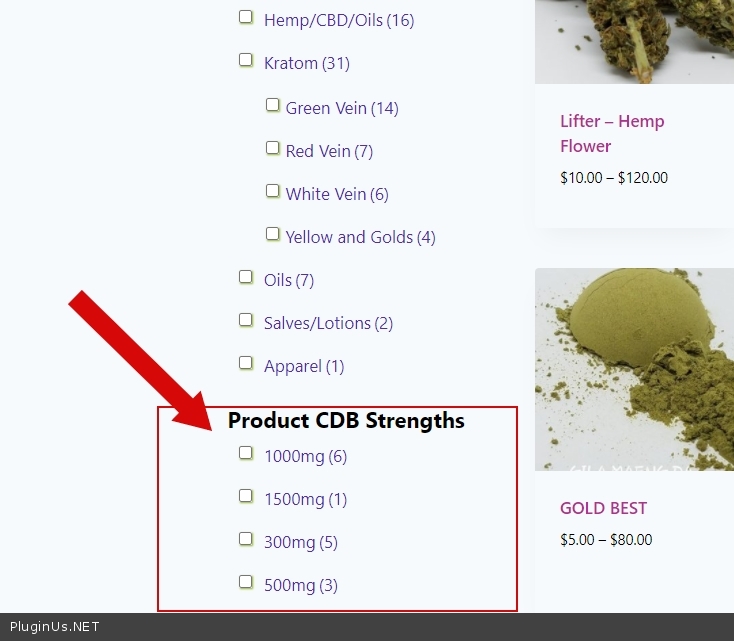
Also, you mention say "Filter is not displayed because there is no search option. " Is there not a way to have the 'Category' element 'stick' and always show?
Thanks again.
Thanks for checking it out...
When you say an error on the shop page you can not repeat...what error are you talking about? The shop page appears to be working correctly.
Also, you mention say"Filter is not displayed because there is no search option." Is there not a way to have the 'Category' element 'stick' and always show?
Thanks again.
Quote from Pablo Borysenco on November 2, 2020, 12:12Hello
what error are you talking about? - https://c2n.me/49F8thi.mp4
On the category page, the filter shows only child categories. This is a very logical behavior. On the category page, you can show ONLY products that belong to the category OR child category. It makes sense to show only child categories( of the current category ), because clicking on any other category will always give zero products )To display all category and it worked - you don't need a filter, you need a menu - https://c2n.me/49F8GOd.png
Hello
what error are you talking about? - https://c2n.me/49F8thi.mp4