

Filtering Within Custom Loop
The support doesn work on Saturdays and Sundays, so some Friday requests can be answered on Monday. If you have problems with registration ask help on contact us page pleaseIf you not got email within 24~36 business hours, firstly check your spam box, and if no any email from the support there - back to the forum and read answer here. DO NOT ANSWER ON EMAILS [noreply@pluginus.net] FROM THE FORUM!! Emails are just for your info, all answers should be published only here.
The support doesn work on Saturdays and Sundays, so some Friday requests can be answered on Monday.

Quote from drewrowland on October 8, 2020, 23:03I had this custom loop written out and it was pulling my items properly, but the filter would not apply.
<?php
$args = array(
'post_type' => 'product',
'post_satus' => 'publish',
'product_cat' => 'prints',
'posts_per_page' => -1
);
$loop = new WP_Query( $args );
if ( $loop->have_posts() ) {
while ( $loop->have_posts() ) : $loop->the_post();
wc_get_template_part( 'content', 'product' );
endwhile;
} else {
echo __( 'No products found' );
}
wp_reset_postdata();
?>
Then I changed to this loop after searching this forum, however now my loop states "no products found". I can't figure out what I am doing wrong here.
<?php
global $WOOF;
if ($WOOF->is_isset_in_request_data($WOOF->get_swoof_search_slug())) {
$_REQUEST['woof_products_doing'] = 1;
$query_args['tax_query'] = array_merge($query_args['tax_query'], $WOOF->get_tax_query(''));
$query_args['meta_query'] = array_merge($query_args['meta_query'], $WOOF->get_meta_query());
$query_args = apply_filters('woof_products_query', $query_args);if (isset($_GET['paged'])) {
$query_args['paged'] = intval($_GET['paged']);
}
// @codingStandardsIgnoreStart
if (isset($_GET['orderby'])) {
$ordering_args = WC()->query->get_catalog_ordering_args();
} else {
$ordering_args = WC()->query->get_catalog_ordering_args($query_args['orderby'], $query_args['order']);
}
$query_args['orderby'] = $ordering_args['orderby'];
$query_args['order'] = $ordering_args['order'];
if ($ordering_args['meta_key']) {
$query_args['meta_key'] = $ordering_args['meta_key'];
}
}
$args = array(
'post_type' => 'product',
'post_satus' => 'publish',
'product_cat' => 'prints',
'posts_per_page' => -1,
'tax_query' => array( array(
'taxonomy' => 'product_cat', // The taxonomy name
'field' => 'term_id', // Type of field ('term_id', 'slug', 'name' or 'term_taxonomy_id')
'terms' => $term->term_id, // can be an integer, a string or an array
) ),
);
$loop = new WP_Query( $args );
if ( $loop->have_posts() ) {
while ( $loop->have_posts() ) : $loop->the_post();
wc_get_template_part( 'content', 'product' );
endwhile;
} else {
echo __( 'No products found' );
}
wp_reset_postdata();
?>
I had this custom loop written out and it was pulling my items properly, but the filter would not apply.
<?php
$args = array(
'post_type' => 'product',
'post_satus' => 'publish',
'product_cat' => 'prints',
'posts_per_page' => -1
);
$loop = new WP_Query( $args );
if ( $loop->have_posts() ) {
while ( $loop->have_posts() ) : $loop->the_post();
wc_get_template_part( 'content', 'product' );
endwhile;
} else {
echo __( 'No products found' );
}
wp_reset_postdata();
?>
Then I changed to this loop after searching this forum, however now my loop states"no products found". I can't figure out what I am doing wrong here.
<?php
global $WOOF;
if ($WOOF->is_isset_in_request_data($WOOF->get_swoof_search_slug())) {
$_REQUEST['woof_products_doing'] = 1;
$query_args['tax_query'] = array_merge($query_args['tax_query'], $WOOF->get_tax_query(''));
$query_args['meta_query'] = array_merge($query_args['meta_query'], $WOOF->get_meta_query());
$query_args = apply_filters('woof_products_query', $query_args);
if (isset($_GET['paged'])) {
$query_args['paged'] = intval($_GET['paged']);
}
// @codingStandardsIgnoreStart
if (isset($_GET['orderby'])) {
$ordering_args = WC()->query->get_catalog_ordering_args();
} else {
$ordering_args = WC()->query->get_catalog_ordering_args($query_args['orderby'], $query_args['order']);
}
$query_args['orderby'] = $ordering_args['orderby'];
$query_args['order'] = $ordering_args['order'];
if ($ordering_args['meta_key']) {
$query_args['meta_key'] = $ordering_args['meta_key'];
}
}
$args = array(
'post_type' => 'product',
'post_satus' => 'publish',
'product_cat' => 'prints',
'posts_per_page' => -1,
'tax_query' => array( array(
'taxonomy' => 'product_cat', // The taxonomy name
'field' => 'term_id', // Type of field ('term_id', 'slug', 'name' or 'term_taxonomy_id')
'terms' => $term->term_id, // can be an integer, a string or an array
) ),
);
$loop = new WP_Query( $args );
if ( $loop->have_posts() ) {
while ( $loop->have_posts() ) : $loop->the_post();
wc_get_template_part( 'content', 'product' );
endwhile;
} else {
echo __( 'No products found' );
}
wp_reset_postdata();
?>
Quote from drewrowland on October 8, 2020, 23:13I see my issue there. I now have the products showing with this loop, but it still will not filter.
<?php
global $WOOF;
if ($WOOF->is_isset_in_request_data($WOOF->get_swoof_search_slug())) {
$_REQUEST['woof_products_doing'] = 1;
$query_args['tax_query'] = array_merge($query_args['tax_query'], $WOOF->get_tax_query(''));
$query_args['meta_query'] = array_merge($query_args['meta_query'], $WOOF->get_meta_query());
$query_args = apply_filters('woof_products_query', $query_args);if (isset($_GET['paged'])) {
$query_args['paged'] = intval($_GET['paged']);
}
// @codingStandardsIgnoreStart
if (isset($_GET['orderby'])) {
$ordering_args = WC()->query->get_catalog_ordering_args();
} else {
$ordering_args = WC()->query->get_catalog_ordering_args($query_args['orderby'], $query_args['order']);
}
$query_args['orderby'] = $ordering_args['orderby'];
$query_args['order'] = $ordering_args['order'];
if ($ordering_args['meta_key']) {
$query_args['meta_key'] = $ordering_args['meta_key'];
}
}
$args = array(
'post_type' => 'product',
'post_satus' => 'publish',
'posts_per_page' => -1,
'tax_query' => array( array(
'taxonomy' => 'product_cat', // The taxonomy name
'field' => 'slug', // Type of field ('term_id', 'slug', 'name' or 'term_taxonomy_id')
'terms' => 'prints', // can be an integer, a string or an array
) ),
);
$loop = new WP_Query( $args );
if ( $loop->have_posts() ) {
while ( $loop->have_posts() ) : $loop->the_post();
wc_get_template_part( 'content', 'product' );
endwhile;
} else {
echo __( 'No products found' );
}
wp_reset_postdata();
?>
I see my issue there. I now have the products showing with this loop, but it still will not filter.
<?php
global $WOOF;
if ($WOOF->is_isset_in_request_data($WOOF->get_swoof_search_slug())) {
$_REQUEST['woof_products_doing'] = 1;
$query_args['tax_query'] = array_merge($query_args['tax_query'], $WOOF->get_tax_query(''));
$query_args['meta_query'] = array_merge($query_args['meta_query'], $WOOF->get_meta_query());
$query_args = apply_filters('woof_products_query', $query_args);
if (isset($_GET['paged'])) {
$query_args['paged'] = intval($_GET['paged']);
}
// @codingStandardsIgnoreStart
if (isset($_GET['orderby'])) {
$ordering_args = WC()->query->get_catalog_ordering_args();
} else {
$ordering_args = WC()->query->get_catalog_ordering_args($query_args['orderby'], $query_args['order']);
}
$query_args['orderby'] = $ordering_args['orderby'];
$query_args['order'] = $ordering_args['order'];
if ($ordering_args['meta_key']) {
$query_args['meta_key'] = $ordering_args['meta_key'];
}
}
$args = array(
'post_type' => 'product',
'post_satus' => 'publish',
'posts_per_page' => -1,
'tax_query' => array( array(
'taxonomy' => 'product_cat', // The taxonomy name
'field' => 'slug', // Type of field ('term_id', 'slug', 'name' or 'term_taxonomy_id')
'terms' => 'prints', // can be an integer, a string or an array
) ),
);
$loop = new WP_Query( $args );
if ( $loop->have_posts() ) {
while ( $loop->have_posts() ) : $loop->the_post();
wc_get_template_part( 'content', 'product' );
endwhile;
} else {
echo __( 'No products found' );
}
wp_reset_postdata();
?>
Quote from drewrowland on October 8, 2020, 23:14I guess an important note is that I am trying to filter on this one category 'prints' with a custom attribute.
I guess an important note is that I am trying to filter on this one category 'prints' with a custom attribute.

Quote from Pablo Borysenco on October 9, 2020, 13:54Hello
Better use this shortcode - https://products-filter.com/shortcode/woof_products/ to set exact category - https://c2n.me/49nvOJv.png
To change template use this hook - https://products-filter.com/hook/woof_template_part/
Hello
Better use this shortcode - https://products-filter.com/shortcode/woof_products/ to set exact category - https://c2n.me/49nvOJv.png
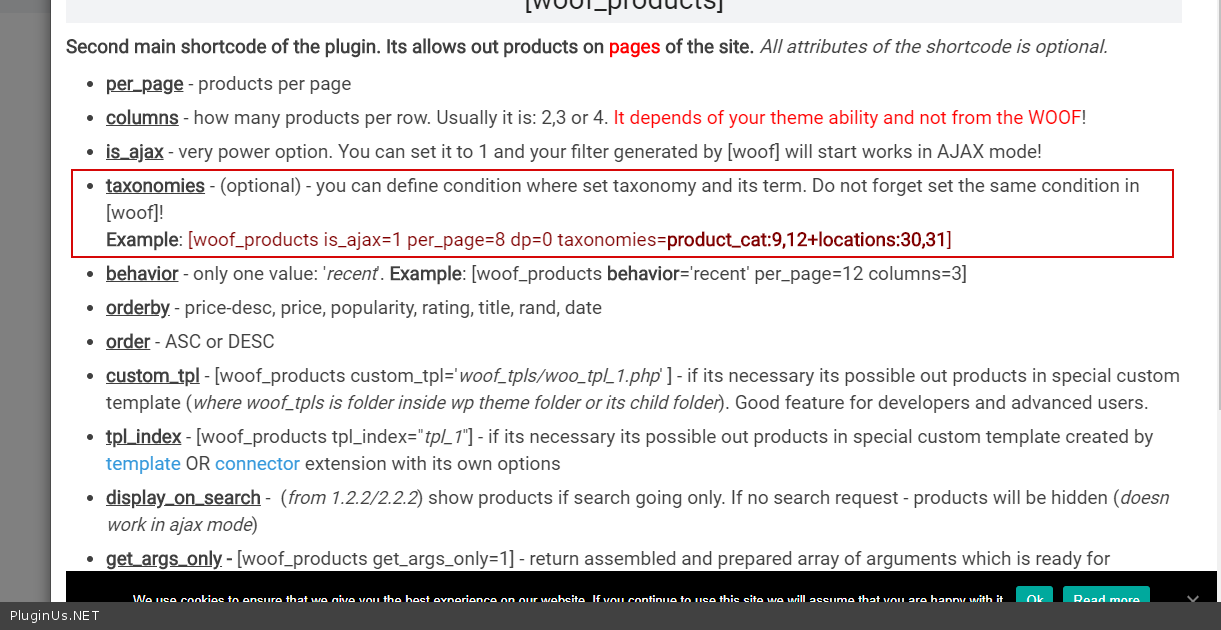
To change template use this hook - https://products-filter.com/hook/woof_template_part/