Filtering Product Attributes
The support doesn work on Saturdays and Sundays, so some Friday requests can be answered on Monday. If you have problems with registration ask help on contact us page pleaseIf you not got email within 24~36 business hours, firstly check your spam box, and if no any email from the support there - back to the forum and read answer here. DO NOT ANSWER ON EMAILS [noreply@pluginus.net] FROM THE FORUM!! Emails are just for your info, all answers should be published only here.
The support doesn work on Saturdays and Sundays, so some Friday requests can be answered on Monday.

Quote from tannett on August 4, 2020, 16:10Similar to this discussion thread:https://pluginus.net/support/topic/filter-drop-down-from-year-make-model-drive/#postid-13764
In terms of product categories and attributes, I was wondering how I would go about filtering all products by year, make and model. I want to know how I can limit certain product attributes based on the vehicle make that's chosen. For example, If I choose "Ford Transit" on my website and move on to choose product "wheelbase & Height", I would want limited options to show up in terms of what's relevant to "Ford Transit". Below is my website. This would be easier if all products only had one specific vehicle type and wheelbase but sadly they do not.
https://comvan.com/shop-van-equipment/
Similar to this discussion thread:https://pluginus.net/support/topic/filter-drop-down-from-year-make-model-drive/#postid-13764
In terms of product categories and attributes, I was wondering how I would go about filtering all products by year, make and model. I want to know how I can limit certain product attributes based on the vehicle make that's chosen. For example, If I choose"Ford Transit" on my website and move on to choose product"wheelbase & Height", I would want limited options to show up in terms of what's relevant to"Ford Transit". Below is my website. This would be easier if all products only had one specific vehicle type and wheelbase but sadly they do not.
https://comvan.com/shop-van-equipment/

Quote from Pablo Borysenco on August 5, 2020, 11:51Hello
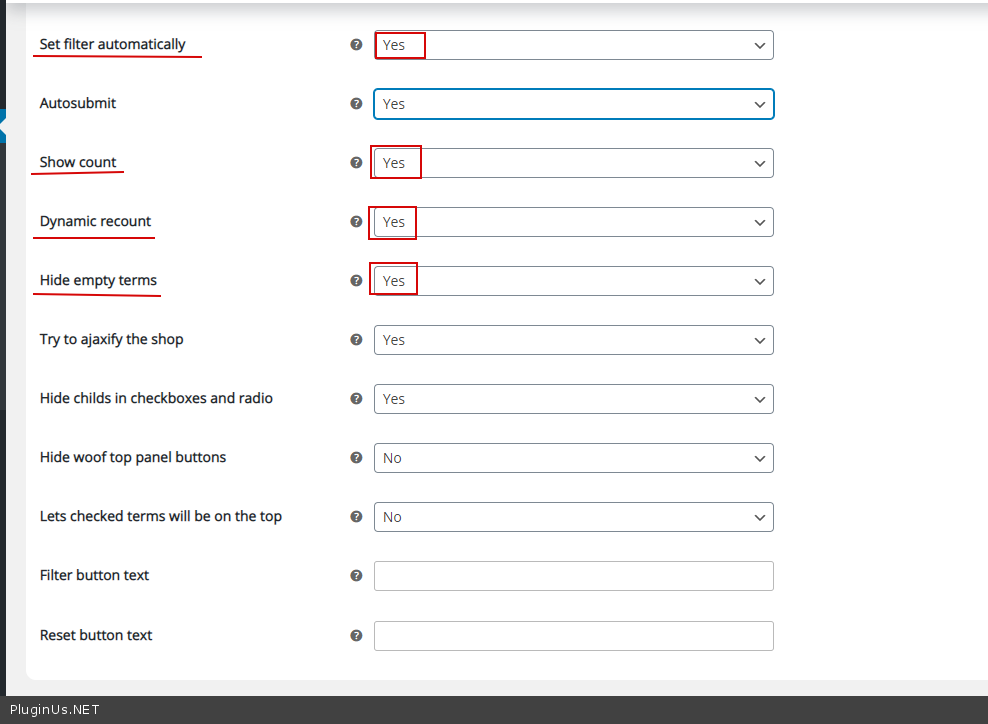
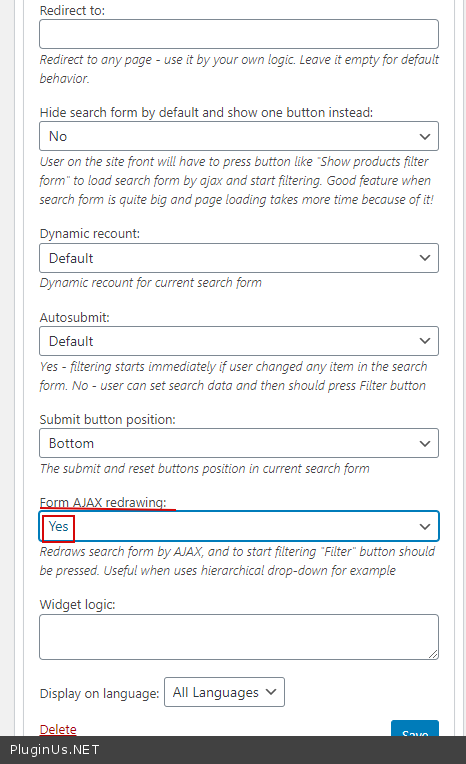
Please check options - https://c2n.me/48Fmyj4.png AND a widget setting - https://c2n.me/48FmKQ5.png
Hello
Please check options - https://c2n.me/48Fmyj4.png AND a widget setting - https://c2n.me/48FmKQ5.png
Quote from tannett on August 10, 2020, 20:47I cannot access the photos you linked - says "This site can’t be reachedc2n.me took too long to respond"
I cannot access the photos you linked - says"This site can’t be reachedc2n.me took too long to respond"
Quote from Pablo Borysenco on August 11, 2020, 11:39Hello
Please check options - https://prnt.sc/txnmbr AND a widget setting - https://prnt.sc/txnneh
Hello
Please check options - https://prnt.sc/txnmbr AND a widget setting - https://prnt.sc/txnneh
Quote from tannett on August 11, 2020, 13:37This works for specific instances where there's only one vehicle attribute attached to the specific product. For example, If I take this part on this page: https://comvan.com/shop-van-equipment/n5-rs72-4/ - it matches with:
Ford Transit 130” Wheelbase | Medium Roof 2014 - 2020 Ford Transit 148” Wheelbase (Extended Body) | High Roof 2014 - 2020 Ford Transit 148” Wheelbase (Regular Body) | High Roof 2014 - 2020 Ford Transit 148” Wheelbase | Medium Roof 2014 - 2020 Mercedes-Benz Sprinter 144” Wheelbase | High Roof 2007 - 2020 Mercedes-Benz Sprinter 144” Wheelbase | Low Roof 2007 - 2020 Mercedes-Benz Sprinter 170” Wheelbase (Extended Body) | High Roof 2007 - 2020 Mercedes-Benz Sprinter 170” Wheelbase (Regular Body) | High Roof 2007 - 2020 Nissan NV 146” Wheelbase | High Roof 2011 - 2020
Even though I've chosen Ford Transit, I'm still going to see other wheelbases that are specific to other vehicles. How would I go about fixing this problem? Am I going to have to switch around my categories and attributes? what would be the best course of action? Is there a way to manually input custom code to tell what combinations will show up when picking specific product attributes? Also, thanks for the continued support :)
This works for specific instances where there's only one vehicle attribute attached to the specific product. For example, If I take this part on this page: https://comvan.com/shop-van-equipment/n5-rs72-4/ - it matches with:
| Ford Transit | 130” Wheelbase | Medium Roof | 2014 - 2020 |
| Ford Transit | 148” Wheelbase (Extended Body) | High Roof | 2014 - 2020 |
| Ford Transit | 148” Wheelbase (Regular Body) | High Roof | 2014 - 2020 |
| Ford Transit | 148” Wheelbase | Medium Roof | 2014 - 2020 |
| Mercedes-Benz Sprinter | 144” Wheelbase | High Roof | 2007 - 2020 |
| Mercedes-Benz Sprinter | 144” Wheelbase | Low Roof | 2007 - 2020 |
| Mercedes-Benz Sprinter | 170” Wheelbase (Extended Body) | High Roof | 2007 - 2020 |
| Mercedes-Benz Sprinter | 170” Wheelbase (Regular Body) | High Roof | 2007 - 2020 |
| Nissan NV | 146” Wheelbase | High Roof | 2011 - 2020 |
Even though I've chosen Ford Transit, I'm still going to see other wheelbases that are specific to other vehicles. How would I go about fixing this problem? Am I going to have to switch around my categories and attributes? what would be the best course of action? Is there a way to manually input custom code to tell what combinations will show up when picking specific product attributes? Also, thanks for the continued support :)
Quote from Pablo Borysenco on August 12, 2020, 11:01Hello
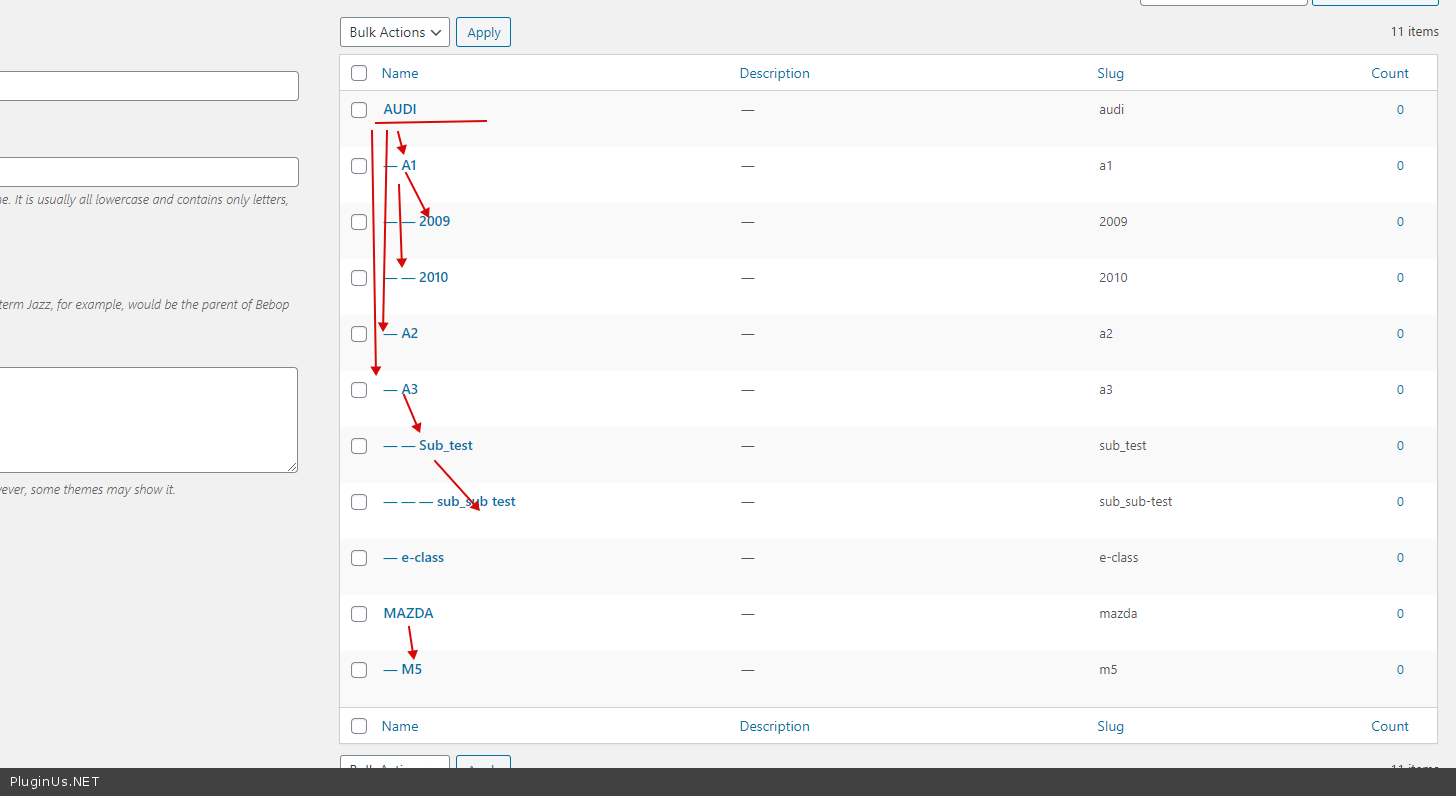
Yes! But this is independent of the filter. It only depends on the data structure.
In your case, you should create a hierarchy. An Example - https://c2n.me/48J3vL9.png
Hello
Yes! But this is independent of the filter. It only depends on the data structure.
In your case, you should create a hierarchy. An Example - https://c2n.me/48J3vL9.png